

Lenovo ThinkStation PGX Topology
Here is the topology map for the ThinkStation PGX:
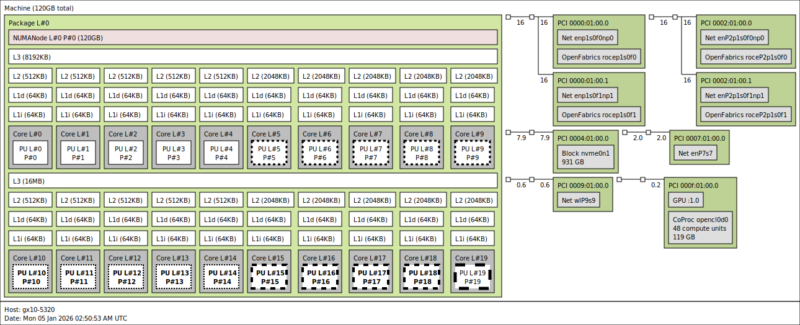
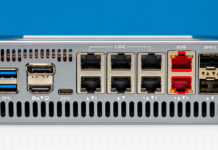
Here we can see the twenty Arm cores, along with the GPU, the WiFi 7 NIC, the 10Gbase-T NIC, and the four ConnectX-7 interfaces (two ports and one per PCIe Gen5 x4 link.) As a quick reminder, here is how the GB10’s ConnectX-7 NICs are connected:
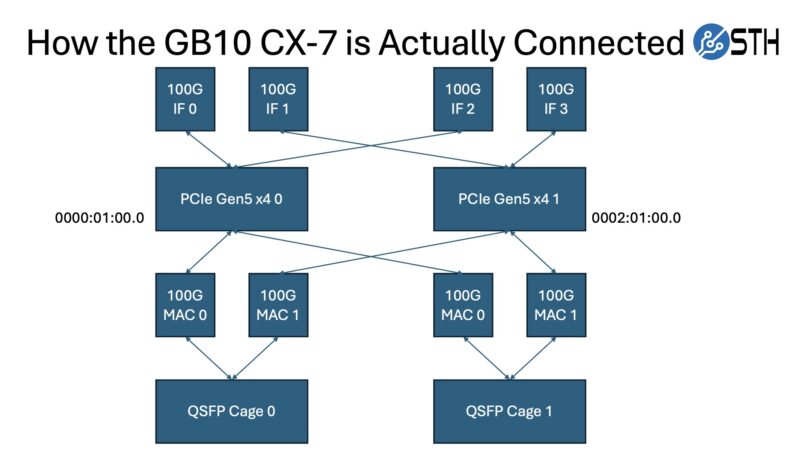
Those NICs are perhaps the most interesting part of this system, as they are a major differentiator from other mini PCs.
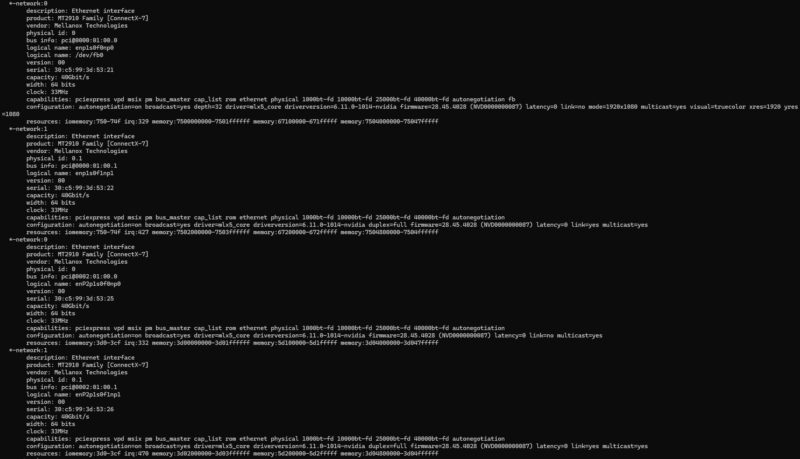
The other interesting part is that since this has unified memory, the memory at the system level and the coprocessor level is the same. That is different from an AMD Ryzen AI Max+ 395 128GB system, as an example.
Lenovo ThinkStation PGX Software Overview
While Lenovo controls the hardware, and as we found out from Dell, the OEMs even control the firmware updates beyond that, the company has very little influence on the software running inside. Like NVIDIA’s own DGX Spark, all the GB10 SFF workstations run NVIDIA’s DGX OS, a variant of Ubuntu Linux with all the necessary drivers and software tools pre-installed. While some may prefer other Linux distributions, the fact that NVIDIA is putting resources into the DGX OS means we get something that is quite useful. For example, there is a NVIDIA Sync utility that sets up all of the back-end SSH keys and tunneling.
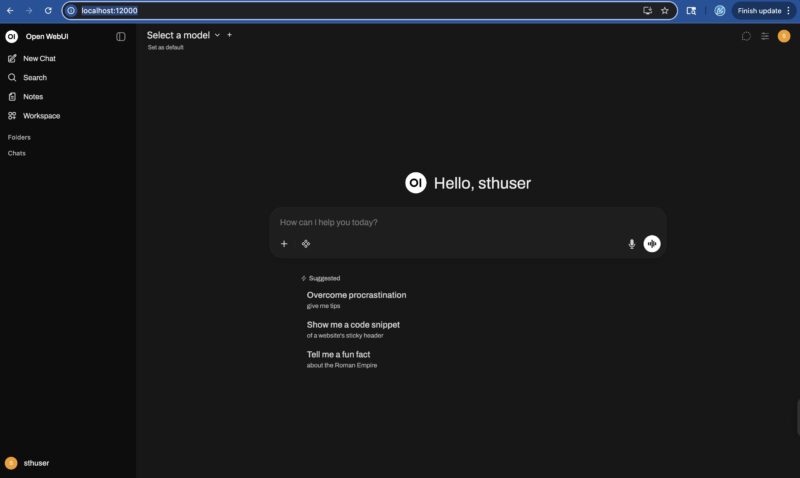
The NVIDIA DGX Dashboard is the primary means of interfacing with the system.
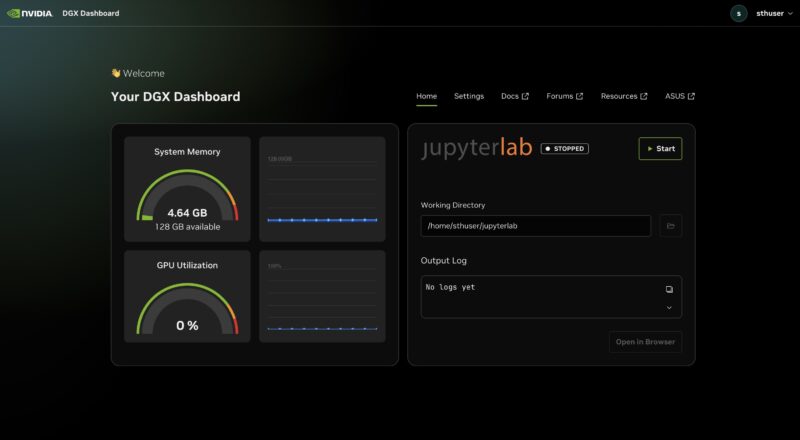
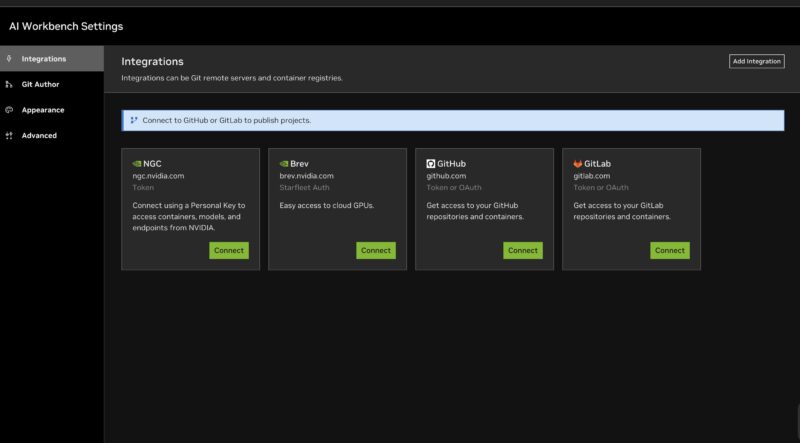
At this point, it is essentially an NVIDIA software environment running inside a box built by Lenovo. NVIDIA has done a lot of work building tools like the AI Workbench to directly connect to various tools.
There are also the DGX Spark Playbooks on GitHub that provide a lot of great starting recipes for getting a variety of scenarios set up from ComfyUI to multi-unit scaling through NCCL.
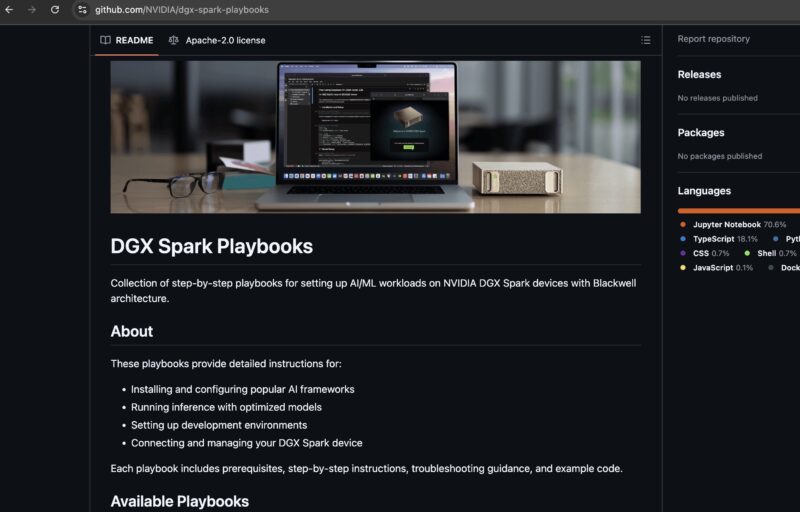
Overall, this is something that is useful. There are plenty of AI with NVIDIA GPU tutorials out there, but having some GB10-specific ones is quite useful. Still, we wanted to see what we could around the performance side of the unit.
Lenovo ThinkStation PGX Performance
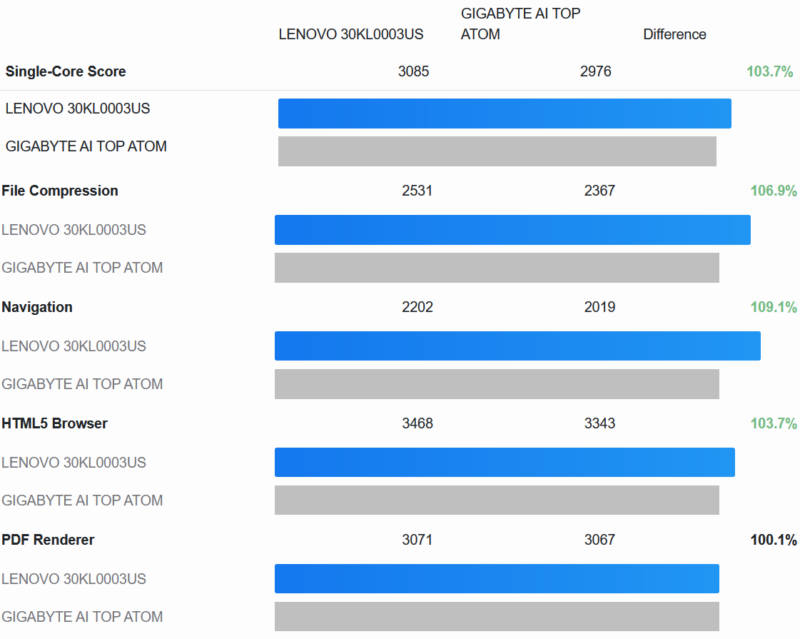
As always, we start things off with Geekbench 6. Given the design similarities between the PGX and Gigabyte’s AI TOP ATOM, we decided it was only fitting to use that system as our point of reference.
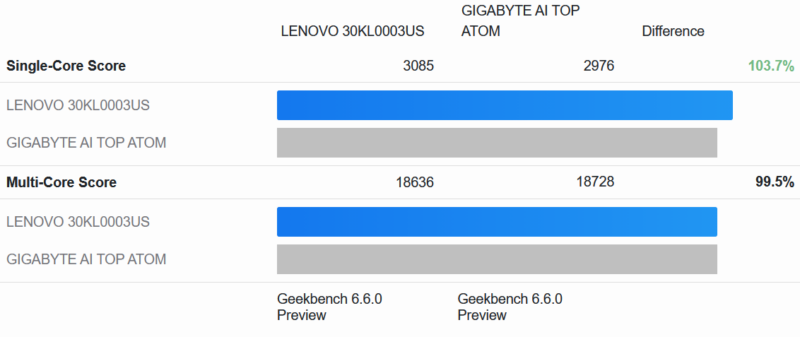
Our high-level findings, in turn, are mixed. We expected these two systems to be virtually identical in performance, and indeed, for multi-core performance, that is exactly what is happening, with the PGX within 0.5% of Gigabyte’s system.
On the other hand, the Lenovo system has a small but tangible advantage in single-core performance. With an average lead of 3.7%, the performance advantage is just outside the expected range of run-to-run variation.
And looking at the individual single-core tests, what we find is pretty consistent. In every test in this section – and indeed all but one test overall – the ThinkStation PGX has a small advantage in single-threaded performance.
Following this, we decided to dig a bit deeper and see how the PGX compares to other GB10 boxes in AI workloads.
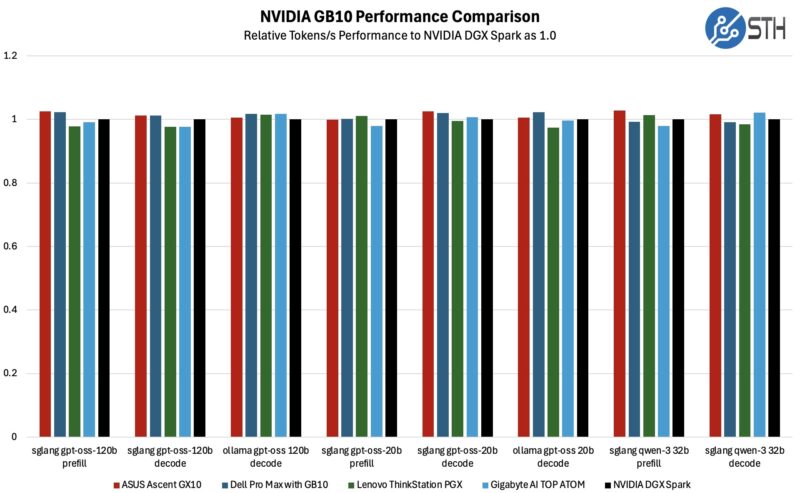
With 5 GB10 systems now in our result set, we are seeing some spread in the scores. However, there is nothing particularly consistent here, which is what we would expect from typical run-to-run performance variation.
To be sure, we also ran some long-term testing, allowing the GB10 systems to heat up for over an hour to see how they would do once they are fully heat-soaked.
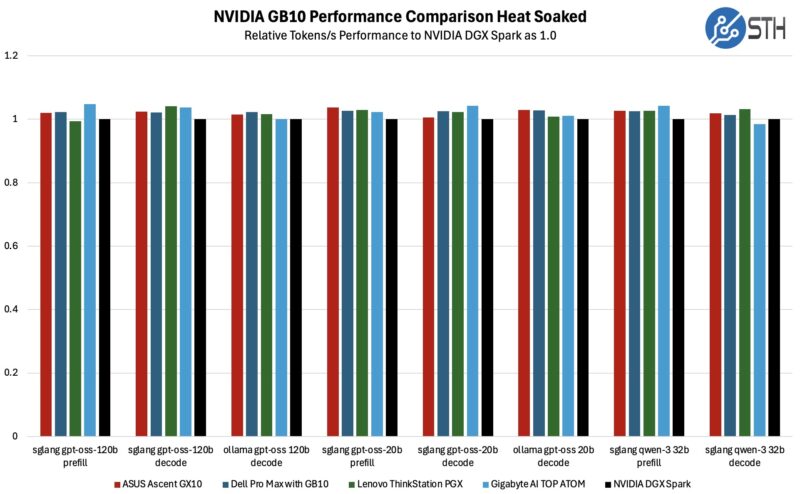
The picture does shift in the heat soak scenario, though only slightly. Lenovo’s ThinkStation PGX comes in a few percent ahead of the NVIDIA DGX Spark in many of these tests, though it is still not a major difference. Compared to the complete field, of the 8 AI tests here, the PGX ends up winning at one and tying at another three. All things considered, it is still a pretty narrow difference, but if you are looking for any kind of differentiation between these otherwise similar systems, here is one small sign.
Overall, cooling is one of the few hardware aspects that the GB10 system vendors have any control over, even though the form factor itself imposes some rather significant constraints on what kind of cooling setups are viable. As a result, this is one of the handful of areas where we would even expect to see a difference – and maybe a slight edge for Lenovo.
Next, let us get to the power consumption.


Why is the SSD controller called as *T*27? The chip is marked as PS5027-*E*27, and Phison website call it PS5027-E27T, the T, if any, should be a suffix rather than a prefix.
@eorof
Good catch! Thank you. That was indeed meant to be the E27T.
It’s possible that this is one of the features that Nvidia controls; but I’m a bit surprised by Lenovo not going with their squared off DC plug for the 240w input.
They use it for basically everything else that exceeds typical type-c power: mobile workstations, docking stations, mini-PCs; and so far the market for type-C PD monitors and docks and so on seems to have vanishingly few 240w options, so one gains little from a port that is technically more capable but will be filled by power adapter 100% of the time.
Not a giant dealbreaker or anything; but of all the outfits that have done a reskin of the Nvidia box I’d have expected a ‘think’-brand lenovo to have gone with an ecosystem-appropriate DC input instead.
That’s a very interesting point, Fungus. I hadn’t even considered the fact that most other Lenovo systems use the proprietary connector.
I strongly suspect your assumption is correct, and that this is something NVIDIA controls. But it is an interesting little deviation from how Lenovo normally designs/powers their SFF PCs.
So whole it has 2×200 ports for 400 total, internally it is only able to handle 200 at most? Why not put 2×100 on this box if that is all that is usable anyway?
Good point Anne, but one decent reason is that it lets you just do 200G in a single DAC or optic so it is slightly more flexible.
You have mistaken wifi antennas with speakers
this is a really interesting direction for lenovo to take with their thinkstation line. the gb10 gpu in a workstation form factor is intriguing – i’ve been curious about how nvidia is positioning these smaller gpu solutions for enterprise ai workloads versus the traditional rack-mounted approach.
a few questions come to mind:
1. what’s the actual thermal performance like under sustained ai inference loads? workstations can sometimes struggle with thermals when pushed hard.
2. how does the 128gb memory ceiling impact model sizes? i imagine it’s fine for inference, but training would be quite limited.
3. what’s the upgrade path looking like? can users expand storage and memory easily, or is this more of a fixed configuration aimed at specific deployment scenarios?
the corporate angle makes sense – not every company needs a full data center setup, and having a quieter, office-friendly ai workstation could open up llmops to smaller teams that don’t have dedicated server rooms.
would be great to see some benchmark comparisons against other workstations in this emerging “ai workstation” category, especially against some of the amd-based alternatives that are starting to appear. the pricing will also be a key factor for adoption.
thanks for the detailed review!
@David:
#1: Very good question. I have some Asus GX10 boxes (same platform) and if they get thermally overloaded it seems they just hard shutdown. I solved that problem by orienting them vertically and pointing a fan at the front for good measure, but it’s not a great look for something that should be a reliable appliance.
#2: I have a cluster of 2 directly connected together via a QSFP56 DAC and it’s a quite capable inference machine for MOE models. The best info for this platform is on the nvidia developer forums and eugr’s “spark-vllm-docker” github repository. Takes a bit of terminal work to get going but it’s pretty stable. After a bit of experimentation, Qwen3.5-122b is my daily driver at about 40t/s with real-world agentic workloads.
As far as training, I haven’t tried that at all I’m afraid…
#3: Mostly a fixed platform; the SSD is upgradeable but it’s the uncommon 2242 format. Everything else is soldered down.