

Gigabyte W775-V10-L01 NVIDIA ConnectX-8 Performance
Starting off, we recently showed some of the optical modules we purchased for these machines, and why. The NVIDIA ConnectX-8 SuperNIC is an immensely powerful networking solution with two 400Gbps rails for 800Gbps of total networking capacity on the NIC.
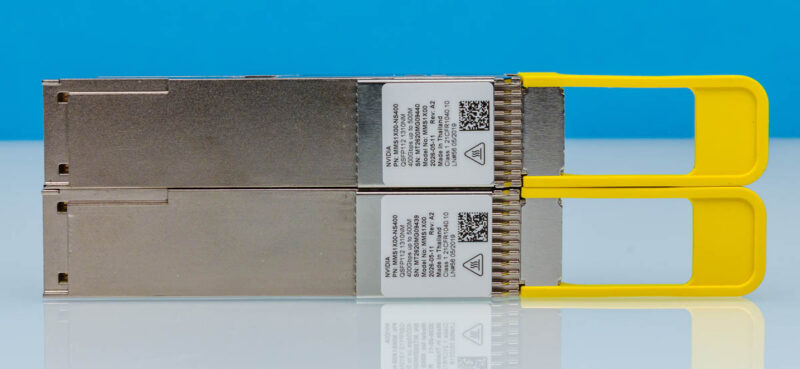
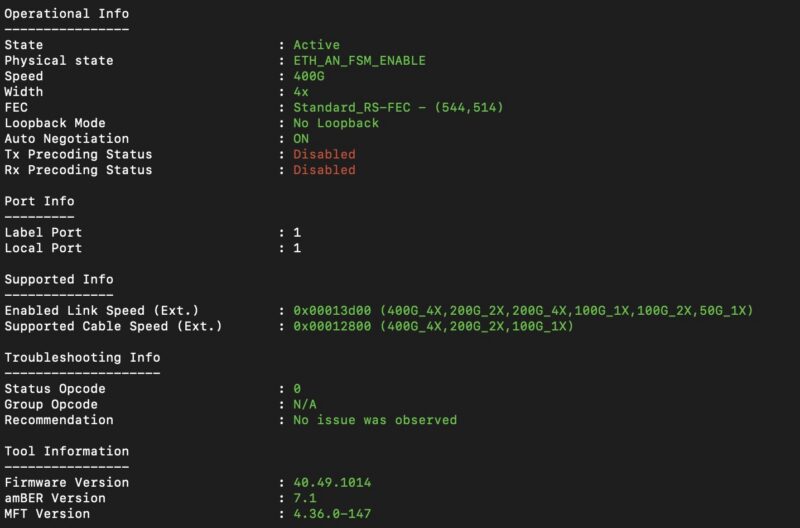
You can use DACs, like the massive NVIDIA 800G OSFP to 2x 400G QSFP112 passive splitter DAC if you have a higher-end switch, but we wanted to see what would happen if you had a single 400Gbps link.
Here is a diagram of what we found. If you go back to the topology section, we found that there is a PCIe Gen6 x16 link to the NVIDIA Blackwell Ultra GPU, which is why on a dual-rail network you can get 800Gbps on 2x 400Gbps links to the GPU.
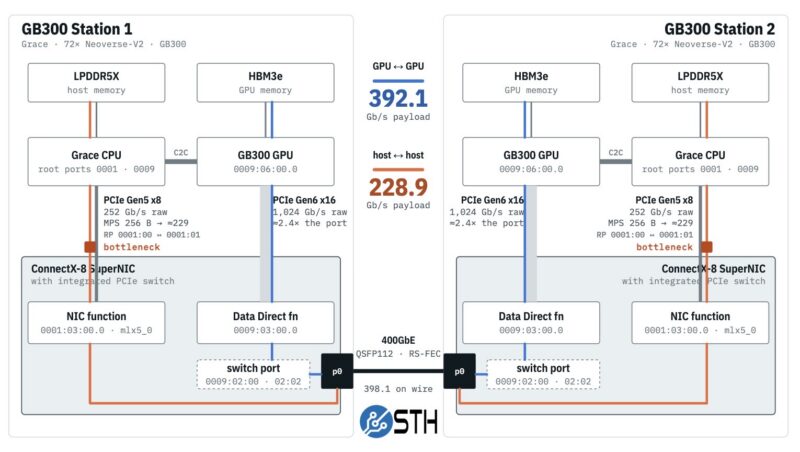
The host CPU side is very different. The PCIe Gen5 x8 link gives you up to around 229Gbps (we measured 228.9Gbps) to the NVIDIA Grace CPU side, which is limited by the Grace CPU’s PCIe interface to the ConnectX-8 SuperNIC. Remember that NVIDIA also has two PCIe Gen6 M.2 slots for eight more lanes hanging off the ConnectX-8, so there is a lot going on here. Still, this was something we had not seen folks discuss before and is really interesting from an architecture standpoint. If you remember, we did a piece around how The NVIDIA GB10 ConnectX-7 200GbE Networking is Really Different. This is another case of NVIDIA doing something perhaps unexpected. The advantage is that NVIDIA is using the PCIe Gen6 switch on the SuperNIC, instead of having another chip that needs to be powered and cooled in the topology.
Something else that was neat was just seeing 392-400Gbps of RDMA traffic over the link from the GPU. We originally saw around 1.4% CPU utilization on the system while doing that, and realized that it was actually more driven by the polling we were doing to check the performance on a single core. For some, that may seem like a given, but the only way NVIDIA can push 400Gbps, let alone 800Gbps for massive GPU scale-out bandwidth, is to have top-tier offloads.
In terms of 800Gbps, we then connected a second set of 400G DR4 optics, and we managed to get 784.3Gbps of payload between the Blackwell Ultra GPUs, but still only 229.0Gbps between the Grace CPUs. Here is a diagram to help you understand the dual-rail architecture.
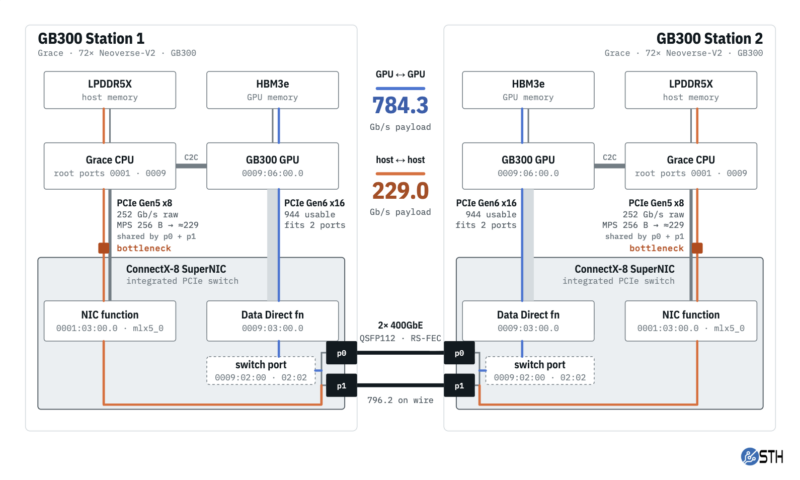
I think that the inclusion of NVIDIA Blackwell Ultra with HBM3E memory is exciting for many. The Grace CPU is neat. What you have to appreciate is that this system has the best networking you will find on a workstation today, given that NVIDIA enabled the PCIe Gen6 x16 link between the Blackwell Ultra GPU and the ConnectX-8 SuperNIC even on a PCIe Gen5 CPU. NVIDIA clearly architected this platform to scale out.
We had not seen a lot on the networking side, so if folks are interested, we have NCCL results and a lot more.
There was another link that we wanted to investigate, and that is NVIDIA’s C2C link between the GPU and CPU.
Gigabyte W775-V10-L01 NVIDIA C2C Impact
NVIDIA touts its C2C link between the NVIDIA Grace CPU and the NVIDIA Blackwell Ultra GPU as a key selling point. We did a quick-and-dirty look at what happens not just with local LPDDR5X memory, but when you access HBM from the CPU remotely over the C2C link.
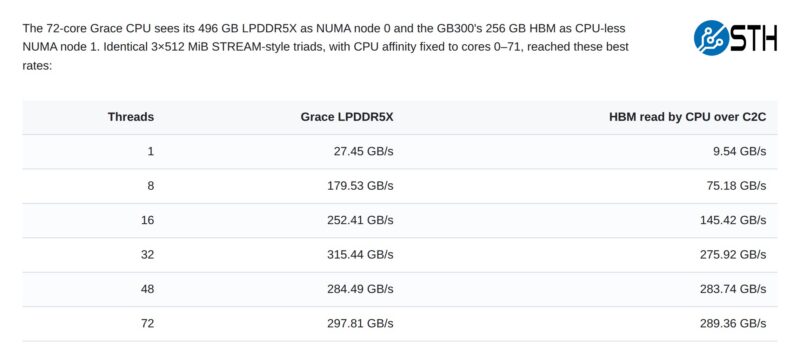
That got us thinking about the possibilities. What if you wanted to run an LLM on the NVIDIA Grace CPU with LPDDR5X, not just on the Blackwell Ultra with its HBM? What would happen if you stored the model in the memory attached to the other compute and used the high-speed C2C link to transfer data?
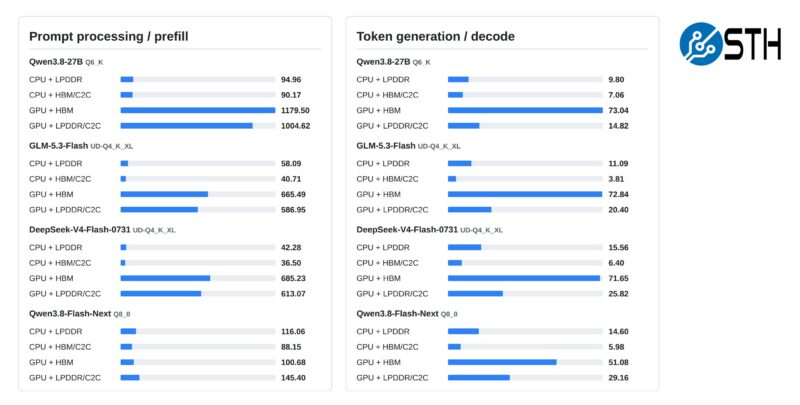
We ran Qwen3.8-27B, GLM-5.3-Flash, DeepSeek-V4-Flash-0731, and Qwen3.8-Flash-Next just to get some coverage. Generally, the prefill worked well passing data across the C2C link, which makes sense since that is more compute-bound rather than memory bandwidth-bound. Still, using LPDDR5X over C2C to feed the GPU gave us better performance across the board than using the CPU with its locally attached LPDDR5X. Remember, a Grace CPU alone has more memory bandwidth than unified memory designs like the NVIDIA GB10 and AMD Strix Halo/Gorgon Halo. This is a great case for using LPDDR5X to expand memory capacity if you want to run a really large model, but it also shows why you clearly want to use HBM for decode.
Next, let us get to the power consumption and noise.




There’s so much more in here than in the early reviews that made it sound like it’s a normal workstation. I watched and read other GB30 reviews, and I didn’t know about the 229Gbps limit. It’s a prime example of why STH is the best at this today, now that Anand is done.