

Gigabyte W775-V10-L01 Block Diagram, Topology, and What We Found
The claim to fame of the W775 (and other DGX Station systems) is NVIDIA’s GB300 superchip. A combination of a Grace CPU, a Blackwell Ultra GPU, and a ConnectX-8 SuperNIC, the GB300 is an extremely powerful processor configuration. This is essentially a server chip setup that just barely fits inside a desktop workstation.
Quickly running down the specs here for anyone not familiar with GB300 or DGX Station, the Grace CPU is a 72-core chip based on Arm’s Neoverse-V2 CPU cores. NVIDIA introduced it as part of the Grace Hopper generation of hardware in 2022. With NVIDIA’s 4 year cycle for CPU development, it has carried on as Blackwell’s designated CPU partner. NVIDIA uses a full configuration for Grace, with all 72 CPU cores enabled.
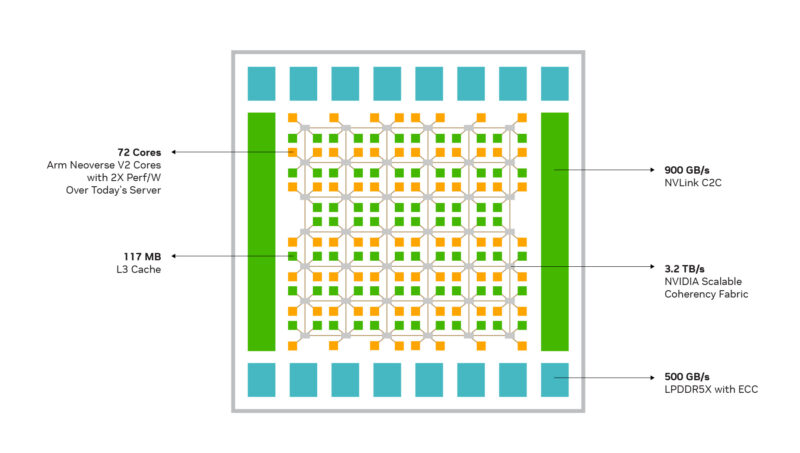
For memory, Grace offers a 512-bit LPDDR5X memory bus. For GB300 systems, this is implemented as four 128-bit SOCAMM modules. The slim memory modules allow for removable/swappable LPDDR5X, though as we noted earlier, DGX Station systems have this locked down as a non-serviceable part. The W775 and other systems come with 496GB of memory (with NVIDIA reserving the last 16GB), allowing for 396GB/second of memory bandwidth. The overall memory bus width is comparable to current high-end workstation platforms from AMD and Intel (8-channel DDR5), though Intel benefits from high-speed MRDIMMs.
For I/O, Grace has no peripheral I/O of its own. Instead, it keeps things generic with 64 lanes of PCIe Gen5. As a result, all USB connectivity comes through the use of discrete USB controllers.
As for the GPU, DGX Station systems feature a slightly detuned B300 Blackwell Ultra GPU. This Blackwell Ultra configuration ships with 7 stacks of HBM3E memory enabled, giving the GPU access to 252GB of memory overall. In terms of bandwidth, this totals 7.1TB/second. Otherwise, in terms of compute throughput (the ultimate reason the DGX Station even exists), a single system can deliver 20 PFLOPS of spare FP4 throughput, 10 PFLOPS of FP8, or 330 TOPS of INT8. Just do not try to use the W775 as an HPC machine: the FP64 throughput is just 1.3 TFLOPS.
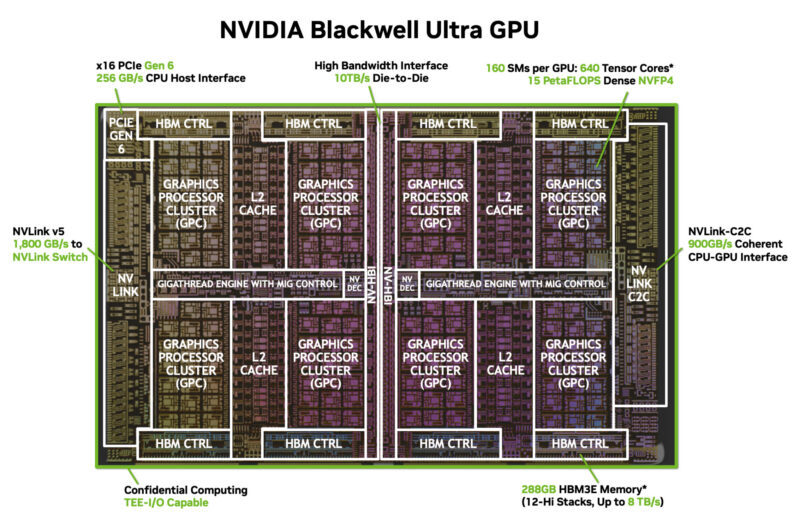
The Blackwell Ultra GPU is connected back to the Grace CPU via NVIDIA’s proprietary NVLink-C2C chip-to-chip interface. This offers 900GB/second of bandwidth, separate from the CPU and GPU’s PCIe lanes.
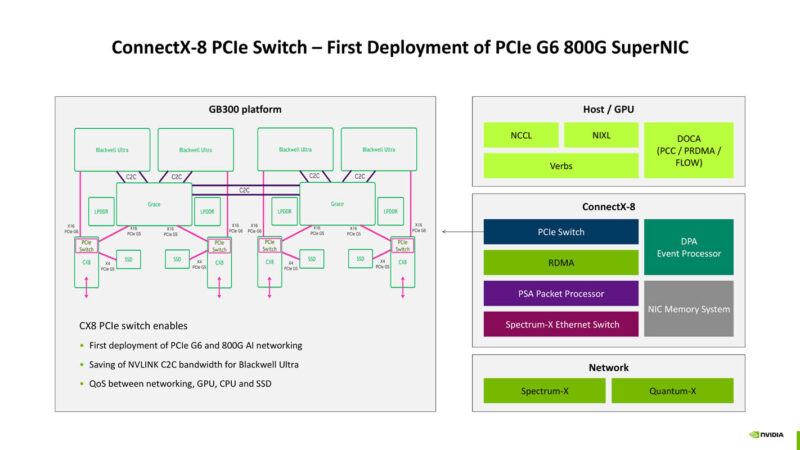
The final piece of the silicon puzzle is NVIDIA’s ConnectX-8 NIC. A staple of GB300 servers (and replacing the CX7 in GB200 servers), CX8 is both a high-speed 48-lane PCIe Gen6 switch and a high-throughput NIC. On servers, CX8 Ethernet ports form the basis of GB300 scale-out networking. On DGX Station systems, they fulfill a similar role.
The ConnectX-8 NIC is the perfect place to start when we talk about the topology of Gigabyte’s W775 system, as the chip’s complexity offers a minor mystery and an interesting revelation.
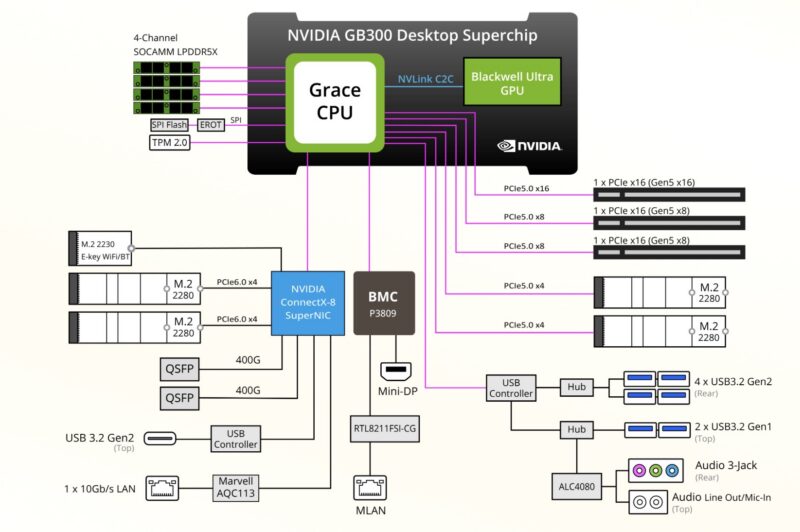
We will start with Gigabyte’s well-illustrated block diagram of the system. Here we can see how all of the devices hang off of the GB300 superchip, including the PCIe slots, two M.2 slots, and a USB controller. Most of Grace’s PCIe lanes are accounted for here, with 40 of them going to expansion slots of one form or another.
Meanwhile, the CX8 NIC has its own tree of child devices. This includes the two 400Gb Ethernet ports, the two PCIe Gen6 x4 M.2 slots, the Marvell AQC113C 10GbE controller, and even the USB controller powering the sole 10Gbps USB-C port on the top of the system.
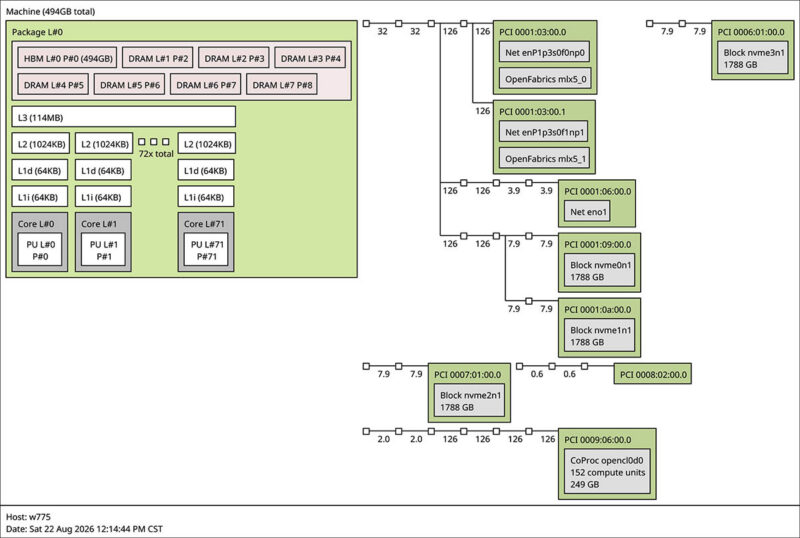
What you will not find here, however, is a clear description of the link between the Grace CPU and CX8 NIC. Given what we saw in the discrete CX8 PCIe card, where the default is to connect 16 lanes to the host CPU, we initially figured NVIDIA was running a PCIe Gen5 x16 link here as well, which would create bandwidth bottlenecks. What we found instead was much more interesting, and fittingly, much closer to how GB300 servers operate.
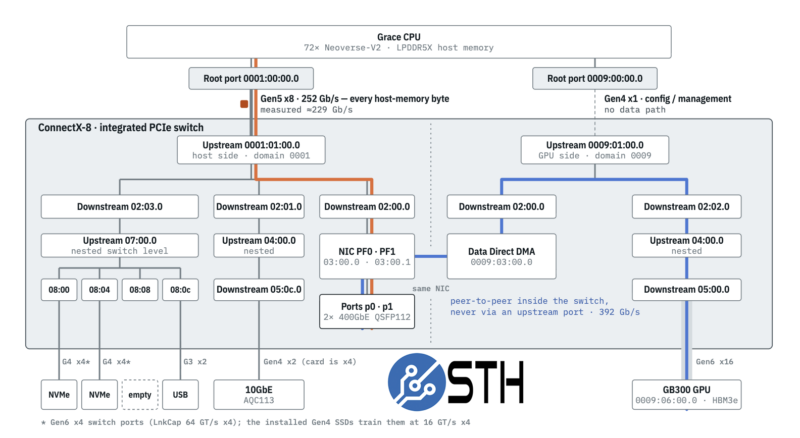
Thanks to some insightful testing experiments, we found that both the CPU and the GPU connect to the CX8 as host devices. NVIDIA is taking full advantage of the chip’s advanced PCIe switching and multi-host capabilities, giving it direct access to both the CPU and the GPU even on DGX Station systems.
From the CPU, we found bandwidth figures consistent with a PCIe Gen5 x8 link, which is actually narrower than expected. This allows for just 252Gbps of bandwidth on paper, and in practice we measured 228.9Gbps. After we got that result, we found a bit of NVIDIA documentation that said we should see 229Gbps on that link, so we effectively achieved that link’s maximum throughput within 0.1Gbps.
Meanwhile, the GPU, which we did not initially expect to even have a link to the CX8, has the fastest link of all: a PCIe Gen6 x16 link. This fully leverages the PCIe Gen6 capabilities of both the Blackwell Ultra GPU and CX8 NIC to deliver a 968Gbps connection. This is vastly faster than the CPU connection, and rivals the bandwidth of the NVLink-C2C connection between the CPU and GPU.
After looking through all the DGX Station block diagrams we could find, not a single one explicitly discloses the GPU connection, or even outlines the link’s total bandwidth, for that matter. Like Gigabyte’s block diagram, all of them imply there is just a connection to the CPU, and that is it. We have seen other reviews of the platform that did not cover this.
The GPU connection is an important (and cool) discovery for two reasons. First and foremost is bandwidth: Grace only has 64 lanes of PCIe Gen5. 32 lanes would be needed to fully feed the CX8, so it has enough bandwidth to support its dual 400GbE ports.

Indeed, this is how we sometimes see ConnectX-8 cards configured in the wild, with a secondary x16 connector on top of the x16 connection from the PCIe CEM edge connector. The problem there is that right off the bat, 40 lanes are reserved for PCIe and M.2 slots on DGX Station systems. Grace does not have enough PCIe lanes and bifurcation capabilities to feed a CX8 and all of those expansion slots on its own.
The second reason this is an important topology feature is that it gives the GPU a faster and lower-latency connection to the NIC, as well as all of the devices hanging off of it. That means the GPU can route traffic directly to the NIC, with the PCIe Gen6 x16 connection supplying plenty of throughput to saturate both of the 400GbE links. Furthermore, it makes the two PCIe Gen6 x4 M.2 slots hanging off the CX8 more useful than they first appear, because it lets the GPU read from them at the full 30GB/second of bandwidth they offer, similar to how you would set up a GB300 server.
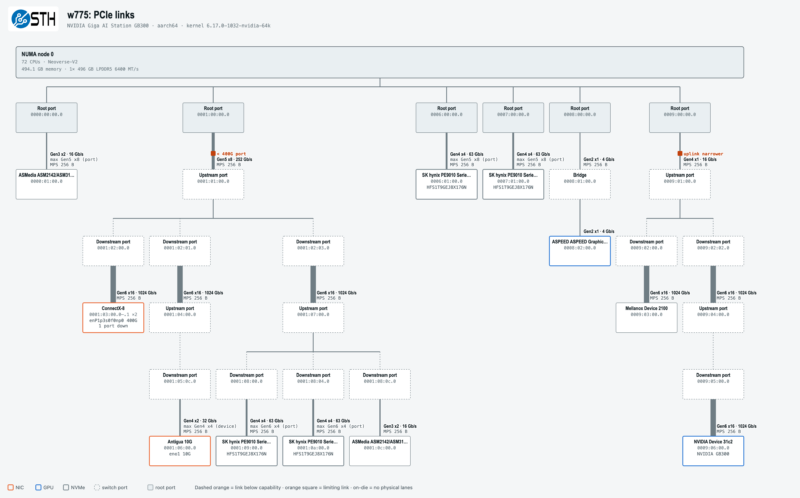
In this respect, Grace is almost a third wheel in the GB300 topology. With the Blackwell Ultra GPU being the critical component, in many ways it is the CX8 NIC that is the GPU’s most important helper.
Next, let us get to the out-of-band management.




There’s so much more in here than in the early reviews that made it sound like it’s a normal workstation. I watched and read other GB30 reviews, and I didn’t know about the 229Gbps limit. It’s a prime example of why STH is the best at this today, now that Anand is done.