

ZimaCube 2 Pro Performance
Under the hood, our ZimaCube 2 Pro review sample is driven by an Intel Core i5-1235U processor, which is part of Intel’s Alder Lake-P mobile family. Intel’s first generation of chips built on their Intel 7 process node, mobile Alder Lake was first introduced in early 2022 and has largely been phased out by successive generations of chips, including Raptor Lake (13th/14th Gen Core), and more recently, Intel’s Arrow Lake chips. So it is a bit surprising to see IceWhale deploying an older Intel SoC here, especially as Intel EOL’d the chip last year and ceased shipments in October.
In any case, the i5-1235U is one of the higher-end configurations of the Alder Lake-P silicon. It offers two performance (P) cores based on the Golden Cove architecture and eight efficiency (E) cores based on Gracemont, with the former topping out at 4.4GHz. The chip is also paired with a relatively powerful iGPU, Intel’s Iris Xe Graphics, which features an 80 EU GPU based on the Xe-LP architecture. This is a rather dated GPU architecture at this point, but it does support HEVC encoding, which is always helpful for a NAS box.
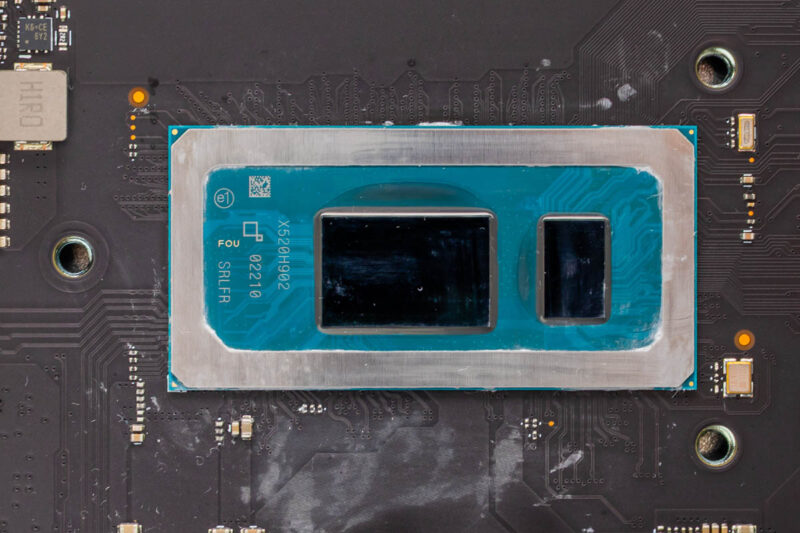
As noted earlier, the Intel SoC is being fed with 16GB of DDR5-4800 memory. IceWhale’s system comes with two SO-DIMM slots, both populated, so while it is somewhat light on memory, it is expandable in the future.
Overall, the CPU performance of the system is unremarkable thanks to the older CPU architecture combined with modest clock speeds. This chip was originally meant for thin-and-light laptops, so it prioritizes power efficiency over performance. This has been mounted in a decent-sized NAS, so the ZimaCube’s cooling system has little trouble keeping the chip cool. Instead, the big reason to pick this particular chip SKU is the number of PCIe lanes available. Alder Lake-P offers eight PCIe Gen4 lanes coming from the CPU, as well as another 12 PCIe Gen3 lanes coming from the PCH. All 20 of those PCIe lanes are put to good use by IceWhale in order to drive the SSDs, PCIe slots, and other add-ons.
Geekbench CPU
For our performance comparison, we have selected Minisforum’s N5 Pro, a 5 bay NAS. The N5 Pro is based on a Ryzen AI 9 HX 370 processor, one of AMD’s recent high-power mobile offerings. While it is not quite an apples-to-apples comparison, it is pretty close for the size and intended use case of the box.
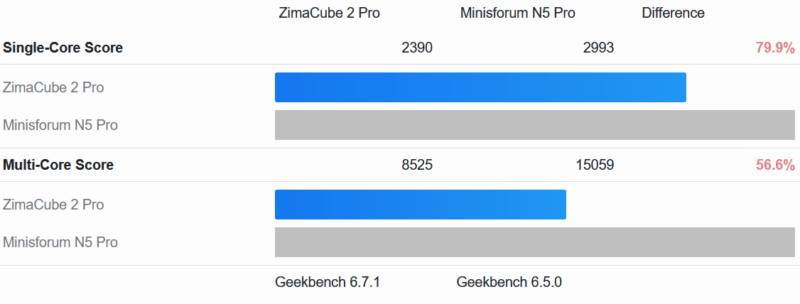
The Geekbench 6 CPU results are as expected. The Core i5-1235U in the ZimaCube still puts up a fight with single-threaded performance, coming within 20% of the Ryzen AI 300 chip in the N5 Pro. However, it falls behind significantly in multithreaded performance.
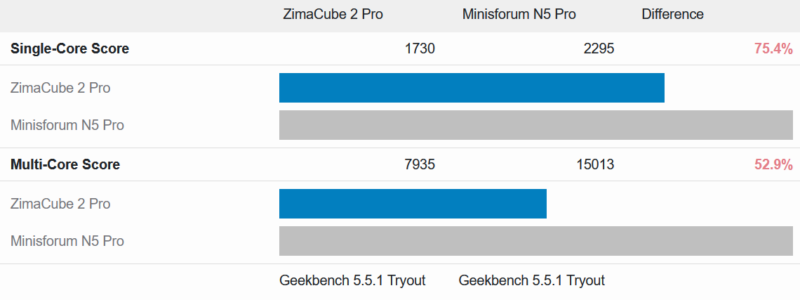
The story is much the same with Geekbench 5 as well.
The Core i5-1235U at the heart of the ZimaCube 2 Pro is still reasonably performant, but it is not a high-performance chip by any means. This makes it a good choice for running a bunch of lightweight services, which is exactly what ZimaOS is doing, but beyond that, this is a box designed to maximize the amount of I/O bandwidth available, not to do a bunch of heavy computational work.
We should also note that for a 6-10 bay NAS, an Intel N355 is a perfectly reasonable solution, and is a lower-end version of this generation of chips with less I/O. Traditional NAS workloads are notorious for using very little CPU.


Too bad it doesn’t seem to support ECC RAM like the Minisforum N5 Pro does.
I have a hard time understanding anyone being willing to run these branded Linux OSes. What they all have in common is small companies supporting them, with unknown or uncertain security track records.
It’s hard enough staying updated in the face of the torrent of vulnerabilities using a well-supported distro (Ubuntu, Fedora, whatever); depending on some unknown small company for this seems foolhardy.
Of course this hardware supports other OSes, so you might well still want it for that, assuming the pricing is sensible.
No SAS HDD support? Another off shoot custom Linux? Not for me.
For what this offers, putting one together yourself with off the shelf parts just as easy, cheaper, better parts and self-satisfaction of doing it open source.
Off topic, this what I expected STH to be reviewing, not the big corp stuff costing tens of thousands of moolah, site has lost it’s way !
what’s up with the ESP32 soldered to the NVME expansion card? What is it good for?
Tubz is right
@Tete There is some RGB lighting in the SSD bay. The ESP32 is what controls it.
The branding makes me think I should be able to get this from the liquor store for $10.
StH needs to include a Nessus scan and the OS build info if you’re going to keep reviewing these no name one off imports.
“Thanks to the low-power Intel SoC… ”
Intel Core i5-1235U consumes 45W and the 13. generation Intel Core i5-1235U only 15W !
Edit: 13. generation Intel Core i5-1335U
Both the i5-1235U and i5-1335U have the same base TDP of 15 Watts. This being standard for the U-series SKUs of that era.
I’d liked to have seen the i3 with 10GbE. The 800$ would be quite fine.
Also support for ECC (DDR5) would have be nice.
But everything come with a cost.
Unfortunately while IceWhale and their Zima series of products look good on paper, my experience with their Zimaboard PCs left me unimpressed. I managed to crowbar the first one I purchased by inadvertently trying to plug a USB-C cable into the Displayport. OK, my bad but that shouldn’t have taken out the power supply. I bought a replacement because it did fit my needs. However, the new one managed to take out the USB ports on a keyboard and mouse I plugged in (these were a Microsoft keyboard and Logitech mouse, not cheap stuff).
I have come to the conclusion that IceWhale is a young company with good basic designs but needs to up their game when designing robust products.