

Building the 8x NVIDIA GB10 Cluster Monitoring and Firmware
Once we had been operating for some time, it became clear that we needed to better manage our cluster, just as you would any cluster. It all came to a head when we were forced to swap one GB10 out of the cluster and replace it with another unit we had running as a single node.
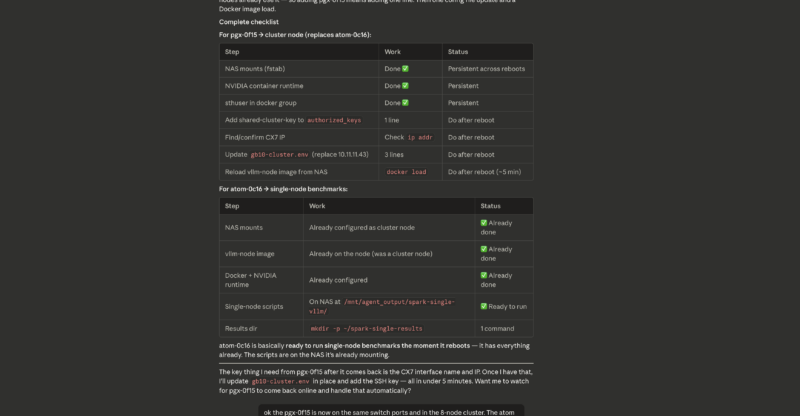
We built a small cluster monitoring setup with the following key features:
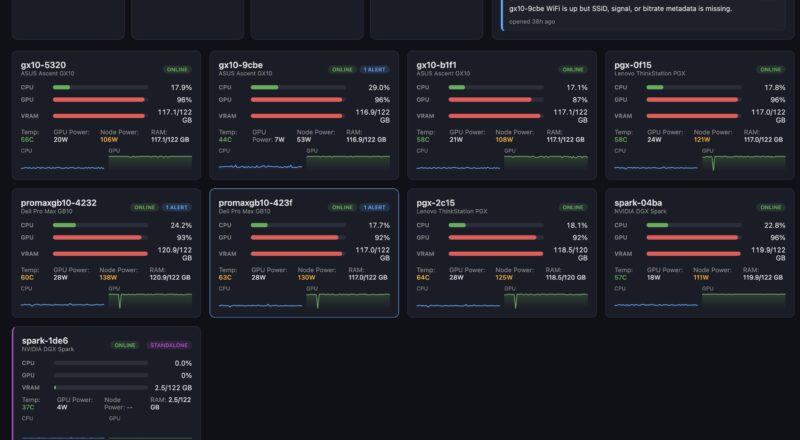
- Monitor each GB10 node:
- CPU Utilization
- GPU Utilization
- LPDDR5X Usage
- Temperature
- Package Power Consumption
- Node Power Consumption
- Links to 10GbE and 200GbE networks
- Ports on the PDU
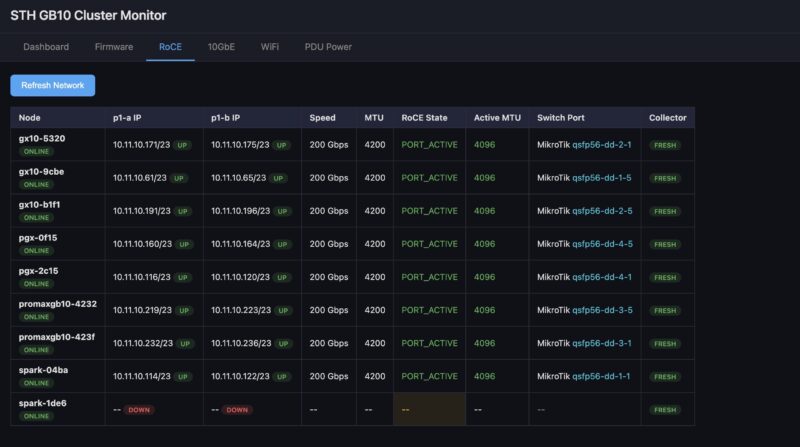
- Monitor 200GbE networking:
- Ensure 200GbE was connected
- Monitor each port
- Monitor RDMA networking status on each port
- Monitor 10GbE networking
- Ensure 10GbE was connected
- Monitor each port
- Monitor WiFi networking
- Ensure WiFi is not connected
- Monitor each so a reboot does not change this
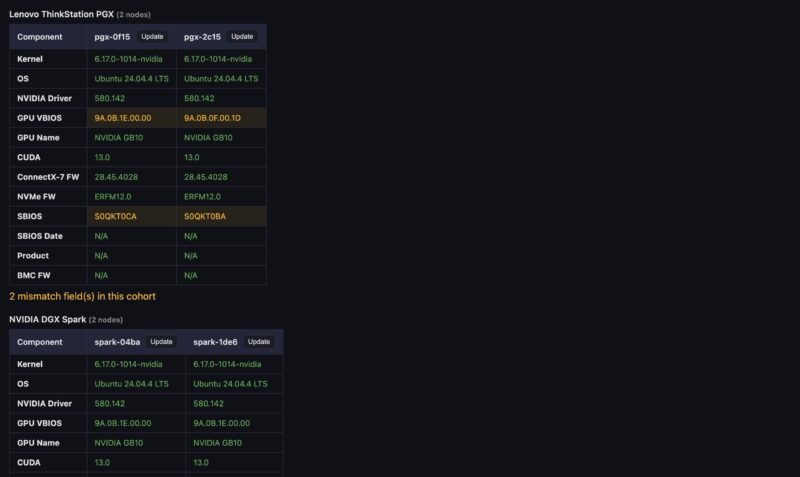
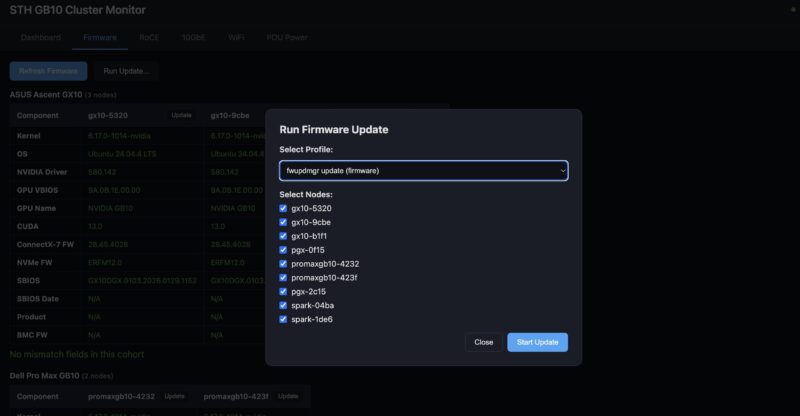
- Monitor Firmware and Update
- Check for OS kernel version
- Check NVIDIA driver
- Check Firmware of GB10
- Check Firmware of ConnectX-7
- Monitor Cluster Power
- Monitor power for the cluster
- Allow for remote power cycling of nodes
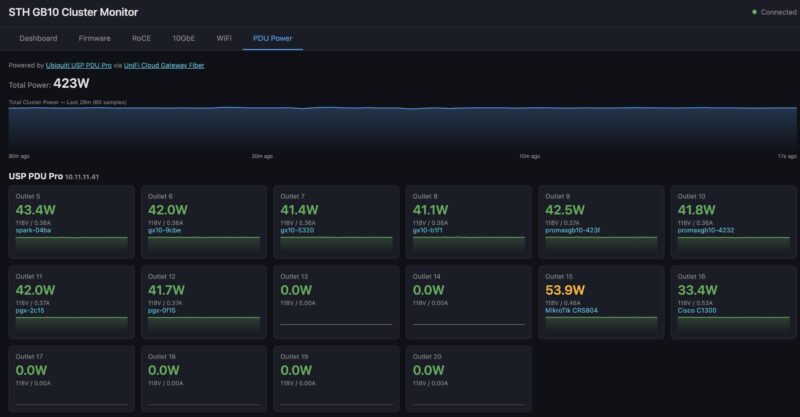
This might all sound boring at first, but keeping all of the nodes on the same firmware is a pain if you are managing each one individually. Also, if you are away from the cluster often (I did 98 flights in 2025 as an example), then having the ability to do remote diagnostics and power cycling is important. Having all of the links between individually switched and monitored PDU ports, switches, and nodes makes both troubleshooting and remote hands easier. Using this, I once had to guide Sam to remotely swap out a node, and it was easy because I had a way to verify the issue and then tell him how to validate that the replaced node was in the correct spot.
Next, let us get to the performance and optimization.


This is f*n awesome. Good on ya bro
BEST piece you’ve done recently. Wow. It makes me only want a 4N not 8N
This is indeed one of your best articles in years. My 2-node cluster will keep me entertained for a long time. Maybe one day I will go up to 4 nodes, we shall see.
The MikroTik CRS804 is perfect for a 4-node cluster, 4x200G for the RoCE, 4x100G for storage, and the last 400G port facing the NAS.
Have you tried implementing TurboQuant on the cluster? I am curious to see how long context windows impact the available vram over time and how TurboQuant might help.
Great article especially showing how you leveraged ai to set everything up!
Repost from the STH Forums, not sure which spot is better for responses:
Fantastic article. I’m running 4N right now, was/am still considering a drop to 2N since the extra 2N arent necessary for all models but your point about the fungibility of having more/spare nodes is excellent.
Very interesting to see the callout on using a flash NAS for shared storage – would love to hear more on best practices for this, especially the situations where a little more GPU in the NAS makes sense. Next click stop for my cluster is the addition of a flash NAS based on the ARR 1U E1S you guys reviewed a while back, but I hadn’t even considered putting a GPU into it. Would love more details on this.
Also if you’re taking requests a network diagram would be fantastic. I’m running 2x 804DDQs to handle the 4N + flash + uplinks + mgmt bit I’m nowhere near settled on the topology, would love to see how you ended up structuring the full cluster network including NAS & DDQ trunks / uplink.
Lastly, WTH was Ubiquiti 10G switch you were showing?! It definitely wasn’t the Pro XG-8 PoE (no screen) and AFAIK there’s no other UI 10G switches that aren’t rack mounted. I’m pretty familiar with the UI lineup and the only unit I know that looks like what you showed was the Enterprise 8 PoE (Vintage) model!
What tool or service did you use to get the stats for all the power and servers
I thought your SM Xeon 6 SOC review was unreal good. This is even better. I think I’m more sold on a 4N not and 8N but the M3 Ultra’s prefill is doggy doo doo. I’m lovin’ your new articles Patrick.
One that I wish you’d done is the QNAP 100G and 25G switch. If you’re only getting 140G then maybe it’d be better to just do 100G
I don’t get the tube comments where they’re so dead set on being the permanent underclass.
Use basic punctuation in your titles. I had a stroke trying to read it.
@El Porto & Peter – Patrick touched on it briefly in the video, but the general idea is the GB10 Connectx7 interfaces (and the CRS804 switch) are purely for inter-node coordination as they are running RoCE.
NAS and management traffic are all on the 10G NICs.
Deviating from that pattern would likely degrade model performance.
Regarding cluster size, I’ve been pretty happy with a 2 node with a simple DAC. An alternative (cheaper) way to scale out could simply be to add a totally separate 2n cluster, and load balance the LLM API requests.
I read about 8. Now I’m ordering a 4-node cluster.
Look at high-capacity DIMM pricing. If you get the 1TB you’re paying for the 128GB, maybe the SSD, but then the CPU, GPU, and NIC are free. These aren’t getting any cheaper. You aren’t going to get a better deal on this much VRAM.
Apple stopped selling the studio 512 because the spot pricing of the memory alone is approaching $15k.
Awesome writeup. STH is crushing it!
Has anyone been able to PXE boot their DGX spark? I want to provision it with MAAS but it always hangs. Is it possible to PXE from the connectx instead of the realtek?
Hi!
“On the MikroTik CRS812 DDQ, set up MTU, PFC, ECN, and all of the QoS bits needed.”
What is your RouterOS version? AFAIK PFC and ECN are not yet supported in v7.21.4 (long term) or v7.22.2 (stable), and are mandatory (?) functions for lossless RDMA connections.
Are you using v7.23b/rc?
Thank you
Amazing work!!
GB10 follow-up: standard RDMA benchmark falsely reports broken fabric on GB10 — characterized with independent probe, 24 GB/s NCCL on 3-node dual-rail MikroTik CRS804 build
Hi STH team,
Your 8x GB10 cluster article and the ConnectX-7 networking deep-dive were the reference points for our 3-node GB10 build (Dell Pro Max FCM1253, dual-rail RoCEv2, 2× MikroTik CRS804 on RouterOS 7.23.1). Along the way we found something your readers building GB10 clusters will hit: ib_write_bw deterministically reports a hard 64 KiB RDMA WRITE ceiling on this platform — responder-side local protection errors, 72/72 failing cells across every node pair and RDMA device — that does not actually exist.
We characterized it fully before concluding: an independent minimal libibverbs probe (with responder-side content verification) passes the identical MR/WR geometry at every size, and NCCL acceptance on the same fabric sustained 24.0 GB/s busbw (3-node all_reduce, full sweep, zero validation errors) with per-MAC byte counters balanced to 0.02% across both rails. Kernel version, IOMMU mode, firmware currency, MR flags, ODP, and relaxed ordering were each eliminated by dedicated experiment. Two unresolved NVIDIA forum threads from 2023 (CX-5) and 2024 (CX-7/KVM) show the same boundary and syndrome — this has been biting people quietly for years.
Full writeup, elimination matrix, and probe source: https://github.com/linux-rdma/perftest/issues/394
Community PSA with GB10 cluster-builder notes (NCCL topology trap, counter methodology, 4-subnet/ARP-discipline config that produced perfectly symmetric MAC loading): [YOUR-FORUM-POST-URL]
Happy to share the dual-rail CRS804/RouterOS 7.23.1 configuration details or run comparison tests if useful for a follow-up piece.
Jacob Johnson