

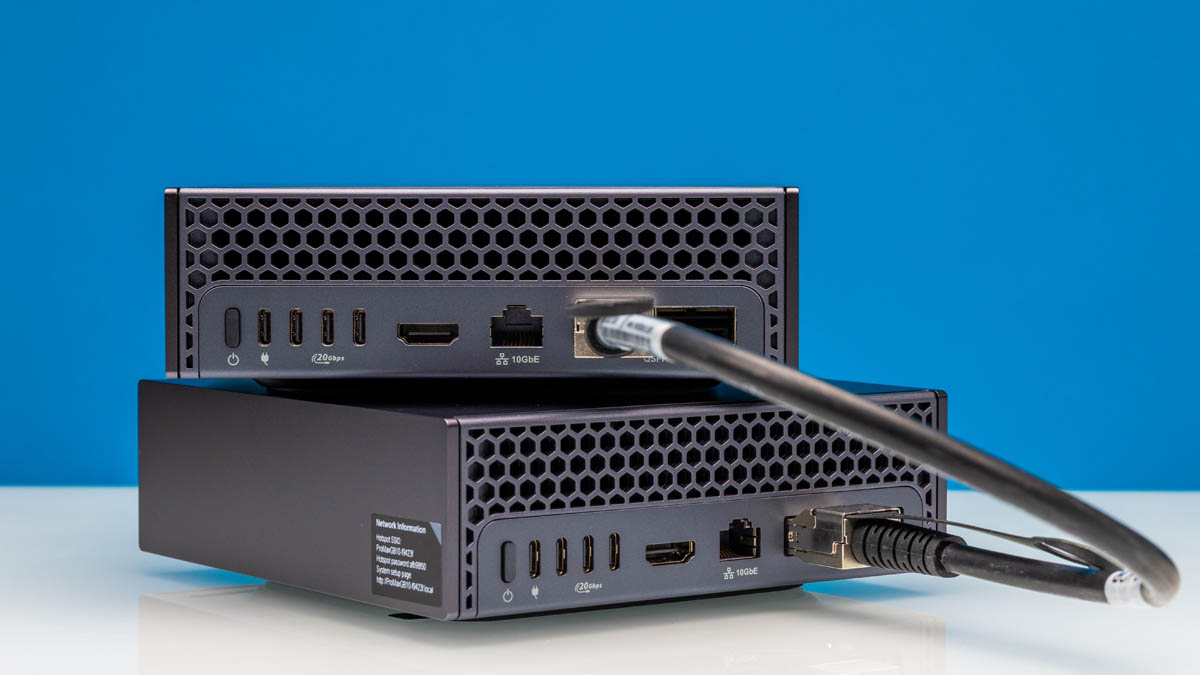
At STH, we have been looking at the masses of 128GB LPDDR5X machines focused on AI inference for several quarters now. Something we did recently was super-cool and had an impact on the business side of STH that is worth sharing. We used the Dell Pro Max with GB10 to automate a partial role we were looking to hire for. This is not a doom-and-gloom AI is taking jobs story. Instead, we were able to roll funding into hiring a new managing editor at STH. Another way to look at it is that we were able to use a Dell Pro Max with GB10 to keep our business data local, and utilizing AI, it had a 12-month (or less) payback period while having plenty of capacity to use the box way more. When we have done NVIDIA GB10 system reviews previously, those have often resulted in folks saying they were “expensive,” albeit pre-DRAM price increases. This is instead an example of how you can think about getting an almost crazy amount of value from a system.
As a quick note, Dell sent the two Dell Pro Max with GB10 systems, and so we need to say this is sponsored. In practice, having the additional systems enabled our side-by-side testing of multiple models in our workflows on historical data simultaneously. That yielded perhaps the most important finding in this exercise around speed versus accuracy.
Step 1: Understanding the Reporting Problem at STH
As STH has grown, we now have six owned distribution channels with over 100,000 views/ month and all are targeted at different audiences. That does not include social media channels. Something we need to look at on a weekly basis is the performance of articles. For example, we might want to know about the performance of an article and a short video on STH labs versus if we do a full length video on the main YouTube channel. We may want to analyze the time engaging with the content. We may want to pull in newsletter views and so forth. Further, sometimes we will get requests from external parties about the performance of certain pieces. For example, Dell might say, “Hey, how many views did that Dell AI Factory tour get?” Or ask how many it got in the first 30 days or 90 days.
We have a decent number of data sources, some reaching 16 years old at this point. Like just about every business, reporting is necessary. While we are discussing how we are using AI to do reporting, it is something that just about every business can use.
With that, it was time to get into the process.
Step 2: Building the Process Flow with n8n
While folks are getting very excited about Moltbot / Clawdebot these days, but we are using n8n for this workflow since we wanted to use this locally on our data, and there were existing integrations to data sources like Google Analytics. That may not seem like a big deal, but we had something working in 4-5 hours of work (plus many hours of testing.) Having pre-built templates to get to data sources made life very easy. Also, I tend to prefer re-using existing tools like this than trying to ask an agent to re-build custom tools. Some may disagree, but again, I wanted to make something widely applicable.
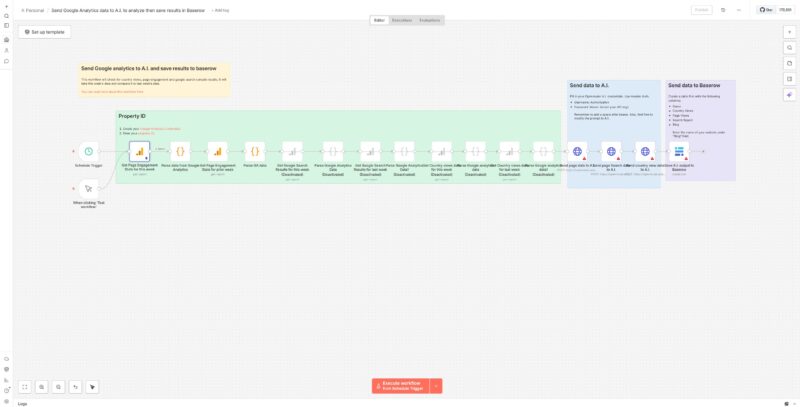
Trying to balance making this super specific to STH and making it more broadly applicable to those reading, here is a high-level sense of the process steps in the flow.
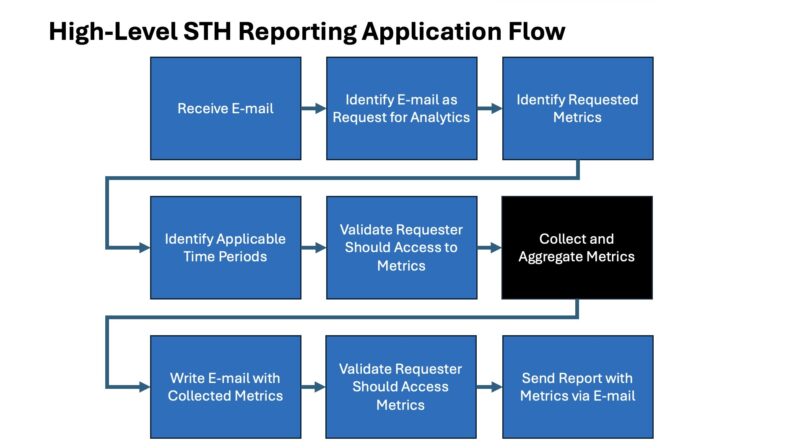
While the details behind each step are a bit more unique to STH, I think the high-level will feel familiar to many. Perhaps the biggest change is that today we can use a LLM to things like ingest any text and extract the data points that are required. I remember doing a project just over a decade ago where folks had to write e-mails with specific formatting and structure to get an Oracle ERP to properly ingest data into a process.
That Collect and Aggregate Metrics flow is what goes out to the actual data sources and queries for information. Luckily, n8n had pre-built templates for almost all of what we needed.
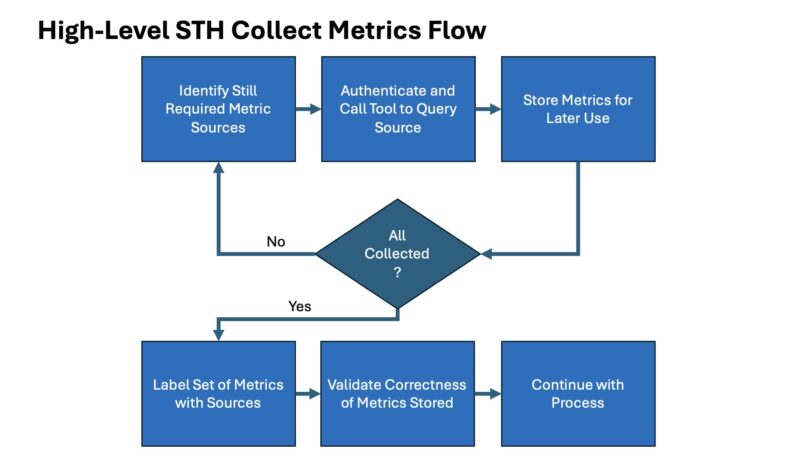
My major tip here was that, because this is something we do regularly, we were not just trying to get views. We are also trying to get other data like limiting the time peroids for each request. I know that sounds like a minor point, but jotting this all out on a notepad before starting with the workflow probably saved a few hours.
Then came the big testing points. I do not want to share the data we used, but one advantage we had was we had both the input query as well as the validated output for roughly 100 requests a year and over a decade. That gave us the test data to try gpt-oss-120b FP8 and MXFP4 versus gpt-oss-20b FP8 for accuracy. Just to make our lives easier, we stopped with the last 1000 requests so from Q1 2015 to Q4 2025. You will note that is not exactly 100/ year, but having a sample size of 1000 we felt was decent. Also, if each workflow takes over a minute to run because it is running sequentially through the collect metrics loop not in parallel (oops!) then it naturally takes quite a bit of time to get through that many iterations.
Something that is going to be a very fair critique of this is that instead of using a reasoning model, there are other small models that might be better, and using a mixture of models is likely the best. It really came down to parsing the incoming e-mails and figuring out which data we needed to pull, and which source that would come from. Oftentimes the request for metrics comes in a small novel of an e-mail with multiple tangential points and asks. The reasoning models did better at parsing through those. It was also Q4 2025 when we set this up, so naturally as we are publishing this the world will change and new models and tools will come out. That is part of the difference between experimenting, and then getting something you put into production.
What we found was really astounding. The gpt-oss-20b model aced the first 20 and so we were originally thinking that we did not need a larger model. Then, #27 came back and it did not match. We realized something was amiss, but the stranger part was that we had so many working perfectly before we got a non-matching result. So we let both Dell Pro Max with GB10 boxes run through the back testing. We did this sequentially so it took some time.
What we realized should make sense to a lot of folks. When we hear a model is 97% accurate, especially on a long response, that is great. What happens here is that we can have over a dozen calls per firing of a workflow so our reliability of the overall workflow if we were only 97% accurate would be more like 69-70%. It turns out, our simple requests did way better than that. We were actually getting closer to 99.4-99.6% accuracy in our sample runs. Still, that led to only a ~95% accuracy. Using the larger gpt-oss-120b got us to 99.96-99.99% accuracy for steps, or an extra nine in overall system reliability. Roughly 95% versus 99.5-99.9% accuracy of the workflow is the difference between low single-digit per year defects, and finding one per week.
Next, let us get into how the math works on having this pay for itself.




I’ve got 4 FTEs doing reporting full-time. For those who don’t get it, they’re using the LLM to convert a very unstructured request into a structured request format. There’s a lot of words around that, but that’s what employs people.
Eye-opening to say the least. We’re going to order a few this quarter just to try this.
What I like is since email is asynchronous that interactive performance doesn’t matter and one can run a capable large language model with everything to gain on cheaper hardware.
You haven’t included energy cost in your business case- how does that play out?
H Lowe – Yes
Eric O – Realistically, when these come in, if we get them out that week, that is usually OK. Sometimes folks need them that day or the next. You are right, the SLA is not tight, which makes this easier.
Martin – Power in Arizona is relatively cheap, which is why there are so many data centers and fabs here. These are sub $5/ month to run. On the other hand, what would 0.05-0.10 of a person’s energy cost be to offset that?
@Martin it should be noted in the analysis that energy costs do need to be added but figures are going to be variable. Different regions can have vastly different power rates.
Analysis of this compared larger rack based systems ran locally at the same cost of energy would be interesting. Rack solutions are supposed to more efficient in terms of performance/watt but have a much much higher power consumption as well. In other words, those larger systems need to be loaded for those performance/watt improves to translate into a return on investment. For projects like this who load is cyclical and job completion is not time sensitive, ROI should arrive much sooner due to lower initial investment. The nice thing about the math in small cluster vs. larger rack solution in this analysis is that per unit power cost get factored out of both sides of the equation as the result is a load factor difference.
The comparison to cloud offerings or hosted data centers is that power often is included in their figures. It may not be an explicit line item but does explain some of the different region-to-region pricing cloud providers can have for the same compute. In addition, the rate for which hyperscalers pay is often less than commercial rates or residential rates of power in an area. Electric companies like consistent load and consistent predictable income from large data centers. The cloud solutions can be competitive on a cost basis as they can run multiple customer job across the same hardware to generate the loads necessary to hit ROI in a similar time frame, even including the differences in power cost though that is more abstracted. That performance/watt difference of the larger rack systems is where the profit is generated for cloud providers as they can operate at the scale and loads that are not feasible in-house.
You really don’t need AI to do this.
Easier to setup some basic workflow automation around your content analytics/metrics and have automated reporting setup to key stakeholders/clients that blasts out reports every week/month/quarter.
Make it part of the package of what they get when they sponsor content/run ads, etc.
MR – That would be great, except that is not for the standard reporting flows we have. This is to address the ad hoc requests that come in and need to be serviced.
Your proposal is to use a different process than what folks are asking for/ need. You are right, the challenge AI is solving is the non-standardized reporting.
It is nice to see a real world use case for AI at this level. The growing concern with AI is that there is a lot of spend on the build out and a lot of folks playing with “slop”. There are little practical use cases especially outside of the large enterprises.
As simple as the use case in this article may seem, it is one of the few times that I have seen N8N being used in a way that benefits small businesses.
It also highlights the nuance of how AI hw can be used in this type of business. It is not training at 100% utilization. You are able to create the app with relatively little effort, test and then set and forget.
Now I need to move beyond creating an animated image of Jensen Huang with ComfyUI!
It’s a thousand dollars more than the HP and the exact same configuration.
@Sridhar: Wasn’t the Dell released earlier?
You were not presenting a fictional “GB20” next step on purpose?
If a future GB20 ever shows up, it should come with 128–512 GB of RAM and around 800 GB/s of memory bandwidth, not just a nicer spec sheet.
GB10 looks great, but on some key specs it was already obsolete on paper the day it launched. Prioritizing 2×200 Gb/s networking over seriously juiced‑up memory bandwidth is a great way to build a “workstation” that looks amazing in a rack but makes a lot less sense on a desk at home, where extra RAM and bandwidth would be far more useful. And given that Apple has been shipping roughly 800 GB/s on a Mac Studio with an M2 Ultra since 2022, it’s hard to pretend that 273–300 GB/s is still “high‑end” in 2026.
GB300 DGX Station is the next step, but that will be $100K+ now.
Remember, you can also scale these out easily. We have an 8x unit cluster already.