

Heart of the Spark: NVIDIA GB10
Given our limited timeline, not wanting to break our system, and the fact that we already had motherboard shots, we are going to use some from earlier on STH. Here is the motherboard in all of its glory.
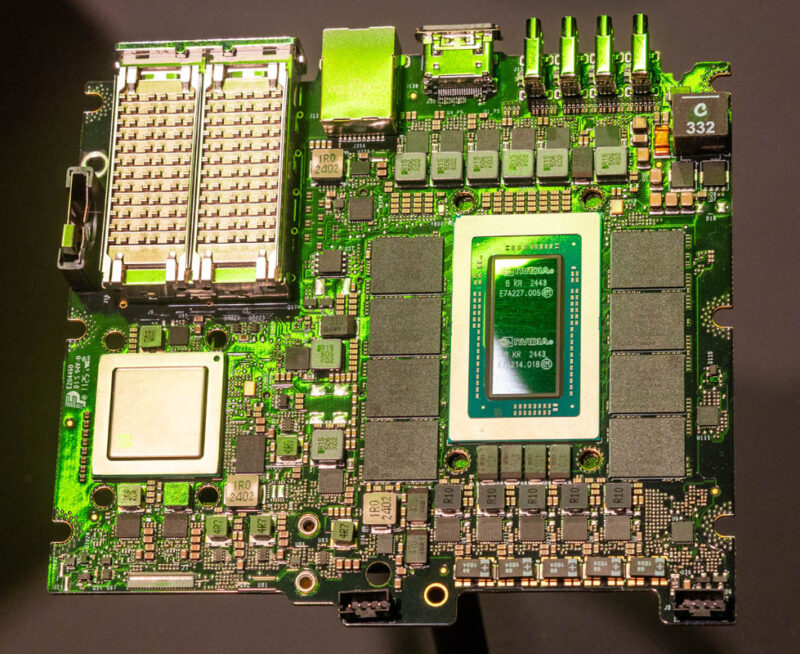
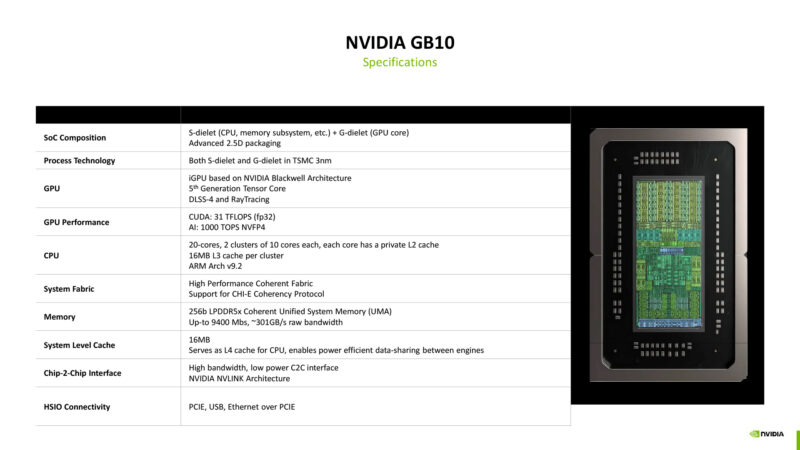
At the heart of the system is the NVIDIA GB10 (Grace Blackwell) package that combines a 20-core Arm CPU with a Blackwell generation GPU connected via C2C NVLink. We also see these are flanked by 128GB of LPDDR5X memory.
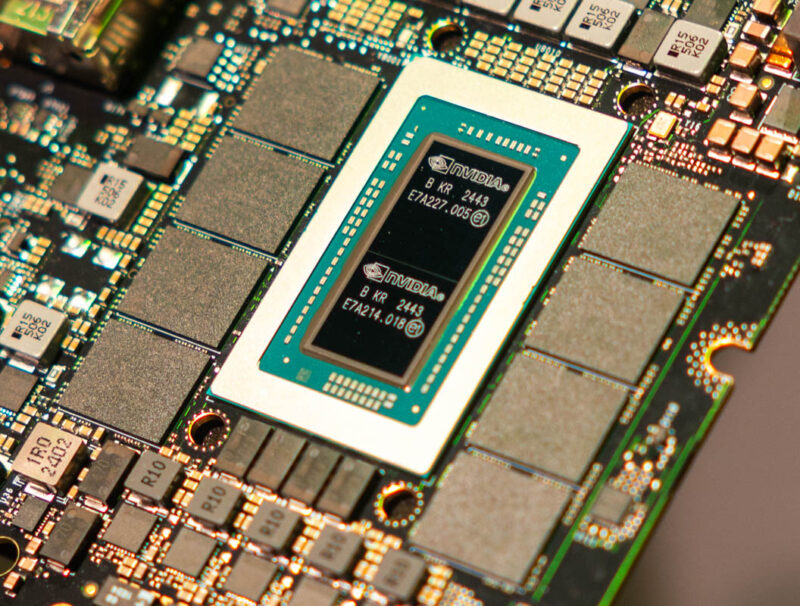
We will show that unified memory later, but that is a significant feature because it means we have one large memory pool to work with.
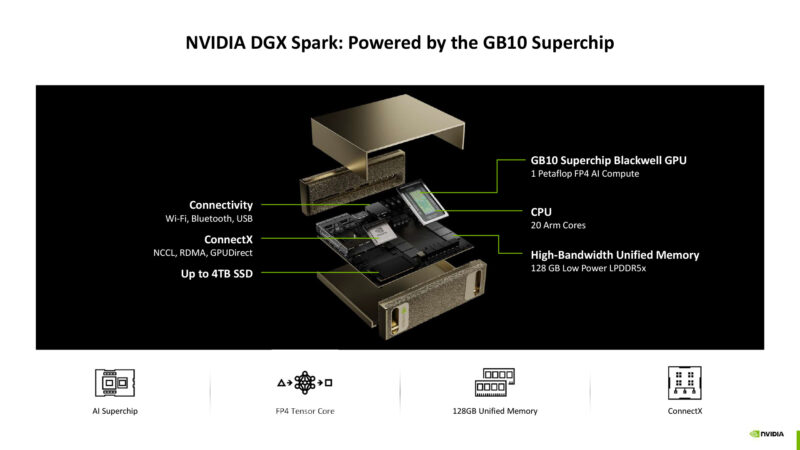
The NVIDIA GB10 is a collaboration with Mediatek and the Arm CPU side comes from Mediatek IP. It is then married with the NVIDIA Blackwell GPU side using the C2C link. This is conceptually similar to a higher-end Grace Blackwell part, but it is like a smaller version that could also be used in desktops and notebooks one day.
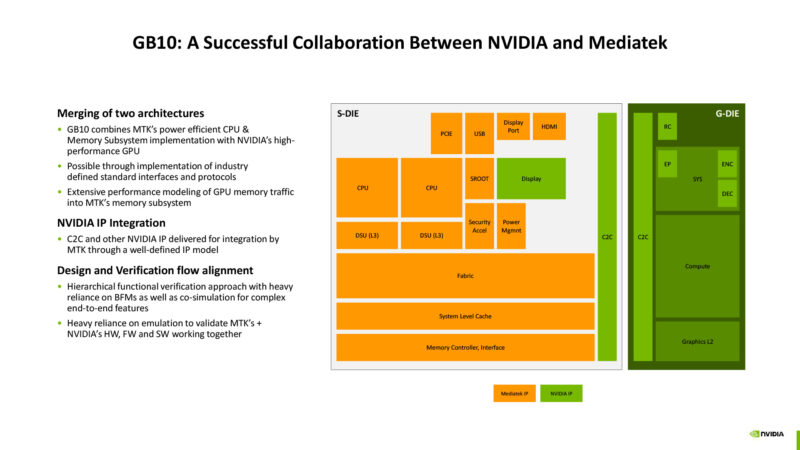
Here is a bit on the 140W TDP of the SoC (that is not system power) and how the GPU and Arm SoC are connected. If you want to learn more, you can see Ryan’s NVIDIA Outlines GB10 SoC Architecture at Hot Chips 2025.
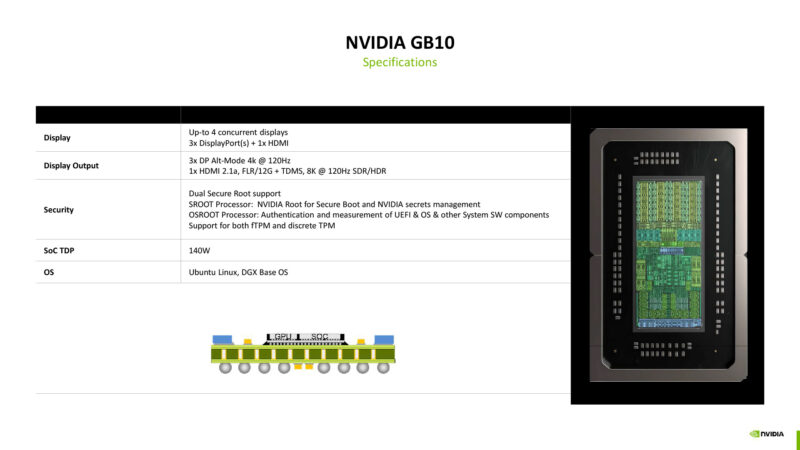
Here are the key specs including the TSMC 3nm process technology, and 2.5D packaging and more.
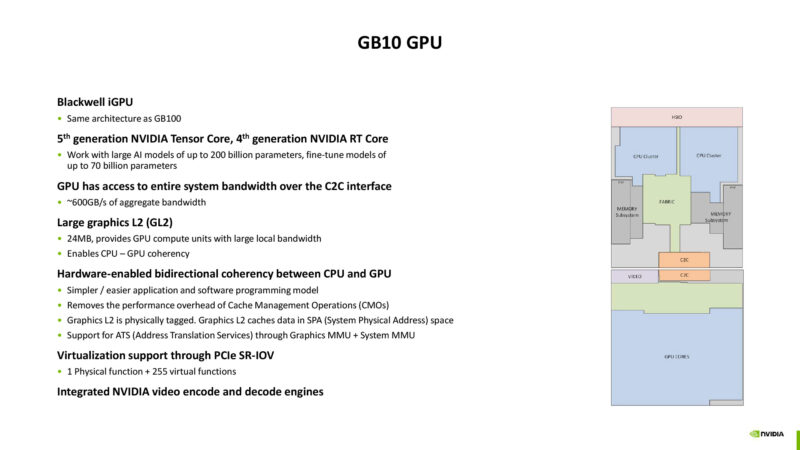
On the GPU side, we can see that the Blackwell GPU has 24MB of graphics L2 cache, and 600GB/s of aggregate bandwidth even though the LPDDR5X bandwidth is less than half of that.
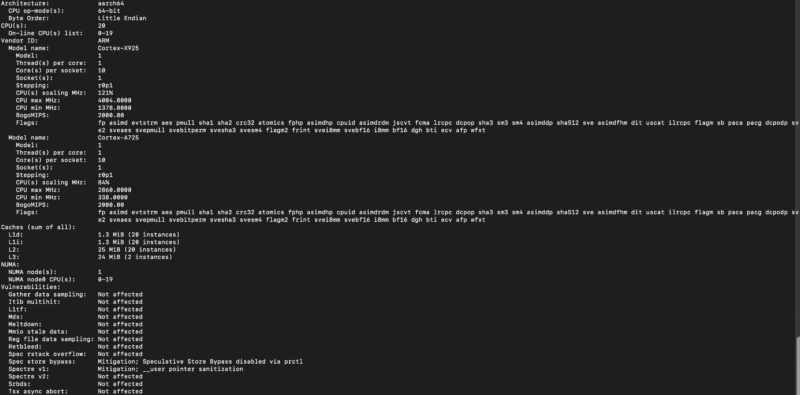
Here is a quick look at the 20-core Arm CPU’s lscpu output:
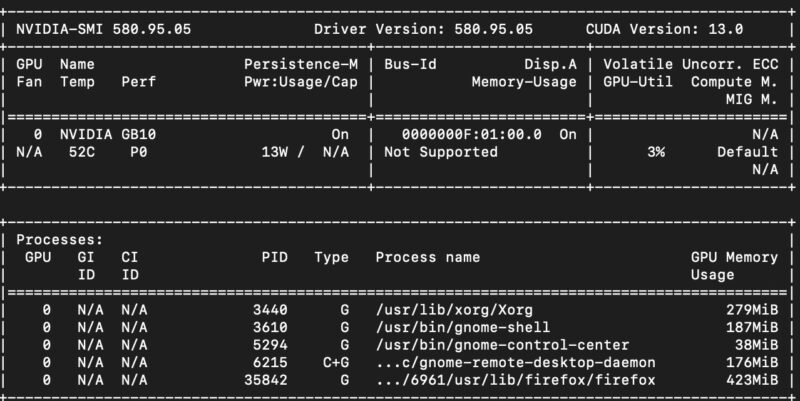
Here is the NVIDIA Blackwell GPU’s nvidia-smi output.
If you see the motherboard, something that should stick out is that the ConnectX-7 is not a small feature. This is roughly a NVIDIA ConnectX-7 OCP NIC 3.0 we reviewed as a 2-port 200GbE network adapter. Even on eBay used, ConnectX-7 NICs sell for $900+.
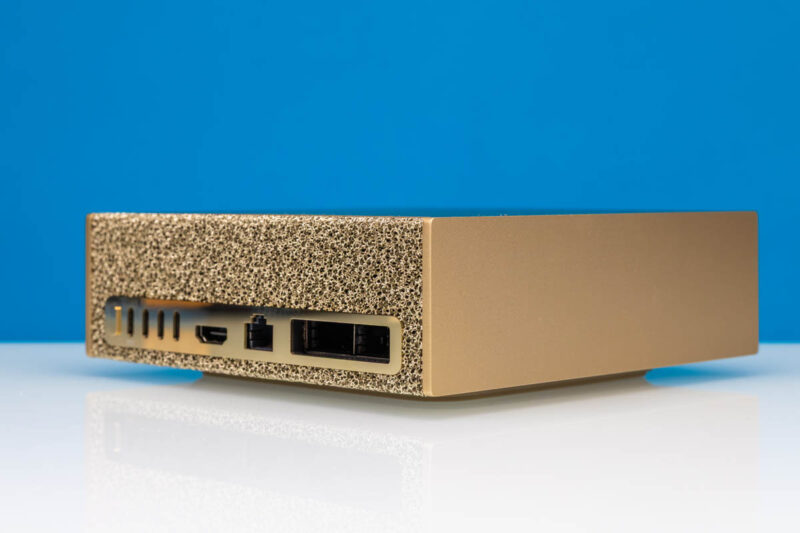
When folks talk about the cost of the GB10 systems, make no mistake, the ConnectX-7 is a large portion of the overall value proposition.

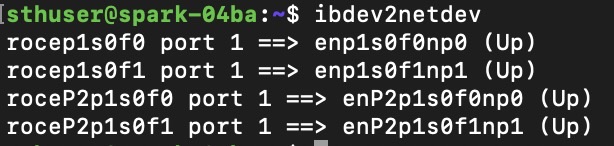
In the event that you were wondering if the NIC actually supports RDMA and RoCE, here you go:
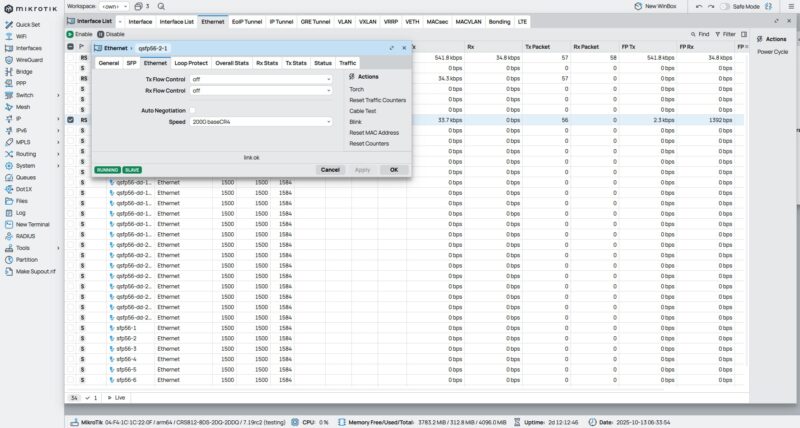
What may also make folks excited is that we can get the same output going over the MikroTik CRS812 DDQ / CRS812-8DS-2DQ-2DDQ. I told NVIDIA that I had a switch that could easily give six ports of 200GbE with eight ports of 50GbE left over. The QSFP56-DD ports split into 2x 200GbE ports and there are two QSFP56 ports here.
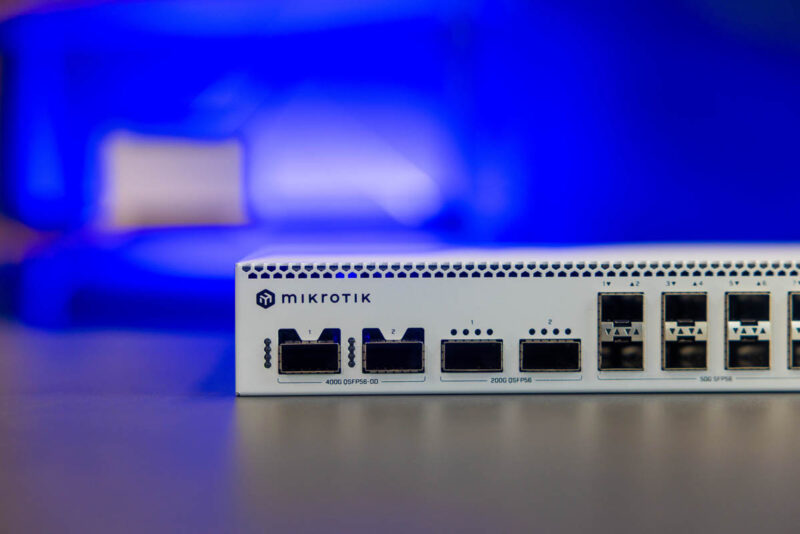
One small item we should note is that the direct attach method seems to auto negotiate 200GbE speeds. Going through this new MikroTik switch requires manually setting 200Gbps port speeds.
It seems likely that since these have high-end RDMA networking, folks are going to start clustering them.
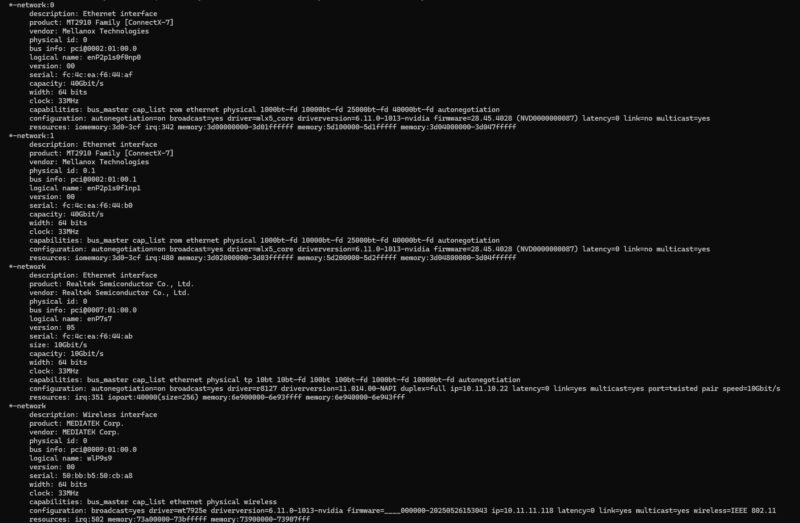
When we look at the ConnectX-7, however, we see that we only have a 32GT/s PCIe x4 link on the CX7 NICs.
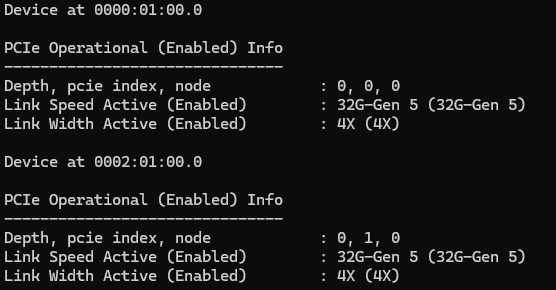
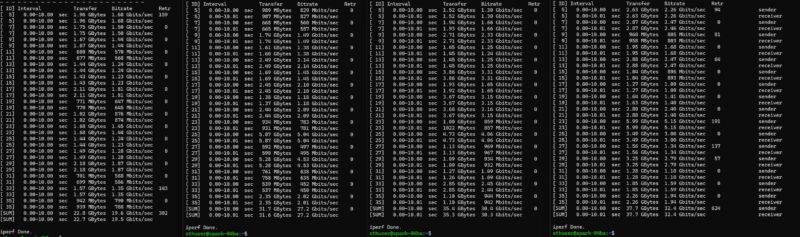
The PCIe Gen5 x4 is notable since a Gen5 x4 link is roughly a 100Gbps NIC. When we push simple iperf3 traffic across both ports, we get the same ~96Gbps of traffic that we get going over a single port when they are linked.
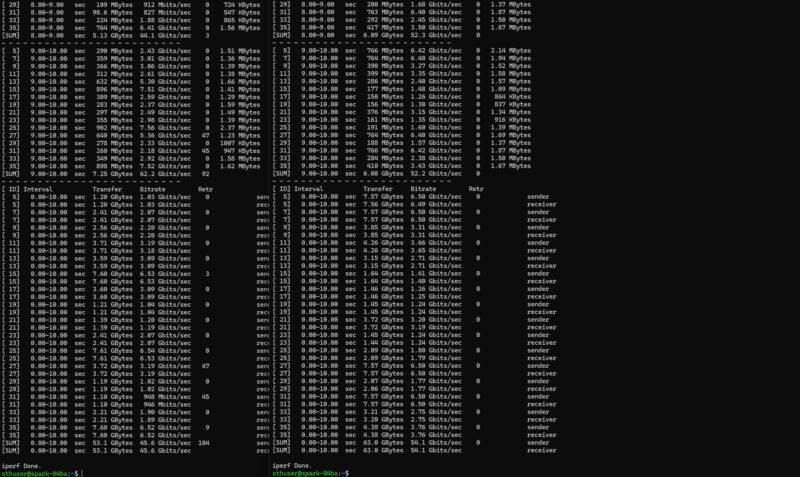
Since the ConnectX-7 shows up as four devices, we ran iperf3 binding the NICs to do four end-to-end tests, both using DACs and through the MikroTik CRS812 DDQ:
A quick also-note is that we have Realtek 10Gbase-T networking and Mediatek WiFi 7 as well. That WiFi 7 can be used for the initial setup as well.
Next, let us get to the topology.




It’s a flimsy mini-pc with a somewhat decent gpu, a lot of vram and 200GB networking which when you want local ai for development is pretty good. It’s a lot cheaper than buying an AI server
My old 2023 M2 Max runs gpt-oss-120b. You quote 14.5 toks/s. Not a serious benchmark, but I typed what LM studio thought was 104 tokens (told me 170 after) and I got 53.5 tok/sec back. Hmm … “Here’s a nickel kid, go and buy yourself a real computer!” I do appreciate your review though. Keep up the good work!
It is a nice system. Do you have any comparison against Strix Point Halo and other systems? Of course some systems are a little bit apples to oranges, but such data is helpful.
I get ~43 tokens/sec (293 prompt tok/s) with a fresh prompt on my Strix Halo computer with GPT-OSS-120B (MXFP4). Is that Spark running a different quantization or is there something else causing the bad performance (CUDA dropping features because it’s too recent, etc.)? On paper the Spark should have an edge because of the higher memory bandwidth.
@Jack, how are you able to run 120B on Strix halo. I thought Strix only had 32G memory.
@Paddy, how are you able to run 120b on M2 ? I dont think the RAM on M2 can hold that big model.
@Adam strix halo with the 128 GB shared memory, like the Framework Desktop and others. I believe they come in 32/64/128 GB RAM variants. There are different types, but I think the AMD AI Max+ 395 or whatever it’s called is the only interesting one.
I believe many of them have articles about them on this site.
The Strix Halo 128gb boxes are half the price. I understand Patrick’s enthusiasm about 200GbE networking but the “throw it in a suitcase for a demo” use case doesn’t make use of it. For clustering I would think you need network storage that can keep up, and I’m sure someone will do it and make a YT video of it for the novelty but I’m not sure the niche here over bigger server hardware is that wide.
So a lot of this value proposition seems to come down to if you really want CUDA or not, which admittedly already commands a considerable premium.
@Oarman:
“The Strix Halo 128gb boxes are half the price.” And a GMKTec NucBox can go for as little as $125. So what? This device beats Strix Halo by 3% in single core performance, 40% in multicore performance and – if the author’s NVIDIA GeForce RTX 5070 comparison is correct – at least 25% in graphics performance as the AMD Radeon 8060S in Strix Halo can’t even keep up with the GeForce RTX 4070 in most tasks. And of course, the networking performance is better.
Now it is up to you to decide whether substantially better CPU, graphics and networking performance is worth $2000. But it is more than just CUDA here. It isn’t as if you can buy 2 Corsair AI Workstation 300 boxes and hook them up to each other to get 100% – or even 25% – more performance.
@rano
If you look at the above, it only beat the power limited Strix Halo box in the CPU performance, it lost in the multi-core when the strix was provided with full power. In addition, the above says nothing about graphics performance, only noting that the INT4 performance was the equivalent of a 5070. The only notes above graphics was that it was flaky driving a standard HDMI monitor. As it is based on on Blackwell AI chips it may very well have a very nerfed graphics processor (they are, after all, not designed for graphics processing but instead AI testing).
The network is certainly superior and having CUDA is certainly nice but the gpt-oss performance is surprising poor.
@Ehren:
“it only beat the power limited Strix Halo box in the CPU performance”
Because it itself is power-limited. The DGX Spark is smaller than the GMKTeck Evo 2. Yes, there will soon be Strix Halo machines that aren’t limited by the mini-PC form factor but the same will be true for Nvidia GB10 devices down the line.
“the above says nothing about graphics performance, only noting that the INT4 performance was the equivalent of a 5070”
Except that is about graphics performance.
“it was flaky driving a standard HDMI monitor”
Because it is a preproduction pre-release model running Nvidia’s DGX version of Ubuntu.
“As it is based on on Blackwell AI chips it may very well have a very nerfed graphics processor (they are, after all, not designed for graphics processing but instead AI testing).”
There is no such thing as “Blackwell AI chips”. They are just Blackwell chips used for professional applications just like their previous Ada Lovelace and Grace chips. The Blackwell Pro 6000 advertises itself as a workstation or high end desktop GPU, not an “AI chip.” Of course, this is nowhere near as powerful as a Blackwell Pro 6000, but the AMD Radeon 8060S is even further from an AMD Radeon Pro workstation/server GPU. (That being said, AMD’s 2026 integrated GPU is going to be way better, almost certainly good enough to match this one.)
https://www.nvidia.com/en-us/products/workstations/professional-desktop-gpus/rtx-pro-6000/
Both AMD and Apple fans are coming out of the woodwork to try to cut this FIRST GENERATION PRODUCT down a peg when both have been releasing their own productivity small form factor devices for years (except the Mac Mini isn’t that small). Hilarious.
There are definitely not for AI developers as in people working on AI. They seem excellent at being small, easy to setup edge devices running private models in typical edge locations.
I doubt executives will buy these and put them in their C-suites when trying out local models. At half the price of an Blackwell Pro 6000 I also doubt that clustering them outside of said edge locations will be viable. And for the ambitious homelabber clustering won’t play a major role which means back to Strix Halo machines at half the price.
These will be neat to play with once they hit the secondhand market at reasonable prices (I would probably pay up to $500 for one of these). Investors and corps will be left holding the bag after buying into the ‘AI is a magic box that replaces human knowledge workers’ delusion.
The llama.cpp github suggests that the poor performance is due to powersave settings. I’m not sure if there’s a module parameter for that or if it requires code updates, but there seems to be a way to make the performance match the specs at least.
I reserved a Spark Duo early in the Reservation window, and was notified last week that I would soon receive an email letting me know when I could finalise my order; the expectation being that I would receive my product ahead of general release.
15 Oct came (and went) with no notification.
So, I decided to just grab one from MicroCenter (I can always get another down the line). Placed my order before Sunrise, and purchased it later this morning.
It’s still in the box, as I have other priorities to attend-to.
Anyone want a late, early release Reserve for a Duo (if I ever receive it, that is)?
does anyone know why they keep on mentioning only 200Gbps throughput total for what appears to be 2 qsfp112 ports which should be capable of 400Gbps total. One way to check is to look at the Lnksta and see if the pci design is limited to x8. If it shows 32GT/s and x16 for each port, there might be a better chance at doing 400Gbps with both ports connected. The IC itself could still be limiting or maybe just a fw limitation.
the docs state that the spark supports multi-rail for the cx7 nic ports. So you should at least be able to connect both ports in a load balancing cfg.
Nice network testing STH.
So, based on the recent network tests, it can only reach maximum throughput of 100Gbps across both QSFP ports? That is strange since Nvidia is claiming it’s 200GbE NIC.
> This is because unlike an AMD Strix Halo system, we have a unified memory system here so we do not have to do a 32GB CPU, 96GB GPU split. Instead, we have a big 128GB pool.
No! Strix Halo like all AMD APU are unified memory. The 32/96 split is only for windows 3D games. On Linux I have no problem to get >126G of RAM and use all of it on GPU with HIP.