

Lenovo ThinkPad P14s Gen 6 (Intel) Performance
Under the hood, the P14s G6 is driven by an Intel Core Ultra 7 265H processor, which is part of the Core Series 2 Arrow Lake-H family. This is Intel’s premier mobile-focused and mid-power silicon, offering 16 CPU cores in total along with Intel’s most powerful Arc 140T integrated graphics (Xe-LPG+ architecture) and a fair bit of PCIe lanes for additional expansion.
As a full-fat version of the Arrow Lake-H chip, the 265H gets access to all the hardware offered in Arrow Lake, with the six performance (P) cores topping out at 5.3GHz. Meanwhile, backing P cores for highly threaded workloads is a further eight efficiency (E) cores. And finally, two low-power-efficiency cores (LP-E), which are essentially always-on cores designed to handle light tasks so the other cores can sleep when not in use.
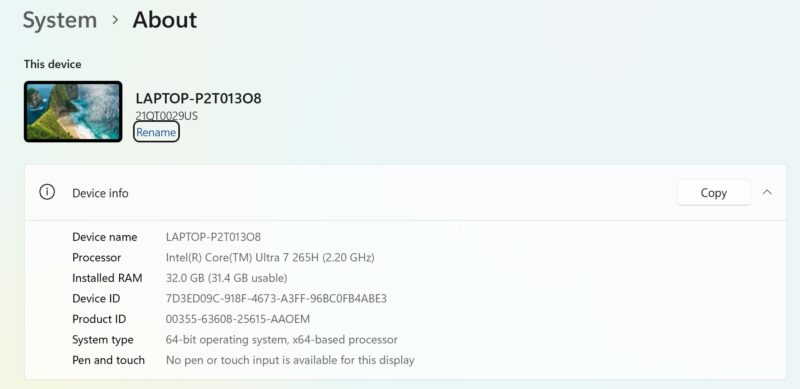
As noted earlier, the system only features a single 32GB SO-DIMM, so the Lenovo system is running with a memory bandwidth performance handicap right out of the gate.
This specific system configuration also features NVIDIA’s RTX PRO 500 Blackwell discrete graphics, which comes with its own 6GB of GDDR7 memory. This is NVIDIA’s entry-level RTX PRO Blackwell part for professional/workstation laptops, and is based on the GB207 GPU. By GPU standards, it is a pretty petite chip, but it has a significant feature advantage over the Intel Arc 140T, and an even bigger performance advantage thanks to its dedicated memory bandwidth and 14 SMs of GPU hardware.
Lenovo pitches the P14s G6 as an AI laptop, and having access to the performance of the RTX PRO 500 and NVIDIA’s CUDA ecosystem certainly contributes to that.
The two GPUs are set up in a hybrid configuration, so even when the RTX PRO 500 is fired up, the integrated GPU on the Core Ultra 7 265H is still driving any connected displays as well as handling desktop duties such as video decoding and framebuffer passing.
Geekbench 6
As we do not review too many laptops around STH, we have a rather limited number of systems to compare the P14S G6 against. Thankfully, a few months ago, we reviewed a SFF PC from Beelink using the same Arrow Lake-H silicon, the Beelink GTi15 Ultra. The Beelink system lacks a discrete GPU, but for a comparison of compute performance, it is not all that dissimilar from the P14s G6, all things considered.
Diving right in, the Lenovo system does start on the back foot in a couple of ways. Besides using a laptop chip inside a laptop (instead of inside a desktop, as is the case for the Beelink GTi15), the Lenovo system also ships with a slightly lower clocked 265H chip, versus Intel’s top-tier 285H.
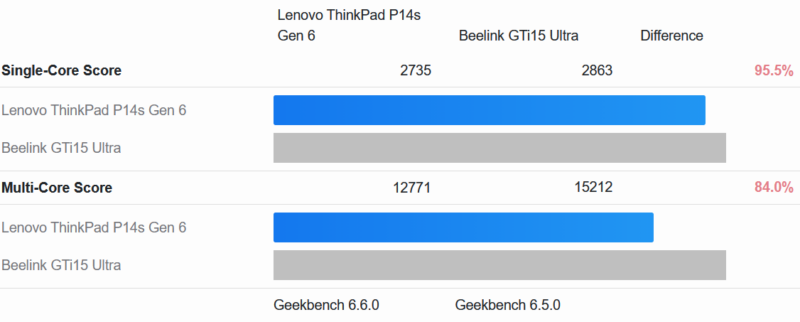
These clockspeed differences are largely why the Lenovo P14s G6 cannot quite keep up in single-threaded workloads. Meanwhile, in multi-threaded testing, the gap widens due to a combination of clock speed, power/thermal limitations, and the artificial lack of memory bandwidth on the Lenovo system.
Meanwhile, since this laptop also has two GPUs, let us see how the two of them compare.
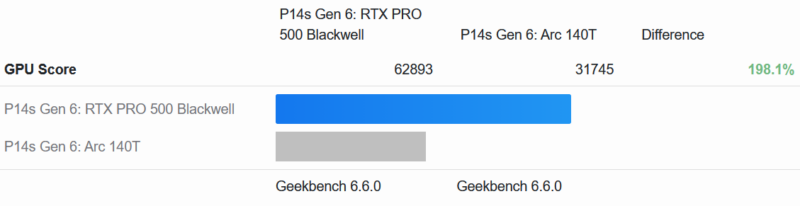
Under Geekbench 6’s GPU compute test, the RTX PRO 500 Blackwell delivers almost exactly twice the performance of the integrated Arc 140T. Again, the latter is running handicapped due to an artificial lack of memory bandwidth, so this is not an entirely fair comparison. But out of the box, as Lenovo configures the P14s G6, this is how you can expect it to perform. The discrete NVIDIA GPU is more than earning its keep here thanks to its much higher performance.
Geekbench’s AI test also paints a similar picture.
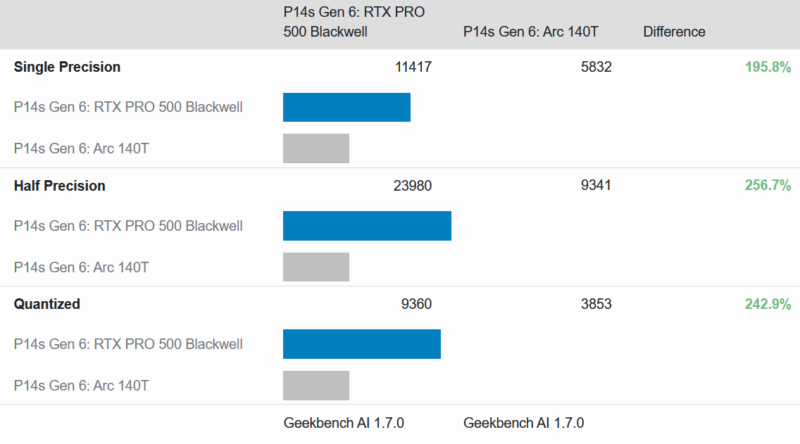
The RTX PRO 500 Blackwell GPU is well in the lead in all cases, and especially with half-precision math, where it has more than a two-fold advantage.




I ordered a month and a half ago on sale direct from Lenovo. Shipment was originally scheduled for 1-2 weeks. Last week I got an email asking if I wanted to cancel my order. I said no because the price was good and I’ve always wanted a laptop with that TrackPoint. I’ll be happy if it comes next month.
If it makes you feel any better Eric, I tried to cancel a PGX (GB10) order the morning after. The shipment was delayed several weeks, but they did not cancel it and it shipped anyway. Not ideal for sure.
I know you want to be fair to products and test them in the configuration as they arrive, but an empty sodimm slot was an advantage prior to the current dram crisis since it allowed the purchaser to use the factory RAM plus add additional ram at a lower cost than from the OEM or at a later time. Thinkpads with user-serviceable parts usually make it very approachable to install sodimms so you still win even if you value the installation time at $100/hr.
Now during the dram crisis, oem Ram prices may or may not be more competitive with aftermarket kits. Buyers should do their due diligence as usual.
The problem with new OLED displays on ThinkPads is that they are GLOSSY. I hate a glossy screen I had it once and if you don’t have ideal working conditions this behaves like a mirror.
Not all ThinkPads are equal anymore. There are the lower tier ones that use the same planars as the consumer oriented Yoga/IdeaPad. These are built to meet market pricing demands. There are the mid-tier ThinkPads which have the better keyboards and sell really well in the corporate world. Then there are the high end ones that come with more ports, the workstation series, with higher spec CPU’s.
I might add that Lenovo has an excellent enhanced warranty program. I paid for onsite service for all 3 price points and I got really good service. The parts were either shipped ahead or came with the tech. My tech was an IBM Services employee who had been with the firm for 22 years! A total pro as he did everything in the ticket on my dining room table.
The price of the TP did not vary the level of service, it was the same for all of them, and I still have them today. For $75 dollars for 3 years it was the best deal ever, especially when the lower tier models hit their 3rd year.
I have read the complaints on the higher end ThinkPads on Reddit where the RTX GPU failed 6-8 weeks after the standard warranty ended. They complained that Lenovo wouldn’t cut them any slack on their $2000 laptop. My thought is, why would you spend $2k on a laptop for personal use and not get an enhanced warranty when it only cost $75?. Seems like money well spent, especially in that last year.
Just my thoughts, others may have different experiences.
i have recently buy a p14s gen6 i7 32GB ram
can add 64×2 128GB ram
use wwan slot to add 2242 m.2 ssd