

Lenovo ThinkPad P14s Gen 6 (Intel) Internal Hardware Overview
Breaking into the P14s G6, as you would expect for a workstation-grade corporate laptop, Lenovo has used the space offered by the thicker laptop to offer some upgradability/repairability. It is not a ton, most users are not going to be doing much beyond swapping out the SSD or memory (and maybe a battery.) It is a step up from thin-and-light laptops, where everything is soldered down.
Removing several Phillips screws to unhook the bottom cover, we have a pretty typical full-size contemporary laptop.
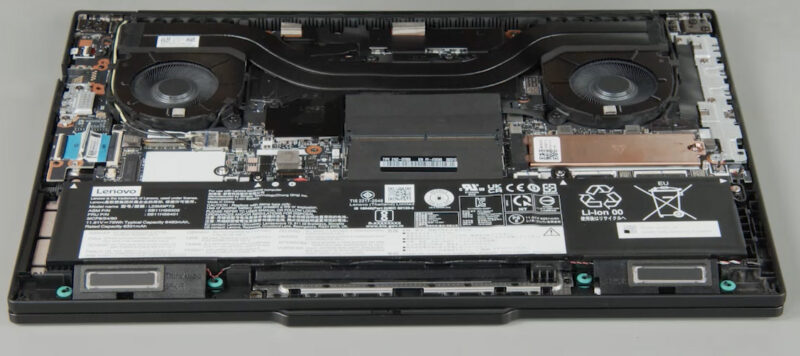
Lenovo designates the memory, SSD, and battery as all being customer-replaceable. All of which are held in with screws and clips.
Starting with the SSD, Lenovo has taken an interesting approach with the P14s G6 by shipping a PCIe Gen5 SSD in a laptop that only offers PCIe Gen4 connectivity to the M.2 slot itself. With Arrow Lake-H’s 8 lanes of PCIe Gen5 routed to the NVIDIA GPU, this leaves just Gen4 lanes for the SSD and other peripherals. It means a Gen5 SSD will be bottlenecked by way of limited PCIe bandwidth, but this allows Lenovo to ship the laptop with modern, higher-performing drives that will offer better performance across the board, even when their peak sequential transfer rates are limited by the PCIe bus.
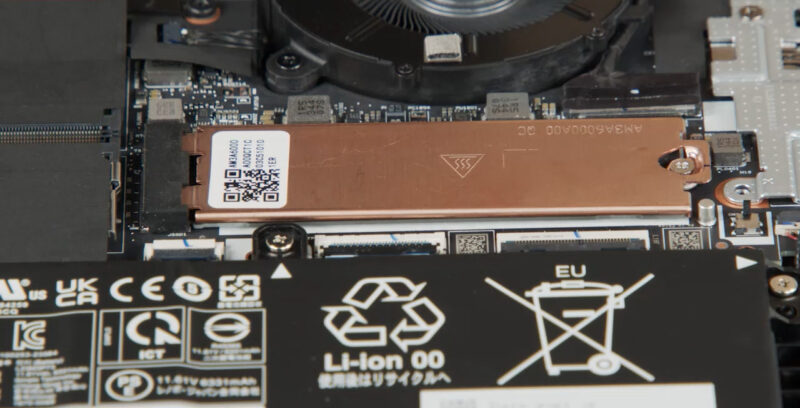
Lenovo includes a copper bracket/heatspreader over the SSD slot, so there is a fair bit of metal for heat soaking to help keep SSD performance up, even if the heatsink itself does not receive further cooling. Our review sample shipped with Lenovo’s “performance” SSD option, which in this case was a 1TB Samsung PM9E1 SSD – Samsung’s latest and greatest OEM drive. Lenovo does not guarantee a specific drive here, and their support documents list that the company also uses SK hynix’s PC801 SSD as their alternative performance SSD offering.
Moving on to system memory, Lenovo has opted to stick with tried-and-true SO-DIMM slots, which are buried underneath a pair of flaps at the center of the system. Being that this is a relatively high-end configuration of the P14s G6, Lenovo has included 32GB of DDR5-5600 memory.
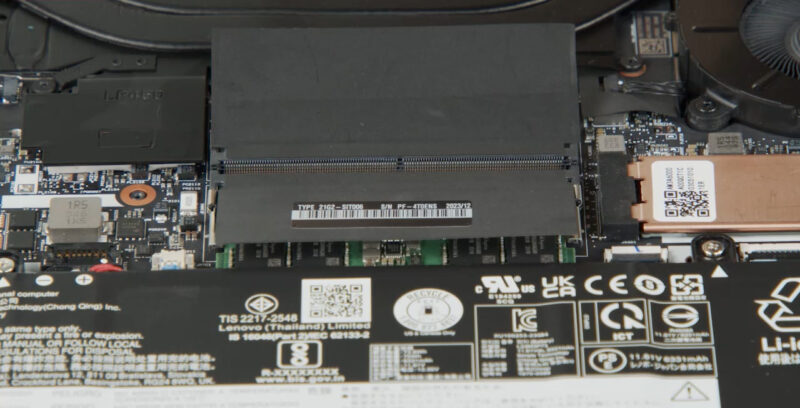
Unfortunately, Lenovo has yet again artificially handicapped the laptop by only including a single SO-DIMM. And at DDR5-5600, this is not even the fastest DIMM speed that the P14s G6 supports, as it can get up to DDR5-6400 speeds with CSO-DIMMs. So although the laptop has ample memory, it can only provide half as much memory bandwidth as Arrow Lake-H would like to be fed.
A mitigating factor here, at least, is that this configuration also comes with a discrete GPU, NVIDIA’s RTX PRO 500 Blackwell, so the system is not leaning on the integrated GPU for high-performance graphics. Still, it is an unfortunate and unnecessary handicap for the laptop when two 16GB SO-DIMMs could provide twice as much memory bandwidth at roughly the same cost.
Finally, a good chunk of the laptop’s internal space is taken up by the battery. Though screwed into the laptop very well, this is a removable part (assuming you can find one down the line).
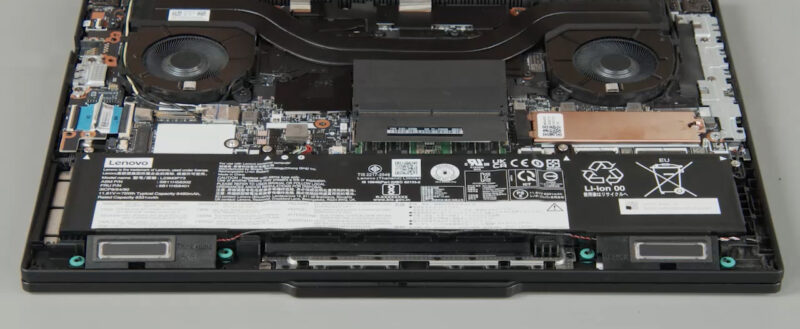
Lenovo offers two options here with the P14s G6: either a 3-cell 57Wh battery or a higher-capacity 75Wh battery. Our review sample came with the latter. Both batteries offer rapid charging and can be charged from empty to 80% in just an hour. With the inclusion of a discrete GPU, the higher capacity of the battery comes in handy, to say the least.
On a final note, Lenovo did opt to save some space with this laptop by using the BGA version of Intel’s BE201 Wi-Fi 7 + Bluetooth 5.4 adapter. So while it is visible within the laptop, you will not be replacing the soldered-down controller.
Now, let us go ahead and see what the full performance of the laptop is like.




I ordered a month and a half ago on sale direct from Lenovo. Shipment was originally scheduled for 1-2 weeks. Last week I got an email asking if I wanted to cancel my order. I said no because the price was good and I’ve always wanted a laptop with that TrackPoint. I’ll be happy if it comes next month.
If it makes you feel any better Eric, I tried to cancel a PGX (GB10) order the morning after. The shipment was delayed several weeks, but they did not cancel it and it shipped anyway. Not ideal for sure.
I know you want to be fair to products and test them in the configuration as they arrive, but an empty sodimm slot was an advantage prior to the current dram crisis since it allowed the purchaser to use the factory RAM plus add additional ram at a lower cost than from the OEM or at a later time. Thinkpads with user-serviceable parts usually make it very approachable to install sodimms so you still win even if you value the installation time at $100/hr.
Now during the dram crisis, oem Ram prices may or may not be more competitive with aftermarket kits. Buyers should do their due diligence as usual.
The problem with new OLED displays on ThinkPads is that they are GLOSSY. I hate a glossy screen I had it once and if you don’t have ideal working conditions this behaves like a mirror.
Not all ThinkPads are equal anymore. There are the lower tier ones that use the same planars as the consumer oriented Yoga/IdeaPad. These are built to meet market pricing demands. There are the mid-tier ThinkPads which have the better keyboards and sell really well in the corporate world. Then there are the high end ones that come with more ports, the workstation series, with higher spec CPU’s.
I might add that Lenovo has an excellent enhanced warranty program. I paid for onsite service for all 3 price points and I got really good service. The parts were either shipped ahead or came with the tech. My tech was an IBM Services employee who had been with the firm for 22 years! A total pro as he did everything in the ticket on my dining room table.
The price of the TP did not vary the level of service, it was the same for all of them, and I still have them today. For $75 dollars for 3 years it was the best deal ever, especially when the lower tier models hit their 3rd year.
I have read the complaints on the higher end ThinkPads on Reddit where the RTX GPU failed 6-8 weeks after the standard warranty ended. They complained that Lenovo wouldn’t cut them any slack on their $2000 laptop. My thought is, why would you spend $2k on a laptop for personal use and not get an enhanced warranty when it only cost $75?. Seems like money well spent, especially in that last year.
Just my thoughts, others may have different experiences.
i have recently buy a p14s gen6 i7 32GB ram
can add 64×2 128GB ram
use wwan slot to add 2242 m.2 ssd