

Dell Pro 5 14 (Intel) Laptop Performance
Under the hood, our Dell Pro 5 14 Intel review sample is powered by an Intel Core Ultra X7 368H processor, part of the Core Series 3 Panther Lake family. This is Intel’s premier mobile-focused, mid-power silicon, offering 16 CPU cores in total, Intel’s most powerful Arc B390 integrated graphics (Xe3 architecture), and a modest number of PCIe lanes for additional expansion.
As a full-fat version of the Panther Lake 12Xe chip, the 368H has access to all the hardware offered by Panther Lake, with the four performance (P) cores topping out at 5.0 GHz. Meanwhile, backing P cores for highly threaded workloads is a further eight efficiency (E) cores. And finally, four low-power-efficiency cores (LP-E), which are essentially always-on cores designed to handle light tasks so the other cores can sleep when not in use.
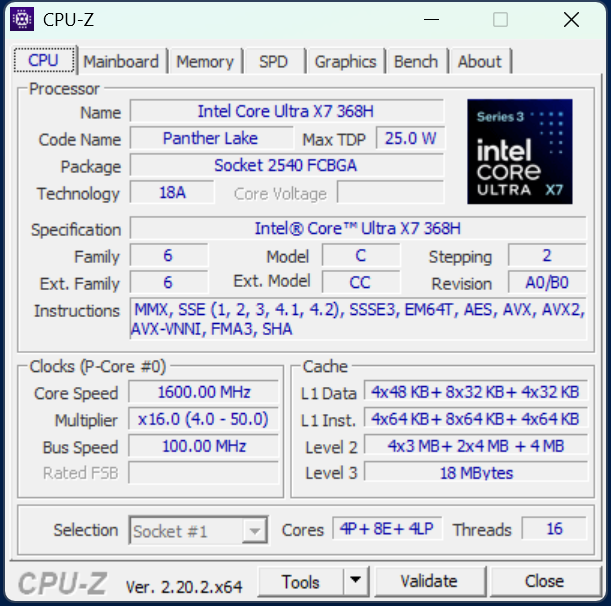
Being a full-fat chip also means the 368H gains access to Intel’s most powerful integrated GPU, the Arc B390. This is a full 12 Xe core configuration of the company’s new Xe3 GPU architecture, and its high performance is one of the primary selling points for Panther Lake, offering massive gains over its predecessor’s top configuration, and making it competitive with entry-level laptop-grade discrete GPUs.
All told, Dell offers quite a wide range of CPU options for this laptop. The Core Ultra X7 368H is the top CPU configuration, while the lower-end configurations extend down to Intel’s lighter-weight Core Series 3 (Wildcat Lake) processors, including the barebones, entry-level Core 3 304 – a part with just 1 P core. So, to say that the Dell Pro 5 14 Intel line offers a wide range of performance options would be an understatement.
In any case, laptop models that come with an H-series Core Ultra 3 processor (Intel’s higher-performance SKUs) will be paired with LPCAMM2-form-factor LPDDR5X memory. Otherwise, all Core 3 and non-H Core Ultra 3 processors come with DDR5 SO-DIMMs.
Geekbench 6
For our look at system performance, we will compare the Dell Pro 5 14 Intel to a similar Dell system we are also preparing for review: the Dell Pro 5 16 AMD. Both systems are aimed at the same mainstream business segment of the market, but are based on Intel and AMD’s latest platforms, respectively. This will give us a chance to see how the two of them compare in a close-to-apples-to-apples setup.
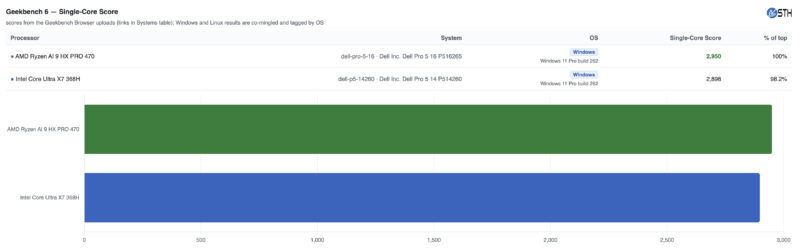
First up, we have Geekbench 6’s single-core test, where the two Dell systems are within a stone’s throw of each other. At a score of around 2900, the Dell Pro 5 14 (Intel) is right about where we expected it to land based on the other Core Ultra 3 systems we have reviewed. It just is not quite enough to outrun the Ryzen AI HX PRO 470.
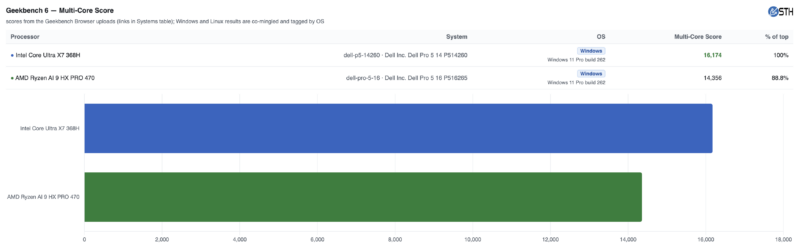
Meanwhile, the multi-core score finds the Intel-based system easily in the lead. 16 CPU cores here is quite advantageous, especially with all the work Intel put into their Darkmont E core architecture. It is a rather good showing for the laptop and the Core Ultra X7 368H chip overall, as this is the highest multi-core score we have seen yet for a Panther Lake laptop.
Geekbench 7
We are also phasing in Geekbench 7 into our testing suite, following the launch of the benchmark’s latest version last month. Consequently, this is the first time we have run GB7 on a Panther Lake CPU.
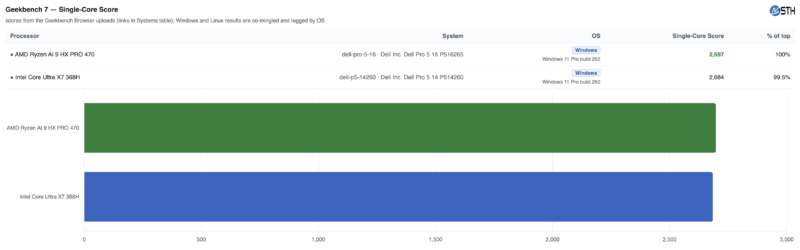
One of the more fascinating (and unexpected) aspects of Geekbench 7 is that the score has gone up from generation to generation. Not that the scores are meant to be comparable in the first place, but it does throw one for a loop the first time they see it.
In any case, the two Dell systems are even closer under Geekbench 7 than they were 6. The 0.5% difference is well within the run-to-run score variation of the benchmark, leaving the two systems virtually tied here.
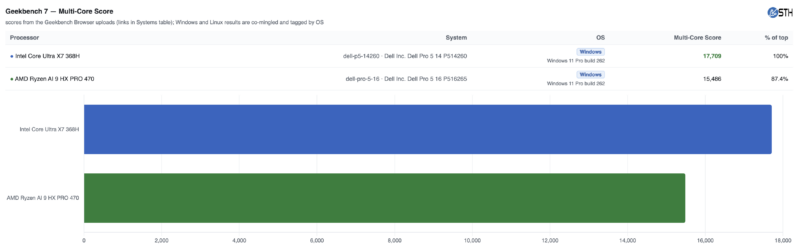
Meanwhile, with the multi-core score, we are once again back to the Dell Pro 5 14 Intel system being solidly in the lead. In fact, it is a slightly wider lead than Geekbench 6 multi-core, reflecting the slight gains we saw in the single-core scores.
MLPerf 1.6.1
We also ran MLPerf Client v1.6.1 on the system, giving us a look at the full spectrum of GPU and NPU performance.
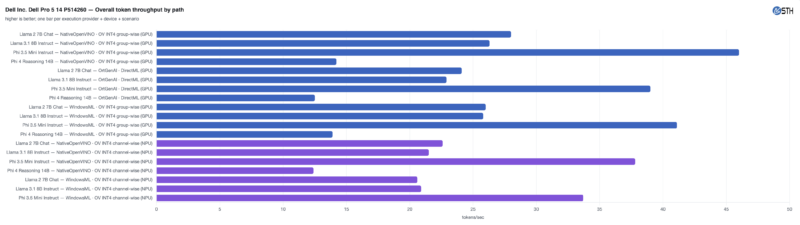
The Arc B390 iGPU fares well here, given the circumstances. While even Intel’s best iGPU is not going to put up the same kind of numbers as a discrete GPU, it is no slouch either, providing more than 45 tokens per second with Phi 3.5. Even Phi 4 is decent at 14 tokens per second, which is about as fast as most people read.
Comparing the different APIs underscores the benefit of using Intel’s OpenVINO stack, though. WindowsML is not significantly slower, but it does trail OpenVINO’s performance across all workloads.
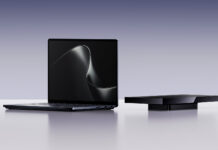



LPCAMM2 is cool, but finding upgrades is impossible right now.
Even Dell runs out of them. Had trouble getting 32GB LPCAMM2 in a pre-built Pro Max recently.