

Cisco Catalyst C1300-16XTS Performance
For this, we are using a Keysight XGS2 chassis with the NOVUS10/1GE16DP card. We are using an RFC2544 Quick Test for throughput with a few changes. For example, we increased the per-iteration run time to 30 seconds and started at 10% of the full line rate, searching for frame loss up to 100% of the line rate. We also test the RFC2544 64, 128, 256, 512, 1024, 1280, and 1518 byte frame sizes, and then add the standard IMIX, the Cisco IMIX, and an IPSec IMIX, which introduces mixed frame sizes into the testing. Let us start with 64B frame sizes.
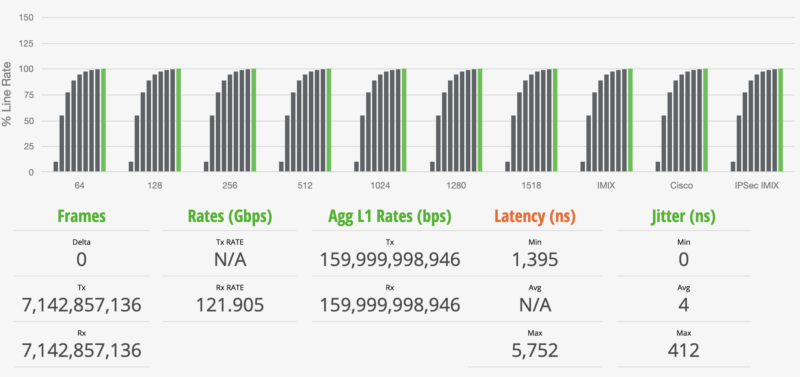
The above may seem strange to some, so let us start with some of the key numbers. First, we observed no frame loss. We see almost 122Gbps of throughput, but at L1 it is almost 160Gbps. The delta is the overhead for the link, including headers and such. Still, we are showing line rate 14 ports of 10GbE even at 64B frame sizes.
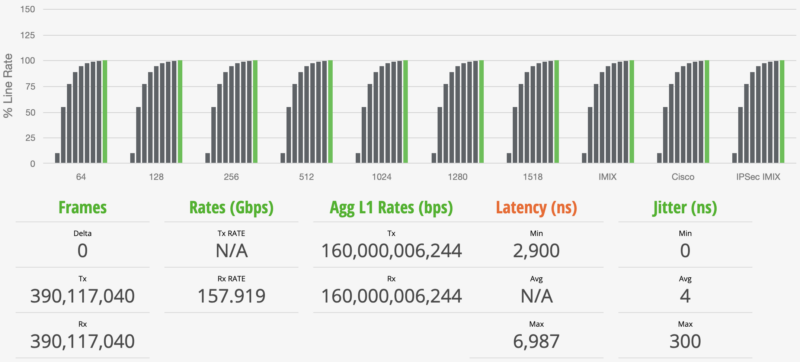
Moving up to the 1518B frame sizes, these are in many ways much easier on hardware, and we can see almost 158Gbps while the L1 rate is at 160Gbps. Again, bigger packets mean less relative overhead traffic in the pipe. If you saw the two SFP+ ports and wanted to confirm they were not sharing bandwidth or something strange in this design, here is the test that clearly shows they are their own ports. Since we were not entirely sure what to expect, we tested this across two of the Keysight Novus line cards with the 10Gbase-T ports on the 16-port dual PHY card, and the two SFP+ ports on the 8x QSFP28 card, then set the traffic to go across all ports. Even in that configuration, we did not see any oddities in the SFP+ port performance, which was great to see.
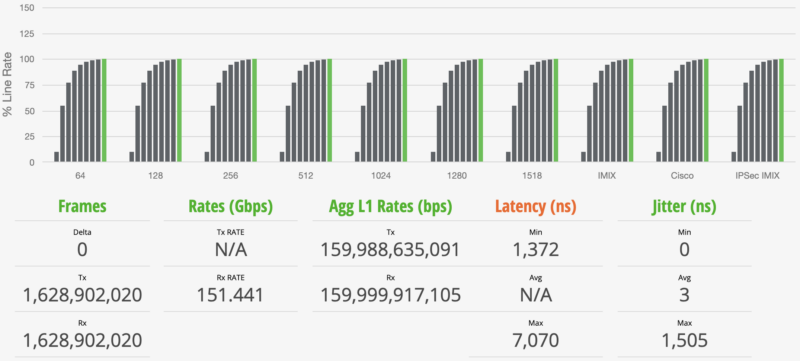
We add various IMIX tests, including the standard IMIX and Cisco IMIX profiles from Keysight. This sends different-sized packets through the switch.
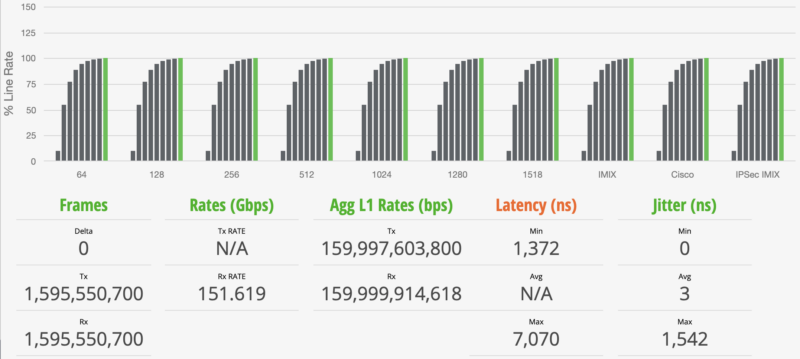
Generally, we see jitter increase on the IMIX results, and it certainly does here. On the latency side, you can see that these follow with minimum latencies that are closer to our 64B minimum latencies and maximum latencies that are closer to our 1518B result maximums since this test is generating a mix of packets.
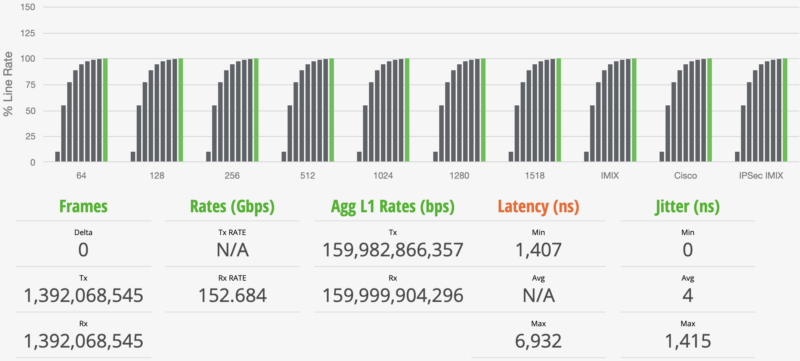
One item to note is that the green bar is all the way to the right on these charts on the ninth test iteration. That means that all ten test profiles hit 100% line rate during testing. Our gear and test methodology look for any frame loss during the testing, and we did not see any here.
Cisco Catalyst C1300-16XTS Power Consumption and Noise
Power consumption and noise are practical concerns for a 16-port 10GbE switch. Copper 10GbE ports can add meaningful power draw, and fan noise can determine whether a switch belongs on a desk, in a lab, or in an equipment closet. This is quiet, but not silent at around 45dba at 1m. We tested the switch in several common states to get a feel for the power behavior.
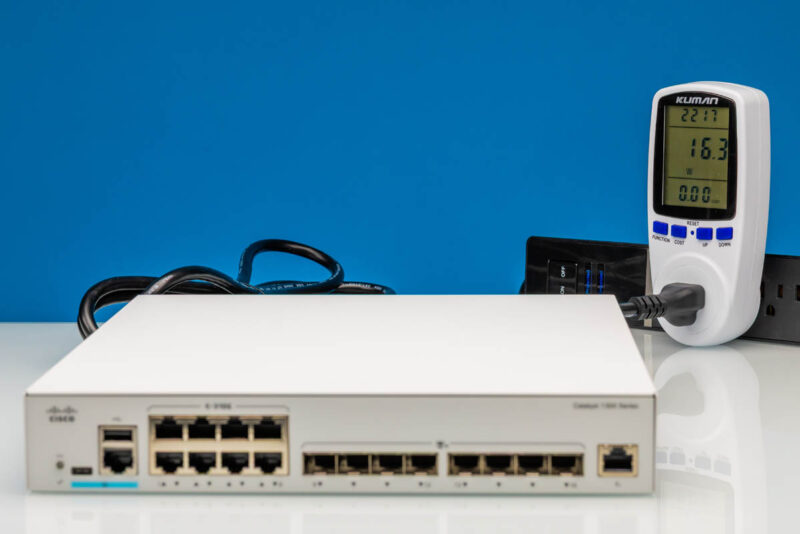
At idle, the switch gives us a 16.3W baseline.
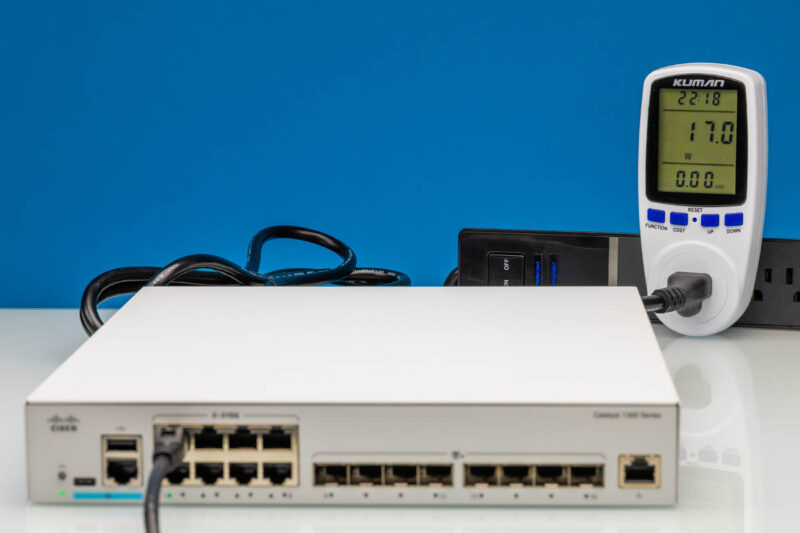
With RJ45 10GbE active, power consumption increases by only 0.7W, which is great. Usually, 10Gbase-T ports linking in switches we test add more incremental power draw.
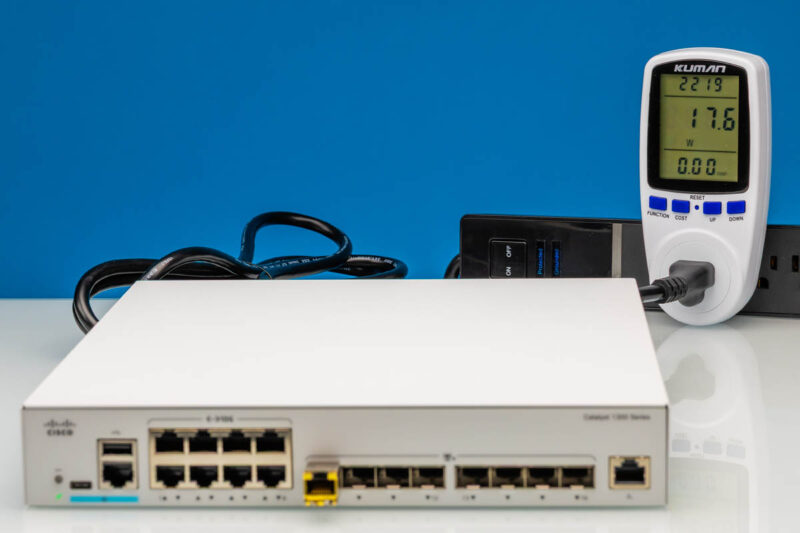
Using the SFP+ ports changes the power profile. SFP+ is often attractive for uplinks, not just because of cabling distance and module options, but also because it can be more efficient than copper 10GbE, depending on the transceivers being used.
Final Words
Overall, the Cisco Catalyst C1300-16XTS is not trying to be the cheapest way to get a pile of 10GbE ports. Its value is the combination of 10Gbase-T density, SFP+ uplinks, Cisco management, and a more polished small-business switching experience. That makes it a different purchase decision than the inexpensive, unmanaged, and web-managed switches we often review. As an example, the QNAP QSW-M3216R-8S8T 16-port 10GbE Managed Switch has a similar port configuration and is also a Marvell-based switch, but the Cisco hardware and management are a step above. Make no mistake, you pay a premium for it, but to many, that will be well worth it.
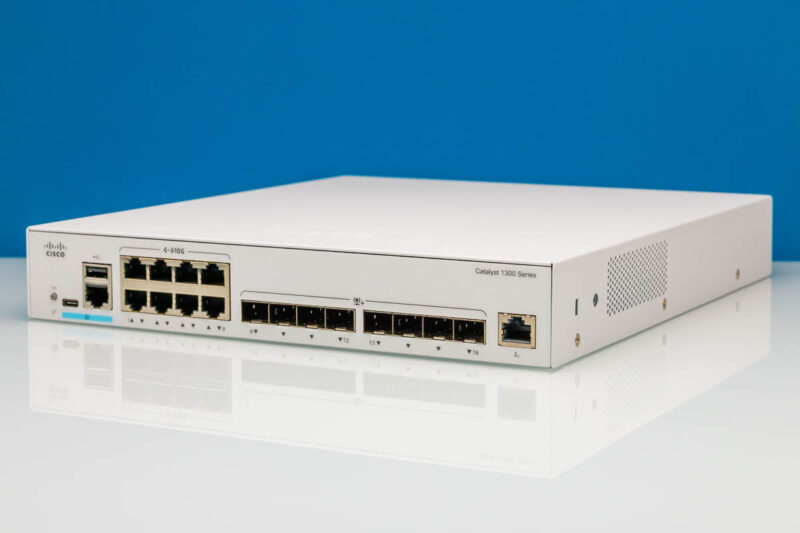
For buyers who only need basic 10GbE connectivity, cheaper switches will be hard to ignore. For buyers who want Cisco management features, clearer support paths, and a switch that fits better into a managed network, the C1300-16XTS makes more sense. This is one we are deploying into our lab because it has worked well for us over the past few months.
Where to Buy
Here is an Amazon affiliate link to the switch we purchased. You can get a refurbished version at this Amazon affiliate link.

Any chance we could get a confirmation on the 10G-BaseT Copper ports supporting 2.5g/5g? Also I didn’t see any noise numbers in the review?
Cheap?! The switch is over 2k new…FYI you never mentioned the price or the noise levels.
@Switch Gears: Where in the article did they say it was cheap? They kept talking about how expensive it is. The price was in the Amazon link in the second paragraph.
Finally a company who designed a switch for the future.
we all are evolving from UTP to SFP+, but still the need POE , which is missing on the UTP ports.
So we still have to split the between a SFP+ and a separate UTP POE+ switch to cover all your needs. also price wise
Why is it sooo difficult to make a switch covering all needs in ONE.
SFP+ plus Min 8 UTP POE(+) Ports for $500
Cisco, a POE version of this, please. Please please olease
If you change the drop down in the gui from basic to advanced you’ll get to see more configuration options.
This is supposed to have (some) L3 functionality. Can you not test that, routing etc?