

Ryzen 9 9950X3D2 Test Configuration
For our review of the Ryzen 9 9950X3D2, AMD sent over a complete testing kit with a motherboard, the 9950X3D2 CPU, cooler, memory, and SSD.
- Motherboard: ASUS X870E ROG Crosshair Hero
- Memory: 2x G.SKILL Trident Z5 16GB DDR5-6000 EXPO UDIMMs
- OS SSD: Samsung 9100 PRO 1TB
- OS Environments: Windows 11 25H2, Ubuntu 26.04
- Cooling: NZXT Kraken360 360mm AIO
Notably, AMD has supplied a DDR5-6000 kit with EXPO memory timings, which we have configured accordingly. For better or worse, because the 9950X3D is using the same IOD as every AM5 processor thus far – going back to the Ryzen 7000 series in 2022 – it has the same memory options and clockspeed ranges as the rest of those processors. DDR5-6000, in turn, is the sweet spot here, as it allows for the memory to run at 1:1 with the memory controller’s clock speed.
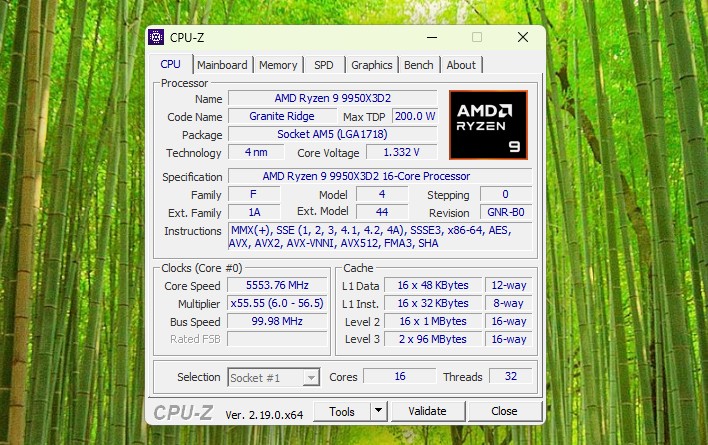
Officially, the chip does not require a specific cooler and can be used with any AM5 cooler. With that said, with the 9950X3D2 setting a new high-water mark for power consumption of an AM5 CPU, a powerful cooler is highly recommended.
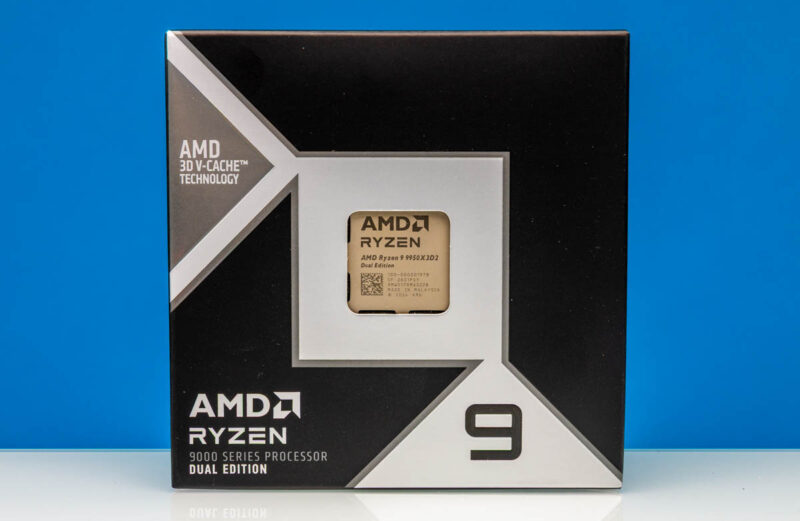
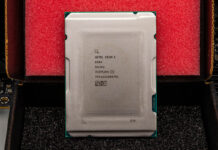
Otherwise, while the 9950X3D2 chip itself looks fairly unremarkable, AMD is shipping it in a unique silver box, instead of AMD’s typical orange-and-black packaging.
Ryzen 9 9950X3D2 Performance
Before we jump into our own results, here is AMD’s official summary slide for the performance of the 9950X3D2.
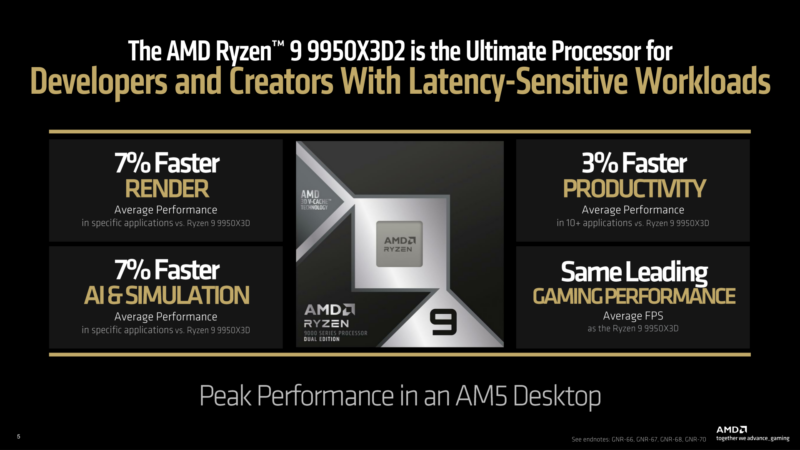
The long and short of matters is that AMD is only touting very modest gains: a 7% average improvement in rendering in specific applications, and a 3% gain in average productivity performance. While the additional cache does bring some benefits, it will not be the same kind of performance uplift as the original X3D parts, and AMD is setting expectations accordingly.
With that out of the way, for our testing, we have a bit of a smorgasbord of different chips. STH does not have an exhaustive collection of desktop CPUs tested with the legacy methodology, as we are swapping to the new benchmark suite with Ubuntu 26.04 LTS later this week. In particular, we do not have any of Intel’s Core Ultra 200 series desktop chips, so this will not be a comprehensive comparison to Intel’s wares. We do have a decent collection of AMD’s desktop chips, however, including the original 9950X, 9950X3D, and now the 9950X3D2. So we can directly see how performance has evolved for AMD’s top chip with the addition of one, and now two, stacks of L3 V-cache.
Linux Kernel Compile Benchmark
First up, we have a fairly standard Linux kernel compilation benchmark.
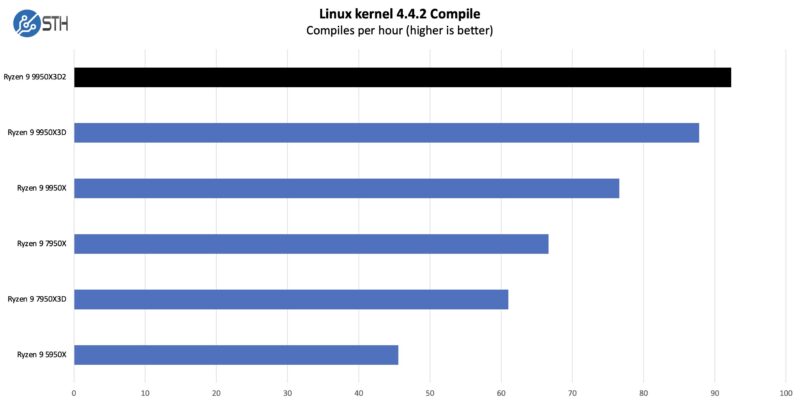
Code compilation is one of those tasks that is reasonably parallel (at least until linking), which means that it has room to scale without creating too much cross-CCD traffic. The end result is that the 9950X3D manages to improve upon the X3D chip by a few percent – and it a few percent over the original 9950X – going to show some of the productivity gains afforded by the additional cache and power.
7-Zip Compression Benchmark
On the compression side, we wanted to see how the new chip would fare compared to some other options.
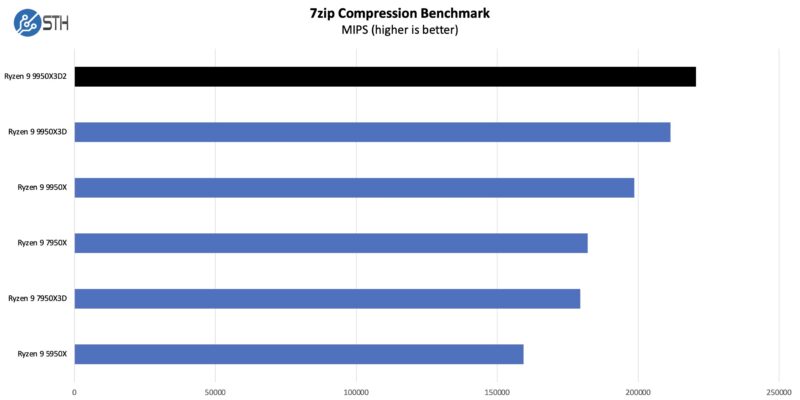
It is a very similar story to our 7-Zip compression benchmark. The extra cache does not make a massive degree of difference, but it does help enough to not just offset the small drop in peak clock speeds, but push the 9950X3D2 ahead of the X3D by a few percent.
In some respects, this is a more remarkable performance improvement because this benchmark as a whole has only modestly improved from Zen architecture IPC gains. This goes to show the importance of data flow to processor performance and why adding cache can sometimes be the most effective way to improve performance.
OpenSSL Benchmarks
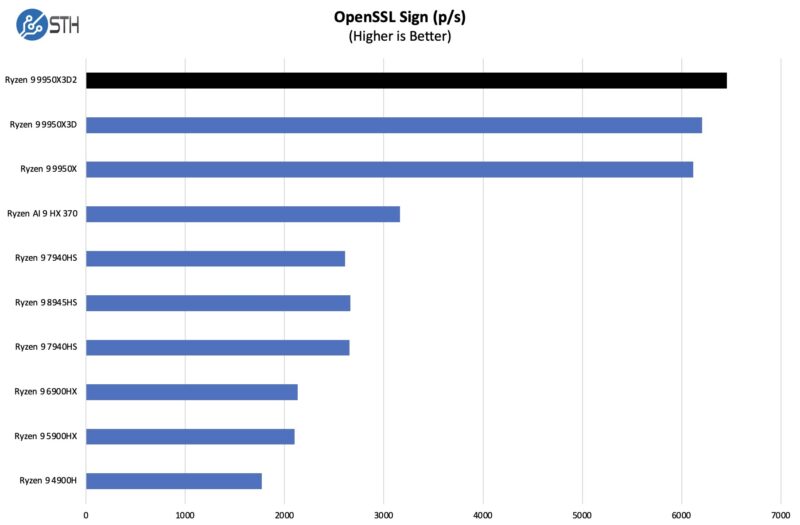
We are going to put the OpenSSL numbers up with many of the lower-end systems we test just to give some sense of scale.
Here are the verify results:
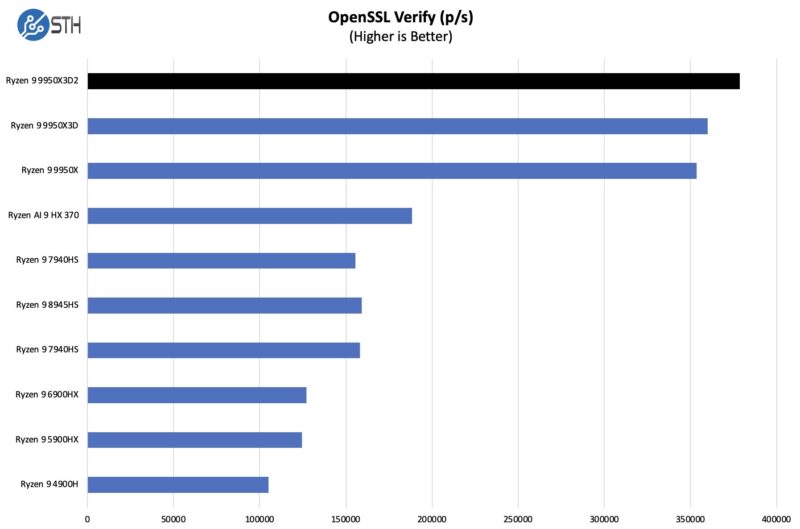
The extra cache and power do help the 9950X3D2 push ahead in both signing and verifying. Though neither to a significant degree.
Cinebench 2024
Cinebench drag racing has long been a pastime for putting a new CPU through its paces, and the 9950X3D2 does not disappoint.
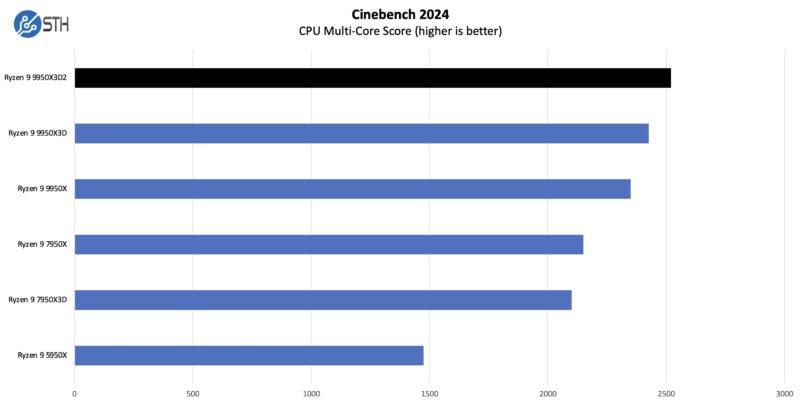
Overall, we got a bit better performance again than we did with the single part. That is always good to see.
Geekbench 5 and 6 Results
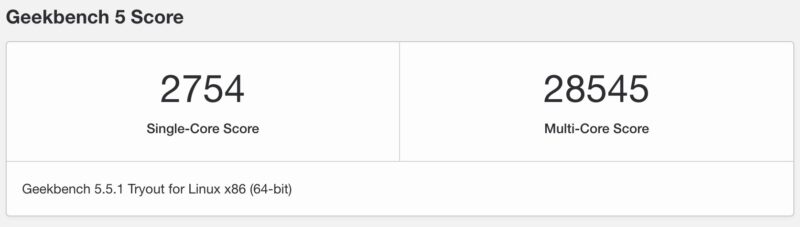
Just so you can easily compare this to your own system, we have a number of Geekbench 5 and 6 results. First the Geekbench 5 results:
Here are the Geekbench 6 Results:
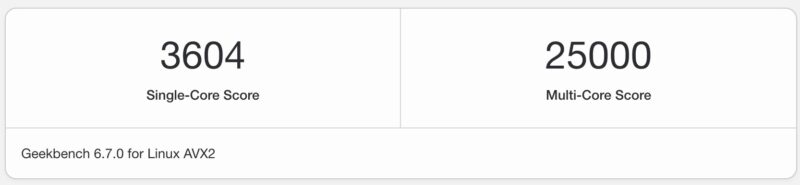
Again, this is a nice upgrade from the AMD Ryzen 9 9950X3D that we tested previously.
AgentSTH V6 Results Preview
Something we discussed is a new Agentic AI benchmark focused on how well CPUs perform on the agent part of workloads, rather than the LLM part, which often runs on GPUs. It turns out that Agentic AI CPU workloads often mirror much of what we see in more traditional workloads, so as we have been overhauling our suite, we wanted to modernize as well.
For those who do not want to see AI, tasks like compression are still very relevant to general-purpose computing use. What we did, however, was to profile a number of different Agentic AI workloads to get a mix for the composite score.
Also, and this is important, we are splitting up tasks. On modern CPUs with hundreds of cores, having a single task on a single core constantly stalling over 100 cores is not ideal. Realistically, today’s CPUs run containers, sandboxes, and virtual machines to use a single server to service multiple workloads simultaneously. So, we are moving to an era where we will look at a number of different CPU splits to see how it handles those simultaneous workloads and how they scale. That means we are not running a suite of benchmarks across a CPU once. Instead, we are now running different workload configurations on the CPU, for example.
Also, we are going to land the public benchmark on Ubuntu 26.04 LTS since we have found a few instances where Linux 7.0 makes a notable difference, and we are days away from the new OS release. Instead of an incremental upgrade for STH, this is a complete overhaul, modernized and written in Rust, and targeted at a modern LTS release.
Staring out, 1 Agent is running one instance of the suite across the entire socket, whereas 2 and 4 Agents are views of splitting the task up to multiple simultaneous agents running. We have a lot more split data on these, but this is just a high-level view of the difference.
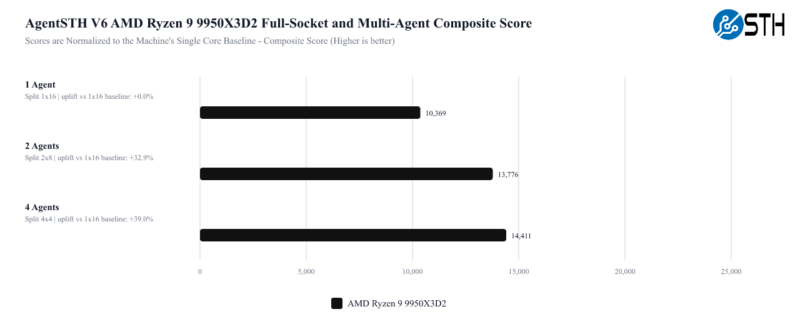
These results are all normalized to running the benchmark on a single core of that machine. The reason the 4 Agents look much better than the 1 Agent is because of the issue of stalling an entire chip for a single core waiting to finish. The key lesson here is that running a single workload across even a 12 or 16-core CPU is relatively less efficient these days. Easier said, the total performance of the chips increases as multiple agents are run instead of just a single agent.
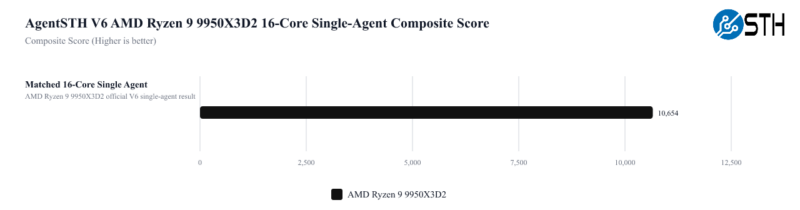
One other one we wanted to look at is the performance of the chips at different core counts and a single agent. We have 16 cores here and a composite score for the CPU across all subtests. We are using those 16 cores just as a standard here to make it easier to compare.
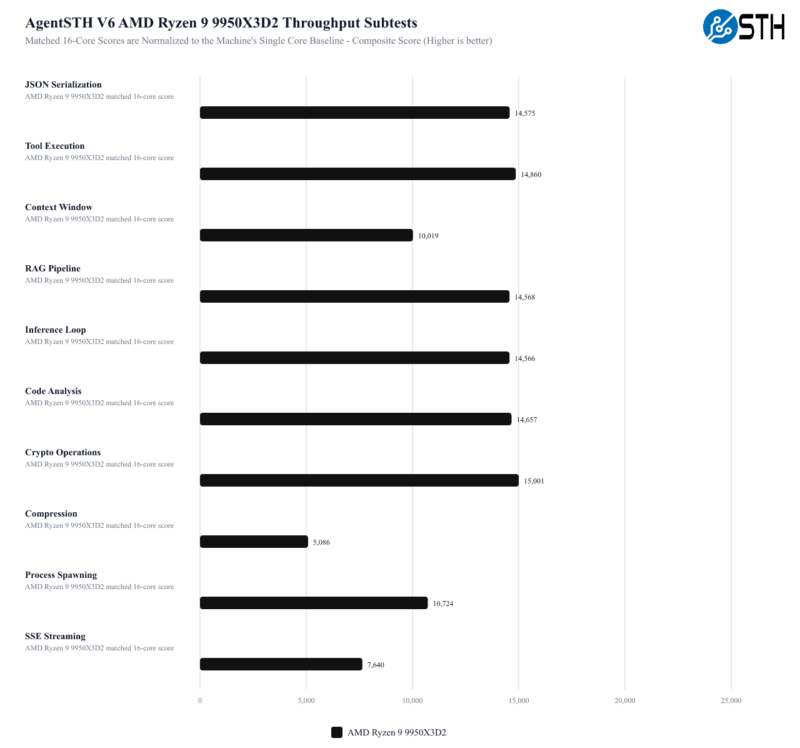
Along with total throughput, we also have a set of tests that are more focused on coordination tasks between agents.
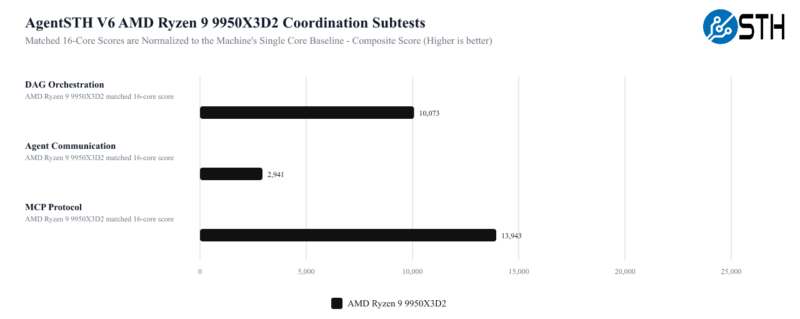
Memory may be the most interesting score here, given the 9950X3D2’s specs. So it will be interesting to eventually see how it compares to other processors without as much L3 cache, and consequently, more pressure on the rest of their memory subsystems.
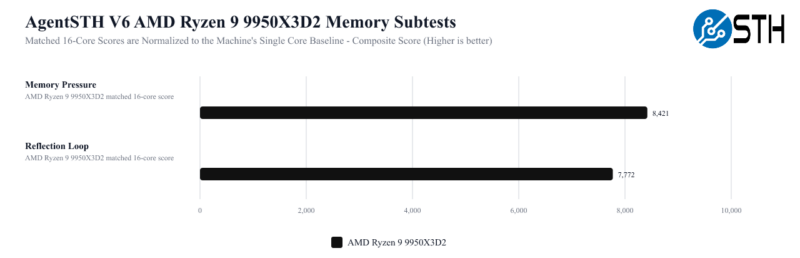
Overall, this is something we have been working on for some time in collaboration with one of the hyper-scale cloud providers’ performance gurus. Our observation a few years ago (over BBQ) was that CPU benchmarking often runs one process per core or per system, but modern cloud CPUs run multiple simultaneous workloads. This is just the first step in getting there. The goal is to turn this into something that we can release for folks so they can run easily. We are also exploring just doing a Geekbench-style distribution and providing pre-built binaries to make it easy for folks.
Now that we have taken a look at performance, let us go ahead and wrap things up.

So, is it a 14 core with x1 management core per ccd? mb
You didnt do gaming benchmarks but still wrote, “games are not the type of workloads that benefit from the additional L3 cache on the second CCD.”
Why? Getting anything out of RAM to cache is always a 100x speed improvement. Its not a coincidense 9800x3d is the best gaming cpu with its large cache
@Alex
Games are typically very “chatty” between threads. This means that if the major threads for a game get split between the CCDs, they will take a sizable performance hit from the high CCD-to-CCD latency. A larger L3 cache in turn makes this worse in some respects, as it means there’s more data in the L3 cache on the other CCD.
Putting extra cache on the *first* CCD is fantastic for games. Putting extra cache on the second CCD is neutral at best – and if not for AMD’s utilities that keep games on a single CCD, it would make things worse.