

Acemagic M1A PRO+ Performance
At the heart of the M1A PRO+ is AMD’s Ryzen AI Max+ 395, the company’s top-end, fully-enabled Ryzen AI Max+ chip SKU. This configuration is the Strix Halo platform at its finest, offering all 16 Zen 5 CPU cores and 40 graphics CUs baked into the underlying silicon. The net result, as we have seen time and time again in other reviews, is that Ryzen AI Max+ 395 can deliver tremendous performance across both CPU- and GPU-bound workloads. The tradeoff is that with 441mm2 of silicon, the chip can pig out on power when system builders allow the chip to run at high TDPs.
Clearly mindful of this tradeoff, Acemagic has kept one of the best features of the original Tank 03 mini-PC: the power mode adjustment dial. As we outlined in our look at the external hardware, the system comes with a rather large knob on the front of the cubic PC that controls its power/performance mode, allowing users to not only select between different performance modes, but to switch between them entirely on the fly. It is a nifty feature that although not all M1A PRO+ owners will use (how often do you need to change the performance mode of your PC?) can definitely come in handy for those who do need to make the occasional judgement.
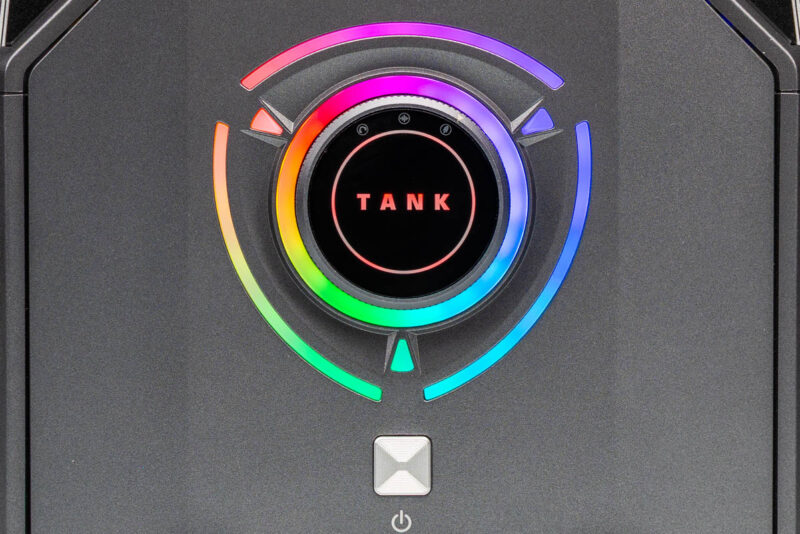
Acemagic ships 3 performance modes (and dial settings) with the M1A PRO+. These are a 70 Watt “Silent” mode, a 100 Watt “Balanced” mode, and finally a 140 Watt “Performance” mode. The purpose of which is to modulate the performance of the system, and ultimately, how much (or little) noise it generates.
| Acemagic M1A PRO+ Performance Modes | ||
| Mode | SoC PL2 Power Limit |
Noise (Vendor Spec) |
| Silent | 70W | 35.5 dB |
| Balanced | 100W | 37.2 dB |
| Performance | 140W | 42.9 dB |
Under the hood, Acemagic’s performance selection dial works by adjusting the PL2 power limit of the Strix Halo chip. PL2 is the short-term turbo window for x86 chips, and while correlated with a chip’s TDP (PL1) is almost always a higher value. It is a small distinction, but it is worth keeping in mind that the values being set here are not just the TDPs for the Strix Halo chip.
Ultimately, Acemagic is not the first company to offer multiple performance modes with a PC, or even the first company to do so with a Ryzen AI Max system, but they are the first to do so in such a front-facing and dynamically-adjustable manner.
For the purposes of our testing, we have done the majority of it in the highest-performing Performance mode. However, we have also run a limited set of tests in the other performance modes to get a better idea of what the performance (and acoustic) impacts will be. Meanwhile, we will be comparing our results to our earlier Minisforum MS-S1 Max figures, as that system uses the same Ryzen AI Max+ 395 chip.
Geekbench 6
Starting things off with Geekbench 6’s CPU benchmark, we expected this test to put both Ryzen AI Max+ systems on pretty even footing as Strix Halo’s CPU cores are not normally TDP limited when running a CPU-only workload (most of that power is for the GPU). The reality of the situation was a bit more surprising, with both systems holding close with single-threaded performance, but the M1A PRO+ falling behind in multi-threaded testing.
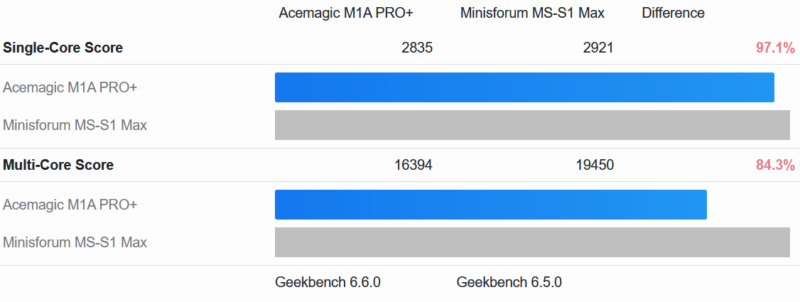
Notably, the Minisforum system has a higher TDP than the Strix Halo system in Performance mode. So it is not an entirely apples-to-apples comparison. But it goes to show that the M1A PRO+ is leaving a bit of Strix Halo’s CPU performance on the table, about 15% in multi-threaded testing, if that is a potential concern for the user.
But it is really GPU testing that sets apart these different systems and performance modes, as the integrated Radeon 8060S GPU is a far more power-hungry piece of silicon that can eat up a system’s entire TDP on its own. So for that, we turn to Geekbench 6’s GPU compute benchmarks.
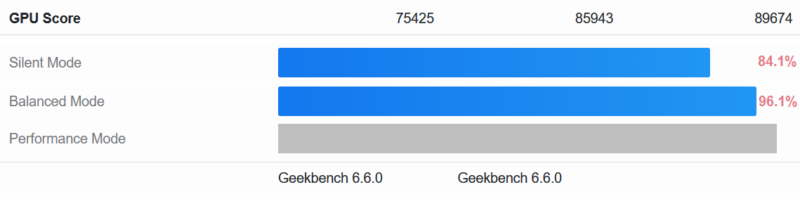
We have several numbers to dissect here, starting with the M1A PRO+ itself. With this being a TDP-sensitive test, it is a great benchmark for illustrating the performance of the cube’s different power modes. In short, while the Balance profile delivers 96% of the GPU compute performance of the Performance mode, Silent mode comes with a far stiffer penalty, shaving off 16% of the GPU’s performance. This follows the typical power/performance curves we see for desktop systems, which can save quite a bit of power in exchange for a modest drop in system TDPs, but experience a more significant performance drop farther down the curve.
Meanwhile, even with its slightly lower TDP, the M1A PRO+ actually pulls ahead of the Minisforum MS-01 MAX system in this benchmark.
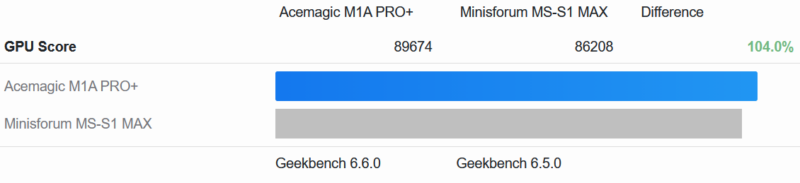
It is a rather minor difference of just 4%, but it is not a setup we were expecting the M1A PRO+ to win at, especially after seeing the multi-threaded CPU performance results.
MLPerf Client 1.5
Taking a broader look at GPU performance with MLPerf Client 1.5, we see that the Acemagic M1A PRO+ delivers the same kind of high-performance results we have become accustomed to seeing with other Ryzen AI Max systems. The Ryzen AI Max+ SoC does remain performance-bound relative to discrete offerings due to its TDP limits, memory bandwidth, and the sheer amount of hardware applied to the problem. But as far as integrated offerings go, this is very good. Coupled with 128GB of memory, this underscores the Ryzen AI Max+’s value proposition as a system with enough DRAM to run local inference on larger models.
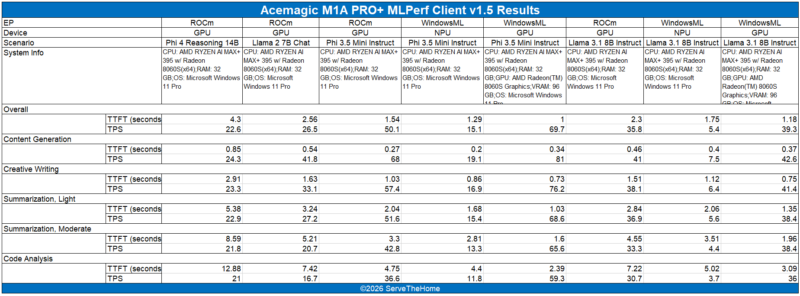
The Achilles’ heel of these systems is the memory bandwidth to the GPU. Generally, you buy these for their memory capacity and to run larger models, rather than to run smaller models quickly.
Next, let us get to the power consumption and noise.


Is it just me, or does this leave PCI lanes on the table? Compared to minisforum and framework solutions, no slots, no occulink, no 5/10 Gbit ethernet, …
I believe they had a problem with shipping malware in the past: https://youtube.com/watch?v=B8nJobY1SGM&t=20s.
Given that GB10 configurations have 200 Gbit networking at an admittedly 20% price uptick, even 10 Gbit would be pretty slow for the AI market.
Maybe this one is only designed for playing video games.