

Ubiquiti UniFi Cloud Gateway Fiber UCG-Fiber Performance
On the performance side, we wanted to do something different. Instead of just showing iperf3, we have been using this as one of our baseline devices to bring up our Keysight CyPerf machine. Our machine is capable of generating complex workflows, including real-world traffic scenarios, simulating attacks, and more, at speeds exceeding 1.6Tbps.
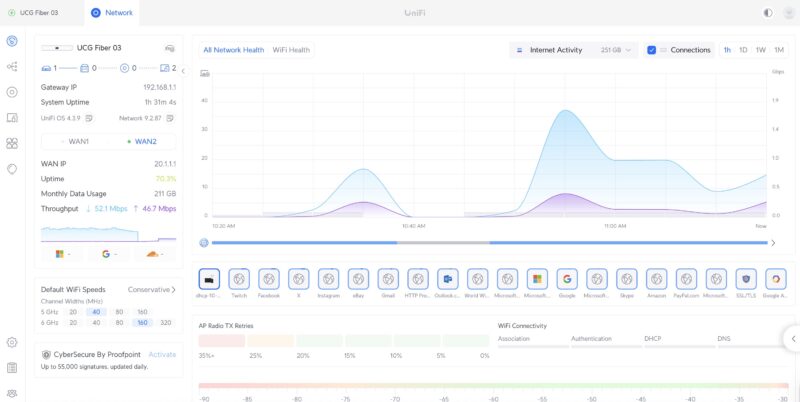
Just to give you some sense, this is one of the UCG-Fiber units we used, running flows from our CyPerf box. You can see that the UCG-Fiber is correctly identifying flows from X, Twitch, Outlook, Google Drive, Gmail, Instagram, Facebook, and more. That may seem like a small item, but that is a big difference between using a high-end tool like this versus iperf3. Soon, we will show you how to use the CyPerf Community Edition as a replacement for iperf3 when testing a device like this.
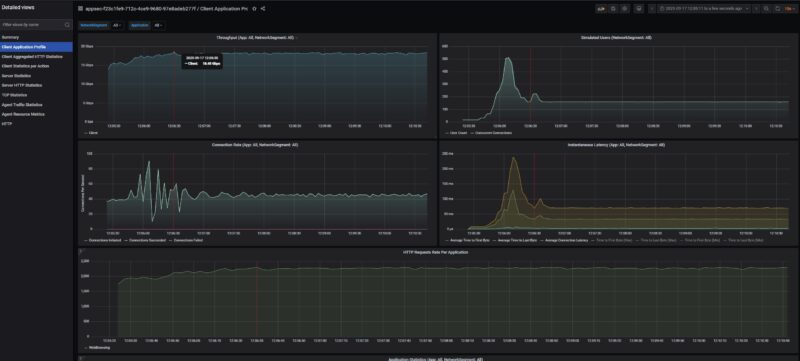
Starting off with a basic HTTP flow, here is 10Gbps speeds being reached going between WAN and LAN and we see very good performance from a $279 device. For those wondering why Rohit and I have discussed the Denverton CPUs having no issues with just passing NAT flows at 10GbE speeds across many ports, Ubiquiti is doing that here with a lower-end CPU than the Intel Atom C3758 without issue. This is also HTTP traffic being tagged as web traffic by the UniFi software.
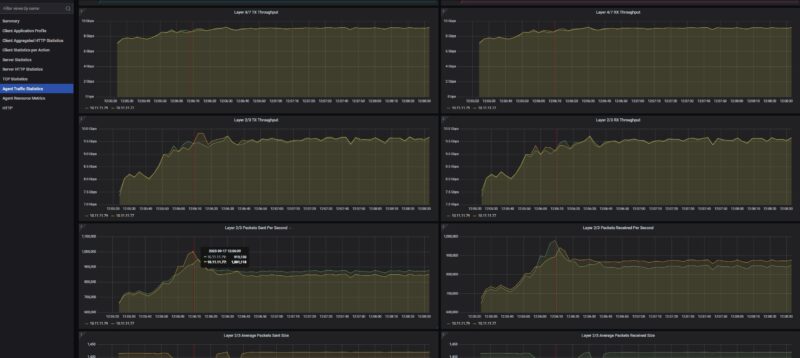
Just to give you some sense, we are pushing around 1 million packets per second doing this.
Here is HTTP traffic running bi-directionally from both 10Gbps ports, giving us 20Gbps.
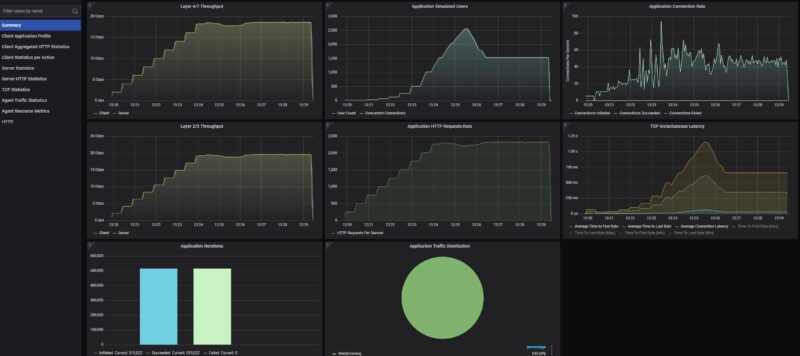
We also found some interesting limits when running real flows through this device. At 2048 users, we found a hard-locking condition. You can see the traffic just stop here as that threshold is passed. The device’s behaviour is that it just stopped passing traffic. We had to power cycle the device to get it to pass traffic again. If you have that many users, you should be using something higher-end than a $279 device with 3GB of RAM, but it was neat to find.
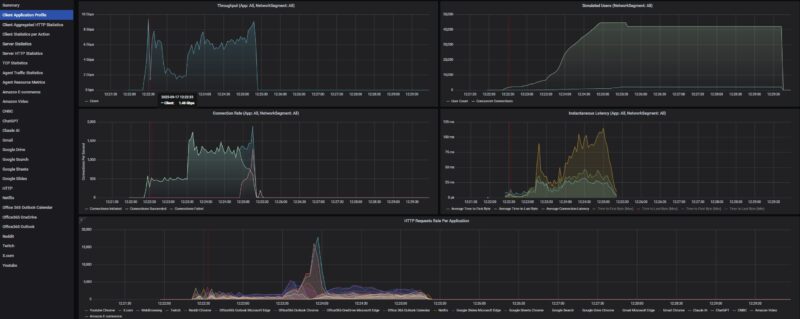
We are standardizing for future low-end STH gateway device reviews on an 11 app mix of ChatGPT, Google Drive, Google Sheets, LinkedIn, Netflix, Office365 Outlook and Calendar, Reddit, X.com, and YouTube. Ubiquiti’s UniFi tags all of these traffic flows correctly as do most other firewalls we have tested. Here is what we saw during testing:
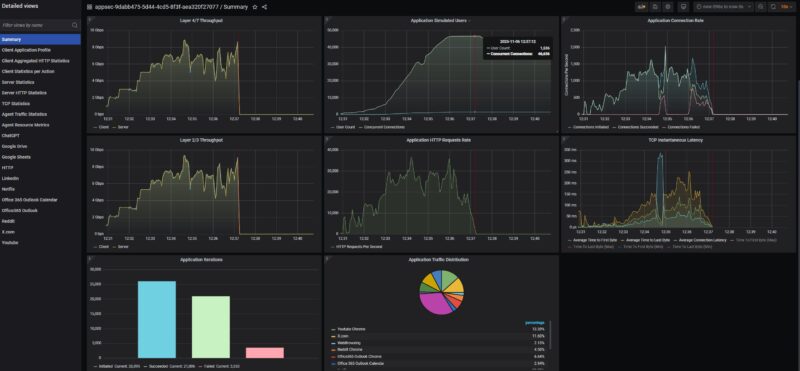
Just taking a quick look at this in more detail, we can see that we were losing connections after saturating the device for some time. This typically happens when buffers or memory become full. This got up to 1536 users before failing, so our original thought that there was a hard 2048 user limit was incorrect. Here is a quick packets per second view where we took out some of the post-traffic stoppage time so you can see it better:
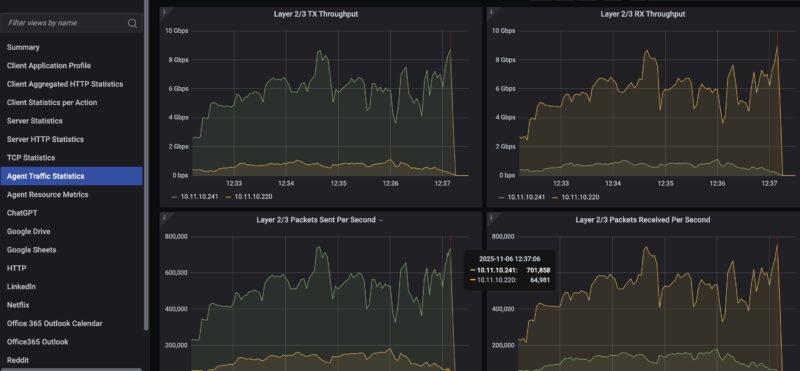
For those wondering if this is a NIC or system limit, remember we are on 50Gbps generation ports running at only 10Gbps speeds, and the box is pushing (well) over 1.6Tbps of traffic and with the next upgrade will be over 2Tbps from our initial testing. A pair of 10Gbps ports is trivial for the machine.
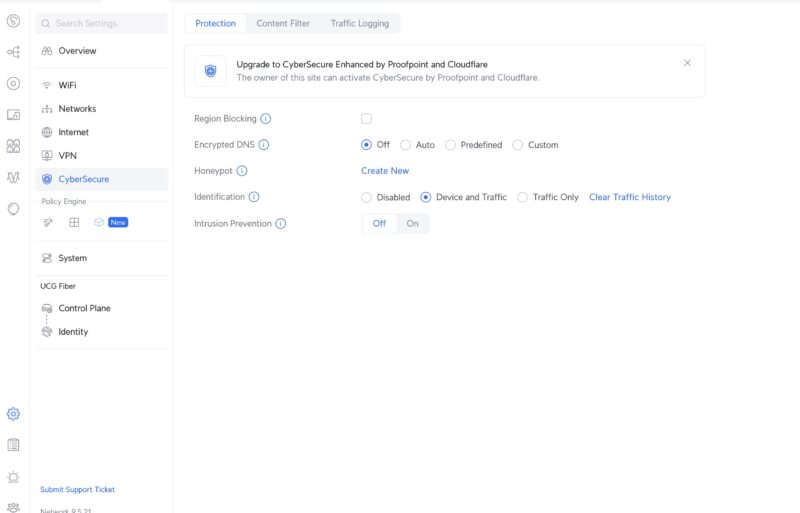
We are still working on this part of our testing, but as a quick preview, in the middle of running real-world traffic (in the above example, it was going to many countries as well), we also injected one of CyPerf’s attack libraries. As you might expect, virtually everything made it through.
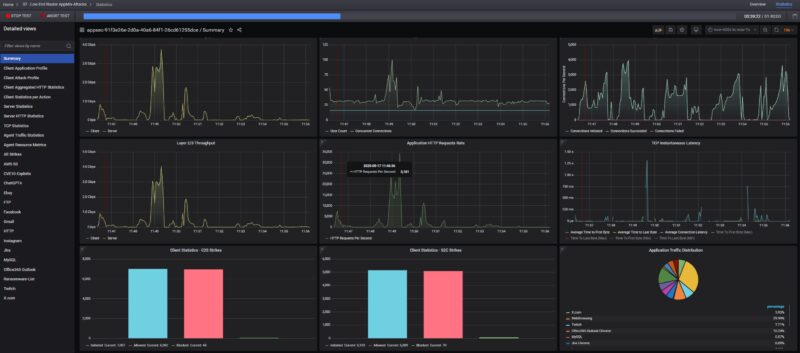
While this may sound bad at first, it is actually the expected behaviour since we did not turn on the $99 CyberSecure Proofpoint firewall feature. Since we have purchased many of these devices, we plan to conduct a follow-up not just for this one, but also for some of the other UCG devices and other devices we have already tested. Perhaps the biggest takeaway here is that just because you purchase a Ubiquiti UniFi Cloud Gateway Fiber and turn it on, it does not mean that 99% of threats are being blocked automatically. To folks who work with firewalls every day, that makes perfect sense. For those who install a $279 device and expect to be protected out of the box, that is far from the case. At $99, the CyberSecure solution is relatively much less expensive than a subscription from a Fortinet, Sonicwall, or
The other big question we will start to answer on STH is whether the security solution is able to stop attacks (is it effective), and what is the throughput of both standard traffic and VPN traffic when the firewall features are running. Right now, gateway device/ firewall vendors have numbers, but we will start to validate them. Just like we are seeing hard limits on the Ubiquiti UCG-Fiber that are out of the expected usage scope for these devices, but that we have not seen before, we are finding some really neat things when testing firewalls.
More to come on this one, but I thought folks might like to see this in action. Of course, the real goal of having a high-end CyPerf tool is not to just test low-end 10GbE boxes like these, but to generate a lot of real-world traffic like we saw when we were passing 800G bi-directional traffic through the MikroTik CRS812-8DS-2DQ-2DDQ-RM. I hinted at this earlier, but we have been buying many devices to profile and test what makes sense to show in our reviews going forward.
Ubiquiti UniFi Cloud Gateway Fiber UCG-Fiber Power Consumption and Noise
The adapter that comes with this is a 54V 1.1A unit.
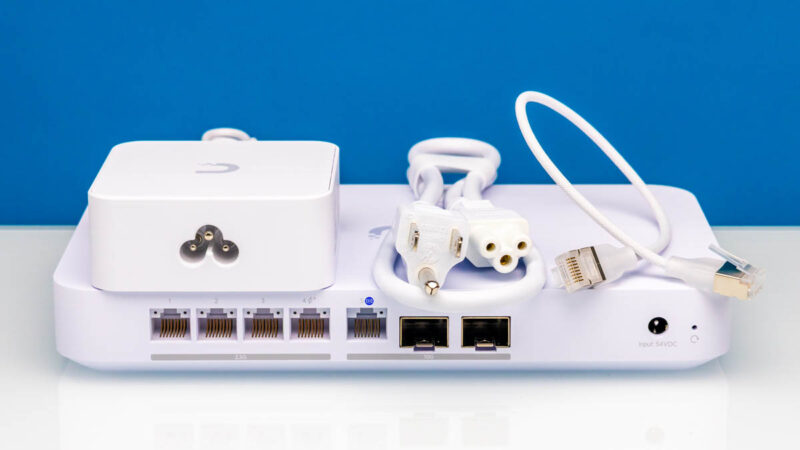
At idle, we saw 6-6.3W. Ubiquiti rates this as using at most 29.6W with attachments, leaving a 30W PoE budget.
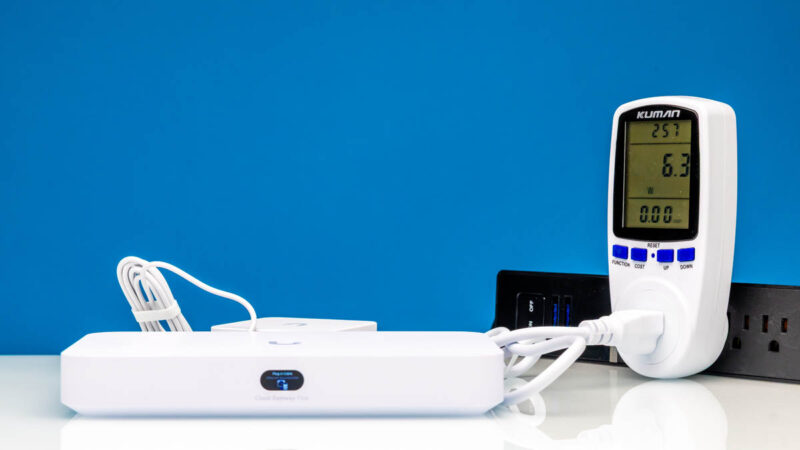
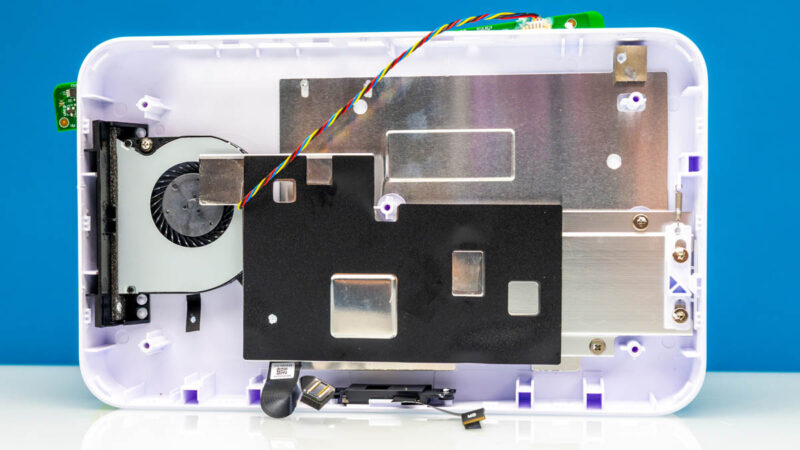
On the noise side, our unit was virtually silent at 1m. Still, there is a fan in there, and since we do not see a reasonable way to clean it, we expect that this will get noisier over time as dust accumulates.
Overall, this is a very reasonable power and noise profile for a device like this.
Final Words
As Rohit, Sam, and I worked on this review, we were somewhat shocked by how popular these are, yet how many strange things we found that were not mentioned in available reviews. The PoE output is something we test, and it seemed so odd that we tried it with multiple units and multiple Fluke testers. Internal photos and finding a fan that was not easy to service was one that cost us $279 to get to, but it felt like it was well worth the effort to show folks. The 2048 user hard locking event and the default firewall attack blocking posture are not something we would expect most people to find, since we are literally using a high-end tool designed to scale to hyper-scalers, testing their hardware at Terabit speeds, and using that tool on a $279 consumer device. Still, it was pretty exciting to find several things when going through this unit.
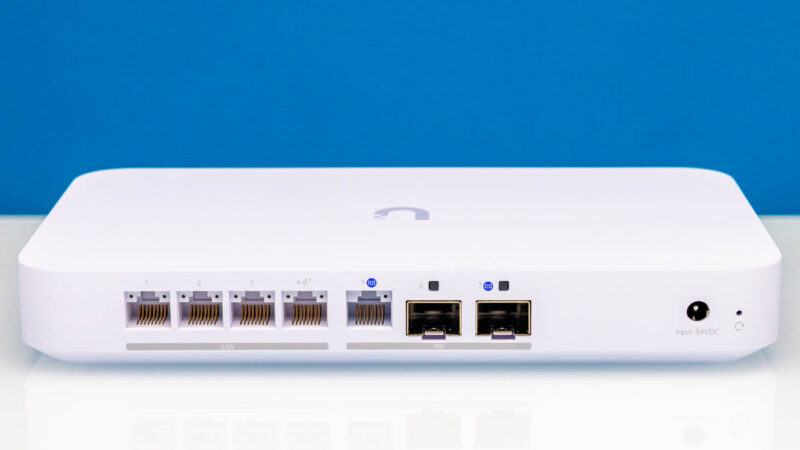
At the end of the day, let us be clear, I think this is an awesome device for the price. Most of the items we found were really edge cases, and on the PoE side, we tested it with several of Ubiquiti’s WiFi 7 APs listed as PoE+, and they worked without a problem. It might just be a fluke with Fluke’s testers. If I just wanted a simple network that also ran at 2.5GbE/ 10GbE speeds, with a nice Ubiquiti UI, the ability to add NVR with an SSD or a WiFi 7 AP directly, then this checks a lot of boxes.
Some great news is that since we went out and purchased a large number of firewall/ gateway/ VPN devices, this is not the only Ubiquiti device we have in the review queue.
Where to Buy
You can find these at Amazon (affiliate link), B&H Photo (affiliate link), the Ubiquiti store, or other retailers.

Perfect timing for this review for me, thinking of picking it up.
For the Fluke meter test, we had an issue with Aruba APs and Cisco Switches where LLDP had to be enabled to get proper PoE values sent to the APs.
If LLDP was off, the Cisco switch would only output 15w or 30w, with it enabled PoE values would drop to 24.5w.
With all that being said, I wonder if enabling or disabling LLDP would change the results of the Fluke meter’s test.
You’ve got to love STH comments like Scotty’s. It’s so technical here. I’d say it’s a finding in either case that I’ve never seen elsewhere except for older UI devices
I’ve got to say, this is one of the best reviews. I’ve always thought Ubiquiti reviews elsewhere lacked any balance. You’re right that I’ve never seen inside this, and I’ve read and watched so many reviews. You’ve shown and articulated both where there are shortcomings and why for $279 they’re expected. STH knocked this one out of the park
Hi Patrick love this review and how in-depth it is. But I do have a question, when you were performing the attack test against the UCG-Fiber could you clarify if you left the Intrusion Prevention setting “Off”? You can turn this on and configure it without a subscription, Ubiquiti provides regular definition updates and IPS categories.
The premium / subscription version is something else entirely to my understanding, though I haven’t tried it.
Justin you are correct. It was off. The reason is twofold:
1. We wanted to show the default behavior since we were showing failure modes and did not want folks to think we had firewall rules impacting that. Also, I went into this in the video but many will buy a firewall, and not turn on the firewall features. I worry about that less on DIY firewalls and $1k+ firewalls, but in this segment of the market, it happens a lot.
2. We are still honing the security and also the VPN testing protocols we will use. I made the call that I did not want to publish before we had those set. My goal is that we continue to add more testing over time, but I want folks to be able to compare historical data.
The profiling may seem simple, but just to give you some sense, we have had this box up since August, and the UCG-Fiber was literally the first low-speed DUT we used. It has taken some time to get a sense of the application mixes we wanted to show.
This is all not a fast process, but the goal is to get going and then improve. Part of that is really running the test protocol through a bunch of devices to see if there is anything obvious that is not working.
Top left chip is the RTL8238B which appears to be POE controller.
The main switch chip is RTL8372N, which appears to have one 10Gbit link to the core, and another 10Gbit link to the rj45 wan port via TRL8261BEI transceiver
The 2x SFP+ cages appear to be routed direct to the core
The core appears to be one of the (IPQ9570)(Pro 1620) series which has a pretty wide range of options
https://www.qualcomm.com/content/dam/qcomm-martech/dm-assets/documents/Networking-Pro-1620-product-brief_87-PW325-1.pdf
Just so you all know, there is a big flaw with this device if you want to utilize a faster than 1GB fiber WAN connection. Upload speeds are currently capped at half of what they should be. I have tried converting one of the 2.5GB ports to a WAN connection, using the POE 10GB WAN port and even purchasing a 10GB SFP+ to Ethernet (Ubiquiti branded). All of these will cap my 2GB fiber upload to around 1 to 1.1GBps. There is no issue with download speed at this time.
Can you please review the Alta Labs Route10 as the sister/competitor device to this unit? I believe they even share the same CPU: IPQ9574.
The memory chips look like 16Gbit/2GByte ether 2Gx8 or 1Gx16 ddr4 3200 or similar.
Something like k4aag085wa-bcwe or k4aag165wa-bcwe
I wonder if they are running some sort of ECC/parity mode and thats why its only speced at 3GB, or if 1GB is used for a ram drive of some sort?
As an Alta Lab Route10 owner, I’d be interested in seeing a review too – mainly so if I can see if I was right to buy a Route10 and not wait for the UCG fibre :)
“For 10GbE networking, you simply do not need that much CPU performance and offload.”
That really depends on what you’re doing, doesn’t it? Just NAT is one thing, complex firewall rules are entirely another, at least potentially. And then, there’s the question of small packets. If you’re the victim of a DoS attack, you’re looking at ~1.4Mpps for every Gbps of traffic. So if this box can handle ~1Mpps, it will fail even if the DoS doesn’t fill your channel completely.
That may be outside the expected performance of a $279 box too, but honestly I think this is a vastly more important and interesting performance question than the ones actually asked and answered. I hope that this will get a lot more attention with your new all-singing-all-dancing CyPerf.
Also, unrelated side note… the back of the board where the CPU (I think) is is a heck of a mess.
On the note about the WAN port being 1/2.5/10G, on my setup (a UCG Fiber hooked up to an AT&T BGW320), that port negotiated at 5G without any issues.
The one thing that made me power off my udm pro max and use the gateway fiber is that unlike the udm systems, this processor does PPPOE offload. For my 3Gb ISP the UDM would loose its mind over 2.5 Gb at 100% CPU whereas the Gateway Fiber barely breaks a sweat. Now if they would only use that proc in a proper rackmout device…
JM and Korev – I responded to a comment on YT, but I saw a Route10 on the photo/ B-roll set before I left the studio this afternoon.
Agree with @smax. The WAN port is absolutely capable of 5G.
The fact that this device locks up and stops passing traffic with more than 2048 users to me suggests a buffer overflow in the firmware. This may not be ideal for security.
Thank you! But I would really be very very very interested how good the protection (and performance) would be with no IDS/IPS vs stock IDS/IPS vs 99$ subscription IDS/IPS.
I came here for the complete story after viewing the video. 99% of the attacks coming through scared me, but here I read that this was with IDS/IPS off.
So, indeed: I’m also very interested to see the comparison No IDS/IPS vs stock IDS/IPS vs 99$ subscription vs a Sonicwall or other solution.
I know this is a lot of work, but it’ll be very much appreciated by a LOT of people worldwide.
No sales pitch for Unifi or their subscription, but just the real facts so we can make a good informed decision.
Looking forward to the security side of things comparison.
The YT video though left me scratching my head. Script was all over the place, repeating things, way too much excitement about testing equipment. That deserves its own, separate video, cluttered this one up and repeated endlessly. Bit of a kid in candy store. Your YT stuff is usually way more on point.
Protectli Vault Pro VP6650/VP6670 would be a good comparison at 2-3x the price point.
Great review and tear down. Thank you!
I’d be interested in more content on the blocked attacks metric.
For example, how does your blocked attacks metric for the UCG Fiber compare with the default config of OPNsense?
I’ve had the UCG-Fiber since it was launched, and had the same issue of it struggling under load. Logs showed a lot of “nf_conntrack: table full, dropping packet” errors, and the nf_conntrack limits were set very low (can’t remember what it originally was).
Using Gemini for some rough RAM usage guestimation, I set 1048576 for nf_conntrack entries: 1,048,576 entries×320 bytes/entry≈320 MB, and for nf_conntrack_buckets (hash table, Kernel 5.4, 1:4 ratio: (1,048,576/4) buckets×8 bytes/bucket=262,144×8 bytes≈2 MB)
Works perfectly now!
This or the dream 7 router for home use
I would love to see some of these network stress tests on some of the other units you have recommended over the years. I personally bought one of the Fanless Soft Router Micro Firewall Appliance VPN Router PC i5 off AliExpress back in 2023 and so far with no regrets. I run OPNSense on it and it seems to work like a champ. I like that I can put just about anything on this unit and it keeps on ticking, which is more than I can say of my Minisforum UM890 pro with the Minisforum DEG1 Oculink and an RTX 5070 TI. It has some serious mid game freezes going on, but that is not the main point of this comment.
Please consider running some stress testing with your fancy $1M+ Keysight CyPerf load generation setup on other boxes.
We have access to Keysight CyPerf where I work. I’d like to interject some perspective. Judging by the box they’ve showed it’s over $1M/year to run this. They’re lying saying it’s only $1M.
Costs aside, they’re using a powerful tool. I wish they would also get a RFC-2544 tester so they can do L1-L3 in more detail. That’d be valuable too. Their tool is not really designed for L1-3 instead L4-7. In so many ways that’s harder and more valuable. They’re sandbagging the capabilities they’ve got. I hope they just go on like some test everything binge. All those Sophos, SonicWall, Fortinet, Palo Alto Networks, Juniper and more should support them in this, including their VM firewalls.
This is like Tolly but better and way more visible from everyone from homelabbers to hyperscalers like where I work
While this is a tremendous review / test and much appreciated… Another vote for the firewall test being flawed and actually the throughput testing as well. It also significantly impacts the throughput performance testing to have not reported IDS/IPS on/off. Why possibly with this great test setup would you not tick the box, run it again, and give those results as well?
Frankly I think its obvious the testers overlooked this as an ooopsie and now are making excuses about it being intentional choice. Yes sure I agree some naive buyers of this equipment will “miss the tickbox” so yes for sure the “raw dog” results are worth reporting *also*, but the vast majority of educated buyers *who are not going to implement a 3rd party / outboard firewall* will have that turned on. Both performance and intrusion results should have been done with the built-in freebie IDS/IPS off, and then on. This is kind of basic standard stuff guys. Hopefully we see a follow-up review with a 3-way results aka nothing/Unifi/CyberSecure. Otherwise very interesting review.
JanJanJan hit it exactly – another vote for “Hopefully we see a follow-up review with a 3-way results aka nothing/Unifi/CyberSecure.”
Testing it without IDS/IPS was not very useful for the majority of Ubiquiti users. Most of us know to at least turn on IPS.
Hi,
right on time :).
There is a lot of issues that have been identified with this device and most of them seems to be related to software development and optimizations issues.
Some examples:
https://community.ui.com/releases/UniFi-OS-Cloud-Gateways-4-2-12/7603848f-1dc4-4228-9cdd-459f9f8b017a#comment/e8ba4923-775b-46de-a477-ac47adba1695
A lot of the issues have been solved with the 4.3.9 but a lot are still there …
i’m almost sure that you reached two of issues:
– memory optimization issue , you literally need to an SSD , it will be automatically used as swap ( 1.9 Gbytes ) in order to help solving something but this generate a lot of writes for nothing, if not the box crash …
– Simultaneous supported and offloaded sessions, the product initially supported no more that 4096 sessions , but this was improved to 65535 but again it’s nothing. At that moment conntrack is saturated … You reached that limit and this is why you have been stucked. I was able on my side to solve some of that ( up to 260000 sessions , i’m hosting public NTP stratum 2 on ntp pool , i have my one stratum 0/1 setup relying on multiple GNSS constellations). I shared comment on that but comments have been back from some of the (almost cult brainwashed) guys:
https://community.ui.com/releases/UniFi-OS-Cloud-Gateways-4-4-7/3616808e-3c70-4a1d-b035-c01d7b2a0089#comment/d5da5c36-6a33-48e8-be61-c97b91e6a32c
The product can do again way more …
Fell free to ping me , i can share some of optimizations i add to put in place in order to have something working “better” that the default.
It’s not yet at the same level of offload / performance of the low end Edgerouters relying on Cavium components ( even if they have been limited to 4Gbps/s over Bonding / LACP) but this can be improved …
@quartermaster , attention point regarding the ECM engine:
you have way more than that for the memory usage, you also have have almost 4KB per session consumed by the ECM / Offload engine:
https://community.ui.com/releases/UniFi-OS-Cloud-Gateways-4-4-7/3616808e-3c70-4a1d-b035-c01d7b2a0089#comment/d5da5c36-6a33-48e8-be61-c97b91e6a32c
Corrected myself:
Feel free to ping me, as I can share some of the optimizations I had to implement to make something work better than the default.
It’s not yet at the same level of offloading/performance as low-end Edgerouters that rely on Cavium components (even though they’re limited to 4 Gbps/s over bonding/LACP), but this can be improved.
+1 for Alta Labs Route10! I’m really on the fence between this and the Route10! There’s a severe shortage of Route10 reviews, let alone in-depth analysis
Hi there! Two of my comments (with links to the issues) are currently under review. Let’s hope they get approved soon!
I bought one for the Teleport VPN (Wireguard) feature. It’s dead simple to set up and works like a champ.
The UI is awesome and any issue I had was immediately addressed by Ubiquity. Great support and great product.
I bought this last month or thought I did but got the UXG by accident. €30 cheaper but no cloud key/controller software built in. Cue another $300 and I’ve the UCG. Note: You can’t manage the UXG with another Gateway with an inbuilt controller, you have to buy the AI Gateway, a separate device 1/2 the price of the UCG! Anyway, got it working but missed the small print!
Great review overall.
However, talking about this type of network focused SoCs as if they are just general purpose CPUs is misleading. Hardware offloading is why they are interesting.
As someone with an Atom C3758 based VyOS router as well as a Banana Pi BPI-R4 based on the MediaTek Filogic 880 with similar offloading support running OpenWrt, I’ve noticed that the latter will easily handle 10 Gbps routing with single stream iperf3 tests. The Atom C3758 can’t (even with nftables software flow offloading), at least not without the use of VPP. I assume it’s because it only uses a single CPU core in those situations, but I would happily be proven wrong (if there is a setting I can change).
@Michael Russel: You don’t need to buy anything extra to manage the UXG models. The free UniFi Network Application (usually referred to the Unifi controller) or the UniFi OS container should both work fine as long as you have something else to run them on. This has been the case for UniFi gateways for over a decade at this point, and should presumably be listed on the product page too.
The similarity in naming between the two models can easily be confusing though. You’re not the first person I’ve seen who made the same mistake.
I’m just getting ready to install this at my house. Sounds buggy as heck. Upload is limited to 1gig? Did I make a mistake?
@Dave: It might be worth checking the /r/init7 subreddit to find more user reports of how this works in practice. A lot of people there have 10 or 25 Gbps internet connections and I believe this unit has been popular there. I haven’t checked recently though.
you should add to the picture that it has bluetooth capabilities supposedly,
which adds quite a lot in terms of “noise” , especially when it is not “de-activable”
Thanks for the review/teardown. Got my unit and it’s great so far. However, I’ve now (one week into use) noticed a strange noise coming out of the unit. It’s a grinding noise that goes rrrrrRRRRRrrrrrrRRRRRrrrrrr (best I can describe this). When tilting the unit to its side (vertical orientation) the noise reduces significantly but doesn’t go away. I think it has to do with the fan and it’s concerning long term. The unit works fine and exhausts warm air but I don’t think it’s supposed to be like that. I was going to open it up but given how difficult it is and I will most definitely damage it, I’m now wondering if I should just live with that noise (not that audible in vertical orientation; my NAS makes more noise) or consider contacting ubiquiti and try to replace it. Appreciate any feedback. Thanks.
In regard to SETI 5000, I have a symmetrical 1G connection with Altafiber connected to port 7 of the UCG Fiber. My router speedtest also shows lower upload speed, 1.09 Gbps down and 698 Mbps up. But the speedtest result on a wired ubuntu server client shows symmetrical 928 Mbps.
I would also love to finally see a review on ids/ips: Disabled vs enabled vs enhanced enabled
In any case, my UCG-fiber seems to struggle in my small home network with just 20 clients, 500/100mbit/s connection and about 4.000.000 flows per week:
kernel: [quic_sm_reassemble_func#1025]: failed to allocate reassemble cont.
cat /proc/meminfo | grep -A 2 “Slab”
Slab: 272556 kB
SReclaimable: 73632 kB
SUnreclaim: 198924 kB
free -h
total used free shared buff/cache available
Mem: 2.8Gi 1.9Gi 166Mi 56Mi 792Mi 690Mi
Swap: 6.8Gi 69Mi 6.7Gi