Microsoft Surface Laptop Ultra Performance
As one of the first Windows laptops to ship with NVIDIA’s RTX Spark N1X (GB10) SoC, the laptop’s interest comes largely from the chip itself. Though GB10 is not new to the world, this is the first time we have seen it used to drive a Windows device, not to mention the first time it has shown up in a laptop.
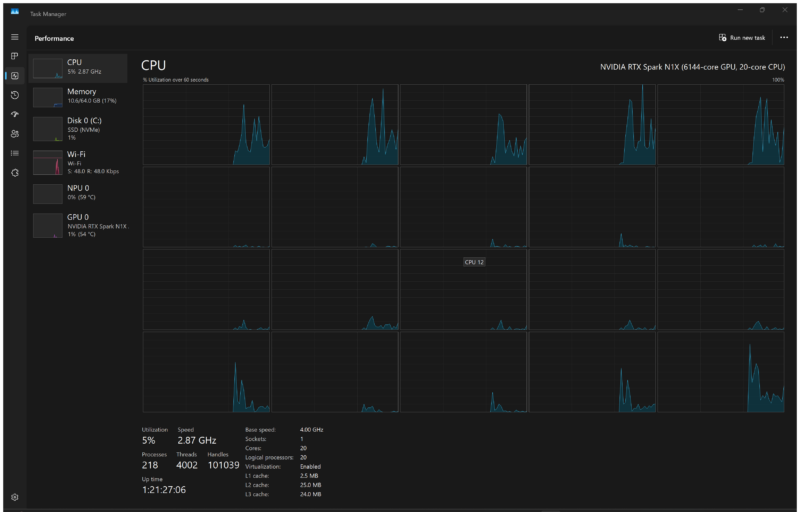
NVIDIA is offering two RTX Spark N1X SKUs, and Microsoft, in turn, is offering Surface Laptop Configurations with both options. At the high-end, we have a full N1X/GB10 chip, which features 10 Arm Cortex-X925 cores as the performance cores, and another 10 Arm Cortex-A725 cores as the efficiency cores. Suffice it to say, this is a lot of CPU cores. Even Intel and AMD’s most recent laptop chips top out at 16 cores. Those cores also lack SMT, so this is 20 cores/20 threads, whereas AMD has 16 cores/ 32 threads.
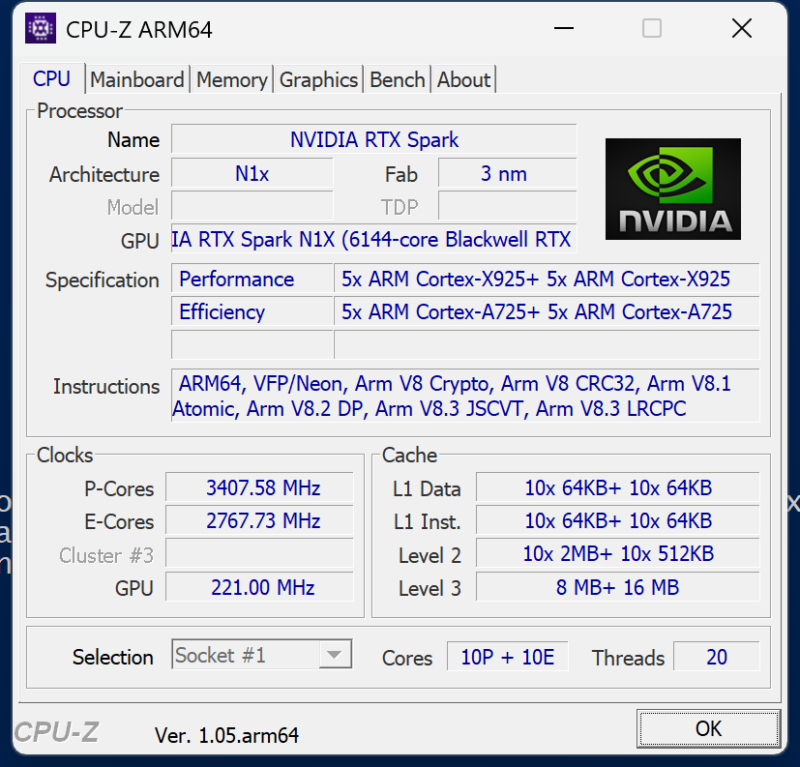
The trade-off is that these are older core designs. GB10 has been shipping for a year, and if you believe the rumors, it shipped late. The X925/A725 have been around for some time (since 2024), so the RTX Spark/Surface Laptop Ultra is launching with a CPU architecture we know a lot about. Keep this in mind as we look at system performance.
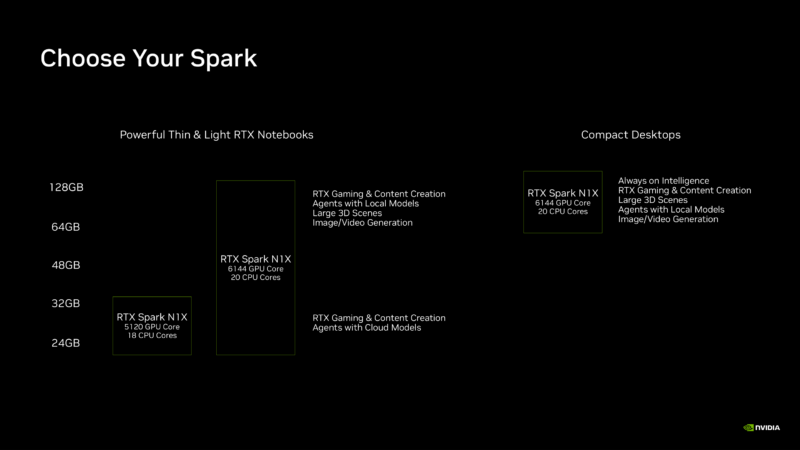
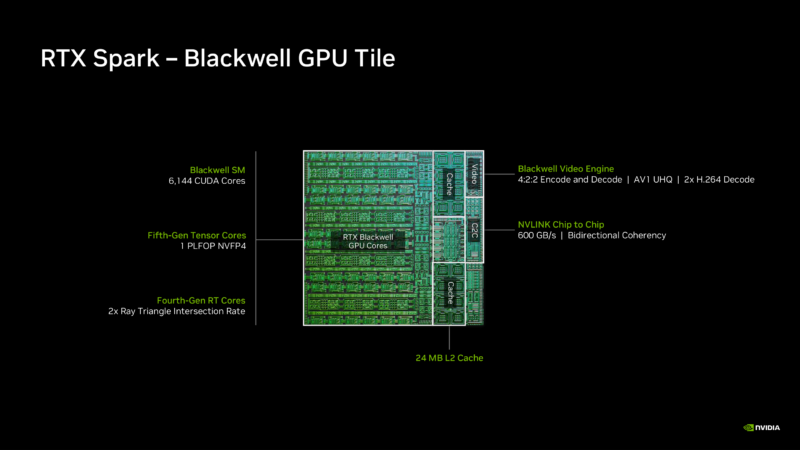
Meanwhile, the GPU side of the chip features a 48 SM, 6144-CUDA-core integrated GPU based on NVIDIA’s RTX Blackwell architecture, which remains their latest and greatest graphics GPU architecture. The iGPU is roughly equivalent to NVIDIA’s discrete GeForce RTX 5070 in terms of available graphics hardware and core counts. However, the memory subsystem is far less powerful than on NVIDIA’s discrete offerings.
Instead of GDDR7, the RTX Spark uses LPDDR5X. A lot of LPDDR5X. GB10’s memory bus is 16 channels (256-bits) wide, which provides up to 300GB/second of memory bandwidth when used with LPDDR5X-9400 memory. This is also what has allowed NVIDIA’s partners to integrate up to 128GB of memory into their laptops.
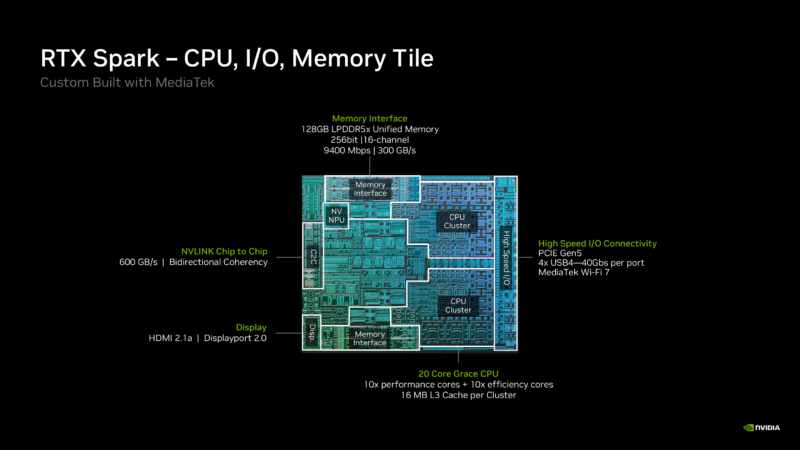
In terms of capacity, this is comparable to other high-end and workstation laptops. The Surface Laptop Ultra is in rarefied company here in terms of memory bandwidth, since the only other systems with similar SoC bandwidth are based on AMD’s Strix Halo and Apple’s high-end M-series chips. That DRAM, in turn, is key to the laptop’s AI ambitions, giving it plenty of room to hold larger models and enough bandwidth to put them to good use.
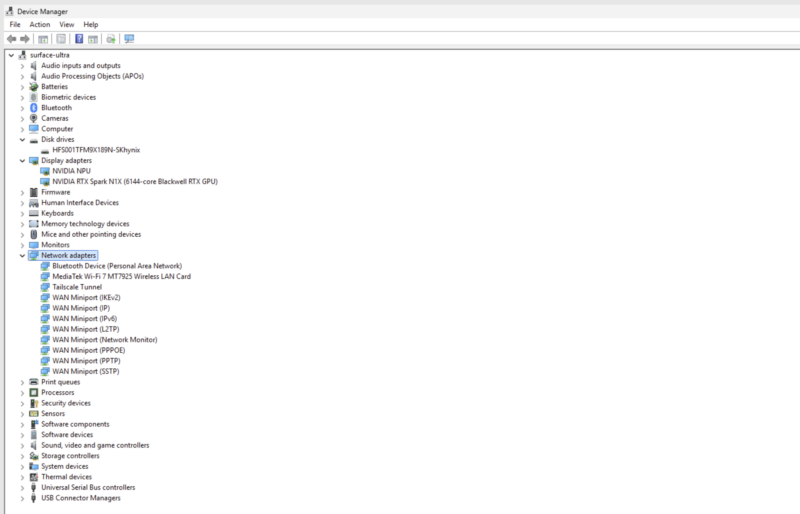
Finally, RTX Spark also offers an NPU for high-efficiency, low-powered inference. This feature has not been a major focus on DGX Spark mini-PCs for developers, but it matters more on a Windows machine. This also ensures that the Surface Laptop Ultra is Copilot+ compliant, for whatever value that brings in late 2026.
As for drivers for this hardware, NVIDIA provides a full graphics driver stack for the RTX Spark under Windows. So the chip has access to all of the Blackwell architecture features (ray tracing, DLSS, the NVIDIA app, and more) and can run standard drivers. Microsoft recommends sticking with NVIDIA’s stability-focused, workstation-oriented Studio driver set rather than NVIDIA’s more frequent Game Ready drivers.
I want to point out a few things here. First off, we had this laptop in the studio for about a week, between having it in the lab where we can get it into its test harness and when this piece is going live. Second, this is Windows. We also needed to generate some comparison data because, for example, MLPerf updated its revision since we last used it. As a result, we got my M5 Max 128GB running, the GMKtec EVO-X3 (since that is a laptop motherboard in a case), the Acemagic Tank, the Dell Pro Max 18 Plus and 16 Plus, Lenovo P3 Gen16 (all with RTX PRO 5000 Blackwell GPUs), and a few GB10’s when they were not running other things to generate a comparison set. A major challenge was finding application spaces that ran on all, but that we could fit alongside photography, Windows and driver updates, and so forth. These days, a GB300 workstation like you saw, a Vera or Venice server, or others, can easily run benchmarks for 2-3 weeks straight, and we had to fit testing into one week, with travel, photography, and more.
Cinebench 2026
Starting off, we pitted the Cinebench 2026 tests between the GMKtec EVO-X3 with the AMD Strix Halo, the Minisforum MS-02 Ultra with the Intel Core Ultra 9 285HX, and the Surface Ultra.

Interestingly enough, NVIDIA’s P-core did relatively well compared to the Acemagic Tank running at its medium setting, bringing it more in line with the power of the RTX Spark. Intel had the faster P-core (and we have reviewed newer chips as well), but the more important part of this might be the single-thread versus single-core result. We often hear vendors who do not use SMT say SMT is not useful. On the other hand, it is giving a roughly 33% boost in performance per core. Another useful way to think about this is that NVIDIA’s CPU is in the ballpark of its competition, but not the fastest.
SPECviewperf V15.0.1 Windows FHD
We have been running SPECviewperf 15.0.1 on many systems since its release. This is an industry-standard benchmark. Notably, there is a native aarch64 version on Linux (Linux runs only 8 tests compared to 11 on Windows), but there was no Windows on Arm version available online for us to use. So this is x86 running on Prism translation on Arm. Since it is primarily a GPU benchmark, we just wanted to see what would happen.
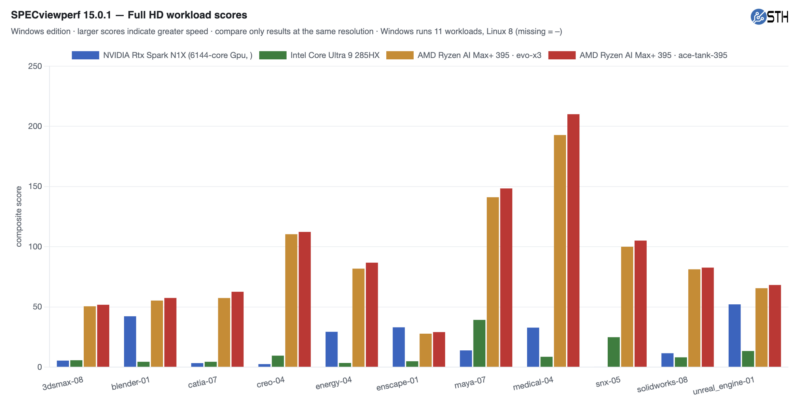
You can quickly see some wild results. Somehow, the N1X came out ahead on enscape-01. That was not expected.
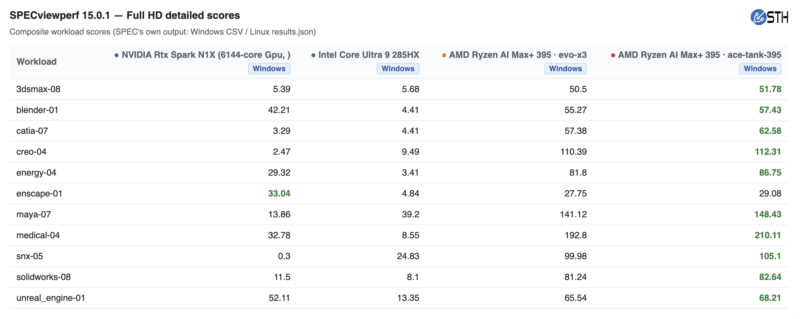
On the other hand, Siemens snx-05 ran, but you can see the emulator is absolutely struggling here. Blender and Unreal Engine performed well. Others running emulation were tough. To be fair, everything “ran,” but this is where you can see some real differences in the ecosystem.
Qwen3.6-35B-A3B Performance
Starting off, we wanted to use the model we have to do a lot of easy grunt work for us: Qwen3.6-35B-A3B. We wanted it to run on the Dell Pro Max 16 Plus and the integrated RTX PRO 5000 Blackwell laptop. Even at Q4_4K_M it was challenged by memory with only 24GB once we started scaling users, so we instead offloaded three experts to system memory just to be able to run the same model. Likewise, we got the Acemagic M1A PRO+ “Tank” system, the Lenovo PGX GB10 system, and an Apple M5 Max 128GB 14″ notebook and ran them side-by-side across a concurrent user sweep. Also useful to note, we did not use a draft model, so you can imagine there is more performance than what is being shown here. Again, we only had so much time.
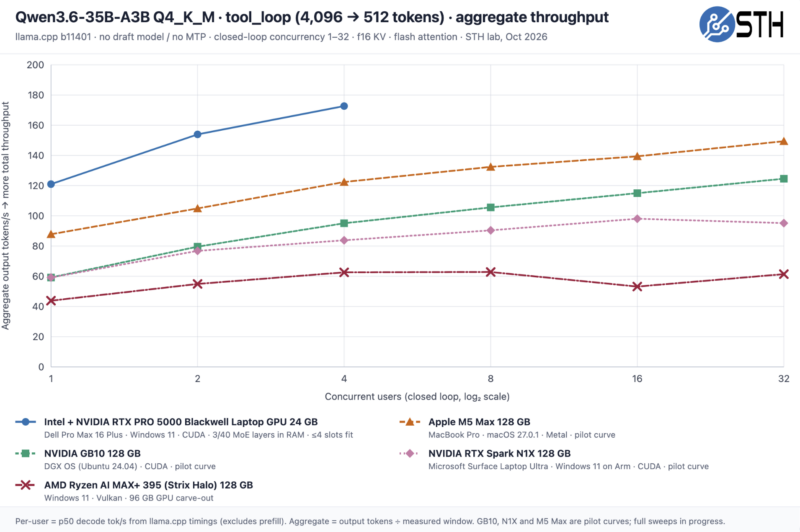
Even offloading a few layers to the CPU memory, the NVIDIA RTX PRO 5000 Blackwell is cooking here. Unfortunately, the setup fell over by the time we hit a c=8 concurrency because we just ran out of memory.
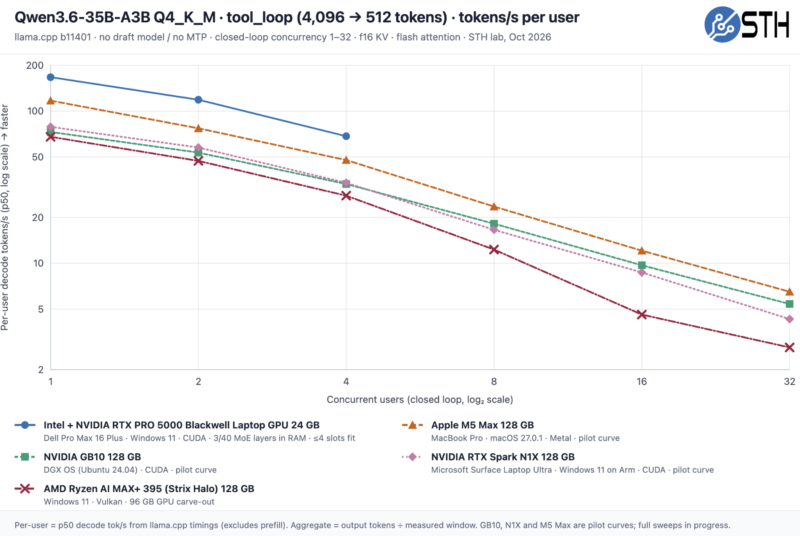
Taking a look at the tokens/ s per user, you can see that the sweet spot for most of these integrated solutions is probably c=1 to c=4 before you start impacting per-user Tokens/s too greatly.
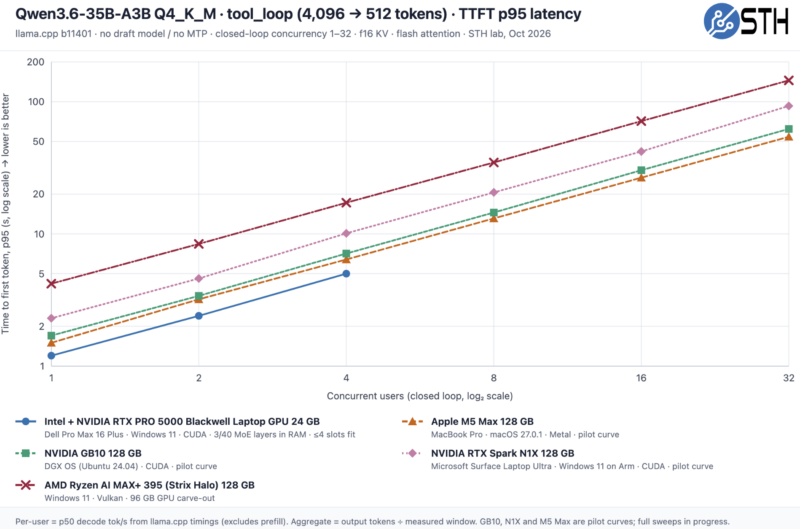
On a performance and latency side, you can see once we get past c=1 the GB10 starts performing a bit better than the N1X in the Surface Ultra Laptop, which we would expect because it has a higher power budget.
Just generating these AI performance charts takes so long now that each run is many hours, and that is if everything goes well. We have Qwen3.8-27B running, various input/ output token profiles, etc., but ultimately we ran out of time.
Qwen3.8-27B Performance
Qwen3.8-27B has become an extremely popular model. Again, this is using the tool_loop 4096 tokens input and 512 token output and llama.cpp without a draft model. This one is still in progress as we are going live, so we pulled these out, and we probably have enough where we can share the results:
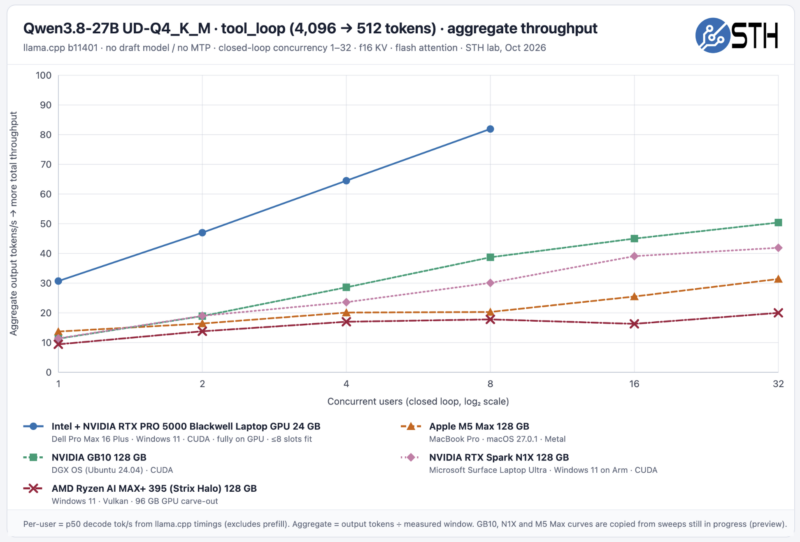
Here, the NVIDIA RTX Pro 5000 Blackwell laptop 24GB dGPU is just awesome. It puts out a lot of tokens and each user even up to c=4 is getting well over 20T/s/user.
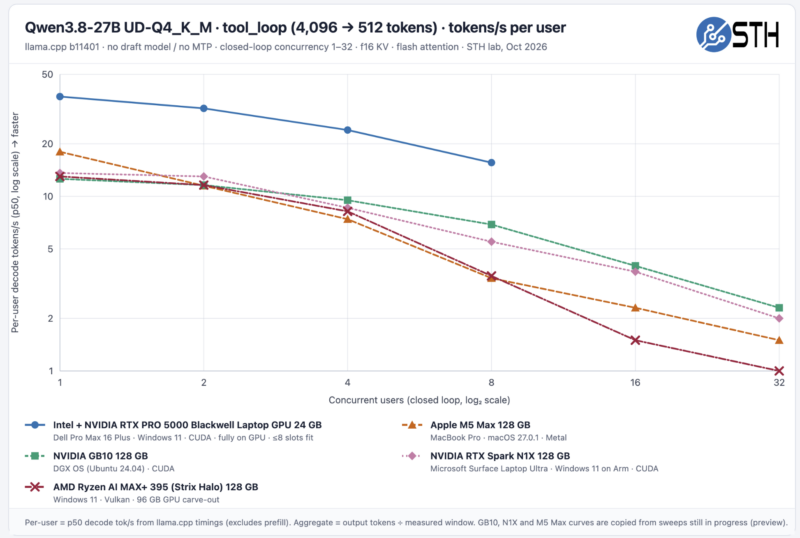
The Surface Ultra with the RTX Spark N1X is clearly performing similarly, but you can see a delta between it and the higher-power GB10.
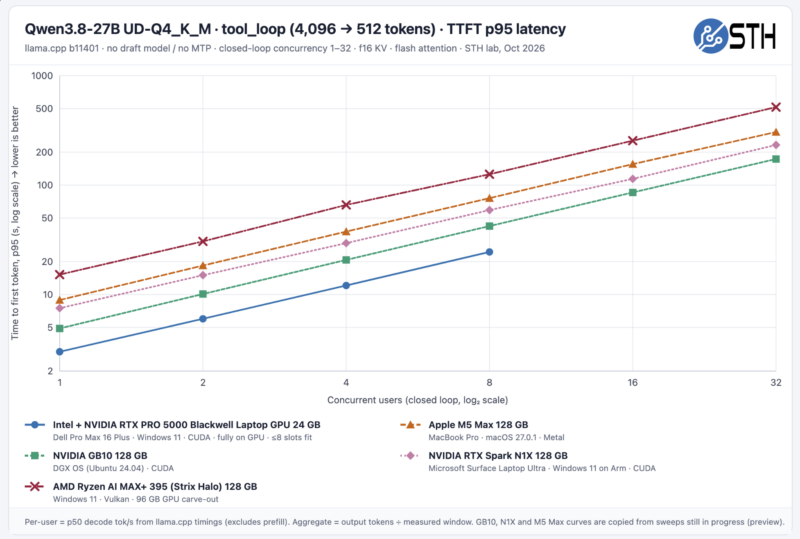
Overall, NVIDIA performs well here, but if you are using c=1-4 anyway, it probably makes sense to use a draft model to get much more usable performance. Just to give you a sense of why these can take a long time, a model-quantization-scenario-concurrency dot can take from a few minutes to an hour to generate and validate on these charts.
MLPerf v2.0.1 Performance
Next up, we have MLPerf v2.0.1:
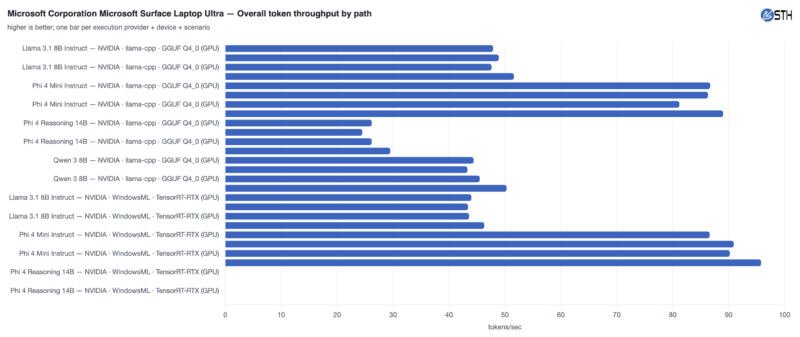
That was the easy path of data. If you have a giant monitor, here is the full run detail.
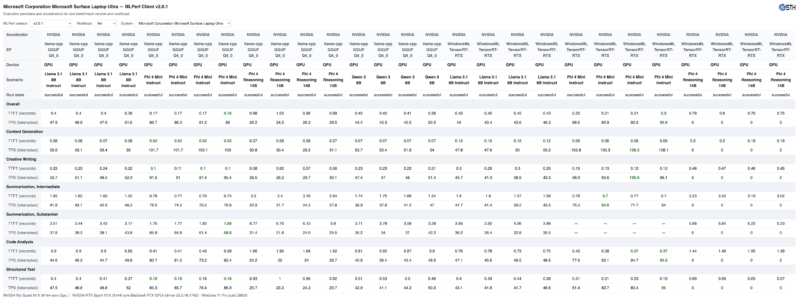
There is lots of data here, and this is only a two-week-old benchmark. You can download it and compare it to your system, or future results on STH.
AgentPerf
My guess is that you will see a lot of AgentPerf today because NVIDIA highlighted it in briefings. This is one where memory capacity is also important, which we found out the hard way with some lower capacity models. Actually, that is an interesting result itself because this is one where the minimum recommended spec is 32GB of memory, like a GeForce RTX 5090 Blackwell GPU, but the NVIDIA RTX PRO 5000 Blackwell laptop edition GPUs only have 24GB. As a result, they are not on our charts.
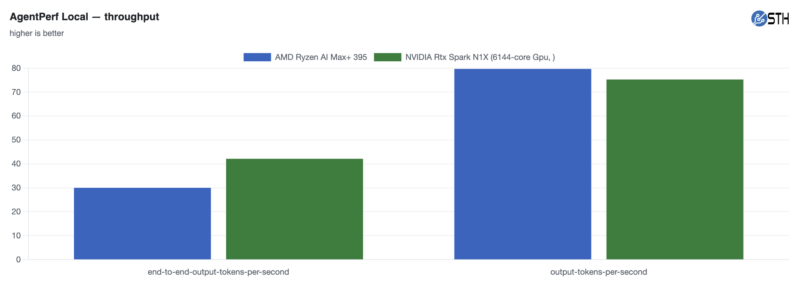
This is really where you would expect the NVIDIA solution to shine, and it did.
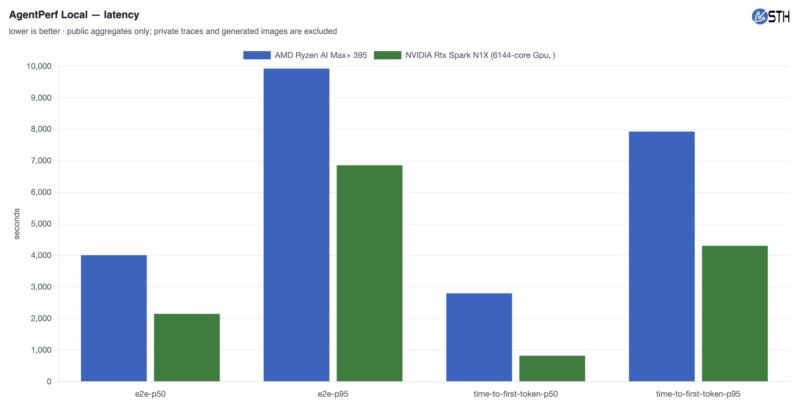
Just to make sure you are reading these right, for throughput, the higher bar is better. For latency, the lower bar is better. NVIDIA recommended this benchmark, and it did very well here.
Geekbench 7
On the Geekbench 7 side, we ran the single-core and saw the following:
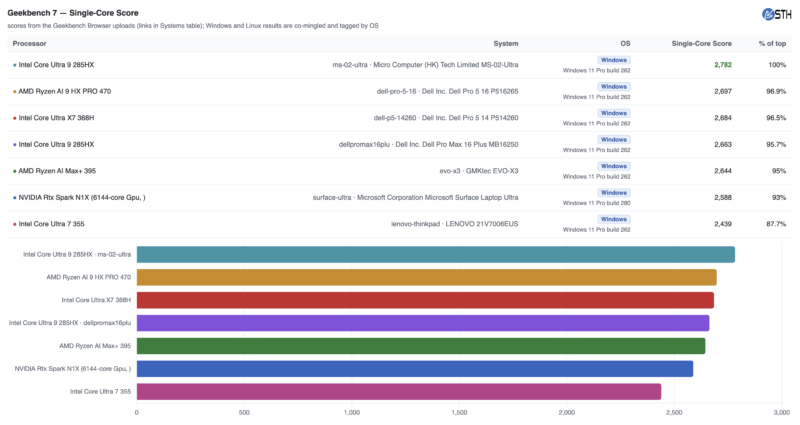
Importantly, the Intel Core Ultra 7 in the Lenovo X1 Carbon form factor is a very nice system to use. Other CPUs are faster at single-core performance, but I wanted to include that result because it shows what a modern, pleasant-to-use laptop’s single-core performance is. Many CPUs are faster than the N1X, but it is fast enough that it does not “feel” slow even if there is a difference in benchmark figures.
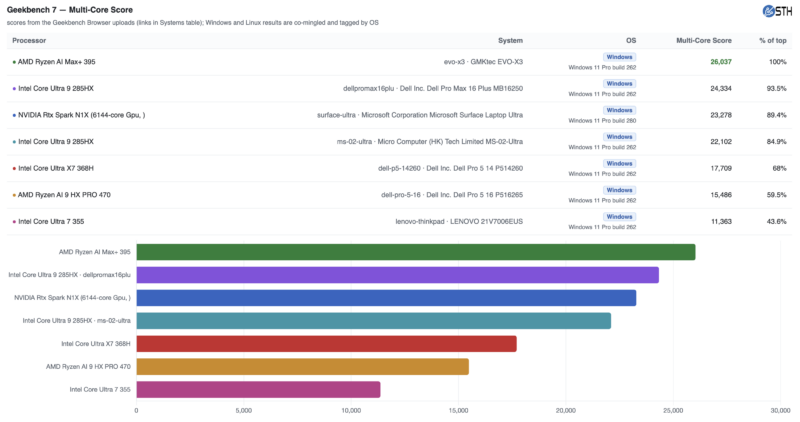
On the multi-core side, NVIDIA’s part does well.
For the GPU side, we are using Geekbench 7.1 results-only and just note the coloring changes because we are running different APIs.
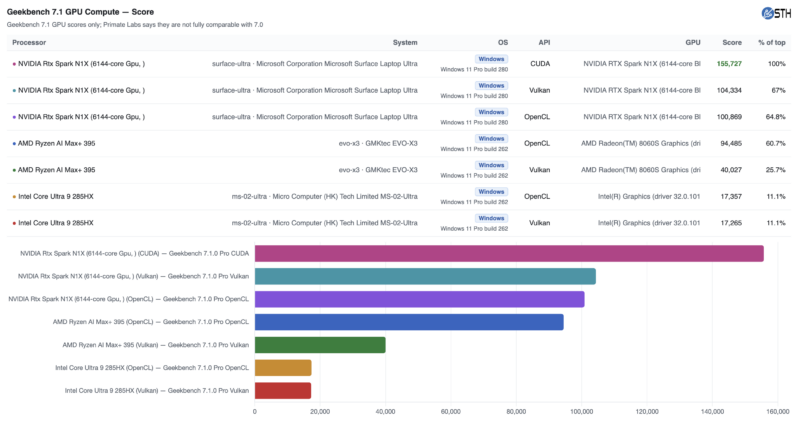
We are a long way from old-school integrated graphics. The AMD Ryzen AI Max+ 395 Vulkan results are particularly bad here because there is a bug in the fluid simulation pass on AMD. Since we found performance challenges with benchmarks like SPECviewperf v15.0.1 we thought we should also show these.
Next, let us talk a bit about the “so what” of all of this.