

Lenovo ThinkPad P16 Gen 3 Performance
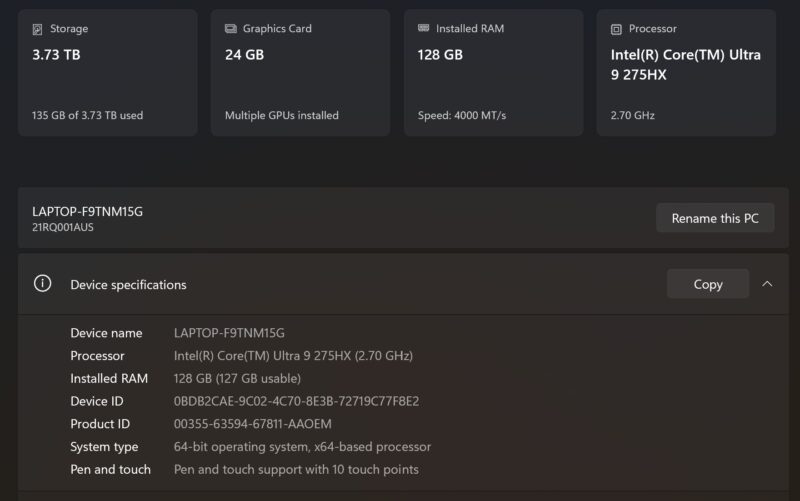
Under the hood, the P16 G3 is driven by an Intel Core Ultra 7 275HX processor, which is part of the Core Series 2 Arrow Lake-HX family. This is Intel’s high-performance mobile silicon, and is essentially a desktop chip in a mobile soldered (BGA) form factor. As a result, the Arrow Lake-HX gets the same 24 CPU cores that Intel’s desktop chips get – though it also comes with the more limited Intel Graphics (Xe-LPG architecture) integrated GPU. Thankfully, it also comes with the same I/O capabilities of the desktop processor, meaning there are more PCIe Gen5 lanes to work with than Intel’s mobile silicon.
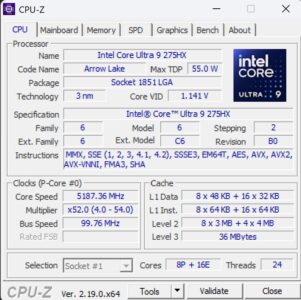
As a full-fat version of the Arrow Lake-HX chip, the 275HX gets access to all the hardware offered in Arrow Lake, with the eight performance (P) cores topping out at 5.4GHz. Meanwhile, backing P cores for highly threaded workloads is a further sixteen efficiency (E) cores, which have a peak clockspeed of 4.6GHz.
This specific system configuration also features NVIDIA’s RTX PRO 5000 Blackwell discrete graphics, which comes with its own 24GB of GDDR7 memory. This is NVIDIA’s high-end RTX PRO Blackwell part for professional/workstation laptops, and is based on the GB203 GPU (the same chip used in the desktop RTX PRO 4500 and RTX 5080). This is a very powerful chip, and for all practical purposes this is desktop-class hardware that can give all but NVIDIA’s best desktop cards a run for their money.
Lenovo pitches the P16 G3 as an AI laptop, and having access to the immense performance of the RTX PRO 5000 Blackwell and NVIDIA’s CUDA ecosystem certainly contributes to that.
The two GPUs are set up in a hybrid configuration, so even when the RTX PRO 5000 is fired up, the integrated GPU on the Core Ultra 7 275HX is still driving any connected displays as well as handling desktop duties such as video decoding and framebuffer passing.
Geekbench 6
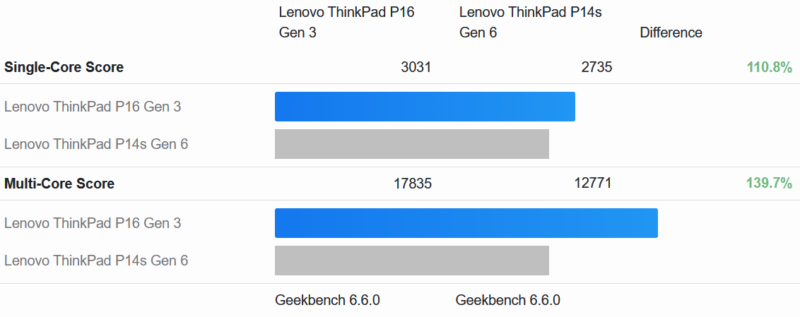
For our performance point of comparison we are using Lenovo’s smaller ThinkPad P14s Gen 6 (Intel), which we reviewed a few weeks back. With both laptops being based on an Intel CPU + NVIDIA GPU setup, this helps to illustrate the higher performance afforded by the larger P16 G3 laptop.
With both laptops based on the same CPU architecture, our Geekbench 6 CPU performance results are not terribly wild. Even with the architectural overlap, the desktop-class 275HX processor in the P16 does pick up about 11% in single-threaded testing just by virtue of its higher TDP, clockspeeds, and memory bandwidth. But the real gains are in multithreaded testing, where the P16 processor picks up about 40% more performance for 50% more CPU cores.
Meanwhile, since this laptop also has two GPUs, let us see how the two of them compare.
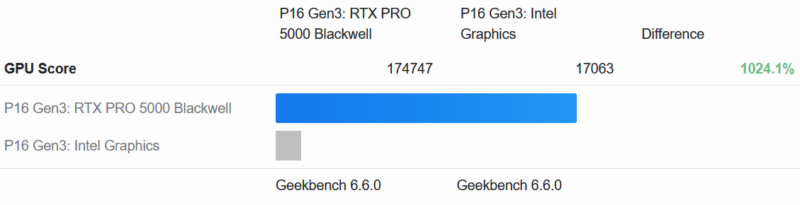
NVIDIA’s most powerful discrete GPU versus one of Intel’s less powerful integrated GPUs does not make for a fair fight. Going with the discrete RTX PRO 5000 Blackwell improves GPU compute performance under Vulkan by a factor of ten. In the P16, the integrated GPU is for desktop graphics and not much else.
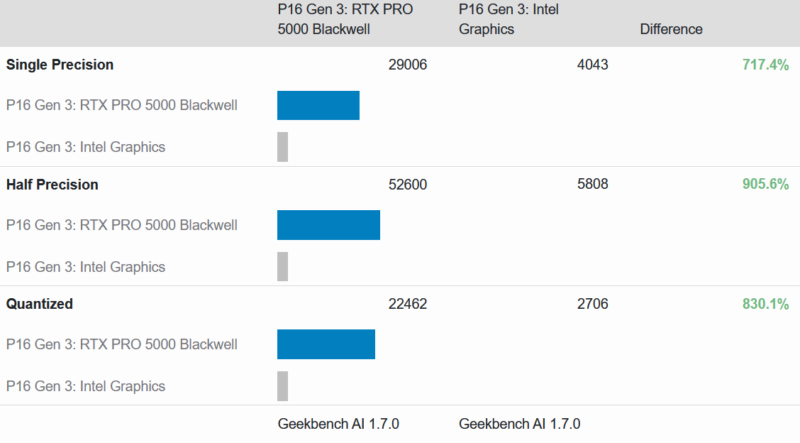
And it is much the story with Geekbench’s more AI-focused workloads. The RTX PRO 5000 is anywhere between seven and nine times faster.
Finally, here’s a look at how the ThinkPad P16 Gen 3 and P14s Gen 6 compare with their respective discrete GPUs.
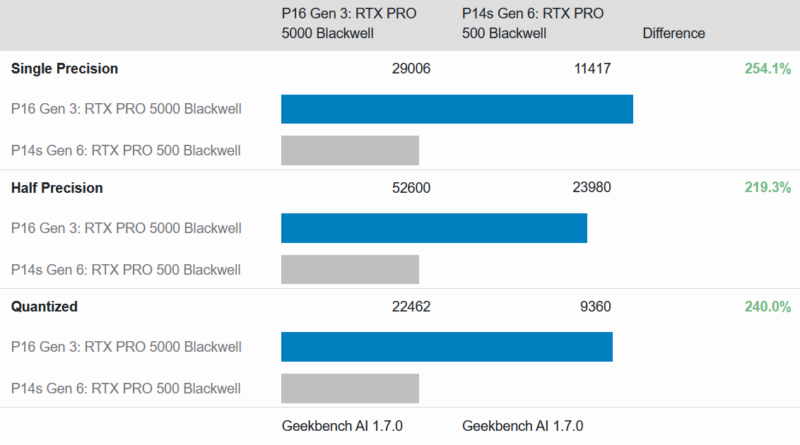
The gap is understandably much smaller here. The NVIDIA RTX PRO 5000-equipped P16 is about 2.5 times faster across the board. On paper, the RTX PRO 5000 is rated to be about five times faster than the entry-level 500 in terms of compute performance, and it is interesting that it is not reaching that full potential here. The RTX PRO 5000 Blackwell is quite a toasty chip on its own. OEMs can set their TGP as high as 175 Watts, so it is likely we are looking at the chip being held back by the P16. Of course, the other side of this is that a higher TGP means decreasing battery life at a rate greater than the increase in performance.
As powerful as Lenovo’s large laptop is, it still has some pretty tight TDP limits compared to how much power the desktop-class hardware inside can burn through if given the chance. Keep in mind that the laptop only ships with a 180 Watt power adapter, after all. Which means the large, power-hungry RTX PRO 5000 Blackwell does not get to fully spread its wings.



I tried searching for full size SD Express cards and couldn’t find any for sale. I hope that the reader also supports the slightly older UHS-II cards at full speed, because that’s what many cameras use and thus that’s what would actually be of some use today.
I have the older T15g gen 2 with a mobile Xeon and ECC RAM. I would really love Thunderbolt 5 and the flexibility of USB-C power delivery. In this DDR5 era, I don’t suppose I’ll ever see another option for ECC RAM though, and, as a Linux user, I’ve had a lot less trouble with AMD graphics, but that’s another option I’ll probably never see.
@Chris
While our review sample didn’t come with ECC memory, according to the spec sheet for the laptop it does support the tech. So you could configure a modern P16 with ECC if you’d like.
Removal of the beefy “Slim Port” and shifting to USB only charging on this latest generation of ThinkPad workstations means those of us who spend the majority of the time connected to mains power have effectively lost the use of a USB port. At least on this one you still have four free ports. But on the slimmer P1 with a charger and mouse receiver, you’re down to two. Yikes!
The only worry is those rear Thunderbolt 5 ports failing, and the
way USB-C ports can be fickle and brittle. And there have been
numerous issues with USB-C ports over the years. They are a known
weakness in many different models whenever they are soldered to
the motherboard.
It’s such an unnecessary weak point for such an impressive product that
the P16 Gen 3 is. They should really have given it proper thought and
mitigation, not rush it.
A problem with the TB5 ports leaves you without a computer, can have
you lose the whole machine because apparently, the whole motherboard
has to be replaced just because of a TB5 port which leaves you with no
way to charge the machine.
It should have a traditional barrel tip charging port alongside the TB5
as well for piece of mind. There should be insistence on Lenovo to correct
this.
Or there should be a version without TB5, with only TB4 together with
the traditional barrel tip charging port because there are many who absolutely
don’t need the massive data capacity of TB5, but need the peace of mind that
comes with replaceable/modular unsoldered TB4 and barrel charging ports.
Other than that, it’s a great piece of equipment.
Personally I would happily have that tradeoff for peace of mind and wait for a
solution that makes TB5 ports modular, not soldered.