

Lenovo ThinkPad P16 Gen 3 Internal Hardware Overview
Breaking into the P16 G3, as you would expect for a workstation-grade corporate laptop, Lenovo has used the space offered by the sizable laptop to offer some upgradability/repairability. End-user upgrades are pretty much limited to swapping out the SSD and memory (and maybe a battery), but with the right parts almost everything can be swapped out.
Removing several Phillips screws to unhook the bottom cover, we have a pretty typical full-size contemporary laptop.
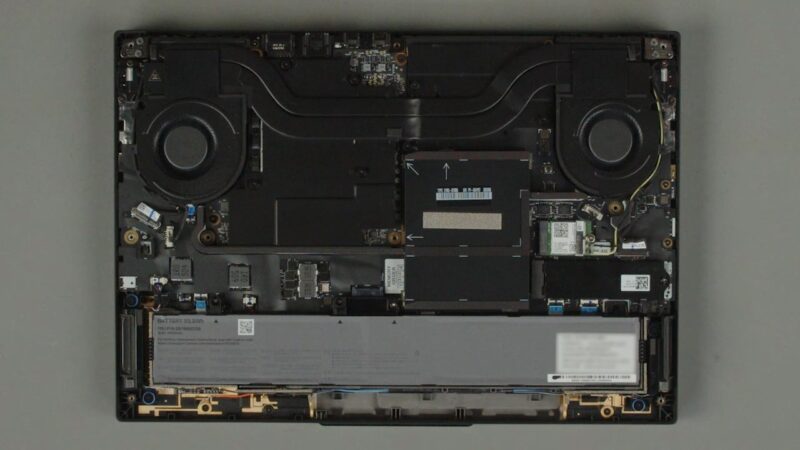
Lenovo designates the memory, SSD, and battery as all being customer-replaceable. All of which are held in with screws and clips.
Starting with the SSD, Lenovo has left nothing on the table with regard to SSD performance or capacity. The primary SSD slot, featured on the bottom of the laptop, is wired up to four PCIe Gen5 lanes coming from the CPU itself. As a result, Lenovo can pack in a PCIe Gen5 x4 SSD – a 4TB Samsung PM9E1, in our case – and run it at full performance.
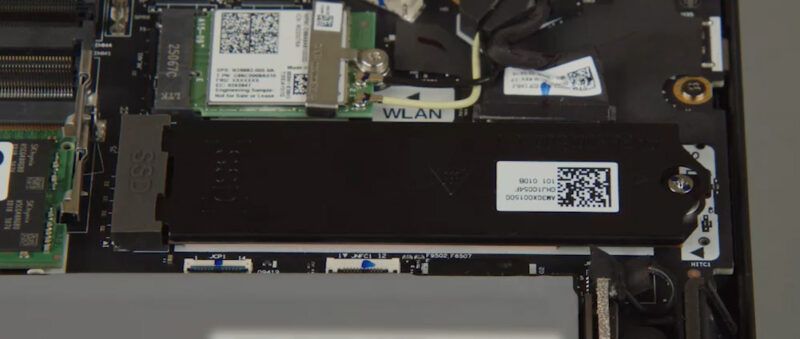
Lenovo includes a copper bracket/heatspreader over the SSD slot, so there is a fair bit of metal for heat soaking to help keep SSD performance up, even if the heatsink itself does not receive further cooling.
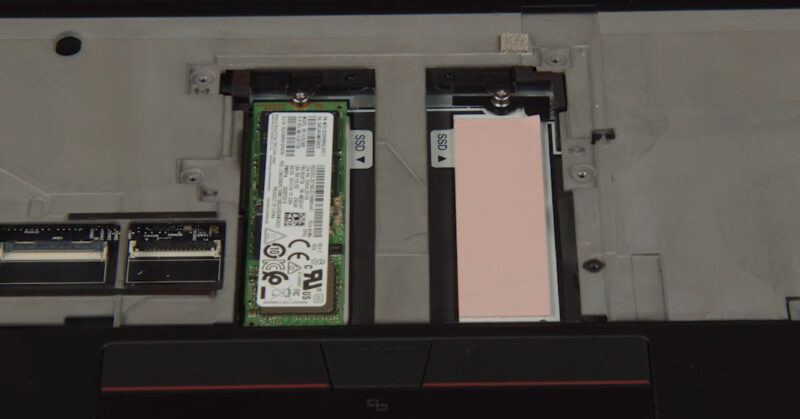
Meanwhile for even more storage capacity, the laptop features two more M.2 SSD slots, albeit in a more interesting location. Seemingly out of room on the bottom side of the laptop, Lenovo has placed them on the top side of the motherboard – effectively putting the slots underneath the keyboard. This means accessing the slots requires a bit more effort since the keyboard first needs removed, but it allows for two more PCIe Gen4 x4 slots and triples the laptop’s overall storage capacity compared to a single slot.
Moving on to system memory, as this laptop is based on Intel’s Arrow Lake-HX platform. This is essentially a BGA version of Intel’s desktop chip, and so the only memory supported is DDR5. Fittingly, Lenovo is using SO-DIMMs here, allowing for a great deal of memory to be installed and swapped out.
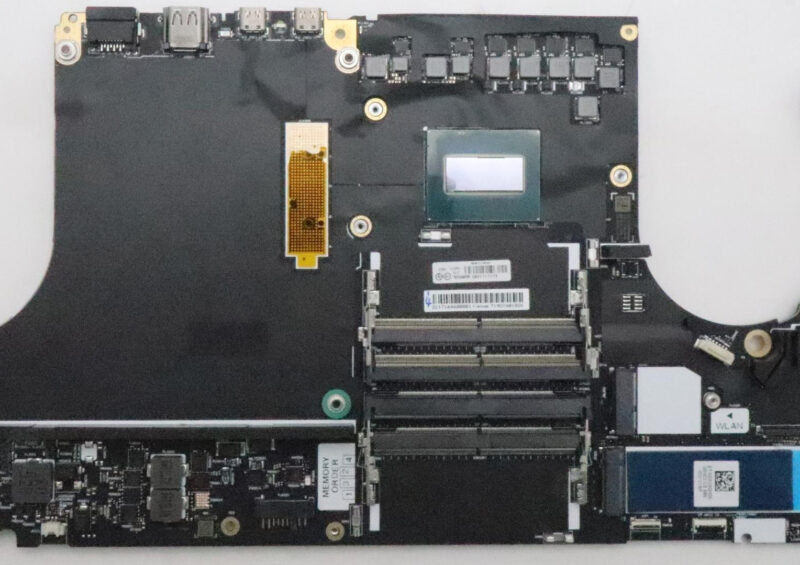
Altogether, there are 4 SO-DIMM slots, allowing the system to house up to 192GB of memory with today’s 48GB SO-DIMMs. Our review sample came with 128GB of memory installed in a 4x32GB configuration. And while spacious, this capacity does come with one drawback: memory speeds. 4 SO-DIMMs means running at 2 DIMMs per channel, which incurs a stiff memory frequency hit. In the case of the P16, that means dropping from DDR5-5600 to DDR5-4000 speeds. Thankfully, with a discrete GPU the memory bandwidth needs on the rest of the reduced, but high capacities still come with a trade-off.
Speaking of GPUs, Lenovo includes discrete NVIDIA RTX Pro Blackwell video cards with all of their P16 G3 configurations. In the case of our review sample, that means packing in NVIDIA’s top part, the RTX PRO 5000 Blackwell. Based on the GB203 GPU, this is paired with 24GB of GDDR7 memory.
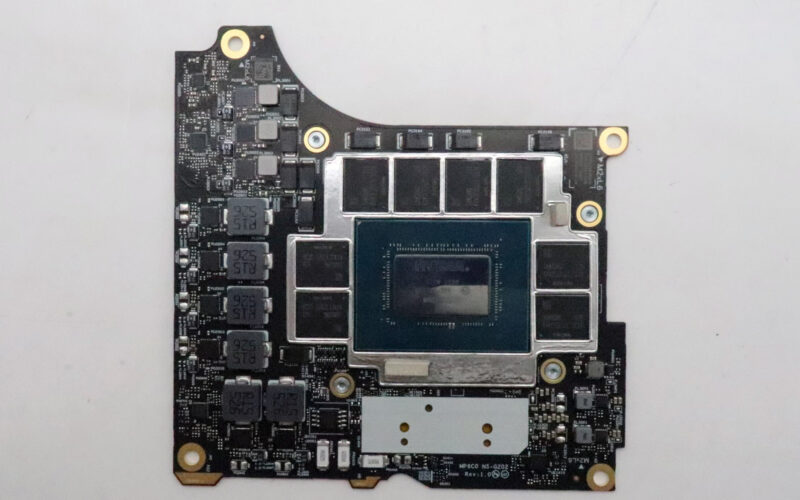
For anyone who has not dug around a high-end laptop in a while, these are all discrete cards. Lenovo relies on a compression connector to wire them to the rest of the system. Notably, these discrete GPUs do share a common cooler with the CPU, so the GPU and the CPU must carefully split the heat and power budgets of the P16.
Finally, a chunk of the laptop’s internal space is taken up by the battery. Though screwed into the laptop very well, this is a removable part (assuming you can find one down the line).
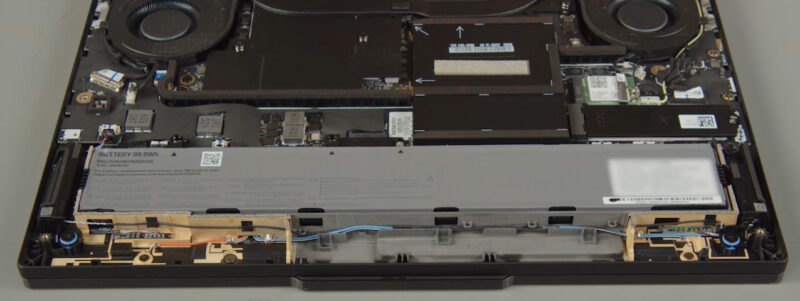
Lenovo uses a 99.9Wh battery here, which is the highest-capacity battery allowed on airplanes. Given how much power the CPU and GPU can draw under load, a higher-capacity battery would not be unwarranted. But this is as good as it gets.
Now, let us see what the laptop’s full performance is like.



I tried searching for full size SD Express cards and couldn’t find any for sale. I hope that the reader also supports the slightly older UHS-II cards at full speed, because that’s what many cameras use and thus that’s what would actually be of some use today.
I have the older T15g gen 2 with a mobile Xeon and ECC RAM. I would really love Thunderbolt 5 and the flexibility of USB-C power delivery. In this DDR5 era, I don’t suppose I’ll ever see another option for ECC RAM though, and, as a Linux user, I’ve had a lot less trouble with AMD graphics, but that’s another option I’ll probably never see.
@Chris
While our review sample didn’t come with ECC memory, according to the spec sheet for the laptop it does support the tech. So you could configure a modern P16 with ECC if you’d like.
Removal of the beefy “Slim Port” and shifting to USB only charging on this latest generation of ThinkPad workstations means those of us who spend the majority of the time connected to mains power have effectively lost the use of a USB port. At least on this one you still have four free ports. But on the slimmer P1 with a charger and mouse receiver, you’re down to two. Yikes!
The only worry is those rear Thunderbolt 5 ports failing, and the
way USB-C ports can be fickle and brittle. And there have been
numerous issues with USB-C ports over the years. They are a known
weakness in many different models whenever they are soldered to
the motherboard.
It’s such an unnecessary weak point for such an impressive product that
the P16 Gen 3 is. They should really have given it proper thought and
mitigation, not rush it.
A problem with the TB5 ports leaves you without a computer, can have
you lose the whole machine because apparently, the whole motherboard
has to be replaced just because of a TB5 port which leaves you with no
way to charge the machine.
It should have a traditional barrel tip charging port alongside the TB5
as well for piece of mind. There should be insistence on Lenovo to correct
this.
Or there should be a version without TB5, with only TB4 together with
the traditional barrel tip charging port because there are many who absolutely
don’t need the massive data capacity of TB5, but need the peace of mind that
comes with replaceable/modular unsoldered TB4 and barrel charging ports.
Other than that, it’s a great piece of equipment.
Personally I would happily have that tradeoff for peace of mind and wait for a
solution that makes TB5 ports modular, not soldered.