

Dollars to Donuts: Why This Matters
We also built a pricing model that asks a very simple question: if you save money by using DDR5-4800 instead of the faster memory option at the same channel count and capacity, how many additional EPYC cores could that buy? The next question is, what do we use for memory pricing? When Sam left recently to film at the Grand Ole Opry and other locations for a well-known country musician, a DDR5-6400 64GB RDIMM went for around $1500 on eBay. When he got back from the tour a few weeks later, those were getting close to $2000 each. Server OEMs have pricing that keeps increasing for DIMMs, but server OEMs also will set list prices anticipating 40-60% discounts.
So we did the best “open market” data point we could find. We looked up the lowest-priced listings on eBay for ECC RIDMMs with at least 24 available (enough to fill a single-socket 2DPC EPYC 9005 server), and the listings were not “for parts not working” or similar on May 1, 2026. We then used that data to determine how much different memory configurations would cost in a public auction market. The inputs used were $700 for a 32GB DDR5-4800 DIMM, $979 for a 32GB DDR5-6400 DIMM, $1,488 for a 64GB DDR5-4800 DIMM, and $1,990 for a 64GB DDR5-6400 DIMM. For 2DPC DDR5-5200 cells, we used DDR5-6400 pricing because the physical modules are the same, downclocked by the platform. When we checked, the listings for DDR5-5200 modules cost more than the DDR5-6400, so it did not make sense to include those. Is this the best or a perfect methodology? No. It is, however, one you can do yourself and get close to the correct answer. Especially since the price of memory modules is moving so fast.
Those assumptions need to be visible because the right answer changes with the DRAM market. If pricing moves, the method still works, but the savings and core-equivalent trade-offs move with it.
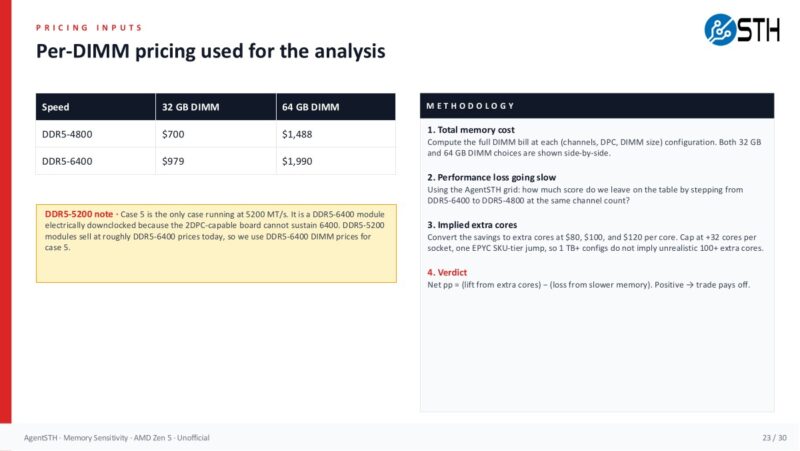
Once the pricing inputs are set, the next view shows how quickly the memory bill diverges across configurations. This is where the configuration discussion turns into a buying decision.
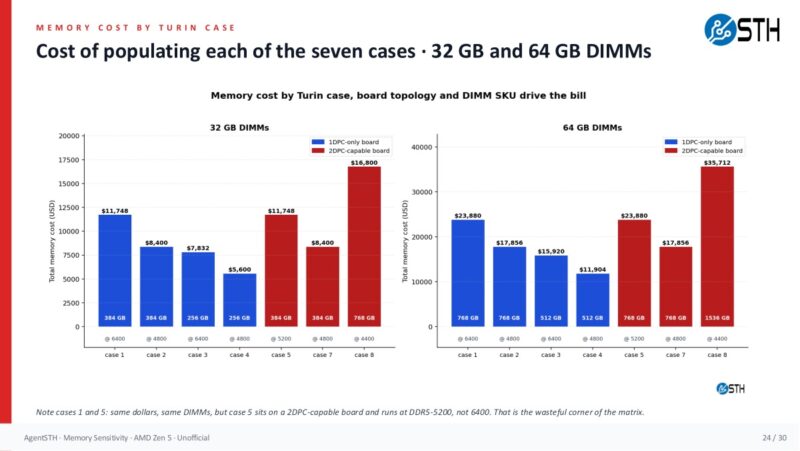
The savings scale quickly. A 4-channel 128GB configuration using 32GB DIMMs saves $1,116 by choosing DDR5-4800 instead of DDR5-6400. An 8-channel 512GB 2DPC configuration with 32GB DIMMs saves $4,464. A 12-channel 768GB 2DPC configuration with 32GB DIMMs saves $6,696. With 64GB DIMMs, a 12-channel 1.5TB 2DPC configuration saves $12,048. Those are not rounding errors. Those are CPU SKU jumps, extra nodes, or real budget recovered from the memory line item.
The pricing verdict model converted those savings into implied extra cores at $80, $100, and $120 per core, then compared the estimated lift from those cores to the performance lost by using slower memory. We capped the extra cores at +32 per socket to keep the large-memory cases realistic. Even with that cap, the trade paid off throughout this dataset. Once you started getting to $200/ core and under $1000/ 64GB DIMM, you would see a bit more action, but our model that worked in March was vulnerable to market pricing.
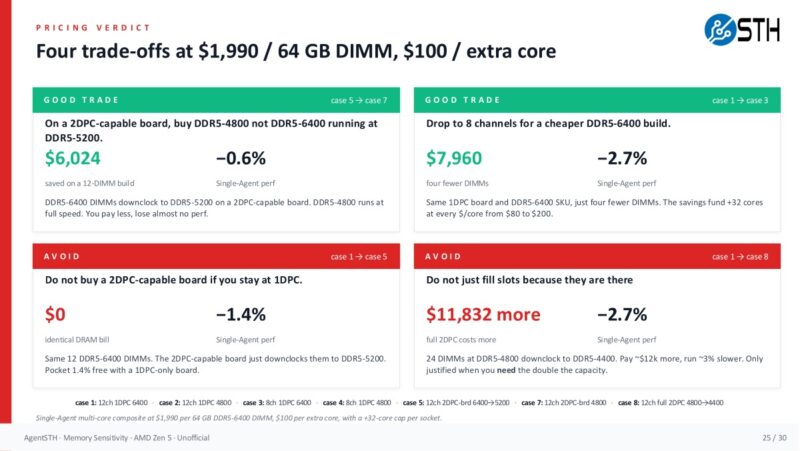
On the smaller 2-channel 64GB case, the savings from slower memory are only $558, but that still corresponds to roughly 4.7 to 7.0 extra cores depending on the $/core assumption. On larger EPYC-class configurations, the savings are large enough that the model hits the +32-core cap. The exact core pricing will change by vendor, SKU, discount, and quarter, but the decision framework is what matters. Compare the performance you lose from memory speed against the performance or capacity you can buy elsewhere.
There are caveats. If you are running STREAM-like memory bandwidth workloads, HPC, large in-memory databases, analytics jobs, cache-heavy services, or AI workloads that are genuinely bottlenecked by host memory bandwidth, do not take this as permission to starve memory. The memory-dimension subtests and several memory-heavy AgentSTH workloads clearly benefit from more channels and faster memory. Likewise, if you need future expansion on a specific node, empty slots have an option value. There is also operational value in standardizing DIMMs across a fleet. This is not a call to buy the slowest DRAM on the quote sheet. It is a call to stop assuming the fastest or largest DIMM is always the best use of the next dollar.
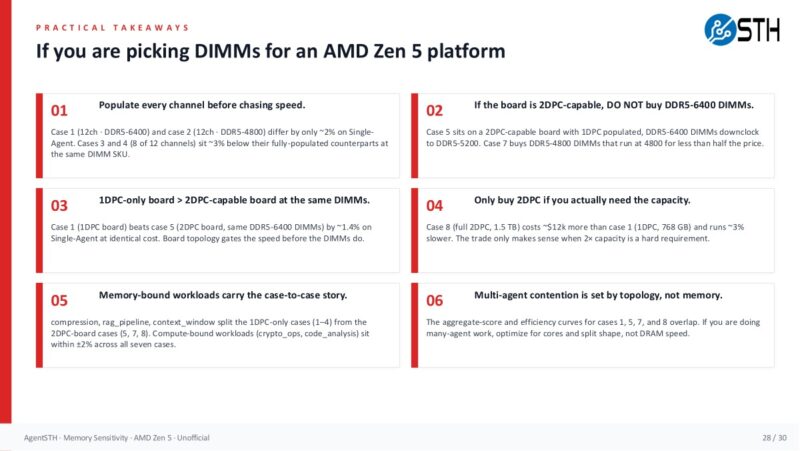
The practical rules are simple enough to audit against a quote. Populate channels before chasing speed, do not pay for a topology that downclocks the modules unless you need the capacity path, and only buy 2DPC when the capacity requirement justifies it.
The video also touches on CXL because it is another way to think about memory capacity. A CXL memory expansion device can add capacity through PCIe/CXL instead of consuming the primary DDR5 channels.
Hyper-scalers have access to deploy these to add capacity and bandwidth while recycling older DDR4 and DDR5. Hopefully, we get more mainstream CXL memory expansion devices because that is a way to relieve some of this pressure.
Perhaps the key message is to get the right amount of memory in the right place, then decide which workloads actually need the highest-bandwidth path.
What if We Are Wrong?
Post-implementation, it is probably worth doing a few things. Namely, continue monitoring instances to see whether actual memory usage and performance match expectations. If you found out that you had a workload that scales to about 95% of STREAM and you were not expecting that, then it would be a good reason to go to a higher-memory-bandwidth node.
Another thought I had while doing this is that you could actually mix memory types. For example, what if you installed 768GB in servers, but some were using high-capacity 1DPC memory, and others were running lower-cost 2DPC configurations, with the same capacity but lower speed? You would not run into VM or container migration issues because the underlying architectures are exactly the same. The difference is mainly that you would have more memory bandwidth in some nodes than in others, even if they all had the same capacity. If you have a portfolio of applications, then you can match workloads to the right servers.
Final Words
The old answer was easy: overprovision memory because it was cheaper than the operational pain of being wrong. That answer worked when memory was not the dominant hardware cost. In 2026, that answer can mean fewer servers, fewer cores, less storage, or slower refreshes. The first step is to profile what your workloads actually use, separating cache from working set and normal peaks from pathological pressure. The second step is to price the memory population that delivers that capacity with enough bandwidth for the workload.
Our data says that for this class of systems, channels matter more than speed, and cores often buy more real-world performance than premium DIMM speed once memory capacity is right-sized. The 128GB desktop/workstation example is the easiest one to remember: 4x32GB can be cheaper and faster than 2x64GB because it populates more channels. The EPYC-class model extends the same idea: once every channel is populated, the extra spend on faster memory has to clear a workload-specific bar, and in many mixed server environments, that bar may be higher than expected.
For folks running memory-bandwidth benchmarks, HPC codes, in-memory databases, or large analytics pipelines, buy the memory subsystem your workload demands. For everyone else, the practical workflow is simple. Measure memory usage, determine the real capacity requirement, populate channels intelligently, and then decide whether the next dollar should go to faster DIMMs or more cores. In a year when memory pricing hurts this much, that question is worth asking before every server purchase, or even evaluating VM or cloud instance use.
For our readers, you can do this in 2026 or miss out on the opportunity. I always tell people that the purpose of much of what we do at STH is to teach folks skills they can use to advance their careers. Using AI to strike back at the AI infrastructure’s spike in memory prices is a great example of this.


This is a really top-tier idea. I’ll say we deployed a firewall with ddr4 instead of ddr5 generation because of the memory
That’s such neat data. Intel and AMD they’ve got similar foils but I’m elated to see there’s some other data for this. We’re using 512G per cpu because we don’t need the extra ram
Good article! But a small criticism, about the conclusion: “For folks running memory-bandwidth benchmarks, HPC codes, in-memory databases, or large analytics pipelines, buy the memory subsystem your workload demands.”
Did someone cut/paste that from your AI output?? I do not see “memory-bandwidth benchmarks” as a common workload, and if you’re doing that, you will obviously be using all the different memory subsystems…
I’m here for page 2
Will this have any effect on my ram stonks?
justsomeguy – I am not a huge fan of STREAM being used for saying how fast one CPU generation is versus another, so that is my little nod to that.
Patrick- Fair point, but I don’t think that text gets it across well (or at all).
Of course, as with every other benchmark, it really depends on what your application is. If it’s heavily dependent on memory bandwidth then STREAM is exactly what you want to use. But I think this topic is really orthogonal to this article, and probably widely agreed on, anyway.
@Patrick Imagine you have benchmark data that also include STREAM, for a plethora of configurations . Then you could throw your AI on the task of finding out which workload (as represented by a particular benchmark) correlates to STREAM performance, and maybe other micro benchmarks, like memory latency (or combination thereof). Then you can categorize workloads as compute bound, bandwidth bound, latency bound, etc. emprically and not just on a hunch. Would be interesting to see.
Or shall I propose that to Phoronix ;)
Nikolay Mihaylov – We have all of that in the more detailed data set. Actually, the AgentSTH is broken down by throughput bound, memory bound, and etc categories. It also runs lmbench on configurations. We had to do that profiling so that way we did not end up with an odd mix and weighting. The ultimate goal is to get something more like Geekbench that folks can run and get a composite score, and then see breakdowns of each.
All good if you want to propose it to Michael. I always enjoy getting a beer with him and we text often.
Skimming the wall of text and I still have no idea what to buy :)
I found this very interesting. Those users of large-scale servers probably found this very helpful and probably intuitive, but it’s really nice to have empirical data to back up what we “think” is the right architecture. For the small workstation user this is less helpful, but still good to know from a $ investment perspective.
Well done, thanks