

Saving Money on Memory Population
Once we know the capacity target, the second question is how to populate the memory. This is the part that sounds simple until you price the DIMMs. If we need 128GB, should we buy 2x64GB and leave channels open for future expansion, or buy 4x32GB and fill more channels? If we need 768GB in a 12-channel server, do we use one larger DIMM per channel, or two smaller DIMMs per channel and accept a lower memory speed? Those questions matter because modern CPUs have many cores waiting on memory. They also matter because the lower-capacity DIMM configuration can sometimes cost less while performing better.
For the first dataset, we used the Xidax Threadripper system with the same total 128GiB capacity in four configurations: 2x64GB at DDR5-4800, 2x64GB at DDR5-6400, 4x32GB at DDR5-4800, and 4x32GB at DDR5-6400. That let us separate two effects: memory channels and memory speed. The clean baseline is 2-channel DDR5-6400, because it is the worst channel count at the best speed. From there, the data gets very practical very quickly.
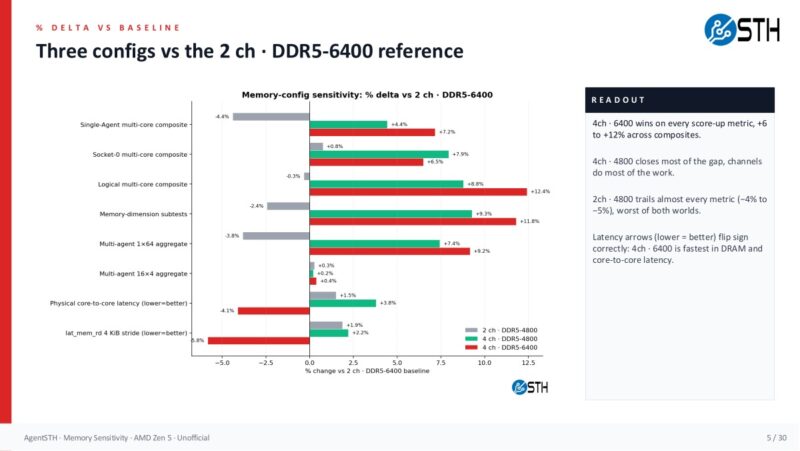
The headline result is that channels do most of the work. Moving from 2-channel DDR5-6400 to 4-channel DDR5-4800 raised the single-agent multi-core composite by 4.4 percent, the logical multi-core composite by 8.8 percent, the memory-dimension subtests by 9.3 percent, and the multi-agent 1×64 aggregate by 7.4 percent. That is the slower memory speed, but with more channels populated. Moving all the way to 4-channel DDR5-6400 gave the best result, with +7.2 percent single-agent, +12.4 percent logical, +11.8 percent memory-dimension, and +9.2 percent multi-agent 1×64.
That matters because the 128GB pricing comparison is almost comical. Using the pricing model in the workbook, 2x64GB DDR5-6400 costs $3,980. The 4x32GB DDR5-6400 configuration costs $3,916, so it is slightly cheaper and faster. Even more interesting, 4x32GB DDR5-4800 costs $2,800. That is $1,180 less than the 2x64GB DDR5-6400 baseline while still being faster on the multi-core and memory-sensitive scores because the CPU has twice as many memory channels populated. This is the kind of place where “buy fewer, larger DIMMs” can be the wrong answer if you are not truly planning to expand that exact node later.
Here is the broader grid view that extends the idea to 8-channel and 12-channel Zen 5 territory. The 2-channel and 4-channel rows are from the 4-channel platform, while the 8-channel and 12-channel rows are for EPYC 9575F using the measured 4-point dataset. The important shape is still the same: speed steps help, but channel steps are larger.
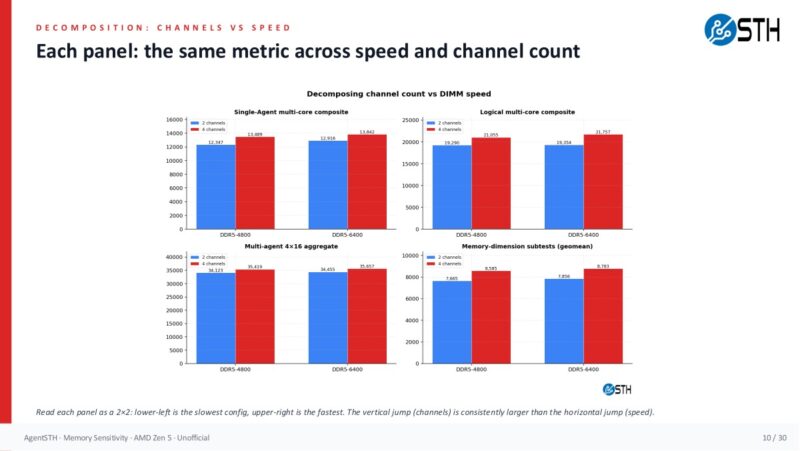
On the EPYC side, this becomes a buying-decision tool. At 12 channels, DDR5-4800 versus DDR5-6400 is not free performance, but the modeled difference is modest for many aggregate workloads. In the 12-channel rows, the single-agent composite goes from 14,829 at DDR5-4800 to 15,134 at DDR5-6400, roughly a 2.1 percent lift. The logical multi-core composite goes from 25,497 to 26,670, around 4.4 percent. The memory-dimension score goes from 9,998 to 10,217, around 2.1 percent. If your workload is directly memory-bandwidth-bound, you may absolutely want the faster memory. If you are running more general virtualization, CI, web, storage, orchestration, or mixed services, those deltas may be smaller than the gain you get from buying more CPU cores or another node.
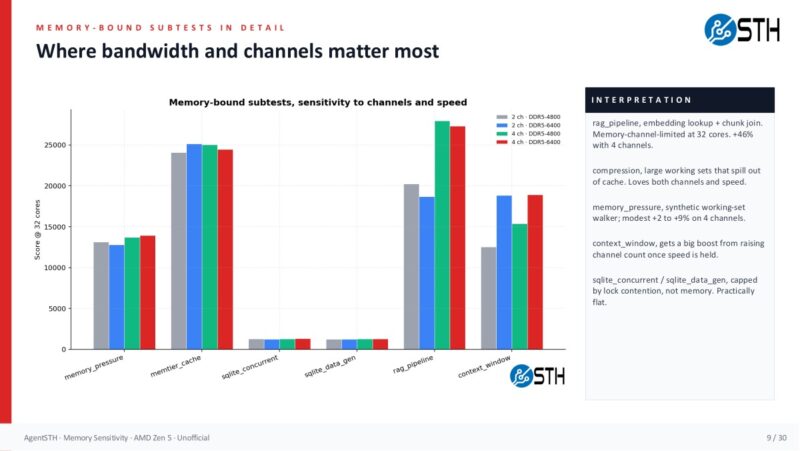
The subtests show why blanket rules are dangerous. Compression and RAG-style pipeline work loved more memory bandwidth. The RAG pipeline, compression, JSON serialization, reflection loop, and memory pressure tests moved the most. Crypto operations, inference loop, code analysis, and MCP protocol tests were mostly flat. In other words, memory population matters, but it matters unevenly. The correct answer is not “always buy slow memory.” The correct answer is “profile the workload, then buy the cheapest memory configuration that does not become the bottleneck.”
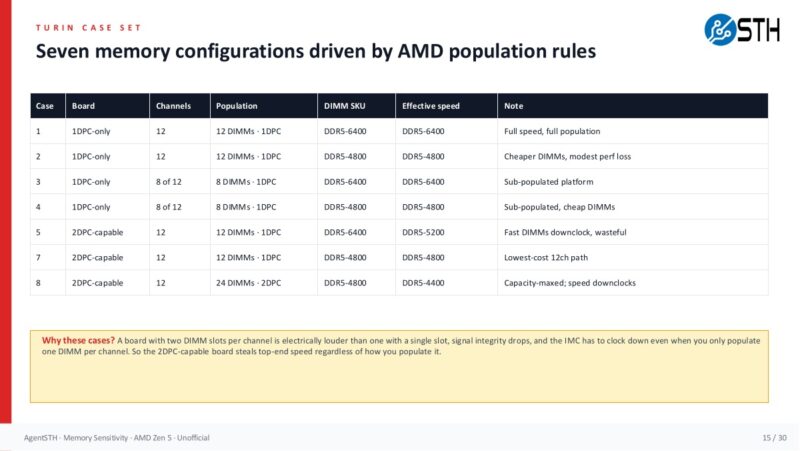
The 2DPC wrinkle is also important. On EPYC platforms, two DIMMs per channel can mean a lower supported data rate. In the model here, DDR5-5200 appears only in the 8-channel and 12-channel 2DPC cases because the same faster module is electrically downclocked. That sounds scary, and for some workloads it will be. Still, the 12-channel numbers suggest the downclock itself is often not the whole story. A 12-channel DDR5-5200 2DPC configuration is close to the 12-channel DDR5-6400 1DPC configuration on the single-agent and memory-dimension composites, while trading more slots and more DIMMs for capacity flexibility.
The EPYC case set is where the article moves from a simple two-versus-four-channel example into the sort of population question buyers actually face on higher-end servers. Board topology, the number of populated channels, and the DIMM SKU all interact.
The bigger point is that once you have a capacity target from monitoring, you can price actual configurations instead of buying by habit. If the monitored estate says a class of servers needs 384GB, then 12x32GB may be a better fit than 12x64GB. If it needs 768GB, then 24x32GB at a slower supported speed may be worth modeling against 12x64GB at a faster speed. If the p95 working set says 512GB is enough, then buying 1TB because the last generation had cheaper memory is no longer harmless. That money may be the difference between a higher-core CPU, more NVMe, better networking, or another server.
Now that we have an idea of the memory capacity we need and how we should best reach that capacity, the question becomes: Should we spend more for faster memory configurations or more cores to improve performance? Let us get to that next.


This is a really top-tier idea. I’ll say we deployed a firewall with ddr4 instead of ddr5 generation because of the memory
That’s such neat data. Intel and AMD they’ve got similar foils but I’m elated to see there’s some other data for this. We’re using 512G per cpu because we don’t need the extra ram
Good article! But a small criticism, about the conclusion: “For folks running memory-bandwidth benchmarks, HPC codes, in-memory databases, or large analytics pipelines, buy the memory subsystem your workload demands.”
Did someone cut/paste that from your AI output?? I do not see “memory-bandwidth benchmarks” as a common workload, and if you’re doing that, you will obviously be using all the different memory subsystems…
I’m here for page 2
Will this have any effect on my ram stonks?
justsomeguy – I am not a huge fan of STREAM being used for saying how fast one CPU generation is versus another, so that is my little nod to that.
Patrick- Fair point, but I don’t think that text gets it across well (or at all).
Of course, as with every other benchmark, it really depends on what your application is. If it’s heavily dependent on memory bandwidth then STREAM is exactly what you want to use. But I think this topic is really orthogonal to this article, and probably widely agreed on, anyway.
@Patrick Imagine you have benchmark data that also include STREAM, for a plethora of configurations . Then you could throw your AI on the task of finding out which workload (as represented by a particular benchmark) correlates to STREAM performance, and maybe other micro benchmarks, like memory latency (or combination thereof). Then you can categorize workloads as compute bound, bandwidth bound, latency bound, etc. emprically and not just on a hunch. Would be interesting to see.
Or shall I propose that to Phoronix ;)
Nikolay Mihaylov – We have all of that in the more detailed data set. Actually, the AgentSTH is broken down by throughput bound, memory bound, and etc categories. It also runs lmbench on configurations. We had to do that profiling so that way we did not end up with an odd mix and weighting. The ultimate goal is to get something more like Geekbench that folks can run and get a composite score, and then see breakdowns of each.
All good if you want to propose it to Michael. I always enjoy getting a beer with him and we text often.
Skimming the wall of text and I still have no idea what to buy :)
I found this very interesting. Those users of large-scale servers probably found this very helpful and probably intuitive, but it’s really nice to have empirical data to back up what we “think” is the right architecture. For the small workstation user this is less helpful, but still good to know from a $ investment perspective.
Well done, thanks