

Minisforum MS-02 Ultra Internal Hardware Overview
Opening up the Minisforum MS-02 Ultra, one of the things that pictures do not capture very well is just how easy it is to get inside of this mini-PC. Removing two screws from the rear of the system is all it takes to release the chassis, allowing it to slide right off to access the internals.
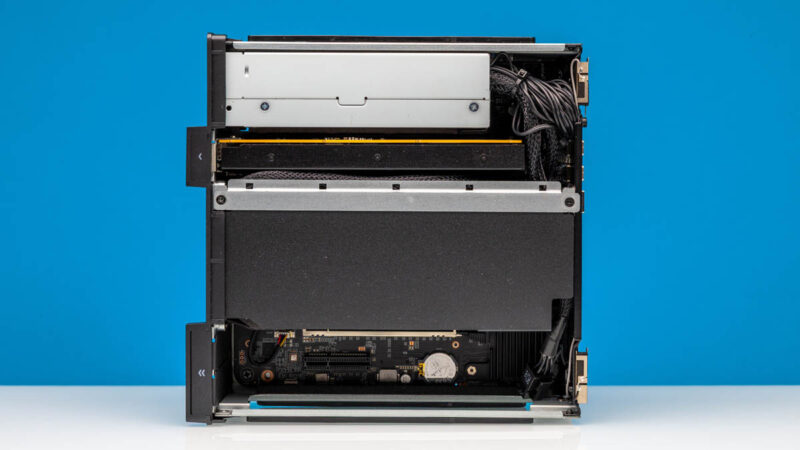
There is a lot to digest here at first when looking inside the MS-02 Ultra, but what we are looking at is essentially a system split up into three bays. The top bay houses the internal power supply, and Minisforum’s included 25GbE networking card. Meanwhile, a middle bay literally covers the cooling for the CPU and chipset. And finally, there is an empty lower bay with two PCIe slots for additional expansion cards.
Removing the sheath over the CPU bay gives us a bit of a better look of how the cooling for the system works. The heatsink over the CPU is sandwiched between both intake and exhaust fans, allowing the system to forcefully channel quite a bit of airflow through the system’s major heatsinks.
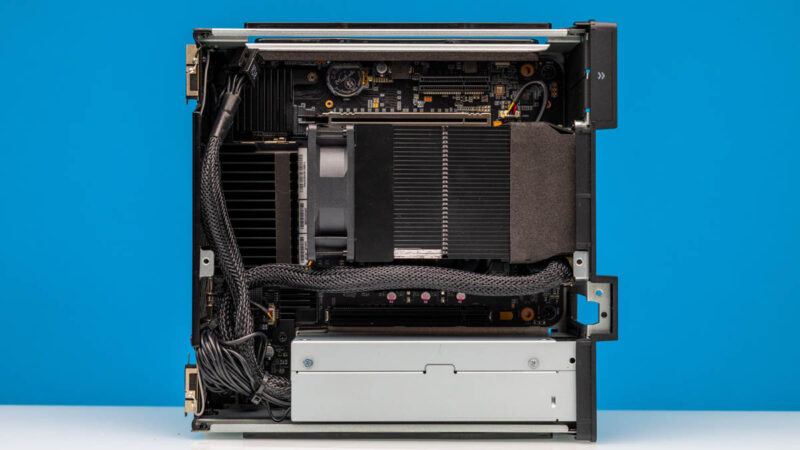
These fans are exclusively for the mid bay, so they do not provide airflow to either the top or bottom bays.
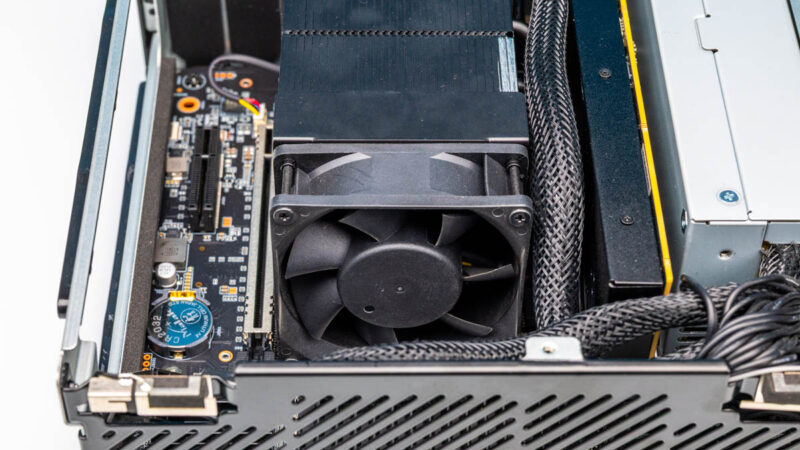
Underneath the very well secured heatsink is the Intel Core 9 Ultra 285HX SoC that forms the heart of the machine. The HX series is technically a mobile part based on Intel’s desktop hardware – albeit in a BGA package – and it is also a good fit for mini-PCs due to its binning for lower power consumption while still featuring all of the CPU cores found in Intel’s flagship desktop hardware.
Buried underneath all of that is also the system’s chipset, Intel’s WM880, which is responsible for enabling ECC support as well as some of the vPro management features the system supports.
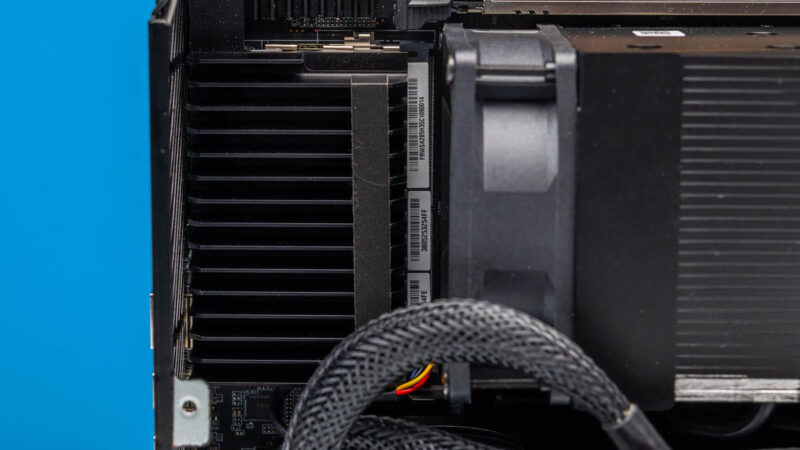
Next to that – and underneath yet another heatsink – are the two primary SO-DIMM slots for memory. While Minisforum was nice enough to put a heatsink over these SO-DIMMs in this packed system, it means that swapping out the pre-installed memory is not an easy task: you will have to remove that heatsink to get access to the SO-DIMM slots. Thankfully, the other two SO-DIMM slots on the rear of the system are easier to get to (more on that in a moment).
Speaking of memory, Minisforum has opted to be surprisingly conservative with its memory clock speeds. While Intel has validated the 285HX for using DDR5 CSO-DIMMs in a 1 DPC configuration at up to DDR5-6400 speeds, Minisforum’s default clockspeed for a 1 DPC setup is just DDR5-4800. And that drops to DDR5-4400 in a 2 DPC configuration or with a high number of memory ranks.
According to the company’s documentation, they are playing things safe here with regards to stability. But it means that they are leaving memory bandwidth on the table.
Speaking of memory stability, the MS-02 Ultra is also in rare company thanks to its support for ECC memory. Now, ECC SO-DIMMs were not easy to find even before DDR5 memory prices exploded (RIP Crucial), so getting access to them in February of 2026 is a bit of a challenge. But if you can, then the system can accommodate up to 256GB of ECC DDR5 memory. At present, the best bet for getting ECC memory at all is going to be to order one of Minisforum’s pre-built configurations with ECC memory included – they offer both 32GB and 192GB pre-builts there.
Moving on, we have the lower PCIe bay, which houses a pair of PCIe slots.
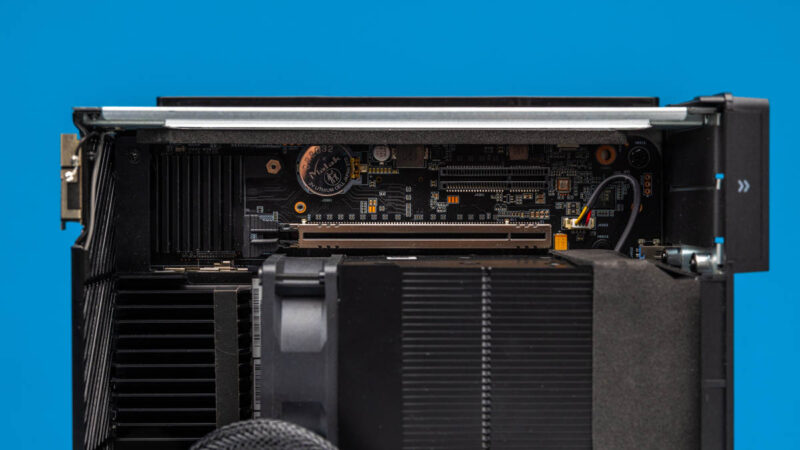
There is well-armored full-size CPU-fed PCIe Gen5 x16 slot here meant for high-bandwidth expansion cards (e.g. video cards), as well as a PCH-fed PCIe Gen4 x4 slot next to that. The primary use case for this bay is to allow the system to accept double-wide half-height video cards – which are the only new half-height video cards being made these days – however if you only end up using a single-wide card, then that opens up the x4 slot for a second PCIe card. In the context of a home lab node, it is worth mentioning that another nice use of this is being able to change video cards. We ended up removing the Gigabyte NVIDIA RTX 5060, adding a Sparkle Intel Arc A310 4GB (which was a mistake), and then decided to just add two 4-port NICs in this space. That flexibility is what many previous and smaller mini PCs lacked. If your needs changed, you were stuck. With the MS-02 Ultra, you can adapt.
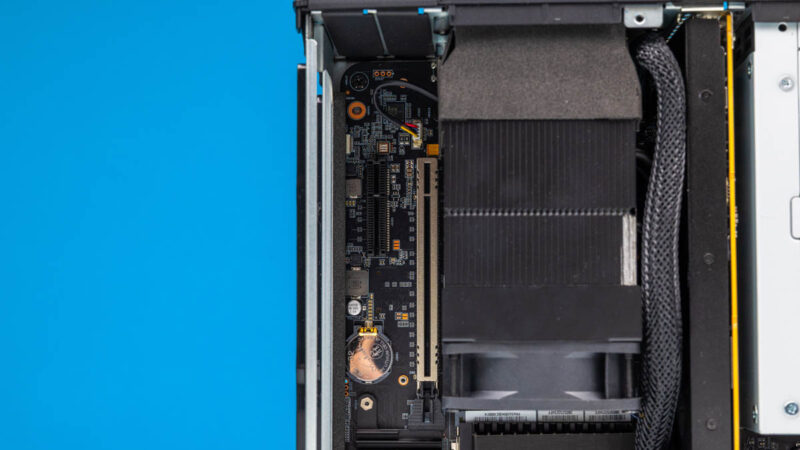
The MS-02 Ultra’s chassis does not provide any active airflow for this bay, so any high-performance cards will need to bring their own cooling. Meanwhile, it is worth noting that with just a 350 Watt power supply, the MS-02 Ultra cannot accept any wildly powerful cards, though a single 8-pin PCIe power cable is available to allow for using cards that run at over 75 Watts. Be advised, however, that the MS-02 Ultra’s BIOS is programmed to step down the TDP of the CPU if a video card is installed in order to keep the system within limits.
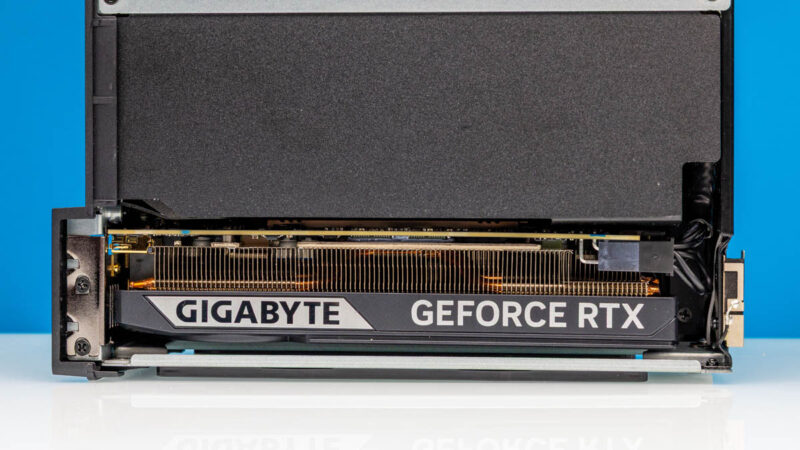
The final stop on the front side of the MS-02 Ultra is the top bay, where the system’s internal PSU and 25GbE networking card sit. The power supply itself is unremarkable; it is not easily removed and connects to the system’s motherboard via a standard ATX power connector.
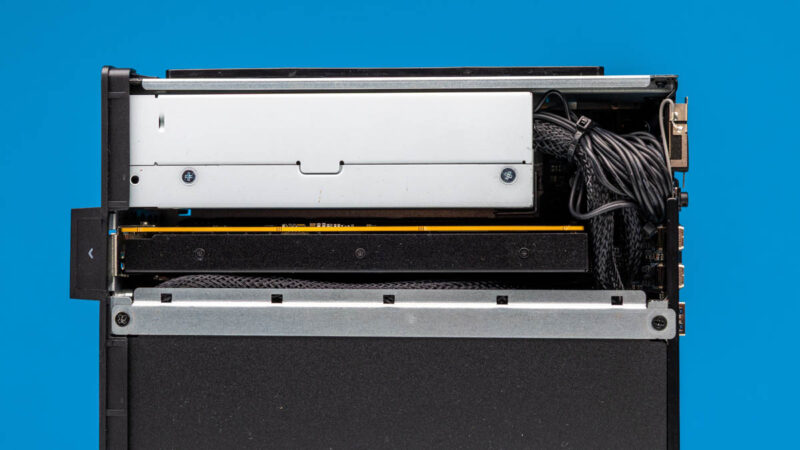
What is more remarkable is Minisforum’s 25GbE networking card, and the PCIe x16 slot it goes in to.
For better or worse, the PCIe slot itself is semi-proprietary. While it uses a PCIe x16 form factor, it is not wired up as a proper x16 slot – or even a proper x8 slot. Instead, Minisforum has wired it up as a trio of x4 slots, pulling the final 4 PCIe lanes from the SoC, and another 8 PCIe lanes from the chipset. This affords more bandwidth than would otherwise be available in such a space-limited chassis (you would otherwise need another PCIe slot), but it means a card needs to be designed to take advantage of this unusual split configuration. Otherwise, for traditional PCIe cards, it behaves as a PCIe Gen4 x4 slot.
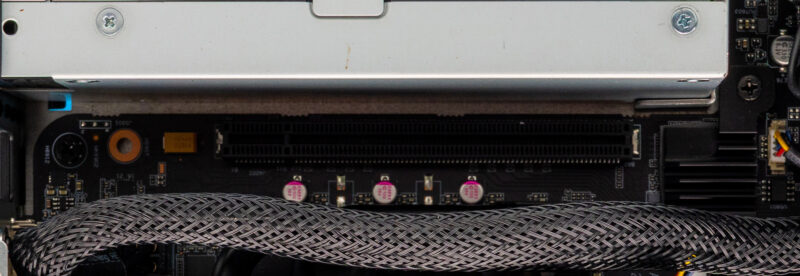
So what is Minisforum doing with their unusual PCIe slot? Two things, as it turns out. The 25GbE NIC included with the 285HX version of the system includes a pair of 25GbE ports powered by Intel’s E810 network controller. It also houses a pair of M.2 NVMe slots, giving the 285HX model a total of four M.2 slots for storage.
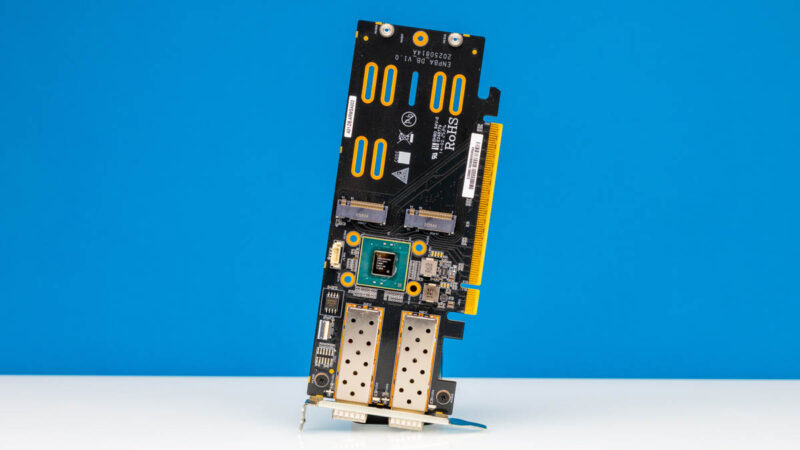
In the consumer world, we have seen the occasional video card with M.2 slots included. But this is a bit more unique in pairing up a NIC with M.2 slots. The E810 controller itself is fed by the 4 PCIe Gen4 lanes coming from the CPU, ensuring minimal latency and no PCIe bandwidth contention with other devices hanging off the chipset. Meanwhile, the two M.2 2280 slots are presented to the chipset as, well, a pair of M.2 slots.
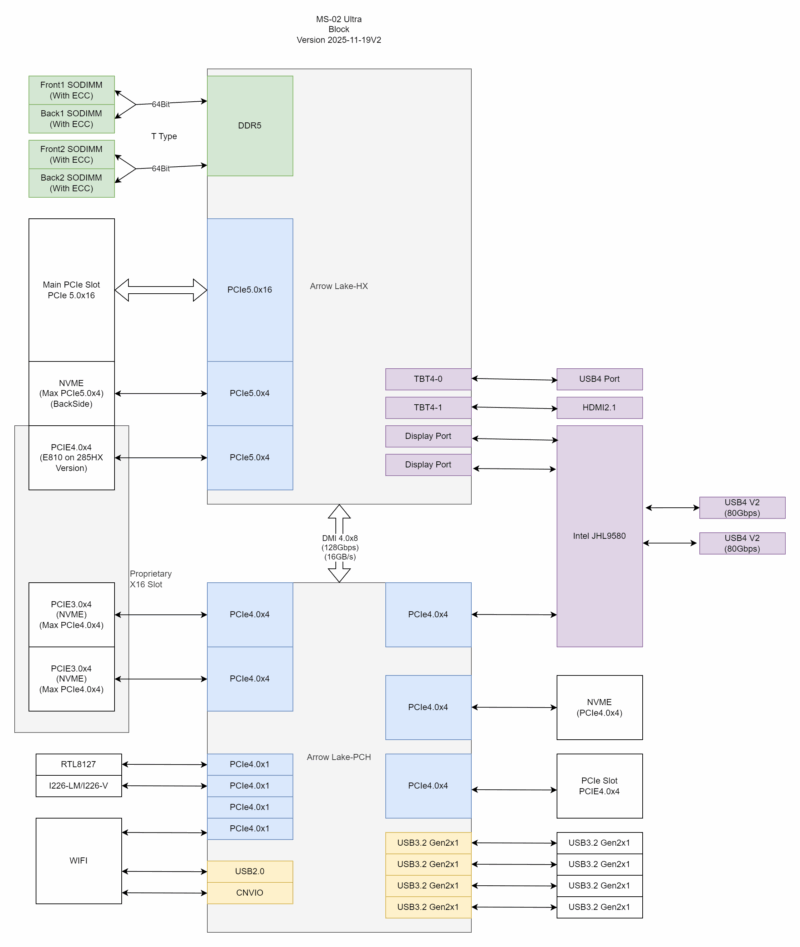
The M.2 slots here are the hardest ones to get to. They are also the slowest: while the hardware technically supports Gen4 x4 operation, Minisforum runs them at Gen3 x4 by default for compatibility/stability reasons (leaving it to the user to enable Gen4 at their own risk). Presumably, the company is not entirely confident in extending PCIe Gen4 signaling further through their card. Consequently, these are M.2 slots 3 and 4 for a reason: there is no reason to use them unless the first two slots on the motherboard itself are already in use.
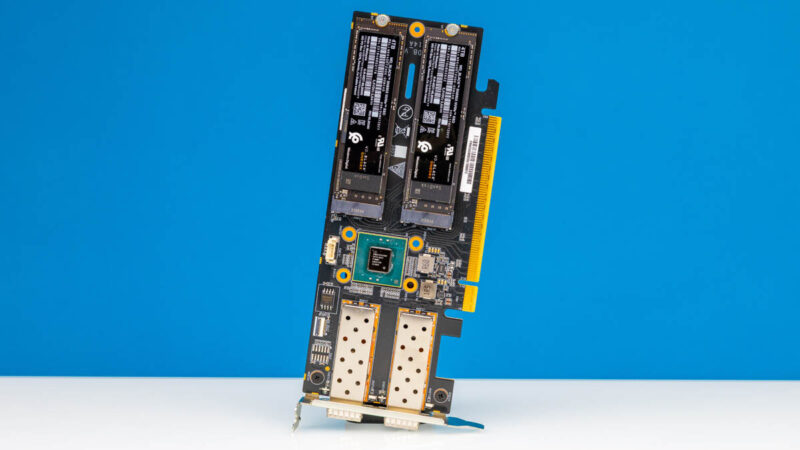
The card itself is actively cooled, utilizing a blower that sits over the M.2 cards and E810 controller. As a result, it is necessary to remove the card and then the blower from the card to access the M.2 slots on it.
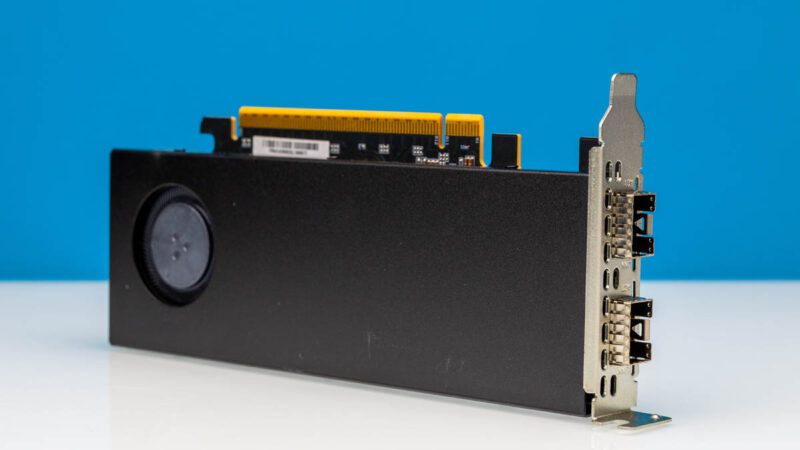
It is a novel idea for a space-constrained chassis. Minisforum could have just skipped the M.2 aspect entirely and tossed in a 25GbE NIC. But it is a compromise solution from the perspective of the M.2 slots.
Thankfully, the system already has a pair of M.2 2280 slots on the motherboard itself. And that brings us to the back side of the MS-02 Ultra.
With so many cables, heatsinks, and PCIe cards on the front of the system, Minisforum has wisely opted to place the system’s M.2 storage slots on the rear side, making them very easy to access. There are two slots here. The primary slot is wired to the CPU and can run at PCIe Gen5 x4 speeds, making it the fastest storage slot in the system. Otherwise, the second slot hangs off the chipset and runs at Gen4 x4, making it a good choice for a second SSD.
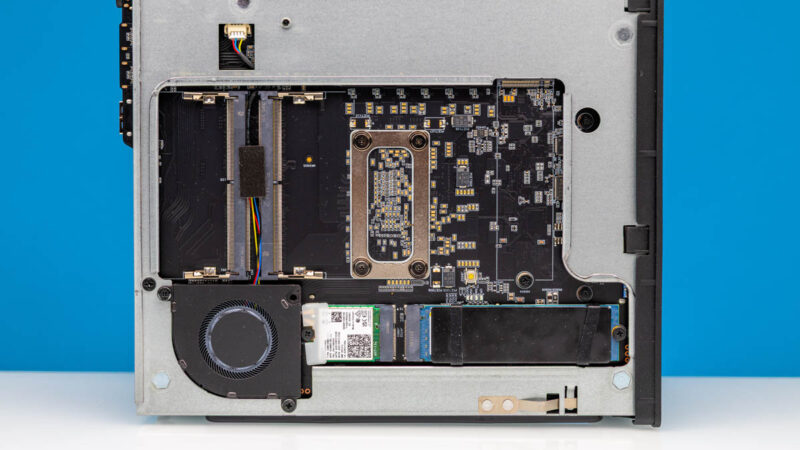
For Minisforum’s included SSD, they also have a small heatsink strapped on to help keep the SSD cool.
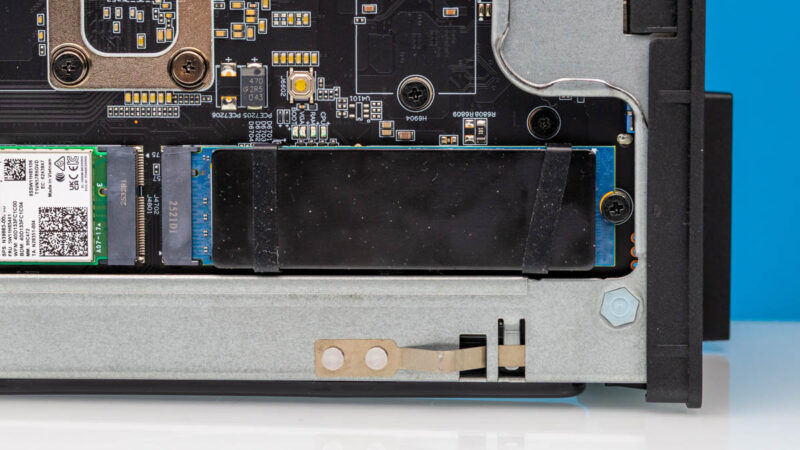
This side is also where the M.2 slot for the wireless card resides. As you would expect for an Intel mobile platform, Minisforum is using Intel’s BE200 adapter here, a Wi-Fi 7 + Bluetooth 5.4 adapter.
Meanwhile, the backside is also where you will find the system’s other two SO-DIMM slots, for running memory in a 2 DPC configuration.
Finally, there is a small and very low-profile blower here as well to provide some very basic airflow for cooling the components on the rear of the system.
With our tour of the hardware complete, let us talk about performance.


I wish they’d have managed to make this fit into 2U so you could fit 2 of them side-by-side in a rack (via a presumably-optional bracket). As it is, it’s about 8mm too tall.
The MS-01 has a similar problem, where it’s ~3.5mm too tall for 1U.
These are slick. Wish I had a use case for one.
I would love to see a comparison between native Intel ECC memory support and the software based ECC capabilities offered on some of the mini platforms. I have soft ecc enabled via bios on 4x alderlake mini boxes and they have been stable for 1 yr+.
I wonder when MCIO pinout and cable finally landed in SFF or normal desktop mainboard? So many benefits come from it.
The article says that the 2 M.2 slots on the PCIe board are limited to PCIe3. The Minisforum site says that it is limited to PCIe3 for 8TB, and PCIe4 for <4TB. Was a less that 4TB SSD tested to see if it runs at PCIe4?
The lack of a TB5 name on the front most likely means some part of the data path is make by someone other than Intel. While they released TB to be an “open standard”, they still own the name and are the only ones that can grant its use. It’s been a good thing, allowing USB4 and now USB4v2 to be compatible. It’s dumb of them, really; in the couple of years nobody is going to bother paying Intel for the name at all, and as a result it will become worthless.
15W power delivery is nowhere near the TB5. Please turn you bs knob down a little bit.
That slot for the 25 Gbit NIC I see as a long term curse: you can’t use it for a 16x device even though it’d physically fit. There are several reasons for it. The first is that there are two sources of PCIe lanes going to it which only a few devices actively support in this fashion. The second is that it is 12 lanes in total. Leveraging 12 lanes in a 16x physical spot is permitted under the PCIe spec but few 16x devices support. Furthermore, those 12 lanes I believe are arranged in a nonstandard fashion for those devices that do support 12x. Thus the best fit for that slot would be a device that inherently needs bifurcation but users have to realize that one of the middle devices is not going to work as it doesn’t have PCIe lane going to it. For example, a quad M.2 carrier card would not have the second M.2 slot functional while the first, third and forth work fine.
I’d almost advocate for having all the lanes from that PCIe slot come from the PCH but it’d be bandwidth constrained due to the DMI link. I’d have implemented the slot as a 4x physical slot and then leverage an 8 lane MCIO connector to a proprietary card to get the additional two M.2 slots off of it. The 8 lane MCIO could find other uses, though the system would likely be physically space constrained for other cards.
Dual 10 Gbit NIC on the motherboard would have been nice to see.
I do hope that Nova Lake adds more PCIe lanes to the desktop platform. The oddities here are all examples of lane shortages forcing compromises into the design.
Why would anyone prefer this crap over Minisforum’s won BG-795SE MoBo with extra 25GbE NIC ?
Or mini-ITX MoBo with 9950X and NIC as needed ?
Why are you hyping those included NICs so hard ?
Hi Tinkering Ted – Just as a FYI as I have a system with the X3D version of that motherboard next to me, and we have another one with the non-X3D motherboard as well. The MS-02 has better I/O like the USB4 ports, it can also take an internal RTX 5060 LP while it has the 25GbE and 10GbE/2.5GbE ports, and more SSD. That AMD board is great, but this has way more expansion potential.
@Andrew
I based that section off of their user guide, which has the most comprehensive details on the matter.
To quote said guide: “For compatibility, the E810 expansion card’s NVME slots are set to PCIe 3.0 x4 by default. You can change them to PCIe 4.0 in BIOS, but after switching it is recommended to run a storage benchmark. If you see anomalies, revert the slot to PCIe 3.0.”
At least there, Minisforum isn’t guaranteeing anything. It can run at PCIe Gen4 speeds, but they clearly aren’t 100% confident about it. Which is why it defaults to Gen3 speeds (and why you’d need to go out of your way to enable Gen4).
Still, I’ve tweaked the language in the article a bit to make it clearer that Gen3 is the out-of-box setting rather than a hard technical limitation.
@Patrick Kennedy:
Who cares bout USB4 on such box.
Also BD-795SE has way faster PCIe5 lanes, that can be split with a simple splitter and use port bifurcation.
PCIE5x4 is enough for 100GbE. One could use 8 lanes with PCIe4 and be still left with 8 PCIe5 lanes for GPU.
Not to mention there are mini-ITX boards with AM5 that have 2x M.2 PCIe5 directly on CPU + PCIe5x16 for GPU etc.
@Illrigger . Read the block diagram. The USB4v2 80Gbps ports are supported with an Intel JHL9580 which is TB5 certified. Minis Forum just chose not to call it TB5.
@Tinkering Ted i care.
@spuwho: Without Intel (paid) certification for the whole device they can’t call it TB5.
When you say adding the Sparkle Arc A310 was a mistake, do you mean compared to the 5060 or were there problems more broadly?
Have one currently running transcoding/encoding duties on a plex server and was potentially planning to build an MS-02 with the A310 as a replacement. Bad idea?
Billy Baroo – I think the biggest reason was that the A310 is not a huge upgrade over integrated graphics if you just want basic GPU/ transcoding capabilities. It also does not offer the bigger gaming and small local AI model jump that you get with the RTX 5060. Better said, it is not a bad card. It just left us feeling like it was not a big enough jump to warrant adding that GPU to this system. Here is an example https://browser.geekbench.com/v6/compute/compare/5697728?baseline=5349589
I go KVM for more flexibility and have been running Debian KVM and Proxmox, so VM license is no longer my challenge.
The 350W power supply makes this system a non starter for anything AI-optimized: there is no way it can accommodate one of the nice 2-slot blower style GPUs (~800w), not counting the CPU, RAM, 4xNVME and NICs. Once again, Minisforum snatches defeat from the jaws of victory.
does the pcie x16 slot bifurcate into x4x4x4x4?