

Dell XPS 14 (2026) Performance
Under the hood, our 2026 XPS 14 review sample is driven by an Intel Core Ultra 7X 358H processor, which is part of the Core Series 3 Panther Lake family. This is Intel’s premier mobile-focused and mid-power silicon, offering 16 CPU cores in total along with Intel’s most powerful Arc B390 integrated graphics (Xe3 architecture) and a modest number of PCIe lanes for additional expansion.
As a full-fat version of the Panther Lake 12Xe chip, the 358H gets access to all the hardware offered in Panther Lake, with the four performance (P) cores topping out at 4.8GHz. Meanwhile, backing P cores for highly threaded workloads is a further eight efficiency (E) cores. And finally, four low-power-efficiency cores (LP-E), which are essentially always-on cores designed to handle light tasks so the other cores can sleep when not in use.
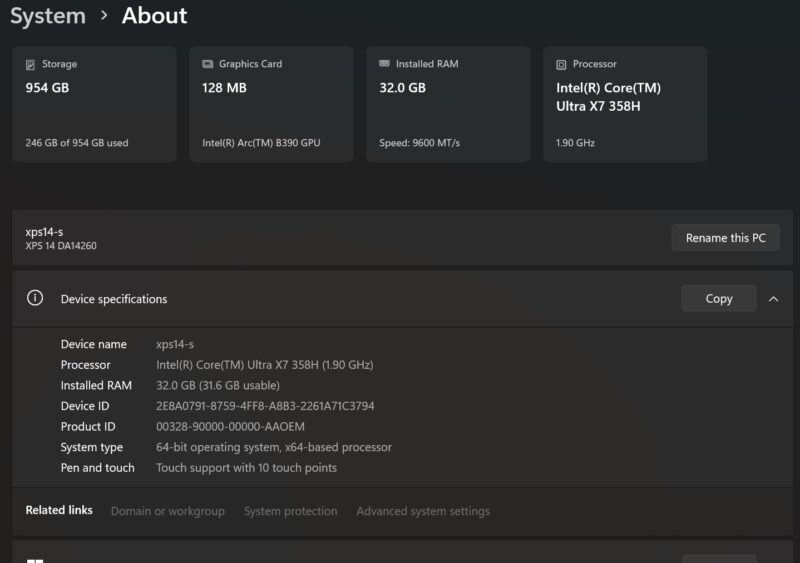
Being a full-fat chip also means that the 358H gets access to Intel’s most powerful integrated GPU configuration, the Arc B390. This is a full 12 Xe core configuration of the company’s new Xe3 GPU architecture, and its high performance is one of the primary selling points for Panther Lake, offering massive gains over its predecessor’s top configuration, and making it competitive with entry-level laptop-grade discrete GPUs. This is the other half of the reason that Dell has moved to a smaller chassis with the XPS 14: they no longer need the space to put a discrete GPU when Intel’s integrated offerings can keep up.
Feeding all of this is 32GB of LPDDR5X-9600 memory, which is soldered down on the XPS 14. Notably, Intel requires the use of LPDDR5X on all Arc B390-equipped chips (Core Ultra X7 and X9) in order to maximize the amount of memory bandwidth available to the integrated GPU.
This review marks the first system with a Panther Lake/Core Ultra Series 3 chip to reach our labs, so we are excited to take a look at it. I will not run down the complete specs of Panther Lake since we have previously published a full article of the architecture, but the chip family features new architectures for almost every last block within the chip, from the CPU and GPU to the NPU and even the wireless radio. This is in contrast to Arrow Lake, which was more of a half-step up from Meteor Lake before it.
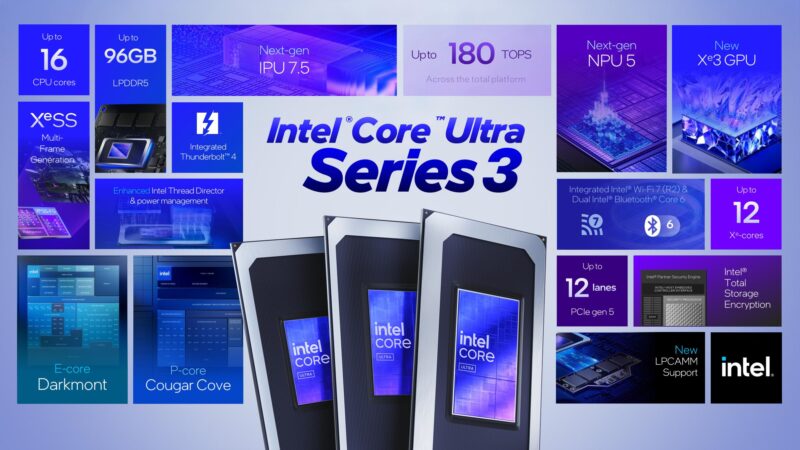
Panther Lake’s compile tile is also the first chip(let) built on Intel’s new 18A process node, the company’s first-generation GAAFET (RibbonFET) node with backside power delivering (PowerVia). So there are numerous improvements and innovations on the manufacturing side of matters as well that play a major role in the chip’s performance and energy efficiency.
Geekbench CPU
As we do not review many laptops here at STH, we have a rather limited number of systems to compare the P14S G6 against. Thankfully, last month we reviewed a laptop with an Arrow Lake generation Core Ultra 7 processor, the Lenovo ThinkPad P14s Gen 6 (21QT0029US). Though it is not a thin and light notebook like the XPS 14, it is similar in size overall, and it offers a solid point of comparison between Intel’s two most recent platforms, as well as providing an entry-level discrete GPU to see how things stack up with GPU performance as well.
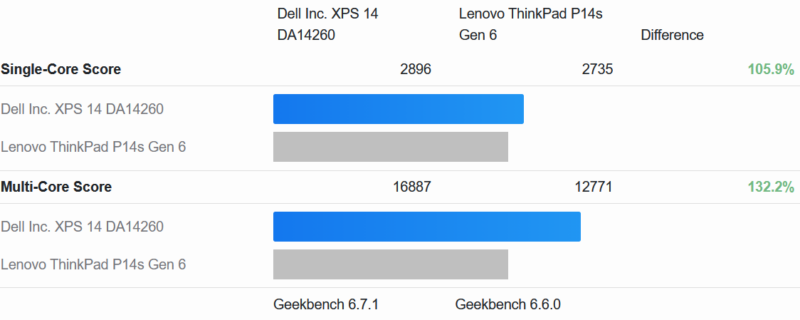
At a high level, Geekbench 6 shows the XPS 14 and its Core Ultra X7 358H chip as delivering a fairly limited performance uplift in single-threaded workloads, but a more significant boost in multi-threaded workloads. This roughly tracks Intel’s initial performance promises, where the high-power Cougar Cove cores are a mild refinement of the previous Lion Cove, while the Darkmont cores are more significantly overhauled in the chip. Consequently, Intel told us to expect limited single-threaded performance gains with far larger multi-threaded performance gains, and that’s what’s happening here.
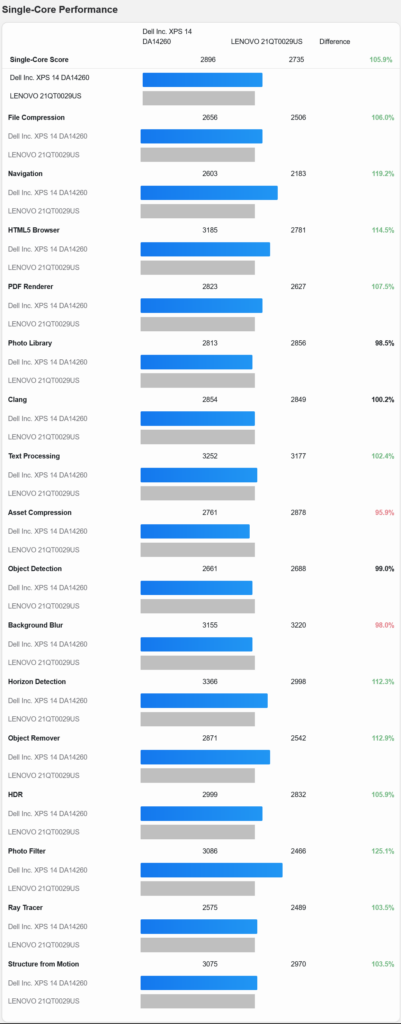
Looking at the individual Geekbench 6 single core score results further paints a picture as to why this is. A single P core on the Panther Lake chip is anywhere between 25% faster to 4% slower depending on the specific sub-test, with the performance regressions likely stemming from the lower peak turbo clockspeeds of the newer Intel CPU. Panther Lake improved on Intel’s P-core IPC, but it also came with a loss in clockspeeds, which has blunted the performance gains of the newer architecture.
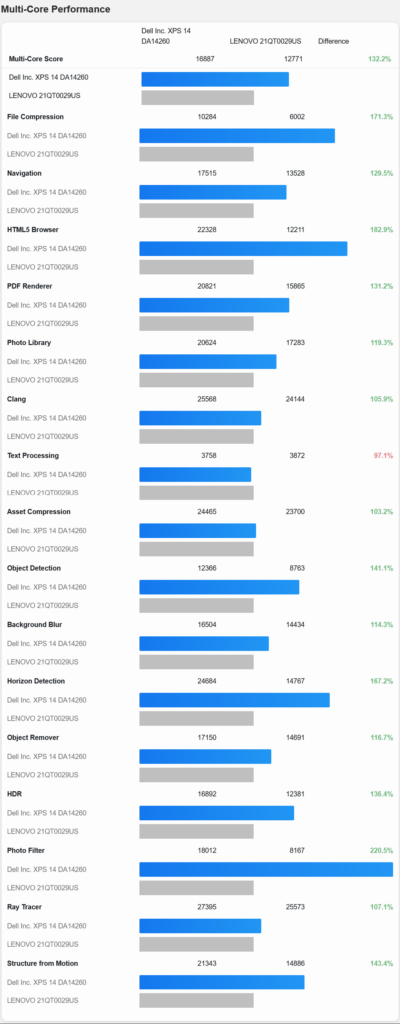
Meanwhile, the Geekbench 6 multicore scores are, with one exception, all greatly improved over Arrow Lake. The major improvements to IPC in the Darkmont cores, as well as Intel resolving some of the performance bottlenecks that are specific to the LPE cores, mean that Panther Lake looks very good when more than a couple of CPU cores are called for and workloads spill beyond just the P cores. Multiple tests here show a better than 50% performance gain, including a ridiculous 220% gain in the benchmark suite’s photo filter workload.
And while we do not make heavy use of Geekbench 5 these days, here’s a quick look at Panther Lake’s performance on that older benchmark suite.
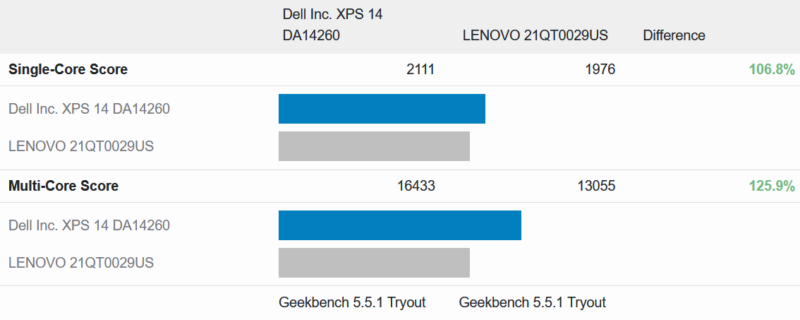
The single-threaded performance gains are similar as with Geekbench 6, while the multi-threaded gains are not quite as high, reflecting some of the major changes in multi-core benchmarking that occurred between the two benchmark suites.
Geekbench GPU
Next up, let’s take a closer look at the performance of the integrated GPU in the 358H, which, according to Intel, is one of the biggest improvements offered by Panther Lake.
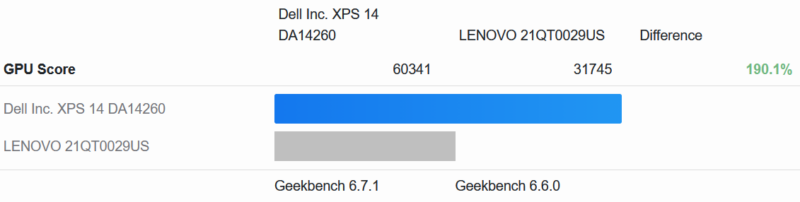
On an iGPU-to-IGPU basis, the difference is nothing short of startling. The XPS 14 and its Arc B390 integrated GPU are delivering almost twice the performance of the Arc 140T integrated GPU in the 265H. It is nothing short of a massive performance gain.
And just to contextualize things a bit, here is a look at how the chip compares to an entry-level laptop discrete GPU: the RTX PRO Blackwell 500 that’s also in our comparison Lenovo laptop.
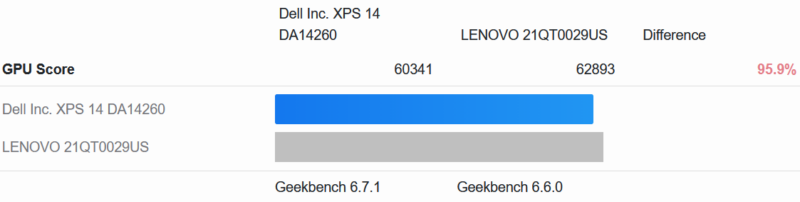
Against a discrete GPU, we see Intel’s B390 pull roughly even. It does not manage to top NVIDIA’s laptop chip, but at 96% of the performance, it comes very close.
Finally, let us see how things stack up in an AI workloads, with Geekbench’s AI tests.
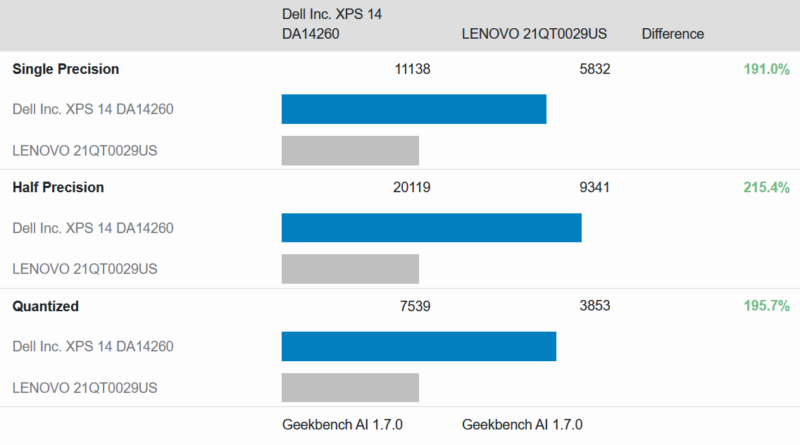
Starting again with an iGPU comparison, the Arc B390 puts the XPS 14 well, well ahead of the older Arrow Lake processor. The performance gains under GPU-driven AI workloads are equal to or even greater than the Geekbench Compute results, with performance improvements ranging from 91% to 115%.
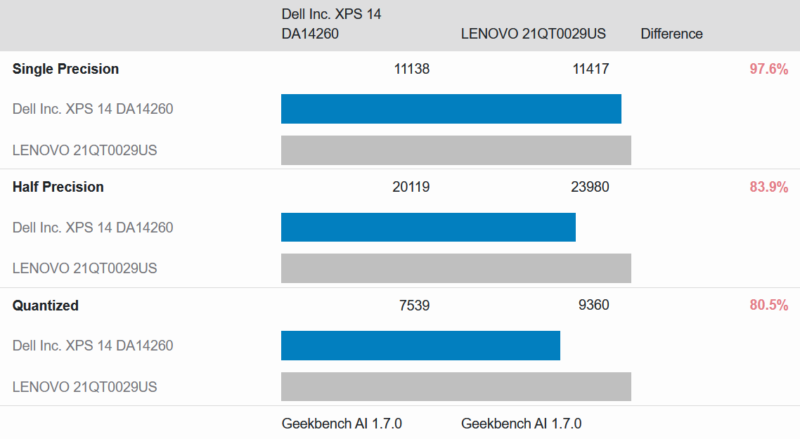
Meanwhile, the Arc B390 loses a bit more ground to the RTX PRO Blackwell 500 dGPU. While single-precision performance remains near-parity, the B390 falls further behind at half-precision and quantized workloads. Still, justifying the jump to a dGPU is much more difficult when the gap is smaller.
MLPerf 1.6.1
For a second opinion on GPU AI performance, we also ran MLPerf 1.6.1 on the B390 as well to see how it stacked up.
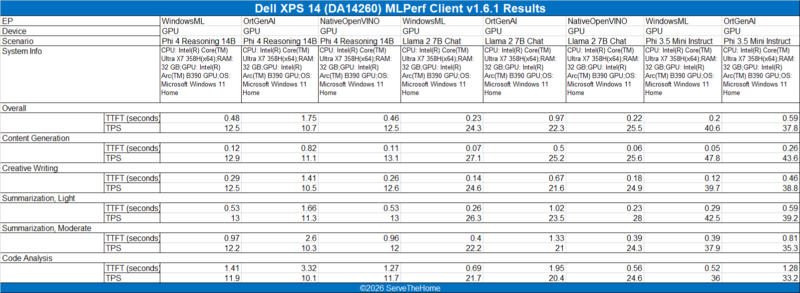
The performance under MLPerf is all quite good. With the exception of code analysis, the time to first token is under a second, with token rates of at least a dozen tokens per second (and sometimes far more).
Geekbench NPU
Finally, let’s see how NPU performance compares to the previous generation.
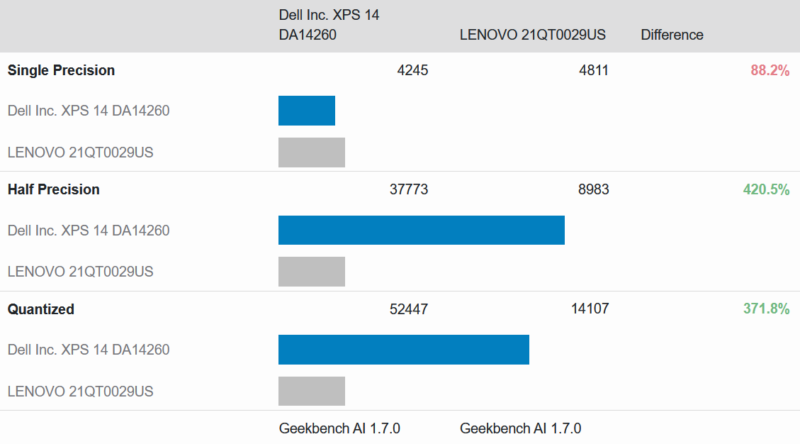
Interestingly, single precision performance has actually regressed a bit. On paper, both of those chips should be delivering about 50 TOPS here. Half precision and quantized performance are greatly boosted thanks to the newer NPU’s architectural improvements to low precision performance.




Have they got a keyboard option with full size arrow keys? Anyone doing a lot of text entry (e.g. programmers) need full size arrow keys otherwise you always end up pressing the wrong arrow. At least they haven’t made the mistake of putting Page Up and Page Down right next to the arrows which is another productivity killer.
Having the function keys small is also a pain unless you have tiny fingers. It’s almost like the people who design laptop keyboards don’t use computers for any real work, where you’re heavily relying on function keys, punctuation and special characters, modifiers (ctrl, alt, etc.) and the arrow keys. Why not make the rest of the keys just as small? Oh, you need THOSE keys do you? Well some of us also need the rest of the keys as well.
Until all the keys are present and the same size, it’s not a product aimed at professional computer users, in my opinion.
@malvineous 100% agree, and thought I’d take a quick look at the 16″ XPS to see if it was any better…
It’s even worse – it’s the exact same keyboard in a 16″ chassis, so just has a huge bezel around the keyboard, rather than actually making use of the space to add even a numpad.
I would like to see at least one USB-A port and a fingerprint reader. Chances are the camera won’t work under Linux, so it would be nice to have the option of using a fingerprint reader instead.
Other than that, it does look pretty sleek and I really appreciate the USB-C ports with Thunderbolt on both sides.
Major props for the right-side USB-C port… I cannot believe how rare these are even still
I have to say the keyboard is much better than what I am reading in comments (normally I am accustomed to an MBP keyboard.) I do a lot of writing and Excel, and the arrow keys are very easy to use once you get accustomed to them. Having right and left big, and up/ down half means it is easy for me to quickly tell the difference when I am not looking. I do not think I have missed an arrow key after the first hour or two with it.
Function keys, bigger would be better I agree, but I tend to use those less. My bigger issue is my brain defaulting to another layout. I actually wish there was another USB port and a SD card reader. I know I am in the minority there, but for pulling footage off of cameras, SD cards are much easier.
I brought this one with me to Dell Tech World and plan to use it the entire show. To be clear though, at an overall package level, it is really good.
I understand that Dell is deeply entrenched, but this seems a weak contender against Lenovo’s offerings.
You can get the same 2.8K OLED panel if that’s what floats your boat, substantially more useful IO (e.g. USB A), and a MUCH more user-friendly approach to maintenance and disassembly from anything in the ThinkPad line.
Squarely a consumer offering from Dell, indeed.
@Andrew
Unfortunately, that seems to be par for consumer laptops. Everyone has copied Apple’s strategy of using the same keyboard in both 14 and 16 inch laptops for the sake of consistency. Dell does offer 16 inch laptops with a numpad, but those are on the Pro line.
I can’t immediately think of anyone who offers full-size function row keys, though. Of all of the laptops I’ve reviewed this year, even the DTR laptops used short keys.
@Patrick: Thanks for the informative response re the keyboard. How do you use the arrow keys if you don’t mind me asking? I am typically typing with both hands and reach across with my right pinky to tap an arrow key and in keyboards like this I often end up pressing the shift key as well as the up arrow, highlighting the row and then promptly typing over it deleting it, or I press both up and down at the same time having no effect.
You do get used to it but it requires you to slow down much more than with a normal keyboard layout. I understand what you’re saying about making it easier to find the keys by feel, but a desktop keyboard typically has empty space around the arrow keys which serves the same purpose much more effectively.
My last Lenovo I had to reprogram the X11 keyboard layout to turn page up and page down into dead keys, because I would hit them with my pinky way more often than I’d hit the up arrow, because they put them in the blank space you normally use to locate the arrow keys. It even had a full size numpad so space wasn’t a concern, so I don’t get why they insist on crippling the keyboard layout for people who need to type a lot.