

Dell XPS 14 (2026) Internal Hardware Overview
With a focus on size and portability, the 2026 XPS 14 is not an easy laptop to break into. Officially, there are no customer-replaceable parts inside the laptop. The bulk of the components in the laptop, such as the LPDDR5X memory, are soldered down, and even the M.2 SSD technically requires professional service. So the common user has little need (and even less ability) to get into the laptop, but the good news is that it is not a sealed system, and it is possible for an experienced hand to open it up.
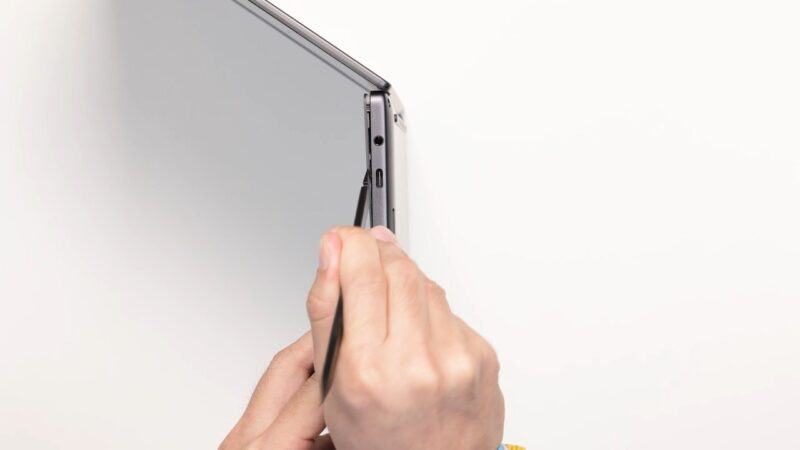
The long and short of matters is that the XPS 14 does not open from the bottom: it opens from the top. Specifically, the top deck of the laptop needs to be removed to access the machine’s silicon internals, with the deck being held in place with a combination of screws (which are what you see on the bottom) as well as multiple clips. This makes cracking open the laptop a tricky affair that will require some rather small spudgers to get at the clips. It is not for the faint of heart. You are absolutely going to want to read the service manual, but with some time and effort, it can be done.
After removing the deck and detaching the cable that connects the keyboard and trackpad to the rest of the system, we can finally see the guts of the XPS 14.
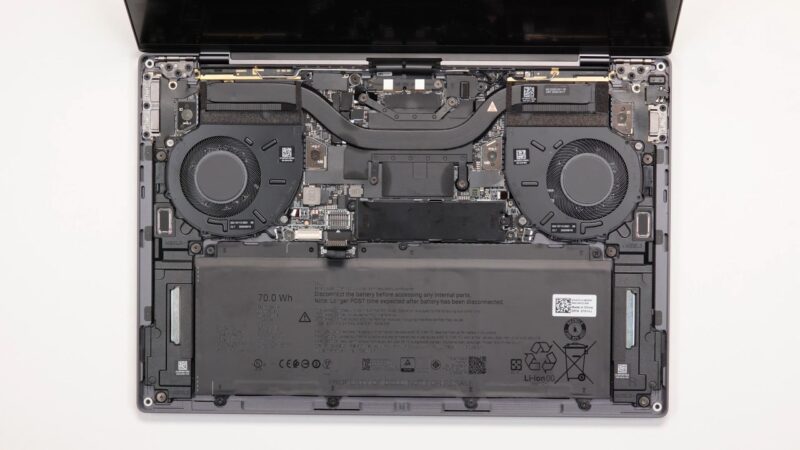
Even with access to the internals of the system, most components within the laptop are either soldered down or, like the Wi-Fi radio, located on the back side of the system board. There are two components in particular, and by far the most important components, that can be easily reached from here: the SSD and the battery.
The XPS 14 contains a single M.2 2280 drive bay. Interestingly, even with the space for a full-size SSD, Dell routinely ships the XPS 14 with smaller M.2 2230 SSDs, which are readily available in the 512GB and 1TB capacities that Dell uses for its default configurations.
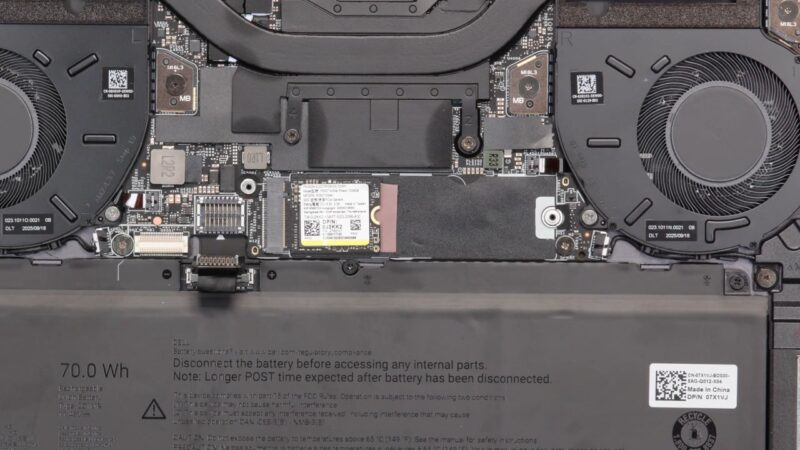
The SSD bay itself is covered with a basic metal thermal shield. Undeath is the SSD, as well as an adapter bracket for an M.2 2230 SSD. Dell does not make any specific performance or vendor claims with the XPS 14 on their user-facing website. Digging into the company’s brochures, there looks to be two classes of SSDs. Systems with 512GB or 1TB SSDs seem to be largely shipping with Phison E27T-based drives, which is a DRAM-less PCIe Gen4 controller. Meanwhile, build-to-order configurations with 2TB and 4TB drives are using a PCIe Gen5 controller, which also confirms that Dell has wired up the Core Ultra processor’s PCIe Gen5 lanes to the lone SSD bay.
SSD matters aside, the system’s battery is also accessible from here. At 70Wh, the battery still takes up a good bit of space in the laptop. Though from what I understand, the XPS 14 and sibling XPS 16 are the first Dell laptops to use higher energy density (900ED) cells, which cuts down on the amount of space the battery takes up.
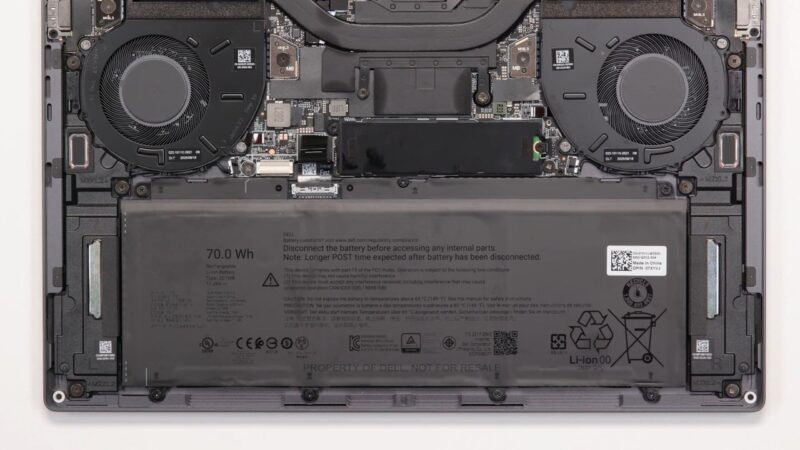
In any case, the battery is only held in place with screws. There is no adhesive or the like. So if the time comes to replace the battery and you can get inside the system, then it is an easy swap (assuming you can find one down the line).
On a final note, while it is not visible or accessible from the front of the laptop, Dell is employing Intel’s BE211 Wi-Fi 7 + Bluetooth 6.0 adapter here for wireless connectivity. This is the latest and greatest from Intel, but it also leverages Intel’s CNVio3 tech, which goes hand-in-hand with the Panther Lake platform. So this is effectively an un-upgradeable part, especially since Dell is using the BGA version of the radio, soldered into a larger (and very hard to access) wireless module.
Now, let us see what the laptop’s full performance is like.




Have they got a keyboard option with full size arrow keys? Anyone doing a lot of text entry (e.g. programmers) need full size arrow keys otherwise you always end up pressing the wrong arrow. At least they haven’t made the mistake of putting Page Up and Page Down right next to the arrows which is another productivity killer.
Having the function keys small is also a pain unless you have tiny fingers. It’s almost like the people who design laptop keyboards don’t use computers for any real work, where you’re heavily relying on function keys, punctuation and special characters, modifiers (ctrl, alt, etc.) and the arrow keys. Why not make the rest of the keys just as small? Oh, you need THOSE keys do you? Well some of us also need the rest of the keys as well.
Until all the keys are present and the same size, it’s not a product aimed at professional computer users, in my opinion.
@malvineous 100% agree, and thought I’d take a quick look at the 16″ XPS to see if it was any better…
It’s even worse – it’s the exact same keyboard in a 16″ chassis, so just has a huge bezel around the keyboard, rather than actually making use of the space to add even a numpad.
I would like to see at least one USB-A port and a fingerprint reader. Chances are the camera won’t work under Linux, so it would be nice to have the option of using a fingerprint reader instead.
Other than that, it does look pretty sleek and I really appreciate the USB-C ports with Thunderbolt on both sides.
Major props for the right-side USB-C port… I cannot believe how rare these are even still
I have to say the keyboard is much better than what I am reading in comments (normally I am accustomed to an MBP keyboard.) I do a lot of writing and Excel, and the arrow keys are very easy to use once you get accustomed to them. Having right and left big, and up/ down half means it is easy for me to quickly tell the difference when I am not looking. I do not think I have missed an arrow key after the first hour or two with it.
Function keys, bigger would be better I agree, but I tend to use those less. My bigger issue is my brain defaulting to another layout. I actually wish there was another USB port and a SD card reader. I know I am in the minority there, but for pulling footage off of cameras, SD cards are much easier.
I brought this one with me to Dell Tech World and plan to use it the entire show. To be clear though, at an overall package level, it is really good.
I understand that Dell is deeply entrenched, but this seems a weak contender against Lenovo’s offerings.
You can get the same 2.8K OLED panel if that’s what floats your boat, substantially more useful IO (e.g. USB A), and a MUCH more user-friendly approach to maintenance and disassembly from anything in the ThinkPad line.
Squarely a consumer offering from Dell, indeed.
@Andrew
Unfortunately, that seems to be par for consumer laptops. Everyone has copied Apple’s strategy of using the same keyboard in both 14 and 16 inch laptops for the sake of consistency. Dell does offer 16 inch laptops with a numpad, but those are on the Pro line.
I can’t immediately think of anyone who offers full-size function row keys, though. Of all of the laptops I’ve reviewed this year, even the DTR laptops used short keys.
@Patrick: Thanks for the informative response re the keyboard. How do you use the arrow keys if you don’t mind me asking? I am typically typing with both hands and reach across with my right pinky to tap an arrow key and in keyboards like this I often end up pressing the shift key as well as the up arrow, highlighting the row and then promptly typing over it deleting it, or I press both up and down at the same time having no effect.
You do get used to it but it requires you to slow down much more than with a normal keyboard layout. I understand what you’re saying about making it easier to find the keys by feel, but a desktop keyboard typically has empty space around the arrow keys which serves the same purpose much more effectively.
My last Lenovo I had to reprogram the X11 keyboard layout to turn page up and page down into dead keys, because I would hit them with my pinky way more often than I’d hit the up arrow, because they put them in the blank space you normally use to locate the arrow keys. It even had a full size numpad so space wasn’t a concern, so I don’t get why they insist on crippling the keyboard layout for people who need to type a lot.