

Arzopa Z3FC Color Performance
We decided to use our Datacolor SpyderPro (Amazon Affiliate) to see what kind of color performance we get with these monitors. This is not the fanciest test equipment by any means, but we just wanted to get some general sense of performance.
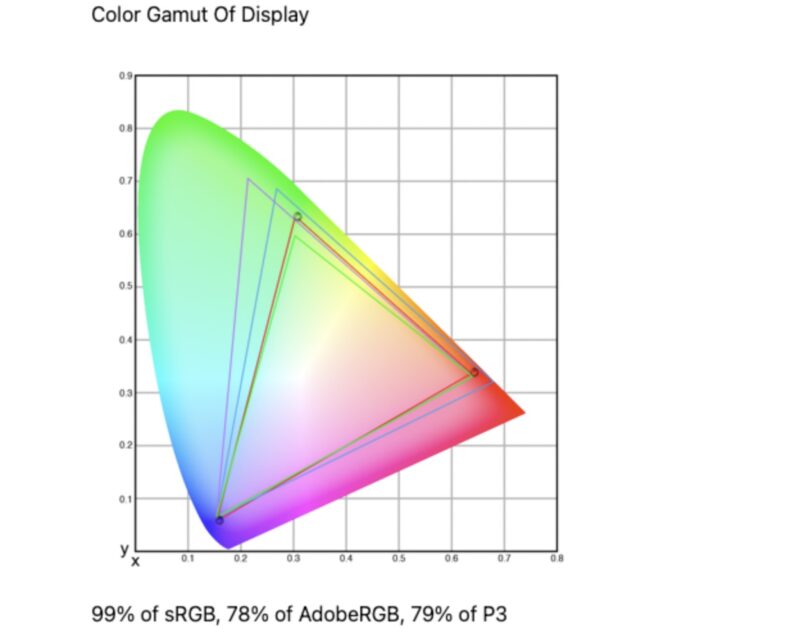
Above we have the Color Gamut, and below we have the Color Accuracy from said Datacolor SpyderPro.
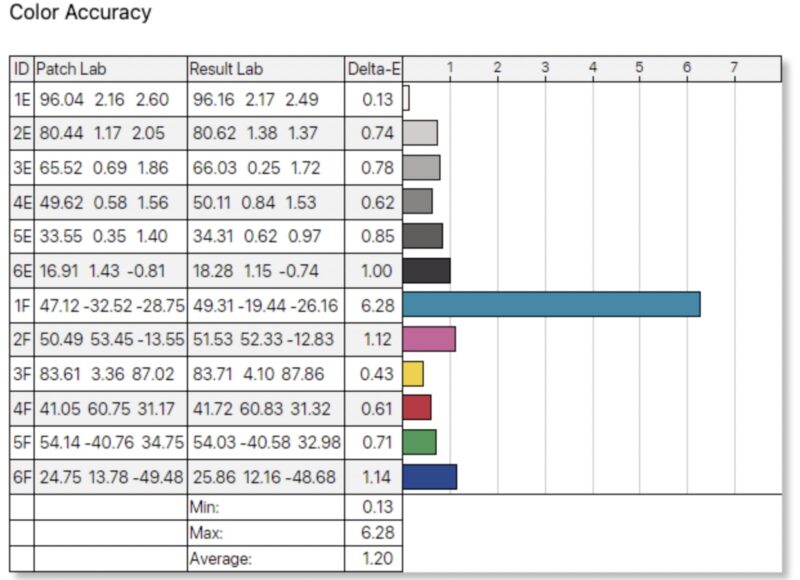
The Arzopa Z3FC is able to display 99% of the sRGB color space, which is a great start. For color accuracy, a dE under 3 is perfectly respectable for an uncalibrated monitor, and by and large, the monitor hits that mark with an average error of 1.20. With that said, however, the monitor’s cyan reproduction is a noticeable outlier, with a delta error of over 6.
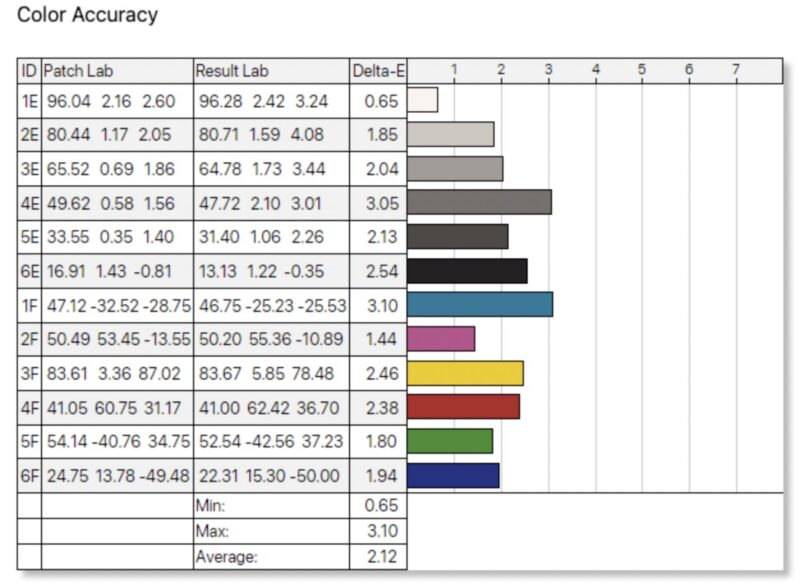
As a quick comparison point, here is what we saw from the Arzopa Z1FC 16.1in 144Hz Portable Monitor, a $109 portable monitor we previously reviewed:
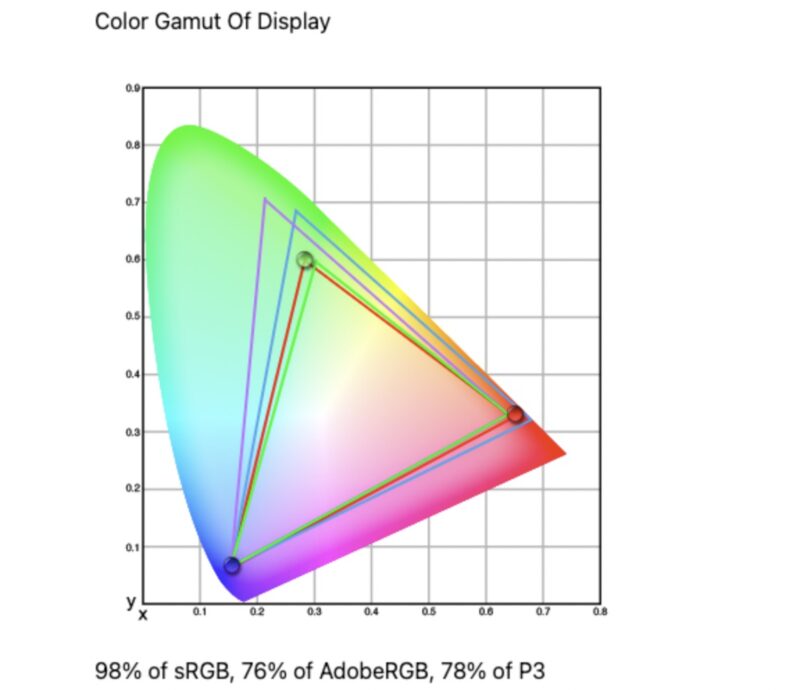
And the color accuracy:
Here is a comparison to the $260 Dell 14 Pro Plus:
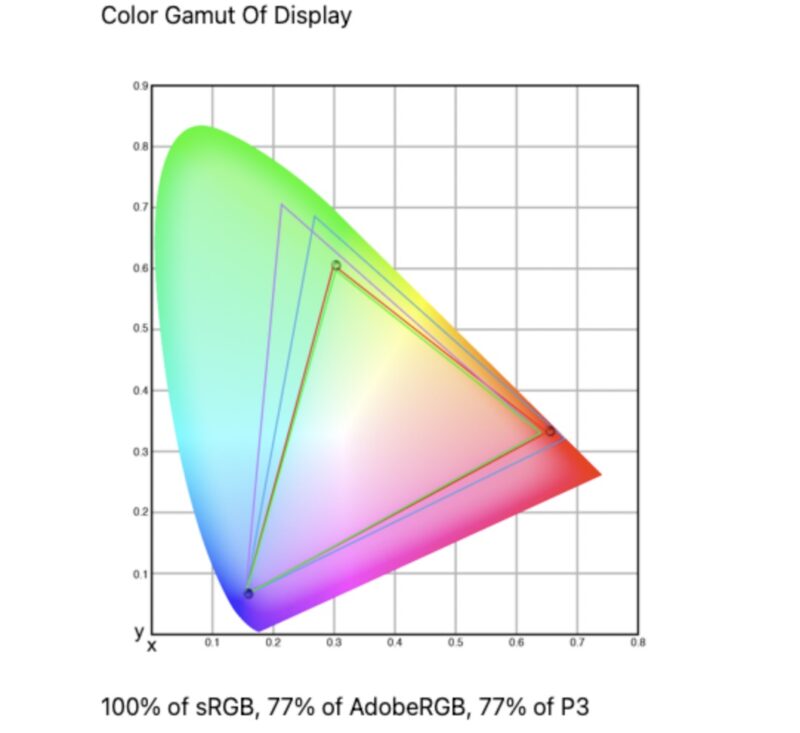
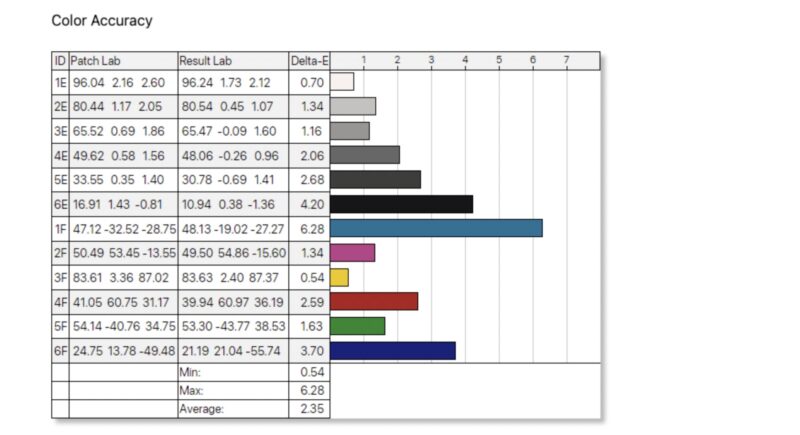
and color accuracy:
Lastly, here is a comparison to the $49 MNN M156F01:
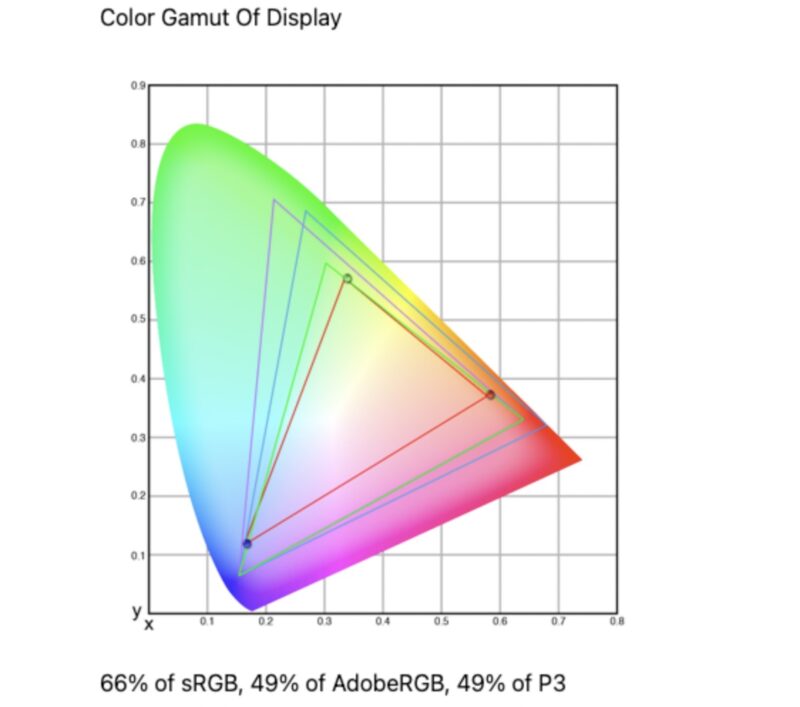
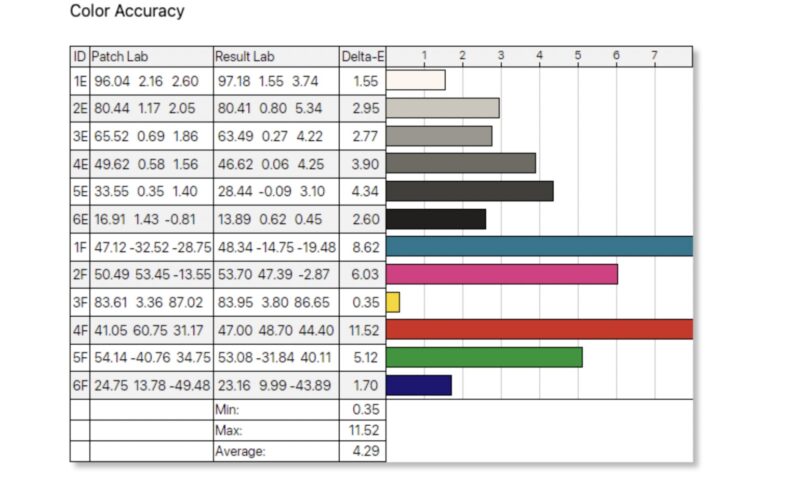
And color accuracy:
Compared to its sibling, Arzopa’s own Z1FC, the Arzopa Z3FC fares a bit better. Grayscale errors are significantly reduced, and color errors at least a bit closer to the mark (with the exception of that stubborn cyan). This leaves it with an average dE of 1.20, versus the Arzopa Z1FC’s 2.12 dE. The Arzopa Z3FC also outperformed the Dell 14 Pro Plus in color accuracy with an average dE of 1.20, versus Dell’s dE of 2.35.
The Dell 14 Pro Plus tested the best for color gamut. It tested 100% sRGB, 77% AdobeRGB, an 77% of P3. The Arzopa Z3FC comes very close at 99% sRGB, 78% AdobeRGB, an 79% of P3.
Power Consumption, Brightness, and Contrast
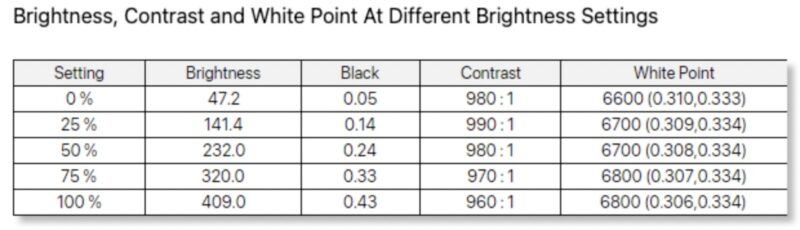
We have found that the monitors often do not scale power and brightness in line with what the settings may indicate. That is important because as a portable monitor, it may be run off of a battery making power and brightness an important trade-off. Here is what we captured for monitor power on the Type-C power input at different brigtness levels.
- 0% (47.2 nits) is 5.9W
- 25% (141.4 nits) is 7.8W
- 50% (232.0 nits) is 9.8W
- 75% (320.0 nits) is 10.8W
- 100% (409.0 nits) is 11.8W
In case you were wondering about what we saw for the brightness and contrast:
This is not the lowest power panel, but it is also not a 100W+ monitor.
Final Words
There are lots of portable monitors available today. Among them, the Arzopa Z3FC 16.1in 180Hz 2.5K Portable Monitor is one of the cheapest portable QHD monitors available. With the addition of a 180Hz refresh rate, it is able to further stand apart from the crowd. Consequently, at its $143 retail price (at the time of writing), the Arzopa Z3FC can be a great value, offering quite a bit of functionality for the price.
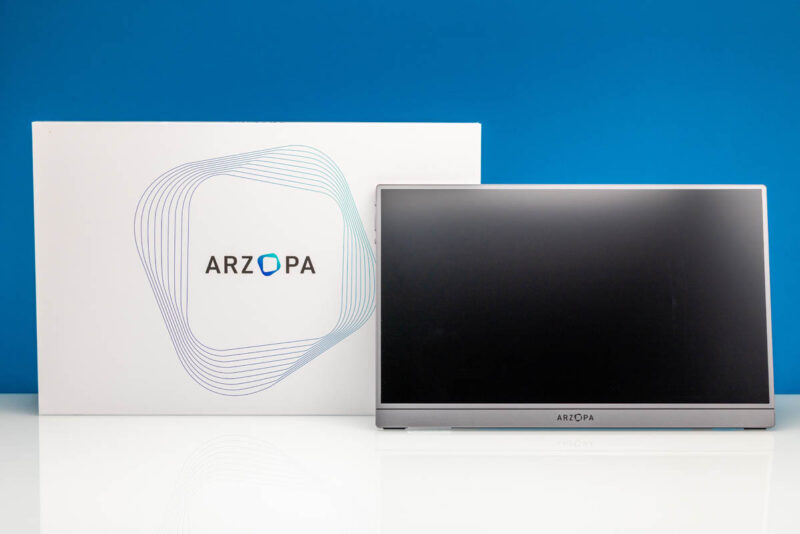
Sizing up how it compares to some of its competitors, the Z3FC finds itself in pretty good standing. We recently tested the Arzopa Z1FC 16.1in 144Hz Portable Monitor as well, a somewhat less advanced monitor that sells for around $109. Compared to that monitor, the $34 premium for the Z3FC gets you a higher-resolution QHD display and a higher 180Hz peak refresh rate, versus the FHD/144Hz Z1FC. They tested very similarly for color gamut and slightly in favor of the Z3FC when it comes to color accuracy, a dE of 1.20, versus a 2.12 dE for the Z1FC.
Meanwhile, the color gamut and color accuracy results are in line with the Dell Pro 14 Plus Monitor, which is nearly twice the price. All of which makes the Arzopa Z3FC look like a particularly good value, as it offers a higher resolution and a higher refresh rate than Dell’s 1920×1200 pixel monitor.
The worst thing we can say about the Z3FC, then, is that the quality and features do come at a price. A true entry-level monitor, such as the MNN M156F01, is going to be as little as one-third of the cost, giving up a slew of features to hit that price tag. If you just need a bit more portable monitor space, that is a serviceable option. Whereas the Z3FC delivers much more than the bare minimum, it comes at a premium price.
Overall, the Arzopa Z3FC 16.1in 180Hz 2.5K Portable Monitor offers a ton of value at its current price point. Especially for users searching for a mid-tier portable monitor that can bring some quality without breaking the bank, the Z3FC warrants a look.
Where to Buy
If you just want to pick one of these up, here is the Amazon affiliate link to where we purchased this unit.


This will be sarcastic but… is it Russian?
@lol: Room 39H-A9, Caifu Building, No. 88, Fuhua 3rd Road, Gangxia Community, Futian Street, Futian District, Shenzhen, Guangdong, China
Arzopa may have been a no-name brand that reached escape velocity from a great TikTok shilling strategy and is now one of the more well known portable monitor brands.
My completely unheard of brand 1080p60 portable is fine for my needs, but maybe I would look into something like this if it broke.
It’s notable this looks better in the photographs of screen. Higher resolution, refresh, or better panel, I’ve just looked back at a few screens and you can tell.
Would refresh rate play any significant factor into power consumption, or is it all down to brightness essentially? I’m a little curious as to what 50% brightness and refresh at 60/120/180 looks like.
I received mine today and my first impression was very good. I purchased it from Amazon in Spain for 152 Euros. All nicely packaged in a nice hard paper box Apple style (almost) and the product felt very well made and of good quality.
What’s in the box:
• The screen
• 1x portable soft padded storage bag/case
• 2x USB-C/C cables (one for power only and one 180º angled)
• 1x HDMI Full/Mini cable. (The STH review mentioned that there was no HDMI cable included)
Build quality:
At the weight of 780 g and made of plastic, it does not twist or bend much when you hold it.
The stand on the back is easy to use even though it has only one leg. The leg has enough friction so it stays in position.
There are two speakers, one on each side of the screen but they are not exactly HiFi, but they do their job fairly good.
Settings:
The On Screen Dislay (OSD) menu takes some time to get used to, but it has the most settings needed. After a few butterfinger attempts I could set the Brigtness and the Volume.
Screen:
The picture quality gives a sharp and clear picture with its QHD (2560×1440) resolution. As good as my other 27” QHD screens.
The screen real estate is small with its 16.1” screen, but setting the scaling to 150% gives a well readable text and icon size. The IPS panel also gives a good viewing angle.
The Nvidia control panel app could not set the refresh rate higher than 60Hz which was a bit strange since it was advertised as a 180Hz screen.
I tried setting a custom resolution at 120Hz and 180Hz but it failed with a black screen and then reverted back to 60Hz. Maybe I missed a setting.
I have the Nvidia RTX 4000 ADA Gen. GPU installed in the desktop PC used for testing.
At this time I didn’t bother with color accuracy settings or HDR. Running a test MP4 video showed natural colors.
Power consumption is only relevant when using a lap top, phone or a power bank as power source. When connected to a desktop PC all the power needed is provided.
Use case:
Besides the obvious extra screen added to a laptop or a phone, I see a usage for a portable screen when troubleshooting a computer and when you don’t have a crash cart or a KVM available.
Pros: Light weight. Good build quality and the cables needed are included. Good picture quality. Good value for the money.
Cons: The screen refresh rate was advertised at 180Hz but it’s only 60Hz. Disappointing and I will follow-up on this.
I would be interested in any thoughts or experience vs the Z1RC model, which has lower refresh rate and brightness (60hz, 350cd/m² vs 180hz, 400cd/m²) but better color depth (10bit (8-bit+FRC) vs 8-bit) and gamut (123% sRGB vs 107% sRGB):
https://global.arzopa.com/pages/comparison2025
Without actually reviewing it, it’s hard to say anything definitive. Especially as software, firmware, and factory calibration play such a huge role.
Though it’s very interesting that it’s a a 16:10 panel; that’s a form factor that’s generally only found in higher-end productivity laptops. Otherwise the larger gamut makes sense, as there’s not a ton of utility in 10bpc color with a pure sRGB gamut. That does mean the backlight is capable of delivering a wider spectrum of light, though apparently not as intensely.