

Arzopa Z1RC Color Performance
We decided to use our Datacolor SpyderPro (Amazon Affiliate) to see what kind of color performance we get with these monitors. This is not the fanciest test equipment by any means, but we just wanted to get some general sense of performance.
The color gamut chart shows how much of each color space the panel covers.
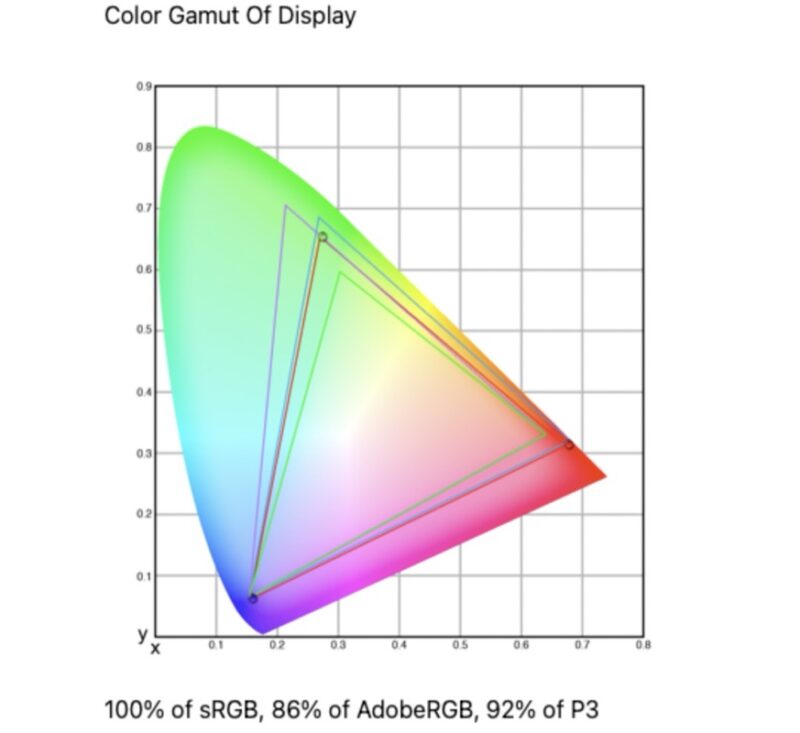
The Arzopa Z1RC covers 100% of the sRGB color space, 86% of AdobeRGB, and 92% of P3. The monitor’s support for wide color gamuts puts it a step above more budget-focused displays, as we have seen a number of portable monitors that cannot even cover 100% of the sRGB space. Overall, the 86% AdobeRGB coverage is useful for general color work, but it falls short of full AdobeRGB for print-heavy workflows. Otherwise the P3 coverage at 92% is useful for modern web content and media consumption.
The color accuracy chart is a more useful companion to the gamut result, showing how close each color patch is to its target.
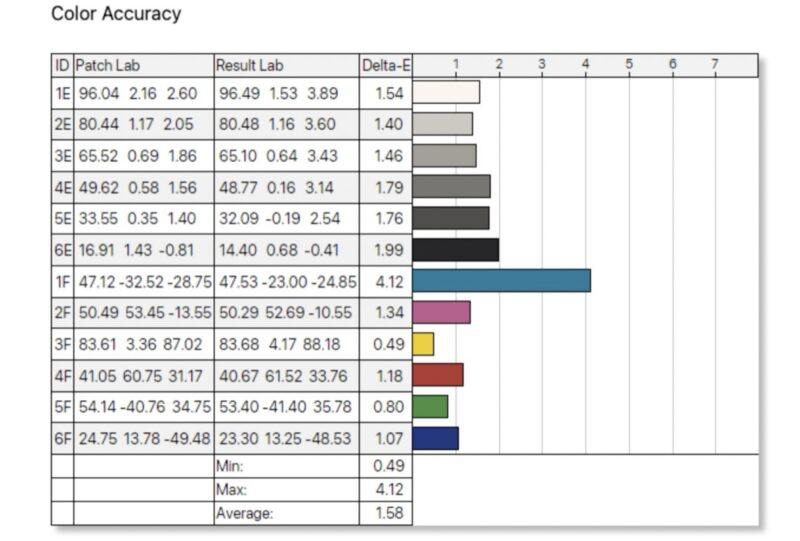
For color accuracy, a Delta-E under 3 is perfectly respectable for an uncalibrated monitor, and by and large, the monitor hits that mark with an average error of 1.58. If not for a single outlier, a dE of 4.12 for cyan, the monitor would be under the magic 3.0 mark across the board – meanwhile one mediocre result in this case will not result in a major color shift. For a portable monitor that ships without factory calibration, these results are solid. This is not a reference display, but the measured color performance is good for a portable monitor in this class.
Power Consumption, Brightness, and Contrast
We have found that monitors often do not scale power and brightness in line with the settings. That is important because, as a portable monitor, it may be run off a battery, making power and brightness an important trade-off. Here is what we captured for monitor power on the Type-C power input at different brightness levels.
- 0% (66.1 nits) is 3.5W
- 25% (154.9 nits) is 4.9W
- 50% (242.8 nits) is 6.7W
- 75% (329.8 nits) is 8.5W
- 100% (415.7 nits) is 11.0W
Arzopa advertises this as a 500-nit-class monitor, and our unit measured 415.7 nits at 100% brightness. That is a notable gap, though the result is still adequate for indoor use and may fall short in very bright environments. The brightness and contrast chart shows how contrast holds up as brightness drops.
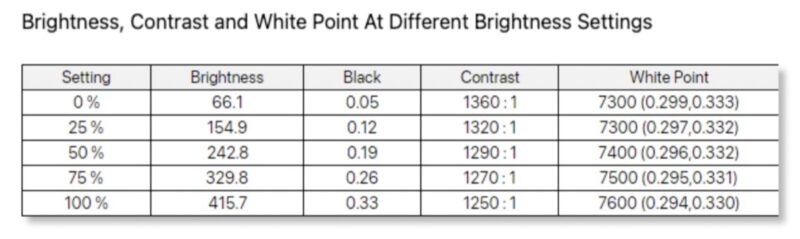
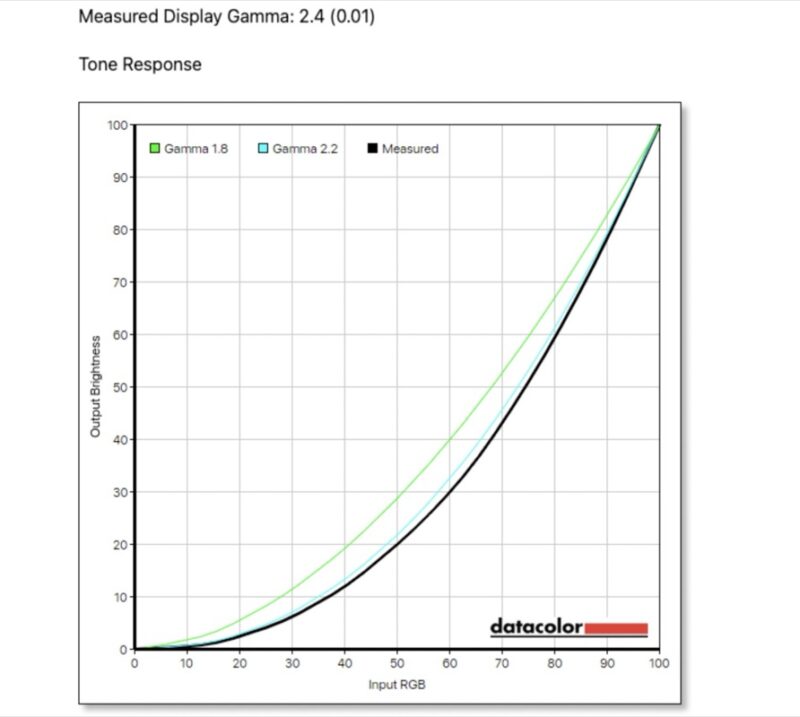
The tone response chart helps explain how the monitor handles darker portions of the image. The measured gamma of 2.4 is slightly above the standard 2.2, which means shadows may appear a touch darker than the reference. The contrast stays in the 1250:1 to 1360:1 range across all brightness levels, which is typical for IPS panels in this class. Power consumption scales from 3.5W at the lowest setting to 11.0W at the highest.
It also bears mentioning that as this monitor is aimed at productivity work, its maximum refresh rate is just 60Hz. Which is fine for the target market – and helps to keep costs down for pro users – but it is also why this is a mid-tier monitor rather than a jack-of-all-trades high-end monitor that tries to deliver everything in a single device.
Final Words
The Arzopa Z1RC is a 2.5K portable monitor aimed at buyers who want a higher resolution display for productivity work. The 2560×1600 panel with its 16:10 aspect ratio gives the display noticeably more usable workspace than the common 1080p portable monitors, which matters for spreadsheets, code, or general productivity.
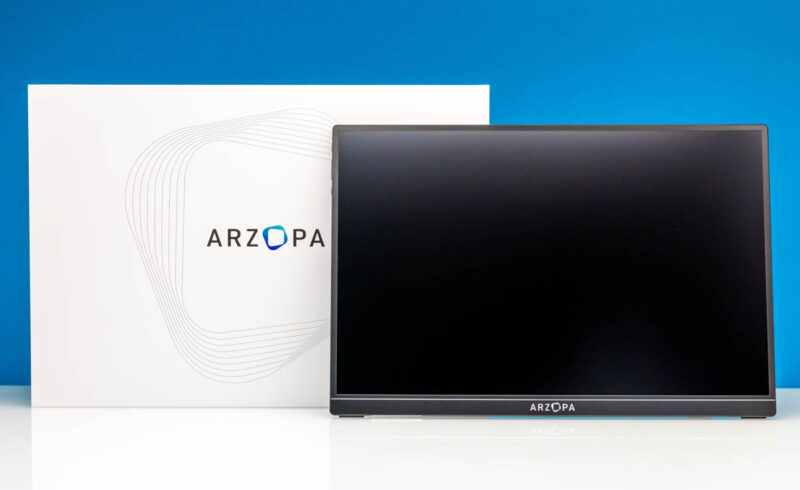
At 60Hz, this is not the gaming-focused Arzopa option. If you need 144Hz, the Arzopa Z1FC is the better pick. If you want the same 2.5K resolution with high refresh, the Arzopa Z3FC at 180Hz is the step up, but it costs more. The Z1RC fills the gap for buyers who want a 2.5K resolution display without the additional premium of a high-refresh panel.
The measured color performance is good for the class, especially the 100% sRGB coverage and average Delta-E of 1.58, but this is not a professional reference display. With a peak power consumption of 11.0W at max brightness, power draw is acceptable but not ultra-low if you are planning to run the monitor off of a laptop battery. Otherwise, the basic single-button OSD and Mini HDMI port are minor trade-offs for a monitor that delivers 2.5K resolution at a competitive price.
Where to Buy
If you just want to pick one of these up, here is the Amazon affiliate link to where we purchased this unit.



What a horrible “stand”. Just like the horrible stand on the original N Switch but with extra crack when torn off. I only buy ASUS and ViewSonic portable monitors which have great stands. No-name garbage invariably chintzes out on everything they can. Buy garbage chuck garbage.
Thank you for following SANE naming convention and calling a monitor with 2560 lines “2.5k”.
I think it’s stupid that we call 3840 lines “4k”, but if they are going to do it anyway, they have to KEEP doing it.
If 3840×2160 is “4k”
then 1920×1080 is “2k”
because that is how numbers work…
Calling 1440p “2k” is literally wrong.