

TP-Link TL-SX1008 Management
As you would expect, this is an unmanaged switch. So there is no management interface or other frills to show. It is plug-and-play.
TP-Link TL-SX1008 Performance
For this, we are using a Keysight XGS2 chassis with the NOVUS10/1GE16DP card. We are using an RFC2544 Quick Test for throughput with a few changes. For example, we increased the per-iteration run time to 30 seconds and started at 10% of the full line rate, searching for frame loss up to 100% of the line rate. We also test the RFC2544 64, 128, 256, 512, 1024, 1280, and 1518 byte frame sizes, and then add the standard IMIX, the Cisco IMIX, and an IPSec IMIX, which introduces mixed frame sizes into the testing. Let us start with 64B frame sizes.
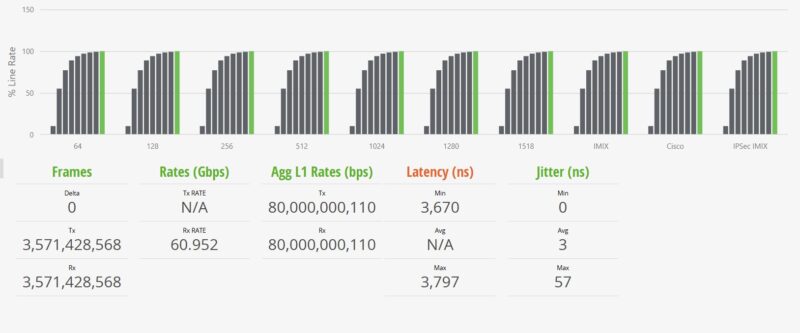
The above may seem strange to some, so let us start with some of the key numbers. First, we observed no frame loss. We see almost 61Gbps of throughput, but at L1 it is almost 80Gbps. The delta is the overhead for the link, including headers and such. Still, we are showing line rate 8 ports of 10GbE even at 64B frame sizes.
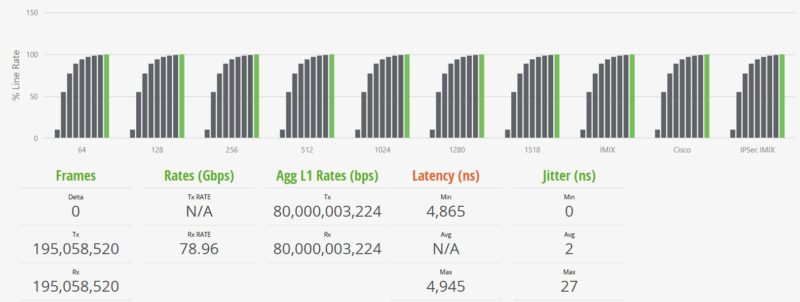
Moving up to the 1518B frame sizes, these are in many ways much easier on hardware, and we can see closer to 79Gbps while the L1 rate is at 80Gbps. Again, bigger packets mean less relative overhead traffic in the pipe.
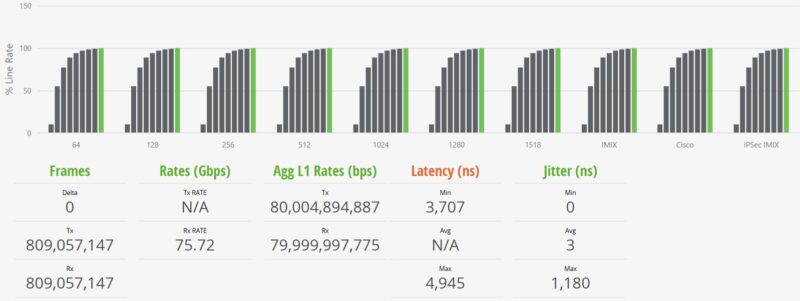
We add various IMIX tests, including the standard IMIX and Cisco IMIX profiles from Keysight. This sends packets of different sizes through the switch.
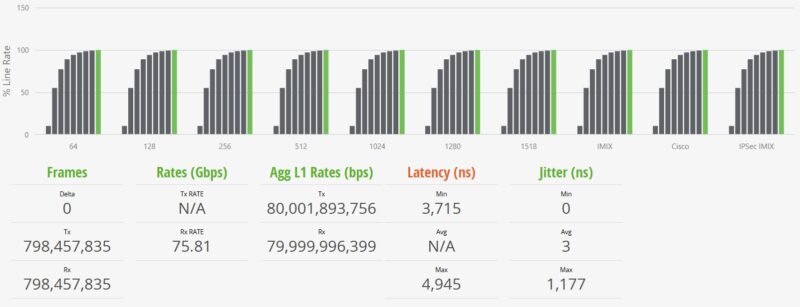
Those are maximum figures, but that is an insight that is very hard to generate unless you are using these high-end FPGA-based traffic generators.
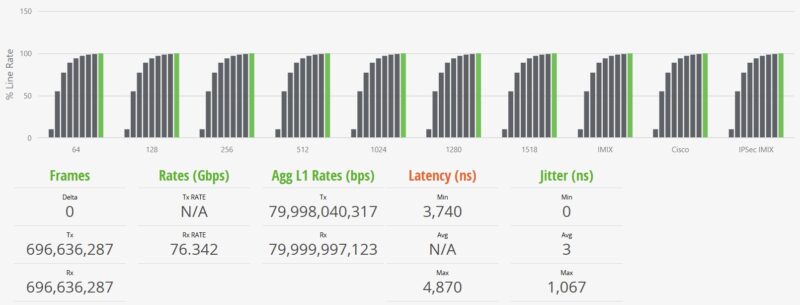
We also have the IPSec IMIX test, which uses slightly larger average frame sizes in the mix. Overall, very similar performance to other Realtek RTL9303 switches which gives us some sense of what is in there even if the heatsinks are fixed.
TP-Link TL-SX1008 Power Consumption and Noise
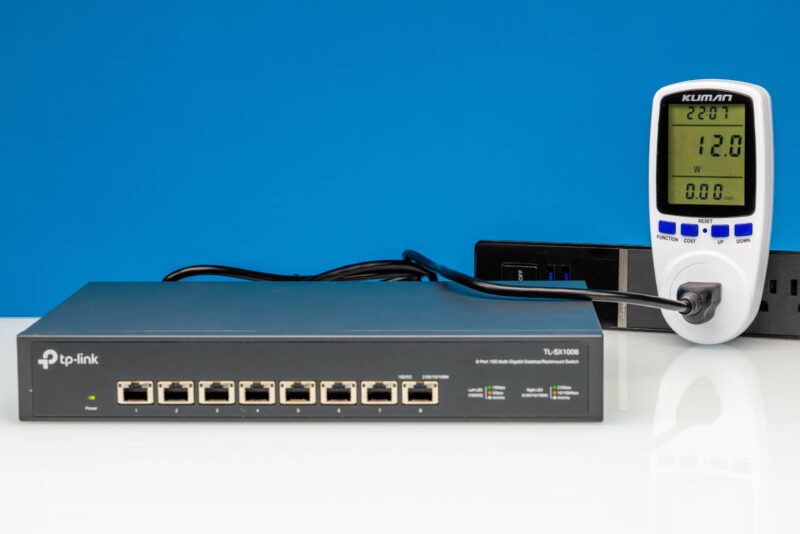
The TP-Link is able to idle at 12 Watts as measured from the wall. That is about 2W higher than some of the 6x 10Gbase-T and 2x SFP+ switches.
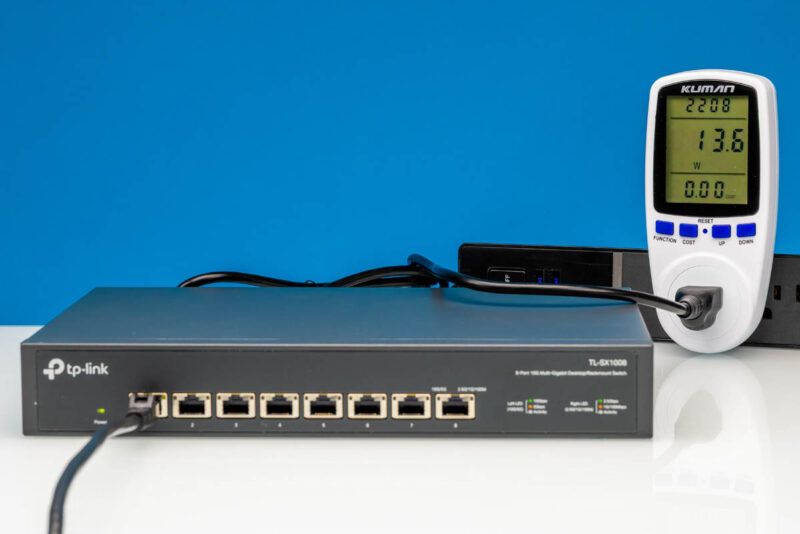
Powering up a single port adds 1.6W, bringing it to 13.6W.
We maxed out around 27W.
As noted earlier, this has a fan that generates some noise. It is in the 48-51dBA range in our 34dBA noise floor studio. This is not a quiet switch.
Final Words
We bought this switch based on recommendations and seeing it as a #1 pick. It worked fine, but at $299-349, it is far from the cheapest switch. You can find a good list of them in our Ultimate Cheap 10GbE Switch Buyers Guide that covers dozens of switches. The big feature is clearly the 8x 10Gbase-T ports, since once you swap two for SFP+, the power goes down, and the pricing of popular options is $100 or more lower.
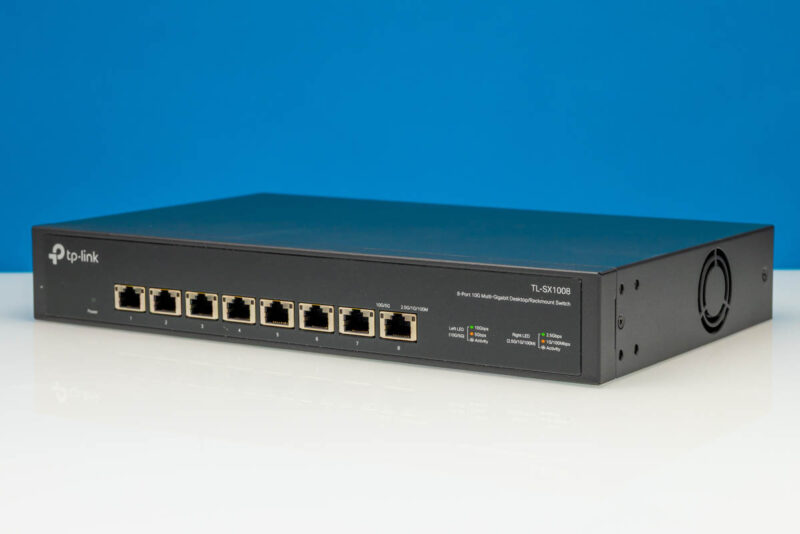
On the other hand, it worked as expected and it seems like a lot of folks are using this model.
Where to Buy
If you want to check current pricing or to buy one, here is an Amazon affiliate link to where we purchased ours.

I have this switch. The fan emits high pitched noise and it is loud for quiet room.
I drilled a hole on the top plate with hole saw / drill press and installed quiet 120mm fan protrudes outwards.
Yeah, me too. I couldn’t keep in the room, due to the noise. So I cut a hole in the top cover, put a big fan there :)
But, after six months switch started acting out. First, one half of ports semi died (worked randomly) and them a month later the second half gave in. I threw it away…
We bought 3 at work. Within a month there two units in active use began to fail. Ports would die randomly (no link light). We got the two units replaced by RMA but never used any of them due to a lack of trust.
Amazon reports “#1 Best Seller”, but that is for a different switch (listed on the same page).
Can you replace that fan with a quieter one from say, Noctua?
Using a 5.5″ hole saw, I cut a hole directly over the heatsinks and installed a noctua NF-A14 FLX. I used GE supreme clear silicone to seal the edges of the fan to the top of the switch. I also drilled some additional holes on the sides to improve airflow. The NF-A14 FLX has a very similar current draw as the stock Runda RS4020B12L-RA, but the airflow and static pressure ratings are MUCH higher. It’s also almost dead silent and the casing itself is much cooler to the touch compared to the stock Runda. I got it for an all time low on of $252.49 at the end of june on Amazon.