

TP-Link BE3600 Wi-Fi 7 Portable Travel Router Performance
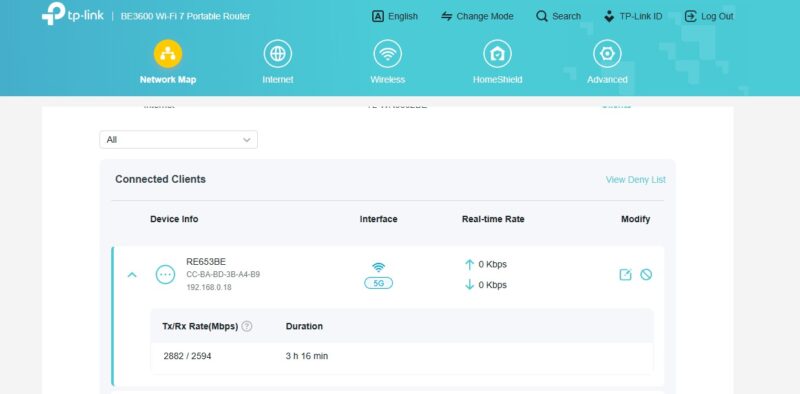
We are still working on trying to get high-speed WiFi 7 to work with our Keysight Cyperf setup. It may sound easy at first, but it is much easier for us to test 400GbE than WiFi. We are working on a solution, but for now, we are focused on the wired networking speeds. For now, though, you can see that next to the device, we could get high theoretical transfer rates, but we were limited to closer to our wired speeds in our testing. We are not 100% sure what the blockage is, but hopefully, we can fix that soon as we profile more units.
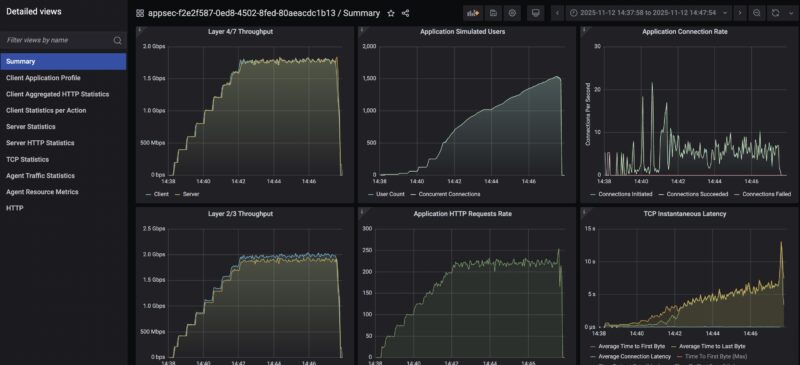
On the performance side, here is our testing of the wired ports using a roofline HTTP web traffic only mode. We managed to effectively saturate the 1GbE links. You can see that the latency really ramps as we scale the number of connections that the router is handling. At around 1500 concurrent connections our TCP latency across the interface was getting into the several second range.
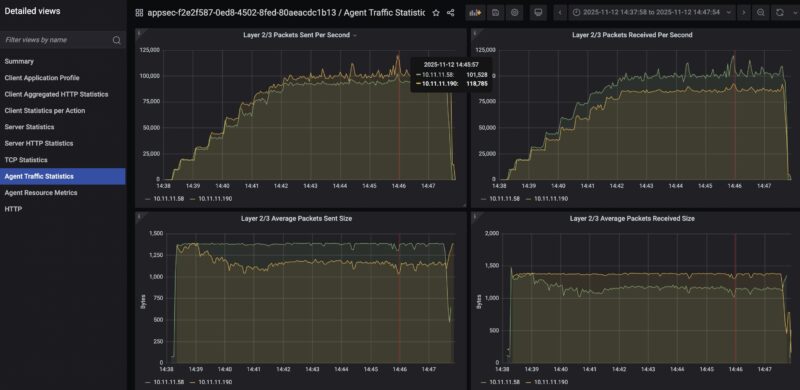
We hit just almost 220K pps sent through each interface which is not too bad on this class of device.
Here is using our standard low-end STH gateway device review 11 app mix of ChatGPT, Google Drive, Google Sheets, LinkedIn, Netflix, Office365 Outlook and Calendar, Reddit, X.com, and YouTube:
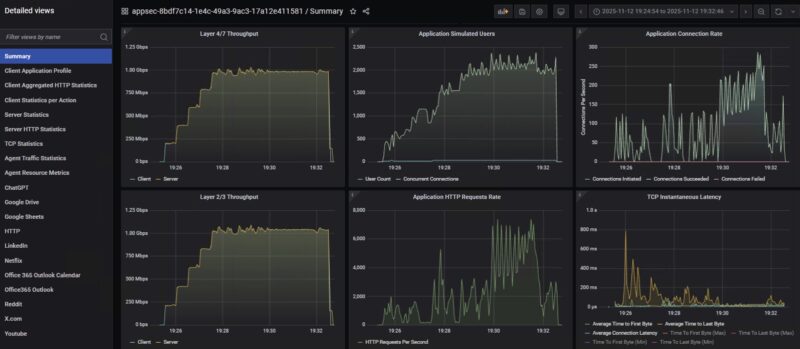
To be clear, I think our WiFi 7 traffic generation needs some work, so take this as a preview at least. Still, there was quite a difference in the TCP latency as the tool pushed the users and connections to try to push more throughput through the connection.
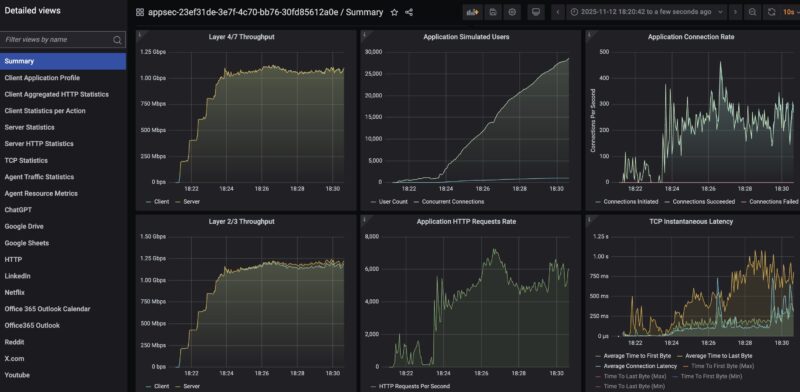
When we tried combining the wired and wireless LAN connections, we got better than one alone, but higher latency. We ended up having to push the user counts, and the time to last byte was very poor, but it kept chugging along.
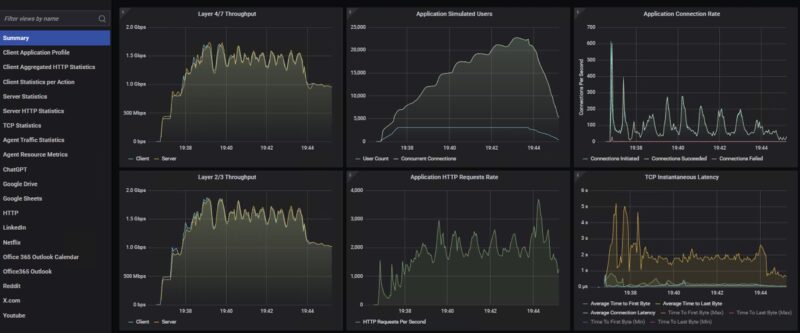
Just as a bonus, we tried doing the 500-person Zoom All-hands call using UDP traffic over this router, and that was a really poor idea. So we scaled back to a 100 person call, and, well that also did not do well.
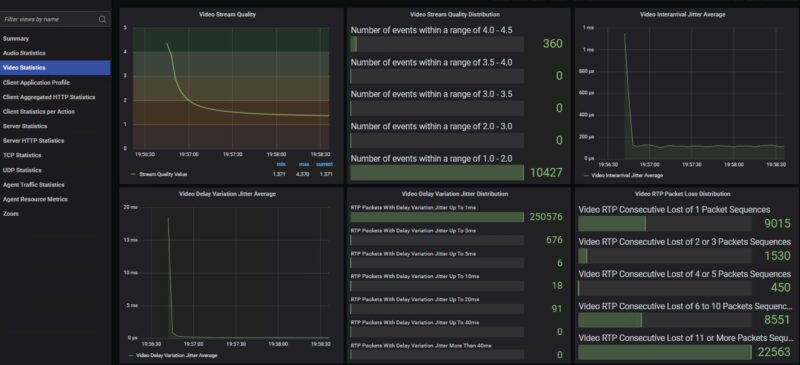
We went down the path of trying a 50-user Zoom all-hands call, and video quality-wise, we were still dropping a lot of packets.
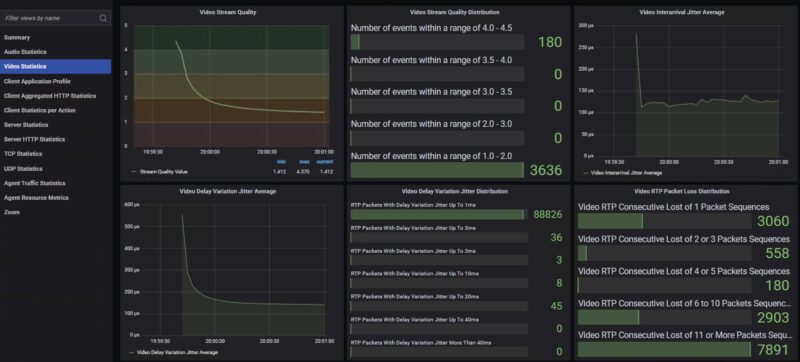
Still, it was interesting to see this struggle since it has a 2.5GbE WAN port and a 1GbE LAN port, yet running a 500-person call on a 10GbE Ubiquiti UniFi Cloud Gateway Fiber UCG-Fiber worked well.
We still have some way to go on this testing, but it is always fun to use a high-end tool on a low-cost router.
TP-Link BE3600 Wi-Fi 7 Portable Travel Router Power Consumption and Noise
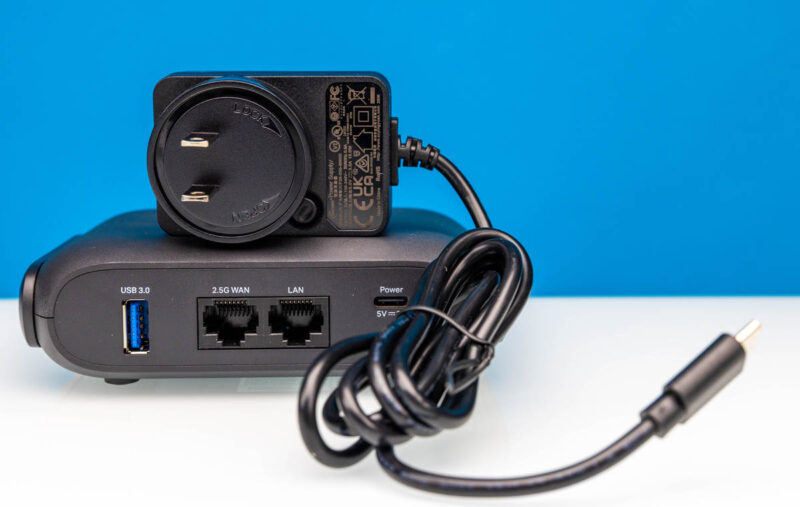
The unit came with a 5V 3A power adapter, and it used relatively low power. We never got close to 15W. We were generally in the 1.6-6W range during our testing, so this could be powered by a portable power bank for some time.
As for noise, we did not pick up anything on our sound meter at 1m away.
Final Words
Although this is only our second review in this series, I have the benefit of having tested a number of these units at this point. What stuck out to me is really the software on this one. The layout made sense, but the automatic firmware updates, Tether app, third-party network scanning, sharing, and so forth really felt overdone. Given there is a lot of US government pressure on TP-Link as we are writing this review, it was shocking to find just how much this wanted to phone home, even if it was asking permission each time. As useful as many of these features are, it just felt like too much here, especially if your goal is to just nerd out and have a travel router.
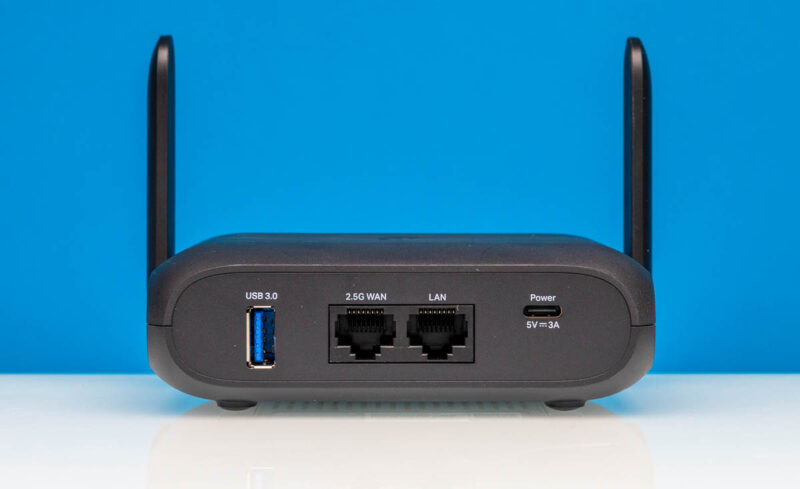
In terms of the hardware, this was a nice little kit, but the product segment is well-defined, so there is a lot of the same here. I think if you are in the market for one of these devices and want a TP-Link, then this unit certainly meets expectations. Still, the GL.iNet GL-BE3600 Slate 7 Mini WiFi 7 Router, at about $30 more, offers the second 2.5GbE port and therefore better performance. Then again, $30 in this segment is a lot.
Where to Buy
You can find this on Amazon (affiliate link.)



 and see some good features and some that we would skip in our review)
Does it ask a permission for proctology exam, or does it do it anyway?
Also does my data go to NSA, the Chinese Communist party, or straight for sale to Data-Pirates(aka Data “Brokers”)?
It’s just called the Slate 7, not Slate 7 Mini.
Also the $30 more you pay is not just for the ethernet port, you get a much better firmware UI that makes VPN use a breeze.
Why no sim card slot again ?
If I travel around with a portable router like this, the last thing I wanna do is start tethering to get a connection.
Please, give us a sim card slot on one of these devices.
This actually runs standard Open WRT under the hood. It’s not in the official support list as yet, as theres not enough market presence but for someone who knows how to do it, it’s an easy add. The RAM and CPU are likely why it falls over on anything more than a few user flows.
I believe this is the same as the TL-WR3002X which doesn’t have the external aerials:
* MT7981B (Filogic 820) dual-core 1.3 GHz CPU
* 512MB RAM
* 256MiB NAND (32MB) XM25QH256C with page size 256 Bytes, erase size 4 KiB, total 32 MiB
* 2.5Gbit WAN and 1Gbit LAN
* MT7976C Wi-Fi 6 support chip
* 1x 2.5G WAN, 1x1GB LAN
U-Boot 2022.07-rc3 (Jan 23 2025 – 14:48:37 +0800)
CPU: MediaTek MT7981
Model: mt7981-rfb
DRAM: 512 MiB
Core: 32 devices, 13 uclasses, devicetree: embed
MMC:
Loading Environment from SPIFlash… SF: Detected XM25QH256C with page size 256 Bytes, erase size 4 KiB, total 32 MiB
*** Warning – bad CRC, using default environment
In: serial@11002000
Out: serial@11002000
Err: serial@11002000
Net:
Warning: ethernet@15100000 (eth0) using random MAC address – 5a:c9:b6:aa:e4:41
eth0: ethernet@15100000
press ctrl-c or t to go to uboot cmdline
0 SF: Detected XM25QH256C with page size 256 Bytes, erase size 4 KiB, total 32 MiB
SF: Detected XM25QH256C with page size 256 Bytes, erase size 4 KiB, total 32 MiB
Reading from 0x100000 to 0x46000000, size 0x100 … OK
Reading from 0x100000 to 0x46000000, size 0x358248 … OK
## Loading kernel from FIT Image at 46000000 …
Using ‘config-1’ configuration
Trying ‘kernel-1’ kernel subimage
Description: ARM64 OpenWrt Linux-5.4.124
Type: Kernel Image
Compression: lzma compressed
Data Start: 0x460000e8
Data Size: 3486983 Bytes = 3.3 MiB
Architecture: AArch64
OS: Linux
Load Address: 0x48080000
Entry Point: 0x48080000
Hash algo: crc32
Hash value: 7a5d3336
Hash algo: sha1
Hash value: 7b7670301ec0f143bbf189505810956c90156241
Verifying Hash Integrity … crc32+ sha1+ OK
## Loading fdt from FIT Image at 46000000 …
Using ‘config-1’ configuration
Trying ‘fdt-1’ fdt subimage
Description: ARM64 OpenWrt mt7981-spim-nor-rfb device tree blob
Type: Flat Device Tree
Compression: uncompressed
Data Start: 0x46353734
Data Size: 17888 Bytes = 17.5 KiB
Architecture: AArch64
Hash algo: crc32
Hash value: cb1ac0fa
Hash algo: sha1
Hash value: dd976b5ff4124f6b0548818c37c669ce00f873a9
Verifying Hash Integrity … crc32+ sha1+ OK
Booting using the fdt blob at 0x46353734
Uncompressing Kernel Image
Loading Device Tree to 000000005f7f3000, end 000000005f7fa5df … OK
Starting kernel …
Next time, can you also test the speed of the usb port when using external drive? USB 3.0 doesn’t really mean anything, when there are plenty of devices with that marking and still only doing 10 to 50 MB/s.
Can it do the captured portal log in the GLi Net travel routers can? If not, kind of pointless for ‘travel’ if you can’t use it in a Starbucks or a hotel.
Worthwhile to flag the likely ban of TP Link products in the US – I would not trust this device on my network, let alone for corporate use by employees.
https://krebsonsecurity.com/2025/11/drilling-down-on-uncle-sams-proposed-tp-link-ban/
The Amazon pricing is currently showing $139 for this unit. That said it seems like the GL.iNet is the obvious choice for only a $10 difference.
No simagai
0 interest from me. I don’t need an app, I don’t need a user experience program…. But I DO need a sim slot.
This looks like a rebranded Huasifei WH3000 Pro.
We recently bought 5 of these via Alibaba, you can choose which 5G modem it comes with, or order without 5G. Price (without 5G) is $61USD. Huasifei were fantastic to deal with. Flashing OpenWrt is trivial via sysupgrade, and it works perfectly.
Well worth a look.
https://www.alibaba.com/product-detail/High-Quality-3000Mbps-Portable-5g-Lte_1601444090654.html