

QNAP QXG-25G2SF-CX6 Performance and Power
We tested these using our old iperf3 tool:
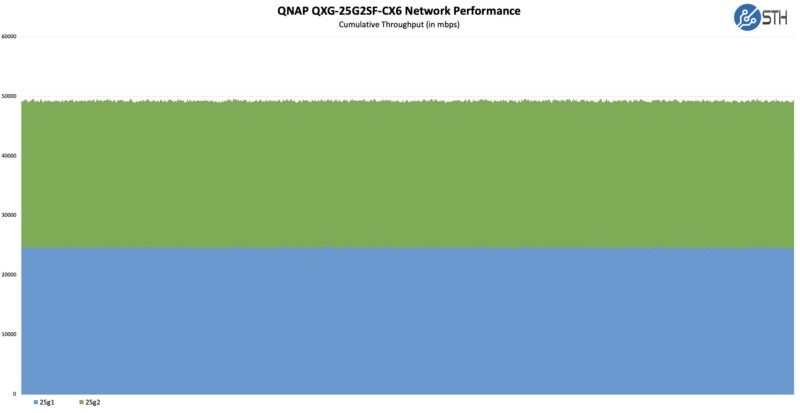
Overall, that is about what we would expect performance wise from an updated 25GbE NIC.
On the power side, we saw 11-16W at the PDU using DACs and one can get a few watts higher with optics. This is far from the 75W+ DPUs we see these days. Still, it means at the card level we are likely in the 10-15W range.
STH Next-Gen Performance Testing Preview
Patrick’s Editor’s Note: We also just blasted traffic through the NIC, in one port and out of the other via our NVIDIA ConnectX-7 Quad Port 50GbE SFP56 Adapter in our new Keysight Cyperf load generation tool. We have just been hooking it up to whatever we can to try different load profiles. This was an education profile that was simulating 512 users using applications ranging from Instagram, Facebook, Netflix, Windows Update, Microsoft SQL Server, MySQL, and some additional web traffic. Here is what we saw on that one:
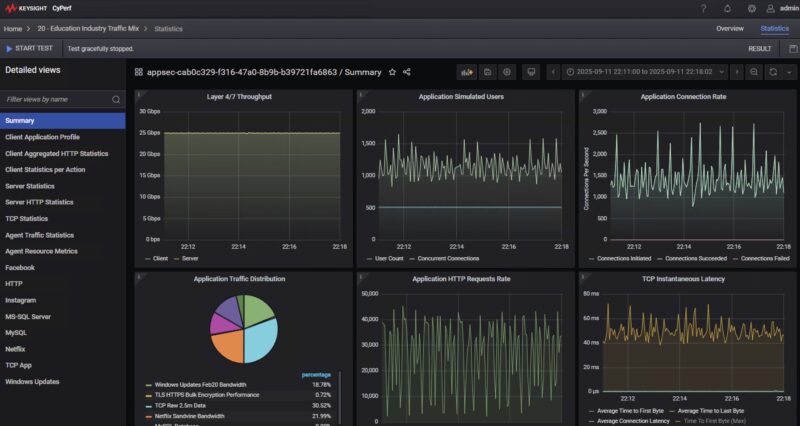
You can see that even with a mix of applications and packet sizes, we were getting 25Gbps performance pushing traffic through the NIC. Again, please treat these as previews as we are still working to tune the very high-end CyPerf setup as we went into in our recent Vimin VM-S251602P 16-Port 2.5GbE PoE with 2x 10G Switch Review. We are roughly three months into the setup, and probably have a few more weeks until we start using it regularly as we are working on finding the right application profiles, stats to show, and ways to show comparisons. We also will be upgrading the box from a ~1.8Tbps load generation capability today to 3.2Tbps or higher in Q4. There is still a ton of work to be done, but this is just a neat look at what a high-end load generation tool looks like pointed at a $399 NIC.
Using the QNAP QXG-25G2SF-CX6
Normally we show screenshots of Linux with the NIC cards, but since the NVIDIA ConnectX-6 is so well-known at this point, we thought folks might rather see it in a QNAP NAS. Here we have it installed in the QNAP TS-h1290fx and all-flash NAS with 25GbE already built-in (review coming soon.)
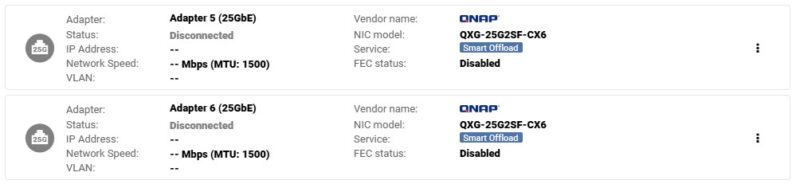
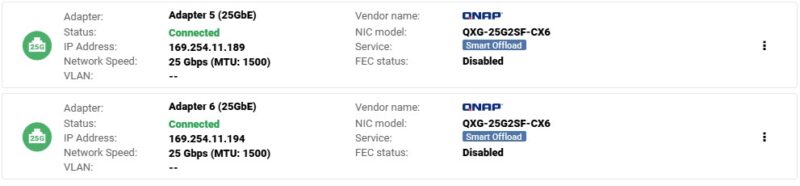
We can connect the two NICs and run the SFP28 ports at 25GbE speeds.
One other notable aspect we saw when installing this into the NAS was that QNAP’s UI not only tells you that you have a NIC installed, but you can locate the card and the port directly from the web interface. Here on the right side we can see the rear of the unit. Instead of being one of the built-in 25GbE ports next to the power supply, we can see we are looking at a PCIe card and the top port of that card.
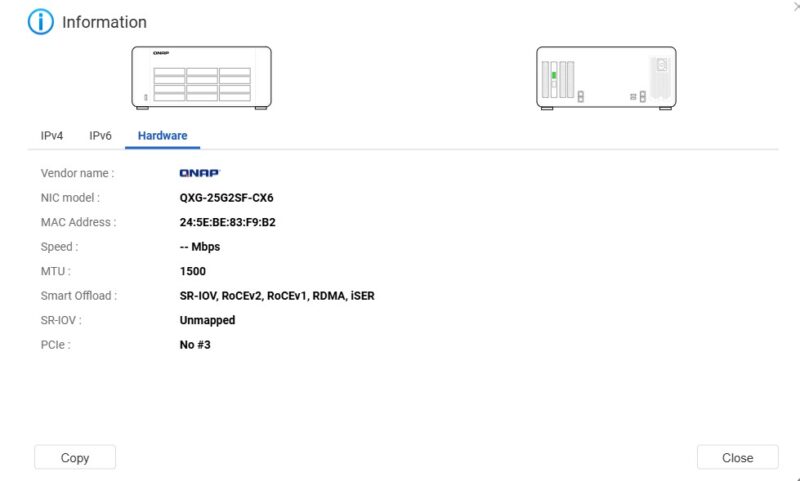
Something also worth mentioning is that the NICs can do SR-IOV, but also has RDMA offload features. The ConnectX-6 Lx is a relatively new 25GbE NIC, and it is great to see QNAP producing NICs with these. It also matches the onboard ConnectX-6 Lx NICs in this system.
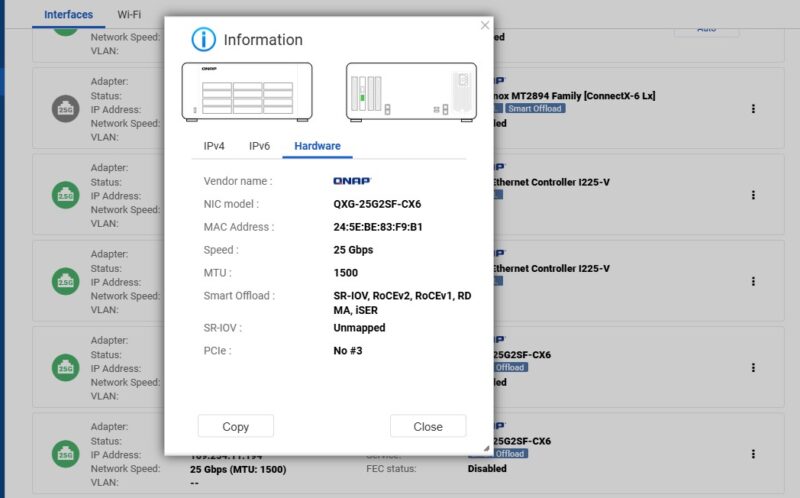
It was just neat to see this integration. If you are not in a QNAP system, then this looks like a CX6 Lx NIC. We did not run into many issues with the NICs.
Final Words
There is, however, a big “gotcha” with this card: the price. It is a $399 list price NIC. When ConnectX-4 Lx cards can be had for less than an eighth of the price and even second-hand that $399 price tag may shock those who normally purchase in those markets. At the same time, for drop-in ease with QNAP NAS units, this makes a lot of sense. QNAP’s pricing is in-line and sometimes lower than other new ConnectX-6 Lx cards. If someone is buying a 12-bay NVMe SSD NAS, then they are likely to spend a bit more for the supported NIC.
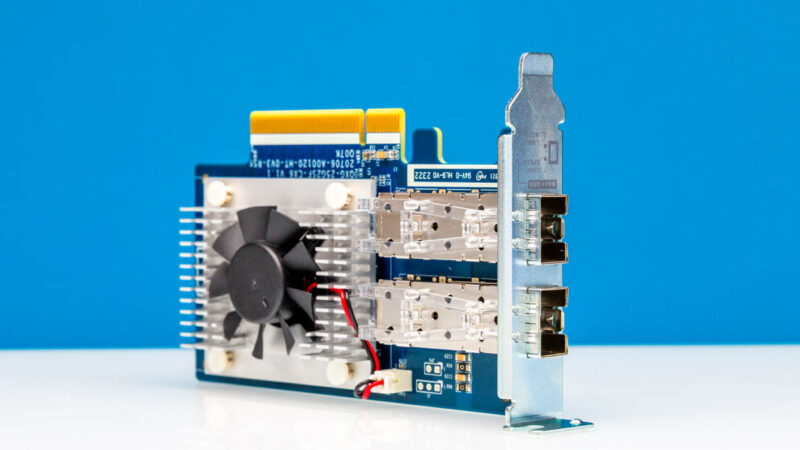
With the fan found on the NIC, and the low-profile I/O bracket, this is also a great NIC that can be used in a number of low-profile card applications. We actually purchased this card to be used in another system, not just the QNAP NAS. Even though this is not the fastest card, adding two 25GbE ports is very useful in many systems.
Where to Buy
If you want to check prices or purchase a unit, you can find one here with our Amazon Affiliate link.




Does it accept standard NVIDIA firmware or is it a special snowflake like Supermicro NICs? If the latter is the case then knowing QNAP chances of them keeping up with up-to-date firmware are slim…
At least Supermicro recently started to publish firmware for their cards.
I can’t wait for those new charts to be mainstream
I like the fan as an option. Most newer ConnectX cards *need* cooling or they’ll overheat and fail within minutes. Servers generally have enough airflow for them, but desktops don’t. I added CX6 to my desktop with a 100G DAC, and it hit 115C and shut down within 10 minutes. I added a cheap slot fan to the system, and that was enough to drop the NIC down to ~50C.
Using a NIC with a built-in fan would have been less work.
QNAP card doesn’t use standard NVIDIA firmware. Their updates are shipped as part of their “AdvancedNetDriver” qpkg, but last time they’ve updated the firmware was in 2021:
FW Version: 26.30.1004
FW Release Date: 29.3.2021
@Civiloid
Thanks for clarifying.
So it’s 32, yes, thirty-two, versions behind and installable only through their own OS? As expected of “stellar” QNAP support then.
@Kyle
There are ways to extract the firmware from their qpkg and then you can update the card with it using standard mellanox/nvidia tools, but overall yeah…
@Civiloid
Will that work for this NIC? Supermicro ConnectX NICs refuse to be updated by standard firmware and require Supermicro-signed firmware.
Older mellanox cards can be flashed with generic firmware, but every attempt I’ve seen or tried even with multiple threads and command workaround have failed for the 6+, barring physical alterations with pins.
What model specifically is this based off of? I would hope for an AC with crypto and secure boot, otherwise for the price you can get 2-3 of the same kind of cards from ebay with much more recent firmware and drivers that work. Just get a cheap fan to put some airflow on it, I don’t see the benefit of this with those limitations.