

QNAP QSW-M3216R-8S8T Management
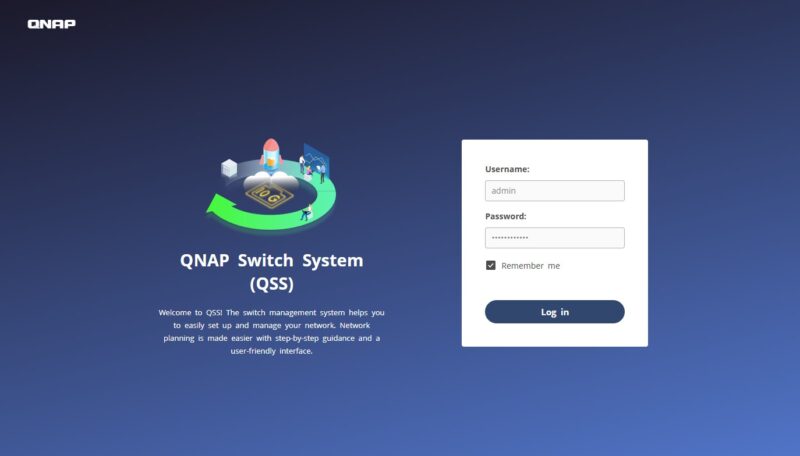
Logging into the switch for the first time, there is a randomized password, that you must change upon the first login to the QNAP Switch System (QSS.) That is better than many other switches that have much more lax security.
Moving along, the overal graphical user interface is easy to navigate. This is probably considered a L2+ managed switch, so the management is fairly basic.
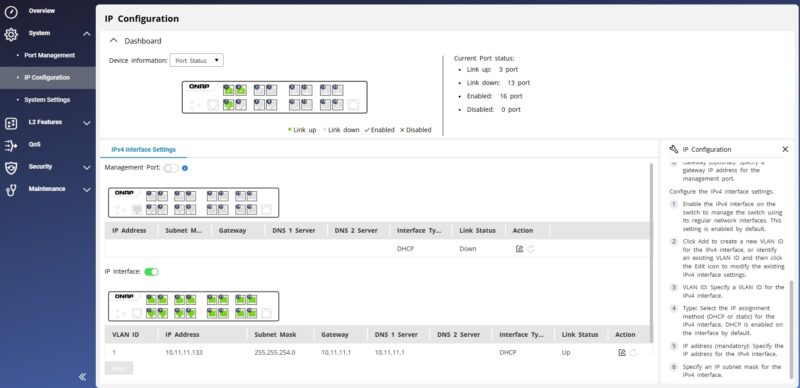
If you just need to setup things like VLANs, link aggregation, and so forth, then this is very easy to manage.
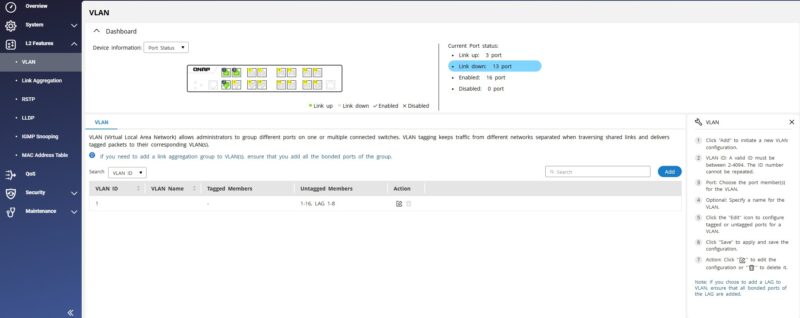
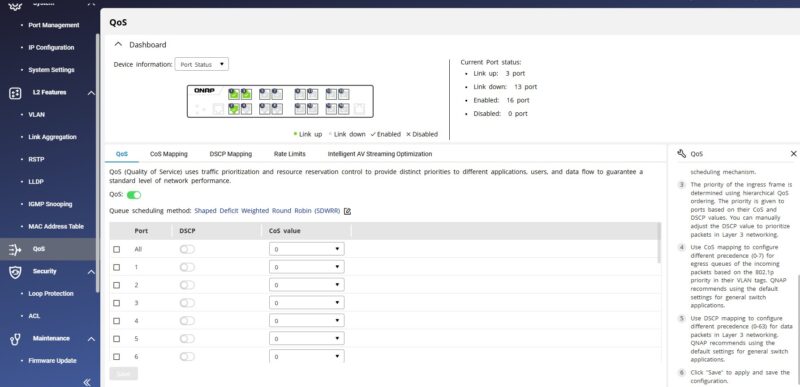
Something you may see on the right hand side is perhaps the most awesome feature. There is a little “Setting Guide” that you can hit, and then it walks you through the configuration steps for the setting. Imagine if someone needs to setup QoS or a VLAN, but has never done it before, or never done it on a QNAP system. Instead of having to look it up, the detailed steps are right there in the interface. To many of our readers who dislike web interfaces and love the CLI, this is going to seem silly. For the market segment of SMBs, homes, and other places where this kind of switch is targeted, this is a standout feature that is also aligned to how QNAP does NAS units. It is hard to understate how awesome this feature was once I clicked the link and saw what was happening.
In a small one that might seem minor, the management interface can check for updates automatically and then apply them. This seems like a small feature, but it makes updating the switch very easy. Lower-cost switches often do not get firmware updates. Higher-end switches often require a CLI trip. Here, it is a notification in the management interface making it very easy.
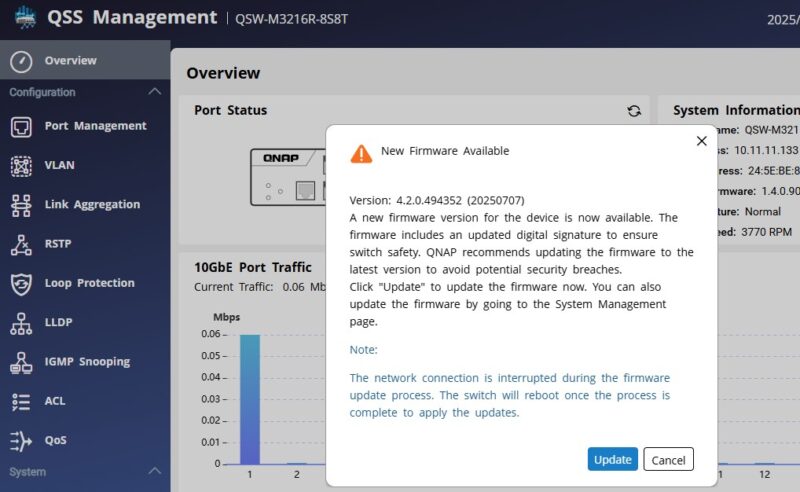
If it seems like this is simple management, but simple management that I found exciting, it is. Having easy-to-read instructions in the same window as where you need to perform the steps is such a seemingly small thing, but makes this so much better if you only go in and use the management interface infrequently. Companies have engineers that use their software every day and are accustomed to how to do things. Users in this segment often buy these switches and use the management interface one time, or maybe once every year or two so having really good in-context help is super.
Next, let us get to performance.
QNAP QSW-M3216R-8S8T Performance
For these, we are still using our simple iperf3 testing.
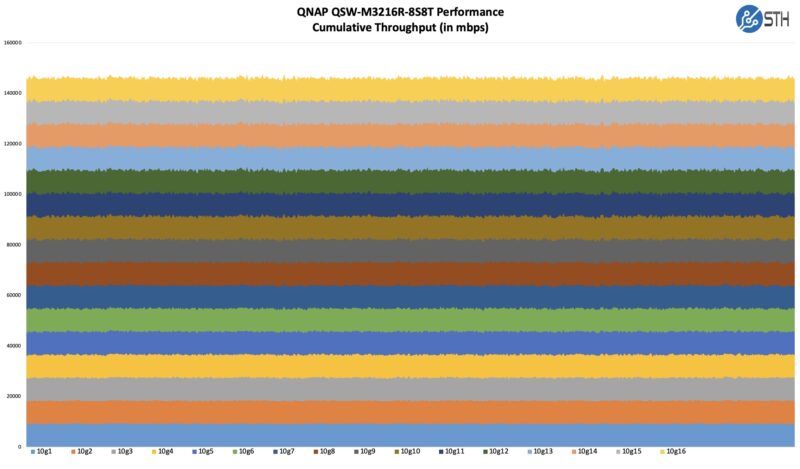
Overall, this is a solid performance result since Marvell’s switch chip is very capable. This is the kind of switch chip meant to handle up to 24 ports of 5GbE with multiple uplink and stacking ports so it has plenty for this type of application.
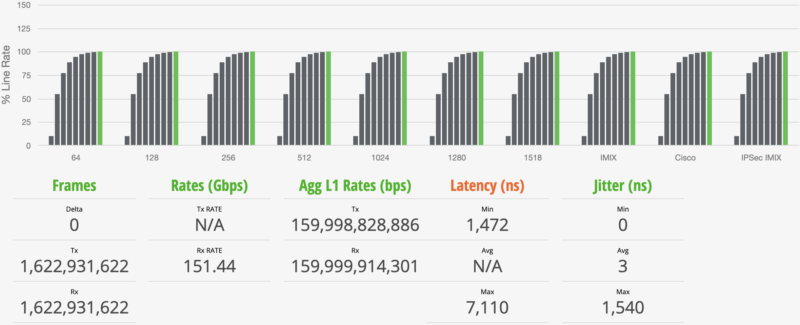
Update 2026-03-08: We re-ran this with our new testing tool and are updating the review with results. To test this, we are using a single Keysight XGS2 with a NOVUS 1/10G dual PHY card. We also upgraded our IxNetwork 11 revision to IxNetwork 26. One of the advantages of using a high-end FPGA-based tester is that we can generate not just 64B packets at line rate and over 1.6Tbps on our setup, but we can also get solid metrics on latency and jitter. We are using the RFC2544 Quick Test template and adding extra time per step, along with some additional IMIX variants, to provide more data. Starting with the 64B line rate test, here is what we saw:
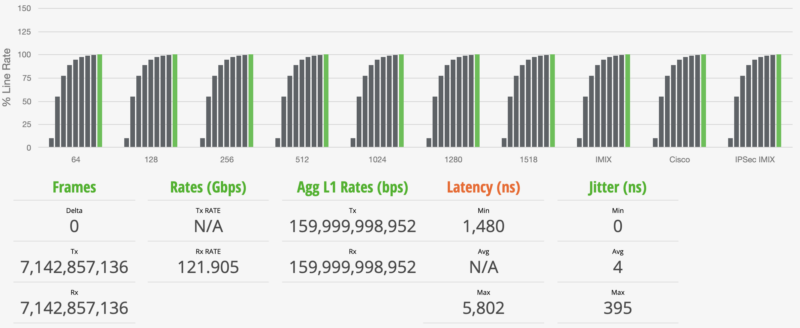
At 1518B frame sizes, we are still at 100% wire speed.
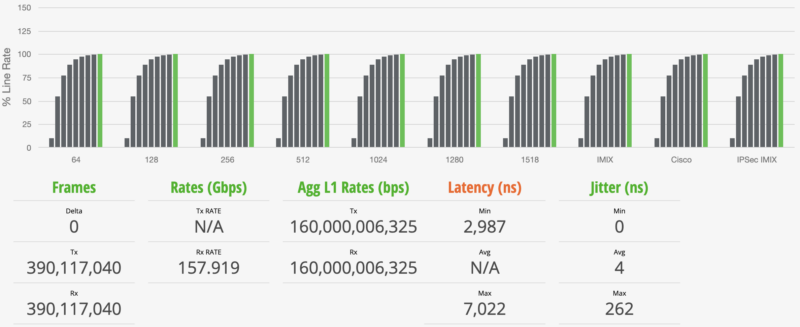
Here are the standard IMIX results:
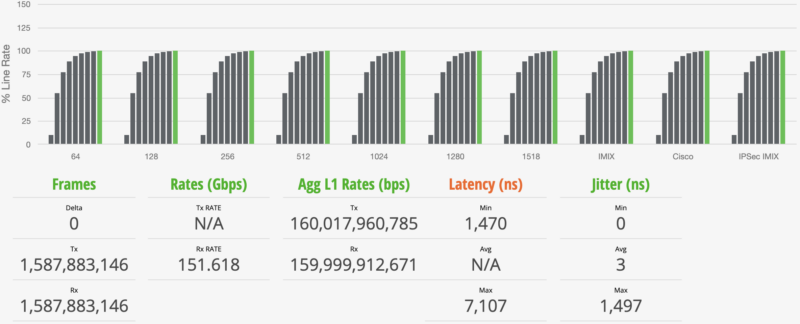
Here are the Cisco IMIX results:
Here are the IPSec IMIX results:
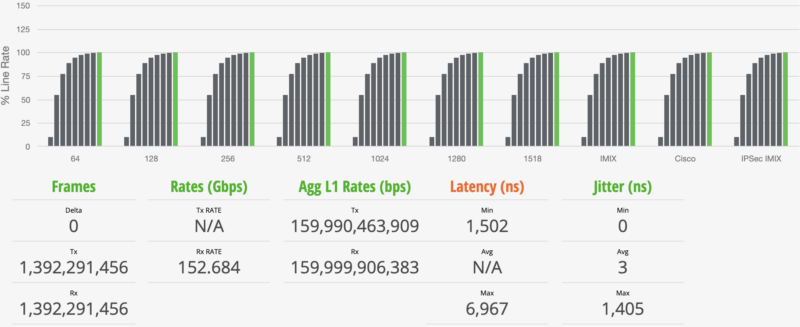
Overall these are very similar results to what you will see with the Cisco Catalyst C1300-16XTS.
QNAP QSW-M3216R-8S8T Power Consumption and Noise
At startup, we got to 42dba at 1m in our 34dba noise floor studio. Normally, the switch ran in the 38-40dba range. That is not silent, but it is also very reasonable if you have it under desk, or if you are in a normal office, it will just slip into background noise.
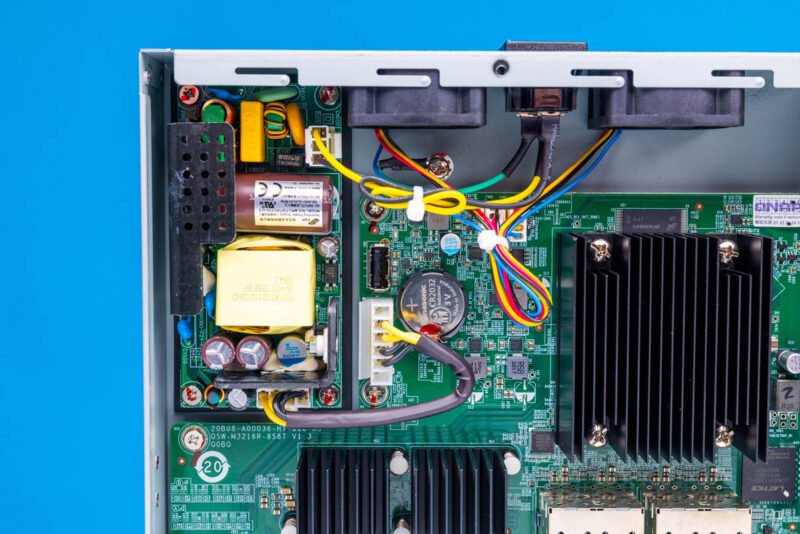
Power consumption was 17W at idle and then adds ~1.7-2W per port being used. This may seem like a small point, but the lack of noise and low power consumption differentiates this versus a larger enterprise/ data center switch. You can get bigger switches cheaper on eBay, but they will not have this kind of power and noise profile.
Key Lessons Learned
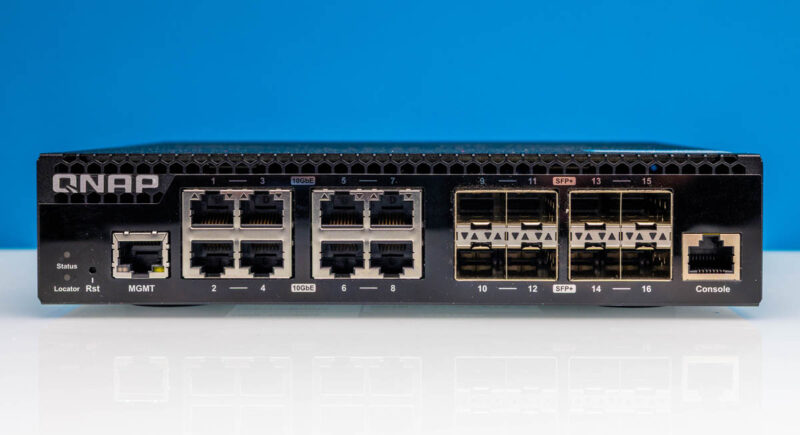
Let me make a bold statement that might get some of our readers fired up. The QNAP QSW-M3216R-8S8T is generally around $599-630 street price which is just under $39/ port. The QSW-M3212R-8S4T-US is still managed, but drops four of the 10Gbase-T ports, but usually only at a $40-45 discount. That works out to $10/ port. Also, keep in mind 10Gbase-T ports can run at Nbase-T speeds. Having four more ports on the same switch, even if you are going to run 2.5GbE devices, is quite useful. Usually, the 10Gbase-T ports are the premium-priced ports, so dropping four of them to save $40 or so feels like a really hard sell.
The QNAP QSW-3216R-8S8T-US drops the “M” off of the “3216R” because it is an unmanaged switch. It also usually drops pricing by roughly $50. On smaller switches that are 4-8 ports, or even just a bunch of 1GbE/2.5GbE ports unmanaged generally works fine. For this class of switch, I prefer management. Some folks have reported issues with loopback prevention on the unmanaged version, and there is no easy way to fix that without the management interface.
I know there are folks who will get upset with us recommending a more expensive model, but when the premium is $40-50 to get management or four additional 10Gbase-T ports, that is one that we absolutely advise getting if you can afford it. The number one reason we swap switches out is because we need more ports.
Final Words
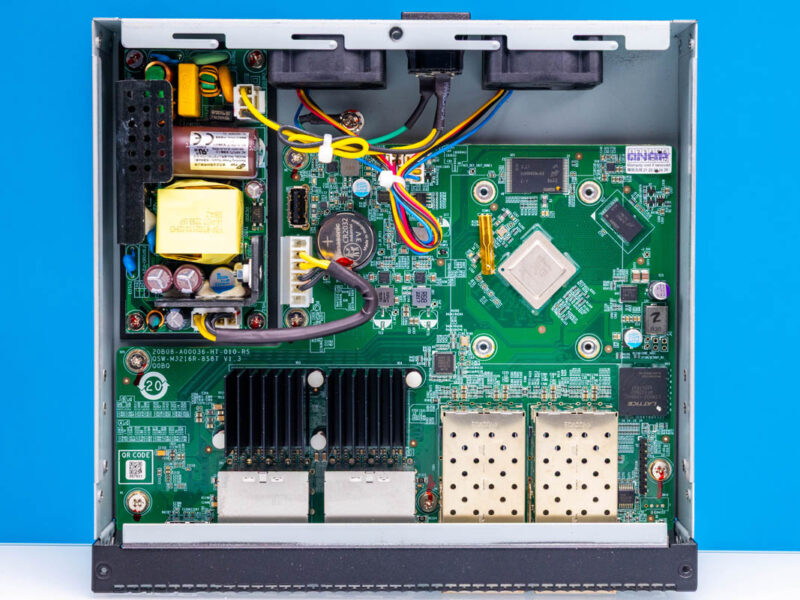
While I wish the switch was slightly quieter, it is not loud. The management may not have all of the bells and whistles of the MikroTik, or the full-stack integration of the Ubiquiti UniFi suite. At the same time, it is so much better than the average low-cost no-name vendor management that we think it is worth a premium. Also, the fact that this switch uses a Marvell Prestera switch chip instead of a lower-end multi-chip Realtek solution we see as a big plus.
For roughly $600-630, this is far from the cheapest switch. On the other hand, getting a 16-port switch that allows you to plug in a mix of devices is going to be perfect for others. To us, if this port configuration fits your needs, then this is a great option you should consider.
Where to Buy
If you want to check current pricing, here is the QNAP QSW-M3216R-8S8T we are reviewing (Amazon Affiliate), then the QNAP QSW-3216R-8S8T-US (Amazon Affiliate) and the QSW-M3212R-8S4T-US (Amazon Affiliate) that we discussed, but our sense is folks are going to gravitate strongly to the QSW-M3216R-8S8T.

For those who care about fanless/silent and the same spec (at least when it comes to ports/speed, unsure about chipset), the QSW-IM3216-8S8T (https://www.qnap.com/en-us/product/qsw-im3216-8s8t) is pretty great.
Though not necessary, if you really want to make a QNAP switch quieter, just replace the 40mm fans with Noctuas. Makes mine virtually silent.
If this is anything like the reasonably recent QSW-M2106R-2S2T, then its 10G SPF+ ports can’t negotiate to handle 25G NICs (Connect X-4) at 10G. Mostly likely something around FEC negotiation, but if you bounced the port enough times it would finally sync and be good. Reboots were ugly. Of course every OTHER managed 10G switch seems just fine(Zyzel, Microtik, etc).
I think its fine that you review switches at this pricepoint as well.
And if you find some with say 8/16 GbE ports & 8/4x 25gb will also be interesting.
Re Fans ,
i have replaced my fans ( standard Sunon 40 x40 x 20) with NoiseBlocker fan’s
from 8.9 CFm with 26.5 dB to 17.7 dB with 5.4 Cfm. temp increased with about 2 dreg C.
Re POE
Why d’not they add PEO to the Rj45 port, so you can get rid of the old 1Gb poe switches.
is the extra cost for 10Gb POE ports so high ? or are they affraid of the heatload ?
I have this switch and it’s excellent, at an acceptable noise level when it’s in the rack. But I had a similar issue as Joel – I had issues with auto negotiating 10Gbps on a 10/25 GbE Broadcom BCM57414 adapter — the link wouldn’t come up if the NIC was attempting to auto negotiate — and had to manually set the link speed to 10Gbps on the NIC side.
These switches are solid and I used them for a small density portable rack that allowed me to combine 2 of these 1/2 rack switches together to fill 1U. I used this switch along with a QSW-M2106PR-2S2T which offers (8) 2.5G copper POE+++ ports as well as (2) 10g POE+++. The combination of these two switches gave me great versatility in speeds and feeds. But the downside is that the M2106’s firmware is severely behind that of the M3216. Like version #1.2 vs 4.2. The biggest issue is that the M2106 doesn’t allow you to set the mgmt VLAN to anything other than 1. it’s hardcoded. so if you don’t use VLAN 1 you have to get creative. It’s sad that a company can produce decent hardware designs and then fail so miserably in software, but that’s always been QNAPs skill. No need to change now….
Does it acctualy work under load? And for more than a couple months ?
Would be perfect with 12 copper (POE+/++) and 4 SPF+ cages.
Did anyone try to replace the firmware with Sonic? I would be very interested in knowing if this would work, as the marvell chipset should support this…
Sonic is an OS used on datacenter switches, and can be automated for cloud deployments (Openstack). I am looking for something like this for my lab setup
Comments are closed.