

NVIDIA ConnectX-7 Quad Port 50GbE SFP56 NIC Inferfaces
Here is a quick look at a cards in our new traffic generation box using lshw.

Here is a lspci -vv screenshot. We can see that this supports SR-IOV as well as 16GT/s PCIe Gen4 speeds. You need PCIe Gen4 x16 to operate a NIC at 200Gbps speeds.

For the port capabilities, these support 50GbE, but also 25GbE, 10GbE, and more.

Next, let us get to the performance.
NVIDIA ConnectX-7 Quad Port 50GbE SFP56 NIC Performance
In terms of performance on very simple flows, here is what we saw:

The ConnectX-7 is realistically desgined for a lot higher throughput than this configuration can handle. We can see that it is doing super well here. Again, this is just simple traffic.
Just a small note on this, we are using DACs not optics. The cost of 50Gbps SFP56 optics was just too much for a review article like this and so we went with the lower-cost option.
What is Next: A Preview
Over the past few months, we have been busy transforming a server very similar to the Supermicro Hyper SuperServer SYS-222HA-TN we reviewed into a massive traffic generation device.

Currently, it has the ability to push over 1.6Tbps of throughput, and to utilize not just simple iperf3 traffic. Instead, it can simulate real user flows, AI flows, zero trust traffic flows, and more. We have been working with the folks at Keysight to get a machine that can reliably run CyPerf, which is a leading tool in the industry. This is not just a “install NICs in a server and download some open source software” type of setup. Instead, this involves customizing the base Supermicro server’s PCIe layout, tuning NICs, and NVIDIA DOCA, getting the costly software package up and running, and more. We are going to go into this box in a lot more detail in the future, but it was time for a quick preview.
Part of the reason for using these NICs in this server is that there is an upcoming platform that we hope to show you in a few weeks. I can tell you that Patrick is very excited about that new platform and this new CyPerf tool.
Final Words
Overall, the NVIDIA ConnectX-7 is a NIC we have seen in many systems, especially in its OSFP form factor. Now, NVIDIA is bringing ConnectX-7 to new segments, including the emerging SFP56 NIC space.
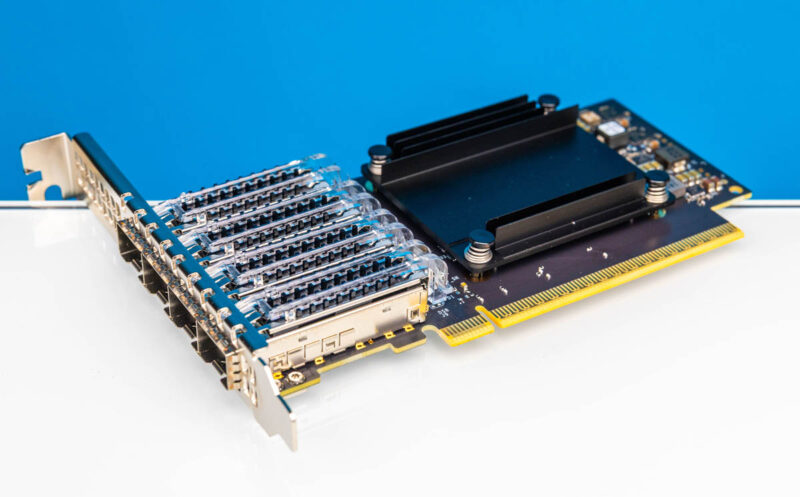
For a lot of our readers, 10GbE/ 25GbE NICs are more useful. Our sense is that over the next few quarters as more SFP56 gear comes online and optical modules come down in cost that this will become a more important option in the marketplace.




I really like what they’ve done with the cooling here; minimize fin count and surface area to minimize heat dissipation!
Seriously? no power draw numbers at idle and load in the “review”?
I don’t think most cards other than DC GPU’s support power monitoring onboard. Servers don’t provide power on a per slot basis. So you’d have to put the card into a power testing rig, but that’d change the data connection between the CPU and the card, so it’d introduce that inaccuracy. You might be able to do power deltas for the server as a whole, but then it’d only be relevant for the server since you’d get cooling too. That’s why nobody does power on PCIe cards. I thought that’s obvious?
Oh, maybe I just got trolled by this James feller. I fell for it.
does it ship with a low profile PCIe backet? Curious if this can be used in a 2U server
@Farhad R
Power measurement interposer’s effect on data lanes is negligible because the additional distance is small. If that mattered you’d see different performance between slots closest and furthest from the CPU, and that’s definitely not the case. Nor are PCIe traces length-matched between slots on motherboards.
Does this mean that Cx-7 is targeting mere mortals with their 50GbE stuff and that prices will be reasonable ?
Small cooler does imply miniscule power, even at datacenter airflows…
Why do all these things in ConnectX family default to slower PCIe with models for lower speeds ( 25GbE/50GbE/100GbE) ?
If they didn’t they’d be awesome for smaller hosts, since they wouldn’t waste precious PCIe5 lanes.
What’s the point of paying for PCIe5 if you get to actually use it so rarely ?