

Intel Arc Pro B50 Power Consumption and Noise
Somewhere that the Intel Arc Pro B50 did exceedingly well in was in the power consumption and noise segments of our testing. We saw idle power consumption in the 12-13W range, and then load in the 48-70W range.
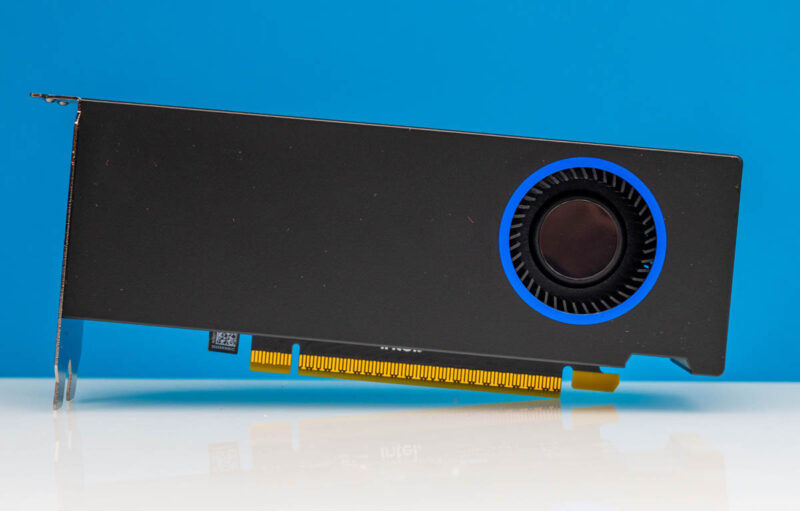
The noise was absolutely an awesome point. Even under load, this GPU was very quiet. Or better said, if you are 1m away and it is in a closed case, we saw a sub-1dba incremental noise increase in our 34dba noise floor studio. While it feels like we want a single-slot cooler, if this is the price for virtual silence from a GPU, perhaps the dual slot cooler is worth it.
Key Lessons Learned
A part of this is getting a useful GPU today. The other part, if we are being frank, is a promise in the future. Intel is launching new features in Q3/ Q4 to help round out its software stack. Something to keep in mind is that Intel has a sizable installed base, and it actually has had historically better AI software than AMD, even when AMD won its multi-billion dollar data center MI300X AI deals (rumor has it that Intel effectively passed on Microsoft’s business.) There are many AI accelerators out there that struggle with software support. We tend to believe that Intel is going to focus on enablement as it has been doing for years for its products, even before the latest AI wave.
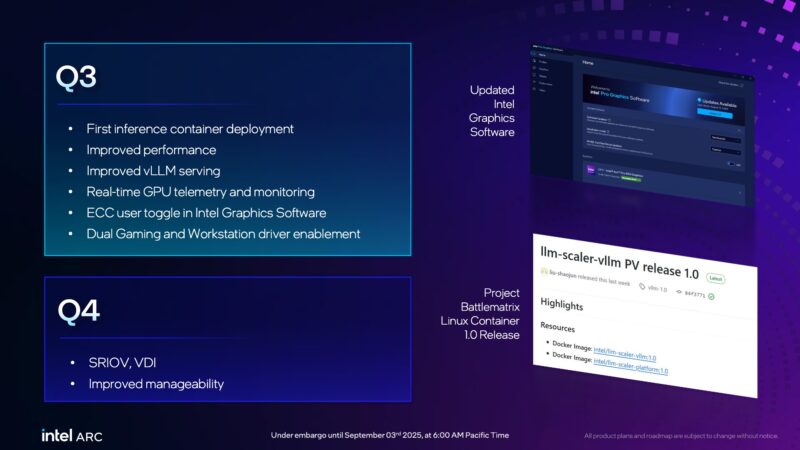
The Intel Arc Pro B50’s proposition is effectively that it can beat NVIDIA’s Ampere generation competition at a lower price point. To us, Intel has been successful.
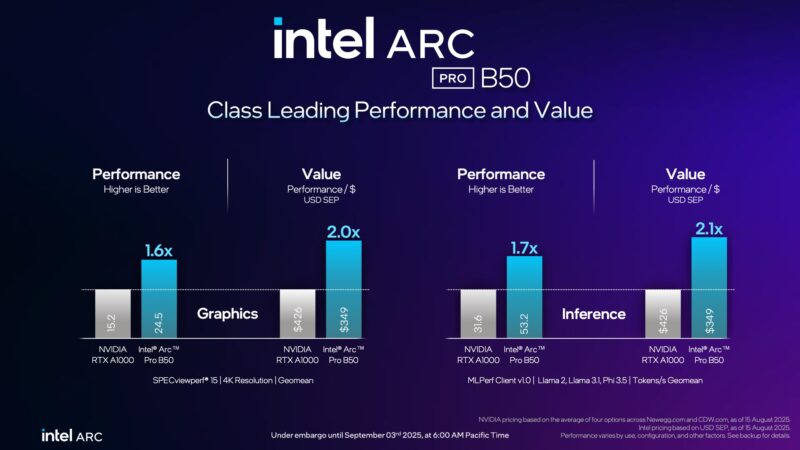
The somewhat strange feeling in all of this is that Intel has an awesome product for a lot of folks outside of traditional workstations. Sure, the workstation market is there. 16GB is a spec we love, even if that caused the price to move on the card over the summer. Maybe the big win is that SFF PCs, workstations, and even 2U servers now have a direct path to a GPU that promises SR-IOV support in the near future so it can be shared, Intel’s great video transcoding, and an AI inference GPU with 16GB of memory.
Between the form factor, the features, pricing, and power consumption/ noise profile, this is one of those GPUs that really makes you think about all of the places it can be used.
Final Words
Overall, this is a really neat card. It is very quiet and we saw it use well under its 70W rating in our use. With 16GB of memory, Intel has something for those who want to run bigger AI models even in smaller systems. Or another way to look at it is that if you had an application that was using the memory of an 8GB GPU previously, and now you want to run an AI inference application on top of that (which is becoming very common in professional software), you now want 16GB or more to be able to fit the model as well. That is what makes this card so impactful.
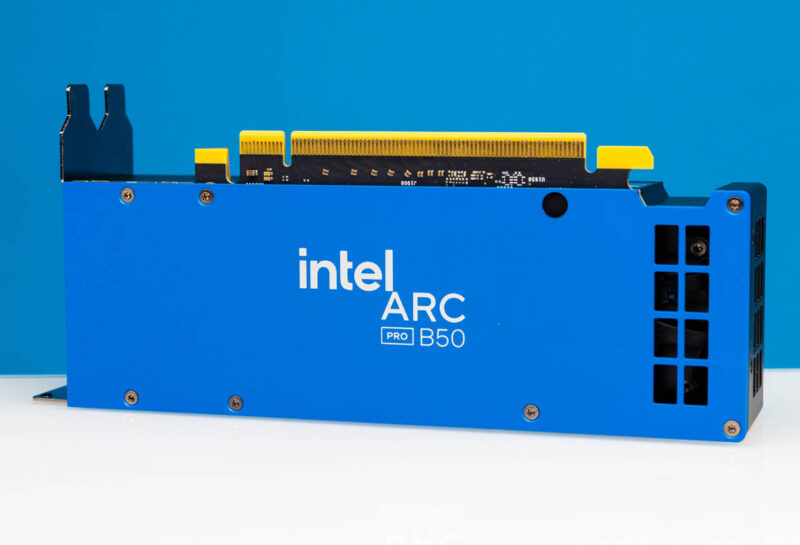
Realistically, we are in a place where many will just buy NVIDIA because NVIDIA is the current king of GPUs. That is a bit of an unqualified statement other than if you look at NVIDIA’s GPU revenue across the company over the past few years. Some folks will not want this solely because it is not a NVIDIA GPU. Others will look at this as a GPU from Intel, a company that has a lot of experience with GPUs and working with ISVs in the workstation market and see that it provides a great value in a small form factor. That is really the point of this GPU, and Intel’s foray into this market feels like a success.
Where to Buy
We saw that B&H has these on pre-order. Here is an affiliate link.




@John Lee
On the Geekbench AI chart, Can’t you relabel the two scenarios for the graph? I get that the only change is the framework, but when looking at the chart and having both runs labeled as “Asus system Product Name” makes things beyond confusing.
This review mentions the A1000 and A4000 but this GPU seems to be trying to match the A2000 16GB Ada edition more then either of those, given it has the same VRAM. The Cooler looks completely identical too.
Having recently purchased an A2000 Ada (and slapped on the single slot N3rdware cooler), I’d be curious to know how it compares to this, when it comes to home-server tasks like trans-coding under Plex, running local LLMs, doing detections in frigate etc. I guess in this case it comes down as well to CUDA vs VAAPI/ quicksync as well.
Also I didn’t see it mentioned in the review, but these intel cards are probably the cheapest way to get hardware AV1 encoding into mini PCs like the MS-01, and I think this B50 has that as well.
sff? mini?
what is here sff or mini?
this is just full length and 2-slots thick gpu.
I want to see a comparison between Arc B60*8 system and RTX 6000*2 system.
A RTX 2000 Ada is a $799 GPU, this is less than half that cost, no? I’d also say these won’t fit in the MS-01 since its dual slot not single, no?
It is SFF because it’s half as tall as a normal GPU.
And the A2000 is also originally a dual slot card, but it is possible to purchase an aftermarket single slot cooler for it, which makes it fir inside the MS-01.
Having a good video encoding engine and SR-IOV support makes this rather interesting, although I would have loved to see the more images of the fin stack of the cooler and the PCB. I know it’s not a gaming card, but these are nice to have, in my opinion.
I’d love to see this somehow trialed in a good homelab setup with Frigate and inference times, gpu usage, and power consumption. You can get a good starter unit with an Intel 12th – 14th gen but this could be a growth choice for folks who use the MS line and want to use the GPU for mixed workloads.
I need a B50 or dual B60 which is single slot full height! So I can put many of them in a single server chassis for QSV transcoding.
Doesn’t do much good without knowing a good SFF PC to use with it?
One thing I’d like to see is how this GPU performs in normal workstation tasks like AutoCAD, AutoCAD Fusion, and SolidWorks.
I noticed the other day that AutoDesk lists some older Arc GPUs in their compatibility matrix. If the Arc Pro B50 goes on the compatibility list and performs well, this is a killer deal for a workstation GPU.
I will NEVER but a product based on the “they will release software features later” mentality.
You always lose, features never arrive of are half baked.
If they do come out with the features – GREAT! But that should NEVER be expected -NEVER.
If the product doesn’t support a feature you see looking for at launch, or if it still needs work to get it to perform as expected (hello Intel CPU division) then do not buy it – no matter how cost effective it might APPEAR to be.
Suggesting anyone more or less (depending on how you look at it) is irresponsible journalism.
@John: exactly my thoughts!
People take it granted that sriov, the arc pro b ultimate killer feature, is indeed coming as promised in 3-4 months. But! If the captain decides in 2-3 months, that “naah, lets fire everyone from the gpu department”, before the sriov driver is released, then all gullible super-optimistic-believer will realize they made a bad decision based on future promises.
This is perfect for my 2U server case. Already have it on order, looking forward to putting it through its paces with thermals and power as a priority for me.
Im excited about sriov. My VMs will all be video accelerated.
Review could have used a section on llama.cpp performance
Still no VR for any intel GPU