

GMKtec EVO-X3 Performance
At the heart of the GMKtec EVO-X3 is AMD’s Ryzen AI Max+ 395, the company’s top-end, fully-enabled Ryzen AI Max+ 300 series SKU. This configuration is the Strix Halo platform at its finest, offering all 16 Zen 5 CPU cores and 40 graphics CUs baked into the underlying silicon. The net result, as we have seen time and time again in other reviews, is that Ryzen AI Max+ 395 can deliver tremendous performance across both CPU- and GPU-bound workloads. The tradeoff is that with 441mm2 of silicon, the chip can pig out on power when system builders allow the chip to run at high TDPs.
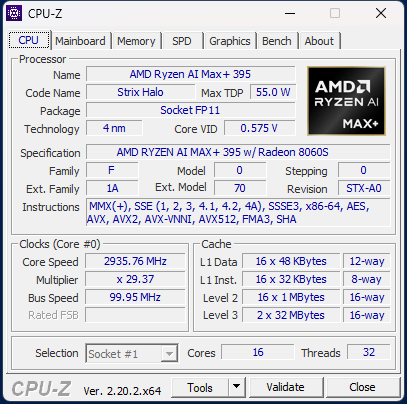
Clearly mindful of that tradeoff, GMKtec has given the X3 multiple user-selectable power/performance modes to balance the performance of the system with its acoustics. These are a 54 Watt Silent mode, an 85 Watt Balanced mode, and an all-out 140 Watt Performance mode.
| GMKtec EVO-X3 Performance Modes | |
| Mode | Power Limit |
| Silent | 54W |
| Balanced | 85W |
| Performance | 140W |
Notably, this is a new feature to the EVO-X3, as the X2 did not have any kind of user-selectable modes (instead, it always ran at 140W). In effect, this allows users the option of capping the system’s power consumption (and thus performance) at a lower level in exchange for less heat and noise.
For the purposes of our testing, we have done the majority of it in the highest-performing Performance mode.
Geekbench 7 CPU
For our look at the performance of the EVO-X3, we will start things off with Geekbench 7. We have reviewed several Ryzen AI Max+ 395 systems over the past year, so Geekbench 7 gives us a solid set of data to look at to see how the Halo systems compare.
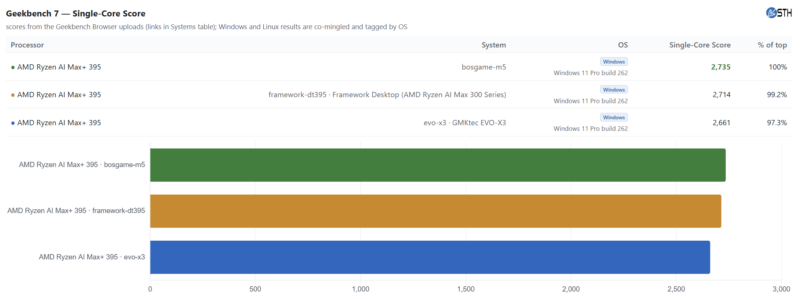
With single-core performance, the spread between the Ryzen AI systems is quite narrow. The slowest and fastest systems are within 3% of each other, which, performance tuning aside, would be within our normal margin of error anyhow. Though the EVO-X3 does technically end up as the runt of the litter, bringing in the lowest score.
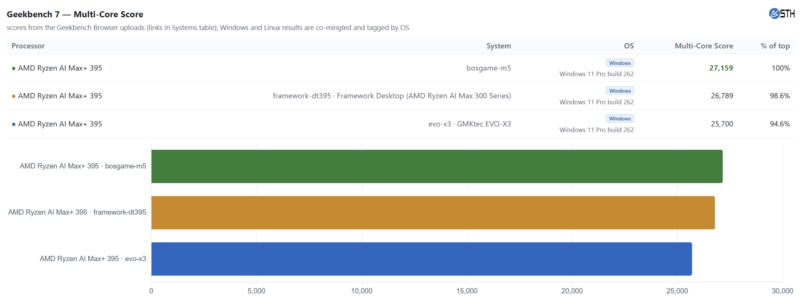
Meanwhile, multi-core performance follows the same trend, though the range of performance between the top and bottom systems has grown a bit. Here, the top system is about 5% faster than the slowest 395 system. The EVO-X3 in particular once again brings up the rear here.
Geekbench 7 GPU
Shifting gears here over to the GPU side of the performance picture, here is a look at how the integrated Radeon 8060S GPU performs under Geekbench 7’s suite of GPU benchmarks.
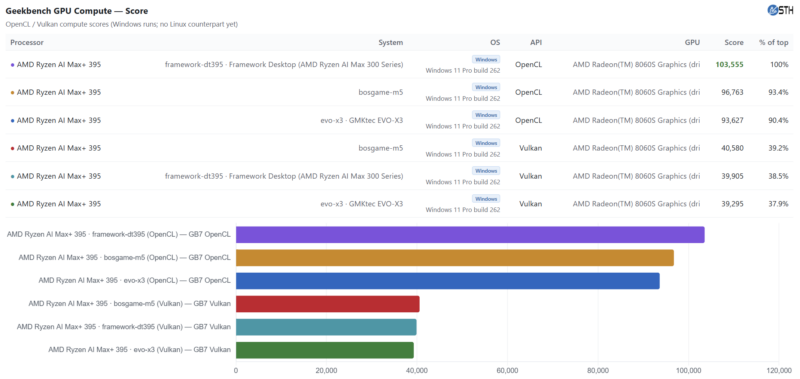
Unfortunately, GB7 is still a bit buggy at the moment. Specifically, the Vulkan version of the fluid simulation sub-benchmark is broken on AMD GPUs. As a result, the Vulkan and OpenCL scores are not comparable.
With that said, we do find a larger-than-expected spread between the 395 systems in the OpenCL version of the benchmark suite, where there is a 10% gap between the top and bottom systems. Conversely, the Vulkan version of the test has all three systems tightly clustered together.
Regardless, the EVO-X3 once again ends up holding the last-place slot in these results. Given the otherwise identical hardware in play here, this hints that the X3 may be tuned to run at a lower TDP (or lower fan speeds), which limits performance a bit more versus other Ryzen 395 systems in these heavy GPU benchmarks.
MLPerf 1.6.1
Taking another look at GPU performance with MLPerf Client 1.6.1, we see that the EVO-X3 delivers the same kind of high-performance results we have become accustomed to seeing with other Ryzen AI Max systems. The Ryzen AI Max+ SoC does remain performance-bound relative to discrete offerings due to its TDP limits, memory bandwidth, and the sheer amount of hardware applied to the problem. But as far as integrated offerings go, this is very good. Coupled with 128GB of memory, this underscores the Ryzen AI Max+’s value proposition as a system with enough DRAM to run local inference on larger models.
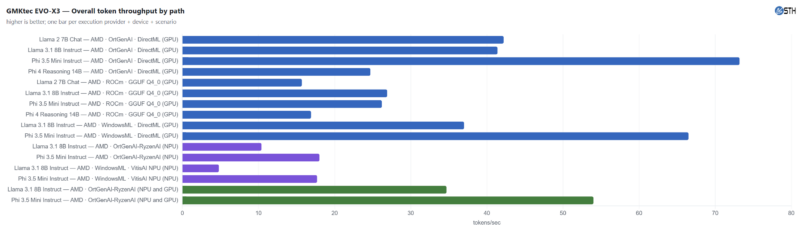
OrtGenAI remains the way to go with these Windows-based Ryzen AI systems, as that software and DirectML backend provide the highest token throughput across all models. Still, these things are changing.
Otherwise, MLPerf Client is neat because it can test not just the GPU, but also the NPU. From the above, it should make sense why many are focused on GPU performance with LLMs. If you want more data and TTFT numbers, MLPerf Client v1.6.1 also spits out that data as well:
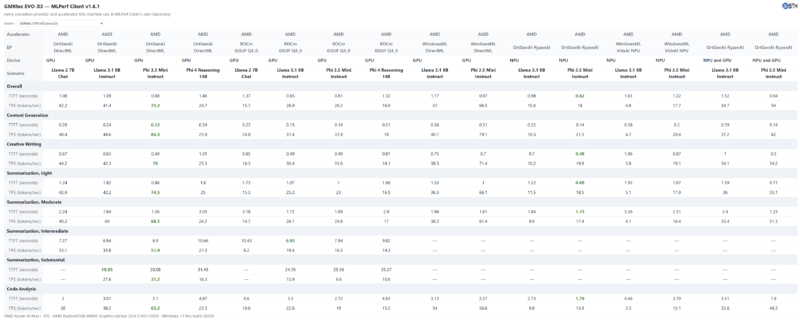
The most advanced model in the current MLPerf client benchmark is the Phi 4 14B parameter reasoning model. Even under that model, the EVO-X3 and its Ryzen AI Max+ 395 chip average a rate of 24.7 tokens per second, with a TFT of just 1.46 seconds.
Next, let us get to the power consumption.



Unfortunate that they did not give y’all the 495 SKU. The 395 is pretty well understood.