

Dell PowerEdge R670 Power Consumption
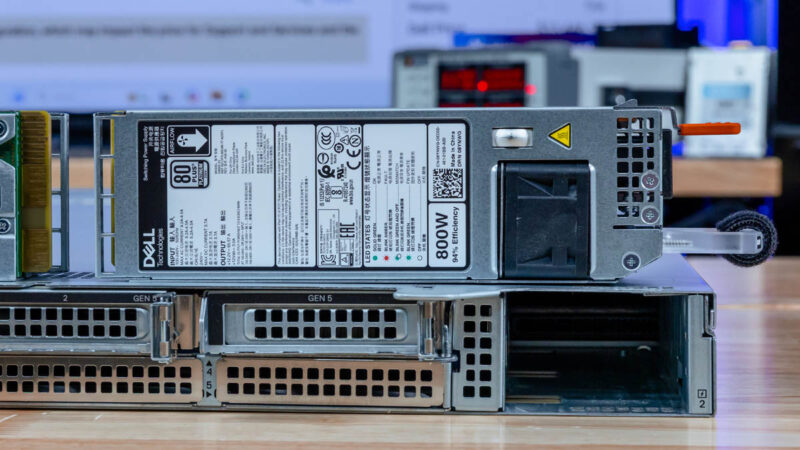
In our configuration we had dual 800W 80Plus Platinum power supplies. We used both since we had two 350W TDP CPUs and by the time we added NICs, cooling, and the front SSDs/ memory we would be over 800W.
A small but nice feature is that Dell monitors the power not just at the CPU and PSU level, but we also get DRAM power consumption that we can see here is 17-19W per socket at idle (1 DPC 64GB DDR5 RDIMMs.) That puts us in the 120-140W range per socket at idle, without any of the other system components. This matters because if you are consolidating from previous generations of servers, the idle and load power consumption will be notably higher in current generations, but the trade-off is that this is for significantly higher density.

We were often in the 420-460W range at idle, and under load we got into the 930-950W range, without adding high-power NICs and optics. With two NVIDIA ConnectX-7 400GbE NICs and DR4 optics, we were over 1kW for this configuration.
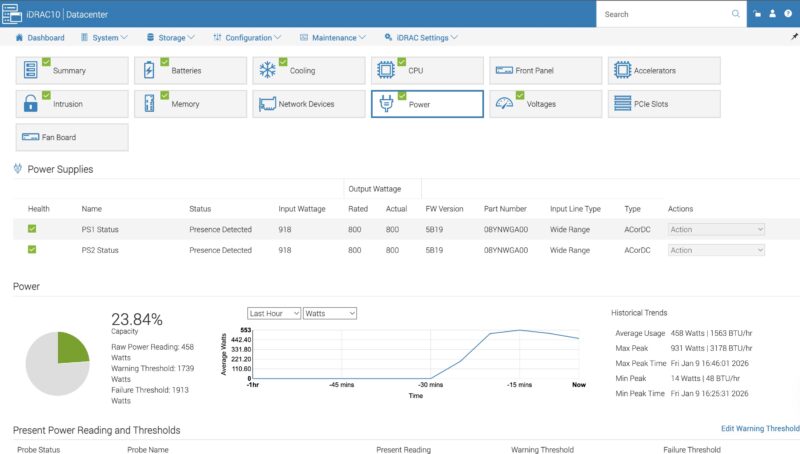
This is a lot of server, and it uses a good amount of power. We would probably say it is a lot, except for the fact that it uses little power per node, and even per U compared to current generation AI servers.
STH Server Spider: Dell PowerEdge R670
In the second half of 2018, we introduced the STH Server Spider as a quick reference to where a server system’s aptitude lies. Our goal is to start giving a quick visual depiction of the types of parameters that a server is targeted at.
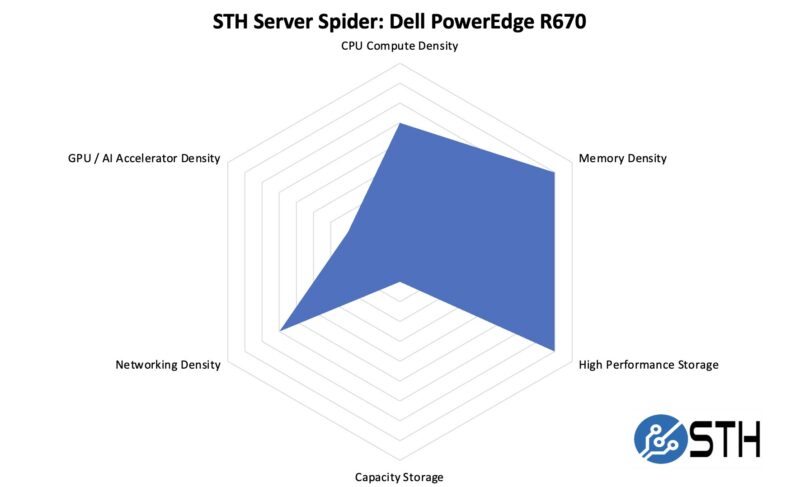
Having the ability to add multiple high-speed PCIe Gen5 NICs in the rear, along with up to 20x E3.S NVMe SSDs in the front, means that even for a single-node 1U system, we get an excellent amount of flexibility. Where the 1U servers excel is in density, and we can see that here. Of course, if you want to build servers around 3.5″ hard drives, or GPUs/ AI acceleratiors, there are more optimized platforms just for those use cases these days.
Final Words
We review so many systems, that in many ways it is fair to say that our opinions regress to the mean. At the same time, it is very apparent from the availability of front I/O options, great fan modules, multiple rear configurations, solid cooling for the CPUs, both PERC and iDRAC, and even down to the little custom bits like a cable organizer/ airflow guide in the rear that Dell’s design team did a great job on the PowerEdge R670.
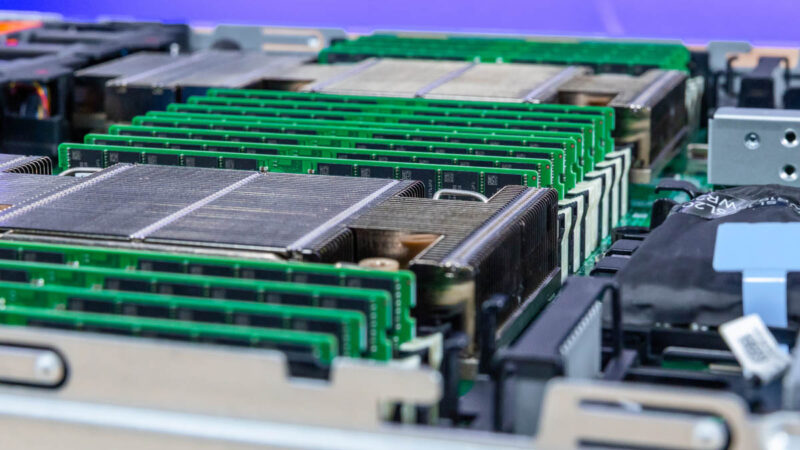
The addition of the E3.S bays was excellent, and offers something very different by offering even more storage in a 1U footprint. 1PB/ U (or more) using standard compute servers is now easy to achieve, as is 400Gbps per port networking. You could, of course, use less dense storage, or networking, or decide to put three NVIDIA GPUs in the rear risers.
Thinking a bit critically, however, I do think that the 1U form factor as being the standard dual socket offering is being challenged in 2026. There is a lot of wisdom and merit to using 2U servers given that today’s servers use more power per node, but offer much higher density in terms of CPU, memory, stroage, and I/O versus previous generation servers. Of course, Dell makes the PowerEdge R770 that shares a lot with this PowerEdge R670 if you were also of that mindset. Perhaps that is the entire point that one can pick the right density chassis but get a similar experience.
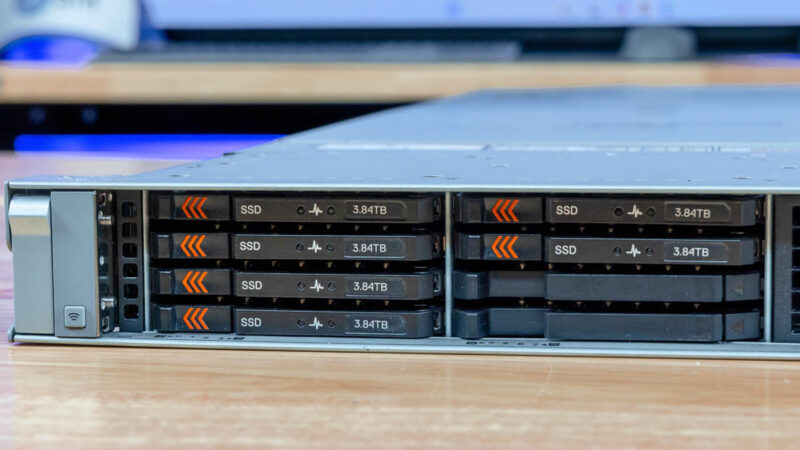
Overall, the Dell PowerEdge R670 shows what happens when a great engineering team tackles ever expanding performance and density frontiers in standard 1U servers.

The Dell honeycomb faceplate looks more photogenic to me than HP and any post-IBM Lenovo design.
In my opinion air-cooled dual-socket 1U servers never made much sense, because the fans are just too small. Now that power consumption has gone up, the sensible choice for 1U is liquid cooling.
Surprised to see it score so low in the spider chart for Capacity since you mention more than once that it can hit over 1PB in a single U. Seems with flash, High capacity and performance are one and the same in 2026.
I’m noticing more & more super basic typos & mistakes in articles lately.
>Each block of eight drives with 61.44TB SSDs gives us just under 1PB of storage
This should read ‘just under 0.5PB’.
>On the other side, we get 16x drives as well.
This should read ‘we get 8x drives as well’.
This review is really starting to read like it’s AI generated :/
>Looking ahead to PCIe Gen6 servers, the U.2 connector will no longer be supported, and the EDSFF connector.
And the EDSFF connector… what? Will replace U.2? Or will also no longer be supported?
>Riser 4 is the low-profile riser slot.
Riser 2 is also low profile.
>In the center we get our man x16 riser connectors.
Main?
>external/ internal
>cable/ airflow
>GPUs/ AI acceleratiors
>cable organizer/ airflow guide
>1PB/ U (or more)
What’s with these extra spaces?
>management of fleets fo servers
This should have been picked up by a spell check.
>as dell has lots of sensors onboard
‘Dell’
>You can pick where you want the system to boot too
‘boot to’
>we also get DRAM power consumption that we can see here is 17-19W per socket
‘per DIMM’
Can STH do a better job of proofreading ? Yeah definitely. Is it a proof that the content is AI generated ? I’d say no, AI does different mistakes and unnecessary fluff. The articles here are very obviously following a template, but that’s a different thing, for better or worse. Given the type of content I’d say better.
This late trend of angry commenters “proofreading” the article, only to add as many mistakes than they correct is funny. I won’t comment on styling (spaces), it is language, medium and time dependent, and what is officially right is not always the most readable.
2 * 8 * 61.44 TB = 983.04 TB
18 W a DIMM would mean very hot memory, without heatsinks ! And 16 * 18W = 288 W, or 65% of the total system idle power. That’s nonsense. Plus you can read the screenshot.
I mean your comments on grammar, spelling and incomplete or unclear sentences are correct, but the math and physics of the article is sound, your corrections are not.
Better proofreading and phrasing wouldn’t hurt for sure, but in my own case, I am here for a reason, and it is not for literature, there’s better sources for that. At least the articles here do not need an AI summary of the AI generated fluffy hollow article, circling back more or less to the original prompt that generated the article in the first place…
@CJ:
Was just about to type up the same comment. Incomplete sentence is incomplete.
What is the cheapest Dell server available with iDrac10?
It’s like 2-3w per DIMM so 18w per socket is right. There’s no way it’s 18 per DIMM.
Your proofreads aren’t even accurate in all cases. Spacing is based on the style guide they’re using. You might be using a different one. I’ve been reading STH since 2018 and last summer I noticed they don’t use contractions.
I like the mistakes. It lets us know that there’s people making these, and it’s not AI slop.
On the content, I’d say this is a great review. You’ve gotta love Dell’s
For those commenting on the grammar: this is the same site that posted article after article referencing “a Nvidia [sic]” GPU and “a Nvidia [sic]” accelerator.
While Patrick was clearly saying “an Nvidia” in all his YouTube videos. One has to wonder if the articles are content-farmed out to non-English speakers.
I just bought one R670 at the end of November, before the terrible jump in memory prices.
I used to buy only the minimum amount of memory and disk with the server because DELL’s markup is like wine’s price in restaurants…
Three years ago, I bought a couple of R650 and the third-party DDR4 cost only 2000 euros for 768 GB. In Novembre, I spent 4000 euros with DELL for only 512 GB of DDR5 and third-party suppliers were much more expensive at this time. I cannot imagine how much it is now in February !
I have choosen the NVME U2 backplane and I’m happy with that because I already have plenty of Kingston DC1500M and DC3000M bought from Amazon for cheap two years ago.
DDR5 is a great improvement for perfomances and latency but I cannot use the Gen5 capability with U2 or U3 SSDs, it works only on PCIe slots or E3S.
My use case is not Ai but kust hosting hundred VMs with the excellent XenServer fork called XCP-NG.