

ADT R27A-BK3 EDSFF with Drives
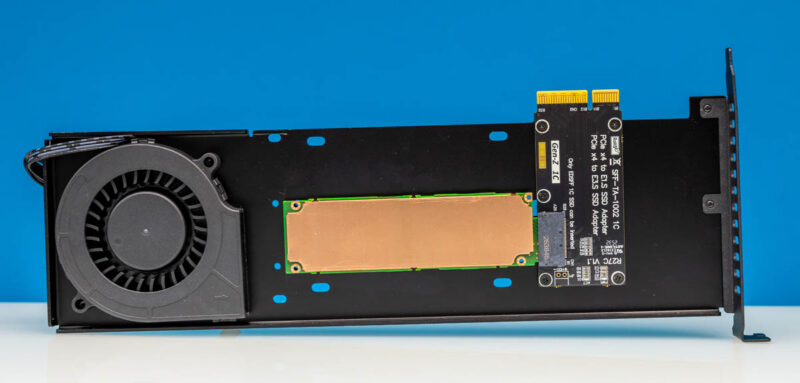
We started with E1.S SSDs. You basically just put them into the EDSFF 1C connector, then secure them to the card’s housing using the supplied hardware.
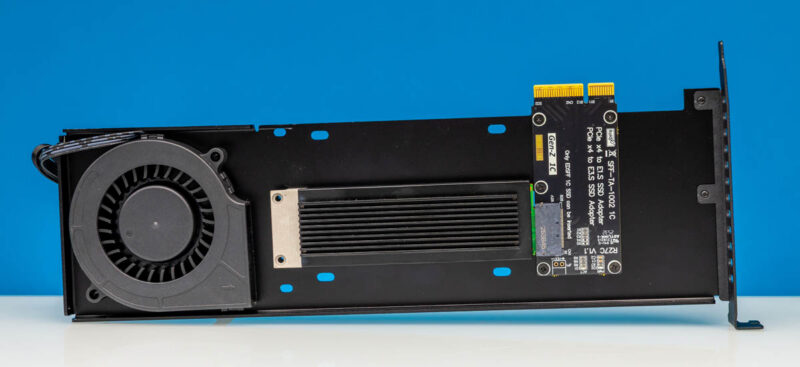
Here is another drive, just so you can see what these look like a bit more easily.
Here is a Kioxia CD9P SSD so that you can see what one of these looks like with an E3.S SSD. You can tell that this adapter is already long, but only fits short-depth SSDs, not the E1.L or E3.L (or E2) drives.
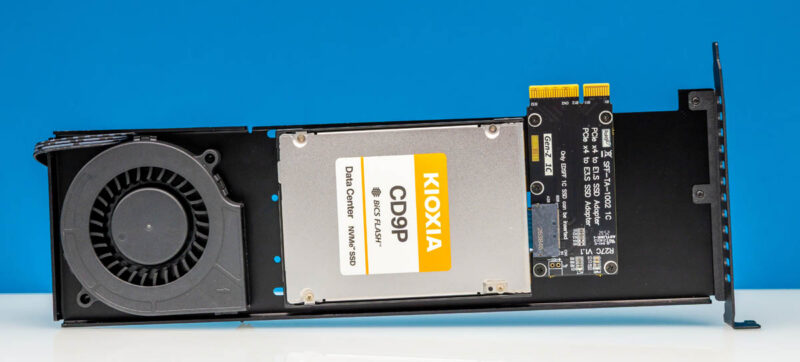
It is a shame that the PCB is so small that the SSD sits far from the I/O plate, leaving a lot of wasted space.
Next, we wanted to test performance of the two units we purchased.
How Did They Perform?
While both of the units were exactly the same, the cooling is problematic at best. While some cooler E1.S and QLC E3.S drives ran fine, we wanted to show two Kioxia drives in adapters as those are hotter PCIe Gen5 drives. Both of which hit 7.2GB/s in sequential writes and over 14GB/s in reads. The write was very interesting because we looked at the data and saw clear signs of throttling.
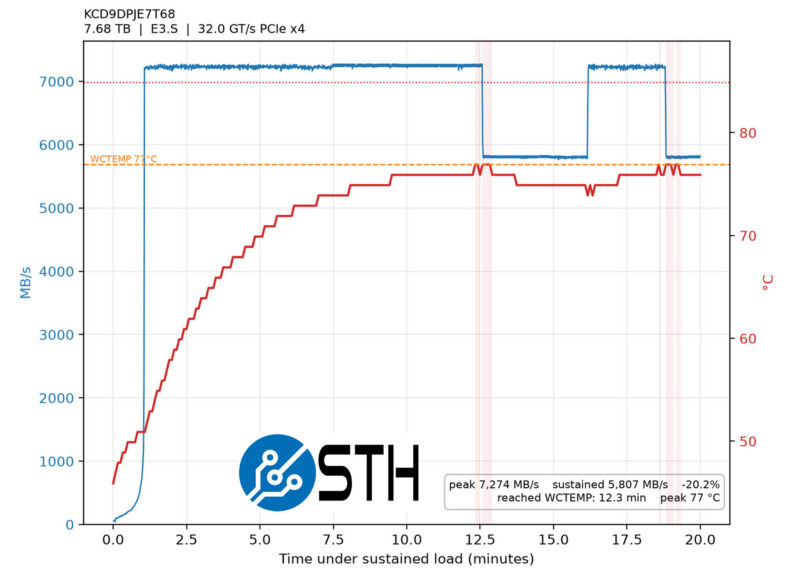
Here, the drive would hit 77C, then drop performance, from 7.2GB/s to 5.8GB/s. After some cooling-off time, it resumed the top-line write performance only to throttle again.
We took the drive and put it in the $795 Serial Cables adapter, which is (much) more expensive but has a built-in fan and takes multiple slots, just to show you the difference:
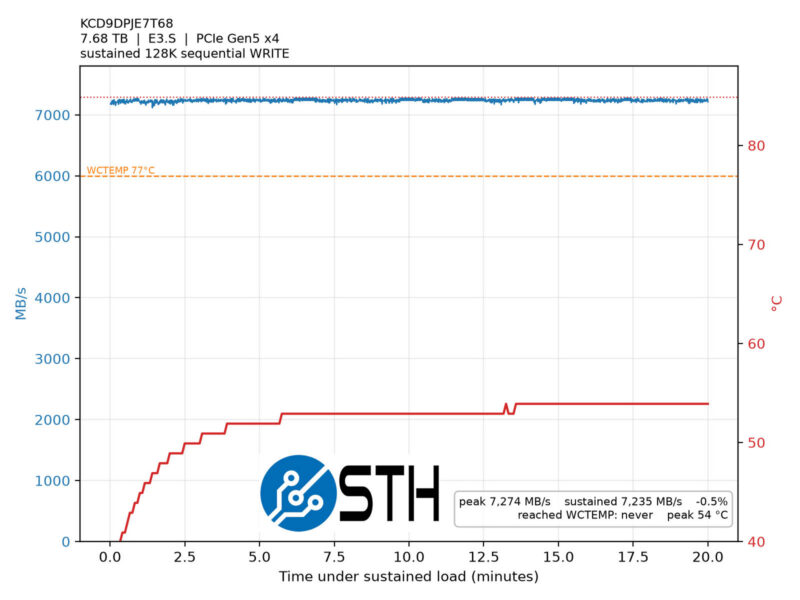
You can immediately see the difference in drive temperature and the lack of a performance drop, thanks to adequate cooling in the new slot.
To ensure this was not just a single-drive-in-the-enclosure issue, we checked the older Kioxia CM7 in one of the adapters. We initially got roughly 7.2GB/s and thought we were getting a familiar pattern.
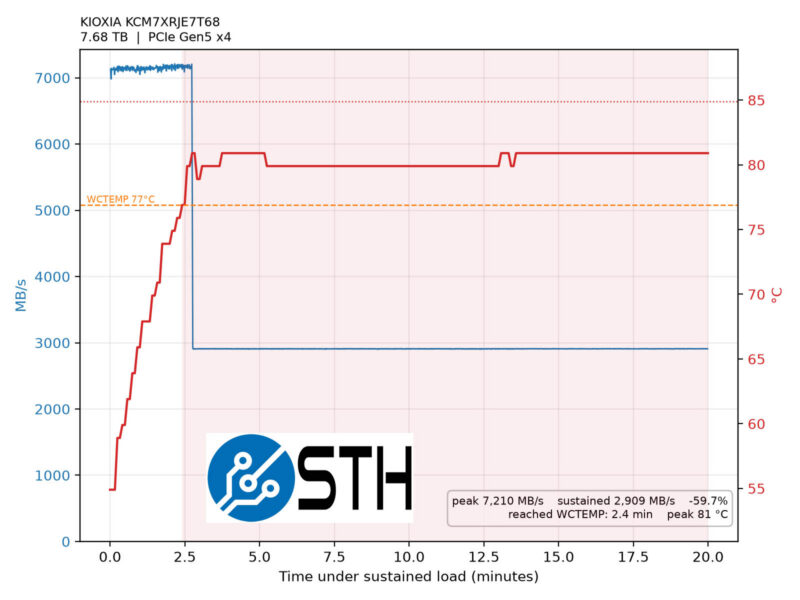
The drive throttled to around 2.9GB/s in less than 150 seconds and just kept heating up. This was only in the 100% write tests, as the read tests were not an issue. We should also note that we tried this on both an AMD Threadripper and an Intel Xeon workstation, on the motherboard PWM fan headers, even set to 100% on those headers. Going 2 for 2 on the platforms made us watch out for this, but different platforms may yield different results.
Perhaps there are two ways to look at the performance. First, we were able to get over 14GB/s transfers, so we were certainly at PCIe Gen5 speeds. Another way to look at this is that you should be wary, especially if using high-performance drives, of this enclosure/ card. Both of these drives have no throttling issues when installed in a Dell or Supermicro server designed for E3.S SSDs. One might also legitimately argue that 10 min, or even 2 min, of sustained 100% writes are unrealistic. Still, we wanted to show what we found so that people do not buy these and cook their drives.
Final Words
As EDSFF becomes increasingly popular, I think more of our readers will look for adapters like these. At least with our units, higher-performance drives were not ideal in the enclosure, but that might just be a fan swap down the road from making them better. Still, we wanted folks to be aware of what to expect. Also important is that as an x4 drive in a PCIe slot, and with many PCIe slots being x16 these days, this is often not an efficient use of lanes. Actually, this feels like a really good case of why it would be better to have an MCIO box that accepts E1.S or E3.S SSDs.
Overall, we can say these are useful tools, and if you are running at lower utilization or a heavier read mix, they can make a lot of sense, especially for under $60.
Where to Buy
You can find what we purchased on Amazon (affiliate link) or AliExpress (Affiliate link.) Again, note that there are different versions, including U.2 versions, so make sure you are getting the right one.


I use two 9.5mm E1.S Samsung PM9A3 drives in my desktop with simple cables. (Be very careful with using cables for these drives, as the connector is mechanically reversible, but the electronics do NOT support that.) They have been running without much in the way of direct airflow for months and while they are certainly warm to the touch, it doesn’t seem to bother them much.
However, these are 9.5mm drives, rated at a relatively low 12V 1.2A, which is 14.4W, at the very low end of the spectrum. I believe the connector is capable of 40W for E1.L drives and 70W for some E3.L drives.
Having said that, I am surprised that the fan is simply incapable to cool down a CD9P, which is supposed to use around 23W.