

The IBM ServeRAID M5014 has quickly become a enthusiast favorite. Recently we did a piece on finding a great deal on IBM ServeRAID M5014’s with BBUs inexpensively. On ebay there are tons of no-bracket M5014 part 46M0916-B2 for $130.30 with free shipping and tax in California. The IBM ServeRAID M5014 is great. The card is essentially a LSI MegaRAID 9260-8i with half of the cache (256MB instead of 512MB) and no RAID 6 or RAID 60 support without the IBM M5000 feature key. For the price, that is probably the best deal around. IBM sells a ton of the ServeRAID M5014 RAID controllers every month and they have great firmware. That is, great firmware for servers that run 24/7. One of the drawbacks is that the IBM ServeRAID M5014 firmware takes a long time to initialize. Just to give you an idea, the below steps have cut well over 30 seconds off of my boot time. Let’s see how to flash the IBM M5014 with LSI firmware.
WARNING – These procedures may permanently damage your hardware. Follow them at your own risk. All responsibility for damage to hardware, software, business or reputation will be solely that of the person attempting to modify their hardware in the manner described herein. Simple version – there is risk to your hardware with this. If something goes wrong it is solely your responsibility.
Flashing the IBM ServeRAID M5014 to LSI 9260-8i Firmware
The first step in this is to get proper firmware. Here is my IPMI compatible DOS Live CD here is the version I use with Supermicro X9SCx BIOS flashing utilities and LSI SAS2008 and SAS2108 firmware. Since the IBM ServeRAID M5014 is a LSI SAS2108 based card, there are lots of options that one can flash to. Once that is done, one just needs to boot to the CD or USB drive that has the flashing tools.

After booting, you need to get to a directory with LSI megarec and the bin and rom files we will be using. Note, this was before I made the Live CD.
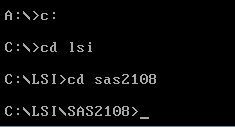
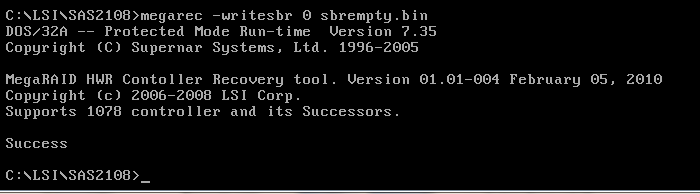
The first step in the flashing process is to clear the IBM ServeRAID M5014 of the IBM firmware.
megarec -writesbr 0 sbrempty.bin
This step allows you to flash the IBM card to firmware from other vendors. 0 is for the card’s position so if you have multiple cards, you may need to change this. sbrempty is used by my Supermicro and LSI firmware Live CD and many others, however you can use a different empty bin if you would like, especially on writable media such as a USB drive.
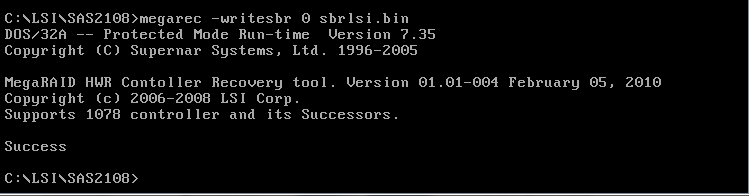
Next, since we are flashing the IBM ServeRAID M5014 to LSI 9260-8i firmware, we now need to load the LSI bin.
megarec -writesbr 0 sbrlsi.bin
You could also flash another IBM BIN onto the IBM M5014 at this point or a Sun BIN as an example.
Next is a step that I have heard folks skipping successfully. With that being said, I always do it when using megarec flashing, so it is in the IBM ServeRAID M5014 guide.
megarec -cleanflash 0
0 is the location of the IBM M5014 one is flashing.
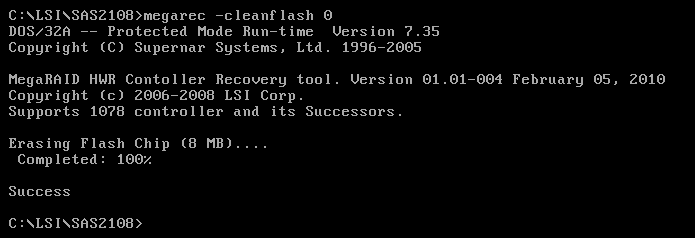
After you see this success prompt, it is time to reboot. If you are using IPMI 2.0 you can simply hit the control alt delete macro or use remote power control. If you are physically at the machine, you can do the same. Either way, you need to reboot into the directory that has the LSI flashing files.
Next, you use the command:
megarec -m0flash 0 0102_lsi.rom
Again, the 0 is the target card’s reference number. The 0102_lsi.rom the file being flashed to the controller.
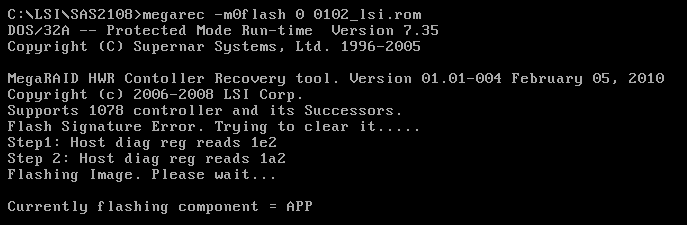
This will take a bit of time but should say success at the end.
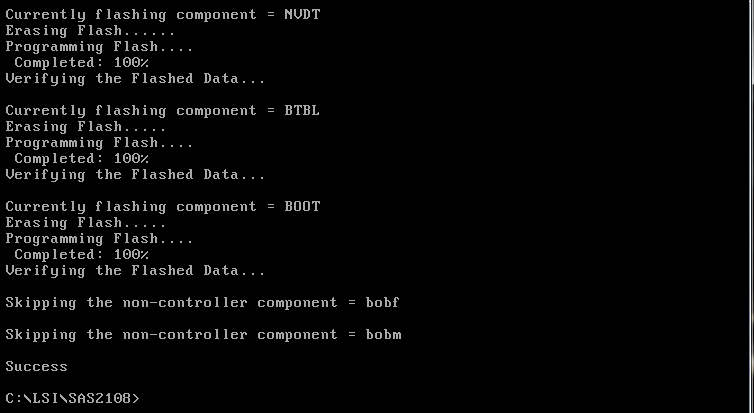
At this point, all one needs to do is reboot the server. The IBM ServeRAID M5014 will show up as a LSI 9260-8i. Boot times will be greatly reduced.
Interestingly enough, this was done using the remote KVM-over-IP and remote CD mount of a Supermicro X9SCM-F. LSI’s knowledge base says that flashing on Intel 3000, 5000 and Supermicro X9 motherboards is hard. The above process takes a few minutes and works well on Supermicro X9 motherboards.
Enjoy!
“The above process takes a few minutes and…”?
What happened to the rest of the article?
Thanks! Looks like a odd caching issue. Should be fixed now.
I have flashed 2 of these Cards to 9260-8i, unfortunately on the 2nd card I forgot to reboot between flashing the LSI SBR and the LSI Firmware. Since then this card just makes “Beeep-Beeep-Beeep-Beeep…”. I tried several other SBR and Firmwares sinces then, but as soon as a SBR is flashed the card beeps after reboot.
Is there any way I can recover from this condition?
Thank you for this write-up! It made it a breeze to re-flash two M5014’s. I can’t thank you enough.
Need I feature key for use RAID-6 after flash to 9260-8i?
I also want to know, does it do Raid 6/60 without the feature key?
Will this work for reflashing an M5015 as well?
I used this how to and it’s working, but when i flash it to the newly firmware from lsi.com it will revert my card back to M5014, is this normal?
You need to change the SBR everytime you update the FW.
I normally change the SBR after flashing new FW BUT before rebooting.
This way you’ll know the lsi9260 SBR has actually been flashed (it will give an error if it hasn’t)
Cleanflash
reboot
FW flash
SBR flash
reboot
Is what I think is best way to go about it.
Do this everytime for best results
Trying to just flash new FW over top of old may give issues with SBR (latter FW have a check)
Next, since we are flashing the IBM ServeRAID M5014 to LSI 9260-8i firmware, we now need to load the LSI bin. (below command just changes the name to lsi 9260-8i)
megarec -writesbr 0 sbrlsi.bin
Note: This is already posted on this site by mobilenvidia under title: IBM M5014 to 9260 reverts back to 5014?
Great article.
I use a lot of the LSI cards but have never tried a re-branded. Once this is done can future firmware upgrades be done from MSM like any other LSI card?
Do you know if the LSI CacheCade module/key can used after the firmware swap? I would like to try CacheCade but the IBM Performance Key is $300 – $400 which kept me from trying this card.
Thanks!
AWSOME!
Thank you!!!
great! it is always best to download the *latest* firmware from lsi and modify the iso before burning it. just flashed m1014 with latest lsi fw.
Fantastic, worked like a charm. Well, after quite a painful process of trying to get my motherboard (Gigabyte with AWARD BIOS) to boot from a USB stick, I finally used Rufus and made a freedos boot USB and the utilities worked just great.
I bought one and combined it with a new iBBU08 backup battery. This worked flawless for a week and now the status of the bbu says “Battery Replacement required”. Might this be due to the fact that flashed it with the LSI firmware?
Firmware flash successful! But there is no RAID6 support, it a pity :(
The link to the Doc Live CD does not seem to be working. Is it still available?
Could you please re-upload the CD image. I can’t find it
Looks like the IBMServRAID M5014 will work only with IBM drives. I am trying to use 1TB WD 1003FBYX drives and it will not work. Does this flashing process remedy that issue? I have 8 of those WD drives that I’d like to use with this card. Is there a link to that DOS Live CD?
Ed- the flashed ones certainly work with other brands. We have many folks in the forums using the M5014’s successfully with other brand drives.
It work with other brands, I use seven 4To seagate with this card.
I even have tried to flash it with the last LSI firware successfully, the drawback is the time taken by the card to be initialized at when I boot the PC, it’s a little bit long.
I am about to upgrade my NAS to a Xeon system with Supermicro X10SLH-F motherboard.
What should I get, IBM m1015 or IBM M5014 seeing the price is almost the same?
I flashed my M5015 to the very latest 9260-8i firmware (From the LSI Site). It’s working properly now, but upon boot it’s saying it’s a “IBM M5015”. I’m using it in a HP Proliant Gen8 micro server with IBM disks (what an abomination!) and it’s now working well!.
My question is, is th boot ROM still supposed to say it’s a IBM M5015 or not?
can someone help me find the correct files? i am missing the BIN file for a IBM M5015 cross flash to lsi 9260. i have tried finding the live cd listed here but to no avail.
“M5014 firmware takes a long time to initialize”
In my case the M5014 is controller 0 (the only one) in the system.
It is NOT necessary to crossflash the controller! You can speed up the initialisation in 3 simple steps:
MegaOEM -AdpSettings Write -f MyM5014.ini -a0
…reads MFC_DEFAULT structure and creates an INI file. Inside the INI search for “delayPOST” and change the value. Possible coded values: 0 to 7, which gives a value of 0, 15, 30, 45, 60, 75, 90, 105 seconds.
MegaOEM -AdpSettings Read -f MyM5014.ini -a0
…reads INI file, forms MFC_DEFAULT structure and sends it to the FW.
Enjoy!
Howdy great website! Does running a blog like this require a great deal of work?
I’ve very little knoqledge of coding however I had been hoping to start
my own bllg soon. Anyways, if youu have any suggestions or tips for new blog owners please share.
I know this is off subject but I jst needed to ask.
Appreciate it!
Where do we find the .BIN files from??? I cannot get the from LSI??
I now have a RAID card that says
Serial Boot ROM (SBR) device is corrupt or bad
Please help!!!!
MegaOEM -AdpSettings Write -f MyM5014.ini -a0 ==> Results in:
OEM = 9
Failed to Program the Adapter because of invalid value of key: DISABLEPOWERSAVINGS.
Exit Code: 0x03
AND, adding megarec -writesbr 0 sbrlsi.bin and front and rest of other commands results in unsuccess! At the end of the job, it says:
Skipping the non -controller component = bobf
Skipping the non -controller component = bobm
Success ==> But “NO” success in fact!
By the way, sas2flsh command does not work in any way, it says: there is no LSI adapter found!
Some/any of those IBM M5014 adapters, lost some critical data at bios maybe. Only with xxxxxx.0189 can accept LSI 9260-8i sbr
If newer xxxxxx.205 or xxxxxx.0239 bioses results in banner “IBM 5014” at the beginning!
NO CURE…. :(
And VERY SLOW initialization with “IBM 5014” banner….
Mike Compton April 10, 2017 at 1:13 pm
Where do we find the .BIN files from??? I cannot get the from LSI??
I now have a RAID card that says
Serial Boot ROM (SBR) device is corrupt or bad
Please help!!!!
This is because of erasing sbr data. You need to re-program your sbr data by typing:
megarec -writesbr 0 sbrxxxx.bin
Patrick Kennedy – September 25, 2012 started this thread and the flashing procedure is “right” but with only certain firmware(s) (He has flashed to 0102.rom on the screen shot!)
That 0102.rom is programmable to IBM M5014 card, but only 6 more other firmware revisions can accept 9260-8i sbr banner, 3 of them can not! (0124.rom, 0205.rom, and 0239.rom reverts back to IBM M5014 sbr)
Those all are:
0102.rom OK
0111.rom OK
0124.rom NO
0139.rom OK
0151.rom OK
0154.rom OK
0167.rom OK
0189.rom OK ==> which is the latest programmable one!
0205.rom NO
0239.rom NO
Hi Cemal – I just saw this. You may want to try posting in the forums https://forums.servethehome.com/index.php?forums/raid-controllers-and-host-bus-adapters.19/ where there is a lot more information. This post was done in 2012 and is now almost five years old.
Well, it’s a bit late reply; but for the sake of sharing info for future readers.
Regarding above CacheCade question – hardware and software keys that belong to LSI card can’t be used on the crossflashed IBM card.
In my knowledge, the small chip next to the feature connector is an eeprom that’s not affected by crossflashing; therefore you have to use IBM FoD key, not LSI. If you find a way to use LSI please share, I can’t find any way.
Topic closed here I think. Please look at: https://forums.servethehome.com/index.php?threads/crossflashing-of-lsi-9341-8i-to-lsi-9300-8i-success-but-no-smart-pass-through.3522/page-4 for successful fast boot with 0239.rom
Just tried the Cachecade 2.0 key and thought I’d share. Petar is right. I have an IBM ServeRaid 5015 flashed into a 9260-8i and a pair of hardware keys, one LSI and one IBM. The LSI key do not work, the IBM ones do.
If this guide still works, then please move the dos live boot cd someplace where you can actually download it.
A lot of guides on the interne reffers to this one, so freaking annoying when you cannot download what is needed.
Michael; The problem is that all the browsers you use no longer support ftp.
They all used to.
Microsoft has made the problem worse by not allowing you to run Internet Explorer which has ftp built in and works great.
There are a number of ftp clients available but they have a bit of a learning curve.
so you can install an older version of a browser with ftp built in and it works just fine.
Many web sites used to use pages that had ftp links in them (including my own) to download stuff.
It makes the creation of the web page very simple, but in this case more difficult for the end user.