

WisdPi USB 10GbE Adapter Performance
We tested the wisdPi adapter using iperf3 to measure aggregate throughput across multiple TCP streams. The chart below shows results across different stream counts.
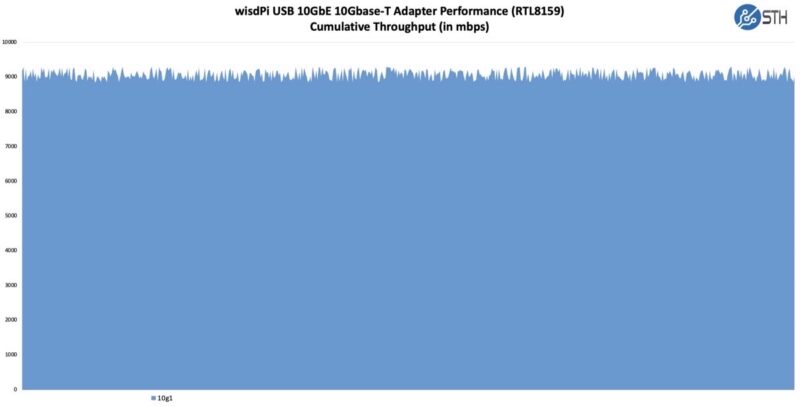
Aggregate throughput reaches near 9Gbps across the tested stream counts. This result aligns closely with what we measured from the Xikestor SKN-U310GT, which makes sense given that both adapters use the same Realtek RTL8159 controller.
USB overhead prevents these adapters from reaching the full 10GbE line rate. A USB 3.2 Gen 2×2 port provides 20Gbps theoretical bandwidth, but the RTL8159 chipset and USB protocol overhead limit actual network throughput to around 9Gbps in practice. Systems with only USB 3.2 Gen 2 (10Gbps) ports will see lower speeds, typically under 5Gbps of network throughput.
- USB 3.2 Gen 2×2 x86: Measured maximum 9.5Gbps throughput (spec: up to 9.6Gbps)
- USB 3.2 Gen 2×1 x86 Measured 6.5Gbps throughput (spec: approximately 7Gbps)
- USB 3.2 Gen 2×1 Apple M4 MBP Measured 6.2Gbps throughput
- USB 3.2 Gen 1 x86: Measured 4.7Gbps throughput (spec: up to 5Gbps)
This performance profile is similar to the Xikestor (effectively the same) but differs from the Sabrent NT-P10G we reviewed earlier this year. The Sabrent adapter uses a Marvell AQC113 controller over USB4, which can reach higher speeds on systems with proper USB4 or Thunderbolt 3/4 support. In our Sabrent testing, we saw the AQC113-based adapter achieve closer to full line rate performance when connected to a suitable USB4 host port.
RTL8159 and AQC113 represent two different approaches to USB 10GbE adapters. Realtek’s solution prioritizes cost-effectiveness and low power consumption, with solid multi-gig performance, while Marvell’s AQC113 targets users who need maximum throughput and have USB4-capable hosts.
Power Consumption
Power draw for the WisdPi adapter stays in line with other RTL8159-based units we have tested. The aluminum enclosure serves as a heatsink, dissipating heat generated by the 10Gbase-T PHY and controller. We measured power consumption using a Power-Z USB-C power meter (Amazon affiliate link). We saw power in the 2.04-2.85W range depending on the platform.
Users should note that 10Gbase-T adapters inherently consume more power than lower-speed NICs due to the additional signal processing required. For battery-powered laptops, enabling link speeds below 10Gbps when full speed is not needed can help extend runtime.
Final Words
This WisdPi WP-UT9 USB 10GbE Adapter fills a useful niche for users who need portable 10G networking without opening their system chassis. Performance matches the Xikestor SKN-U310GT we reviewed earlier, as both share the Realtek RTL8159 controller. The small size and raised channels on the aluminum enclosure really make this adapter stand out compared to other, larger, less exciting adapters we have seen. On something like this that can be used for travel, this is one that can get you style points. For most, however, the more exciting feature is that you can get roughly twice the performance of the WisdPi WP-UT5 5Gbps USB-C to 5GbE Adapter we reviewed.
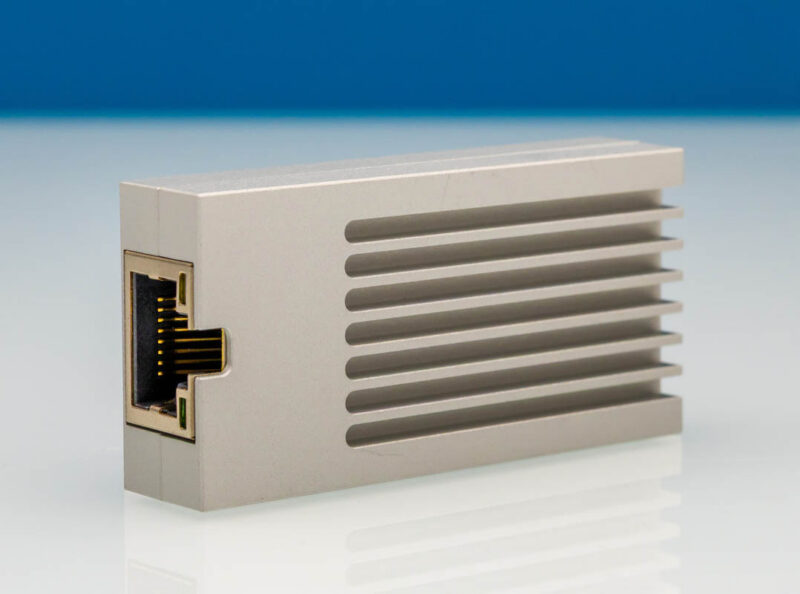
For users with USB4 or Thunderbolt hosts who need maximum throughput, there are a lot of options. This WisdPi makes more sense when the host offers USB 3.2 Gen 2×2 as it is a low-power NIC.
Where to Buy
You can find the wisdPi USB 10GbE Adapter via this Amazon affiliate link.


I’v purchased it for around three months ago.
No issues, very stable, no interruptions etc.
Recommend
I’ve been curious about these this as I recently brought a Threadripper (TR) system with 2x10gbe ports and the isn’t an easy way to add a 10gbe port without hanging off the PCH (see rant below). One of these would be a good option, before jumping to 100gbe (they’re pretty cheap on eBay) to connect my main desktop (I don’t mind cutting the x16 slot in half).
An important note is that most USB ports are connection directly to the CPU’s IO die, meaning it isn’t putting yet more pressure on the PCH(s), which are limited to a PCIe4.0 x4 interface (they amount of stuff hanging off them is ridiculous (seriously, look at a motherboard diagram), it hasnven’t received a major update since x570/ 2019). Check you motherboard many & test. Also, this isn’t only on AMD, Intel is much the same (ironic that you need a new motherboard each generation, yet largely using the same (although Intel recently switched to PCIe4 x8*👍).
Modern AMD desktop sucks. They keep adding more and more stuff yet still limited to 2x memory channels (2DPC is a minefield, it was already bad on AM4). I hope their next socket supports 4x channels with Ryzen 9. AMD needs a new socket ASAP, when the laptop SoCs run rings around desktop performance (AMD could add more memory channels). 395’+ PCIe port is PCIe4 x4 (forget adding 100/200 gbe NICS – AMD missed a trick here!)
*Funfact: TH has a PCIe4 x8 link to the PCH, yet it is rarely used (actively avoided with so many PCIe lanes available). Most TR boards have a “X570 options” menu in the in the BIOS, so it can be done. /rant
PS: Make your form timeout/ refresh longer!