


We recently bought a bunch of travel routers just to see how much of a difference there is between them. For about $119, we bought a TP-Link BE3600 WiFi 7 portable travel router. The actual model number is TL-WR3602BE. This is a little unit that is a step below the GL.iNet GL-BE3600 that we reviewed a few weeks ago. It is also one that might meet the needs of a lot of folks in the future. Since we now have a very healthy backlog of gateway devices, we decided to get this review going. Also, this uses a different software stack than another TP-Link gateway device we are testing, so it provided a good time to look at the software and just how much it is pushing opt-in data sharing. Before testing this device, I had no idea of just how often TP-Link asks to share. The software section on page 2 is going to be eye-opening for many folks who have not used consumer TP-Link devices recently..
You can find this on Amazon (affiliate link.)
TP-Link BE3600 Wi-Fi 7 Portable Travel Router Hardware Overview
The unit itself is very small at around 4.96×3.68×1.42in or 126×93.5x36mm. The idea with these travel routers is that you can stick them in your bag. You could also fairly easily Velcro these to a surface and move them around.

Whereas the higher-end GL.iNet GL-BE3600 Slate 7 Mini WiFi 7 Router we reviewed has a touchscreen display on the front, this has a single status LED in the center.
We have flip a up antenna on each side, and a vent on one side.

The other side has another antenna, then an action button and a reset button.

That has a few different functions, so here is the setup page that lets you change what that button does.

On the rear, this has a USB 3.0 port that you can use with an external drive for network storage. There is also a 5V 3A Type-C power input. The WAN and LAN ports are interesting as they are 2.5GbE on the WAN side and 1GbE on the LAN side. Since we do our best network testing on the wired side, we would have liked to see symmetric 2.5GbE ports like the GL.iNet unit.
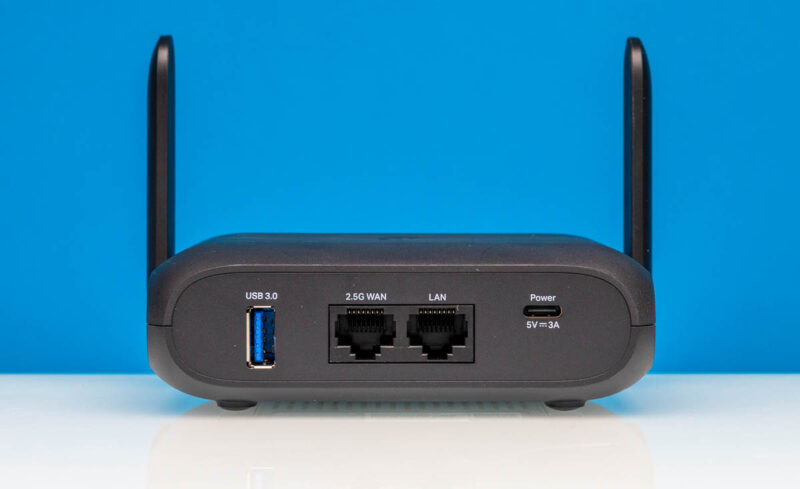
On the top, we get a TP-Link logo.

On the bottom, we get connectivity information and more vents.

The kit comes with a 15W power adapter that you can pick different plugs for, an Ethernet cable, and then a USB Type-A to Type-C cable.

Since we are still working on our WiFi 7 testing setup, we are not going to open this one to keep it pristine for when we eventually get our full setup going.
Next, however, is the software, which was a bit surprising to us and is certainly worth a look.



 and see some good features and some that we would skip in our review)
Does it ask a permission for proctology exam, or does it do it anyway?
Also does my data go to NSA, the Chinese Communist party, or straight for sale to Data-Pirates(aka Data “Brokers”)?
It’s just called the Slate 7, not Slate 7 Mini.
Also the $30 more you pay is not just for the ethernet port, you get a much better firmware UI that makes VPN use a breeze.
Why no sim card slot again ?
If I travel around with a portable router like this, the last thing I wanna do is start tethering to get a connection.
Please, give us a sim card slot on one of these devices.
This actually runs standard Open WRT under the hood. It’s not in the official support list as yet, as theres not enough market presence but for someone who knows how to do it, it’s an easy add. The RAM and CPU are likely why it falls over on anything more than a few user flows.
I believe this is the same as the TL-WR3002X which doesn’t have the external aerials:
* MT7981B (Filogic 820) dual-core 1.3 GHz CPU
* 512MB RAM
* 256MiB NAND (32MB) XM25QH256C with page size 256 Bytes, erase size 4 KiB, total 32 MiB
* 2.5Gbit WAN and 1Gbit LAN
* MT7976C Wi-Fi 6 support chip
* 1x 2.5G WAN, 1x1GB LAN
U-Boot 2022.07-rc3 (Jan 23 2025 – 14:48:37 +0800)
CPU: MediaTek MT7981
Model: mt7981-rfb
DRAM: 512 MiB
Core: 32 devices, 13 uclasses, devicetree: embed
MMC:
Loading Environment from SPIFlash… SF: Detected XM25QH256C with page size 256 Bytes, erase size 4 KiB, total 32 MiB
*** Warning – bad CRC, using default environment
In: serial@11002000
Out: serial@11002000
Err: serial@11002000
Net:
Warning: ethernet@15100000 (eth0) using random MAC address – 5a:c9:b6:aa:e4:41
eth0: ethernet@15100000
press ctrl-c or t to go to uboot cmdline
0 SF: Detected XM25QH256C with page size 256 Bytes, erase size 4 KiB, total 32 MiB
SF: Detected XM25QH256C with page size 256 Bytes, erase size 4 KiB, total 32 MiB
Reading from 0x100000 to 0x46000000, size 0x100 … OK
Reading from 0x100000 to 0x46000000, size 0x358248 … OK
## Loading kernel from FIT Image at 46000000 …
Using ‘config-1’ configuration
Trying ‘kernel-1’ kernel subimage
Description: ARM64 OpenWrt Linux-5.4.124
Type: Kernel Image
Compression: lzma compressed
Data Start: 0x460000e8
Data Size: 3486983 Bytes = 3.3 MiB
Architecture: AArch64
OS: Linux
Load Address: 0x48080000
Entry Point: 0x48080000
Hash algo: crc32
Hash value: 7a5d3336
Hash algo: sha1
Hash value: 7b7670301ec0f143bbf189505810956c90156241
Verifying Hash Integrity … crc32+ sha1+ OK
## Loading fdt from FIT Image at 46000000 …
Using ‘config-1’ configuration
Trying ‘fdt-1’ fdt subimage
Description: ARM64 OpenWrt mt7981-spim-nor-rfb device tree blob
Type: Flat Device Tree
Compression: uncompressed
Data Start: 0x46353734
Data Size: 17888 Bytes = 17.5 KiB
Architecture: AArch64
Hash algo: crc32
Hash value: cb1ac0fa
Hash algo: sha1
Hash value: dd976b5ff4124f6b0548818c37c669ce00f873a9
Verifying Hash Integrity … crc32+ sha1+ OK
Booting using the fdt blob at 0x46353734
Uncompressing Kernel Image
Loading Device Tree to 000000005f7f3000, end 000000005f7fa5df … OK
Starting kernel …
Next time, can you also test the speed of the usb port when using external drive? USB 3.0 doesn’t really mean anything, when there are plenty of devices with that marking and still only doing 10 to 50 MB/s.
Can it do the captured portal log in the GLi Net travel routers can? If not, kind of pointless for ‘travel’ if you can’t use it in a Starbucks or a hotel.
Worthwhile to flag the likely ban of TP Link products in the US – I would not trust this device on my network, let alone for corporate use by employees.
https://krebsonsecurity.com/2025/11/drilling-down-on-uncle-sams-proposed-tp-link-ban/
The Amazon pricing is currently showing $139 for this unit. That said it seems like the GL.iNet is the obvious choice for only a $10 difference.
No simagai
0 interest from me. I don’t need an app, I don’t need a user experience program…. But I DO need a sim slot.
This looks like a rebranded Huasifei WH3000 Pro.
We recently bought 5 of these via Alibaba, you can choose which 5G modem it comes with, or order without 5G. Price (without 5G) is $61USD. Huasifei were fantastic to deal with. Flashing OpenWrt is trivial via sysupgrade, and it works perfectly.
Well worth a look.
https://www.alibaba.com/product-detail/High-Quality-3000Mbps-Portable-5g-Lte_1601444090654.html