


MikroTik announced its CRS804 DDQ, which is a 4-port 400GbE switch. In doing so, it now has a second 400GbE switch in its lineup, and one that is very small indeed. This is a major evolution in MikroTik’s offerings.
MikroTik CRS804 DDQ Announced 4-Port 400GbE Switch
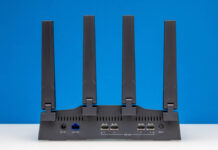
The switch has four QSFP56-DD ports in the front, and then two 10G ports from the management CPU. It is also a half-width device, so it can be mounted side-by-side in pairs.
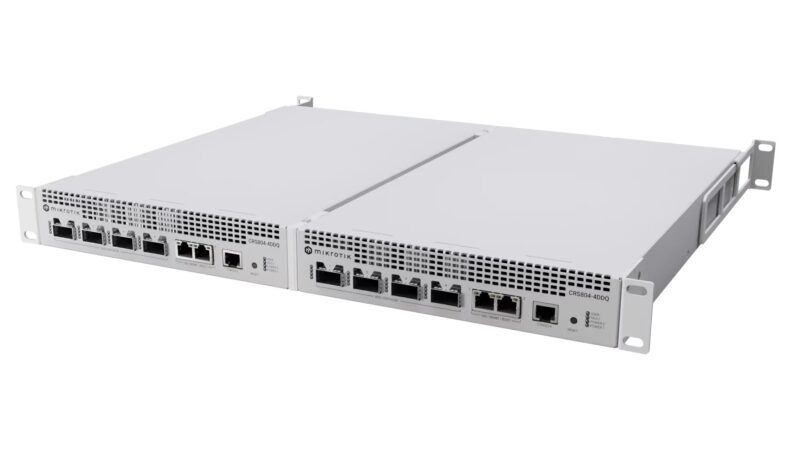
Inside, it is based on the Marvell 98DX7335 switch chip and the Annapurna Labs AL52400 quad-core Arm CPU. The Marvell switch chip is the same that is in the MikroTik CRS812-8DS-2DQ-2DDQ-RM which makes sense since we have all 56G lanes and 1.6Tbps of total performance.
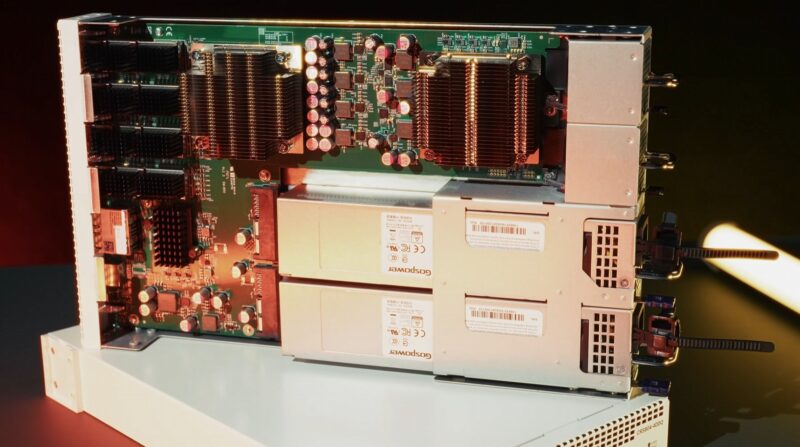
The maximum power consumption is rated at 123W, but without attachments, it is rated at 92W. On a W/bit basis, this is lower than a 12-port 1GbE switch running at 1W, making it very low power. The big delta with attachments is because QSFP56-DD optics can use a lot of power, as much as some lower-end 10GbE switches.
Still, with two hot-swap fans and redundant power supplies, there are some decent features.
Final Words
This is actually a switch I saw back in July when we filmed the Touring MikroTik in Latvia to See How They Make Awesome Networking Gear video. At the time, it was envisioned mostly as a backhaul connectivity solution, somewhat as a MikroTik CRS504-4XQ-IN but with 4x the network throughput. I pushed fairly hard on the idea that the CRS812 DDQ and this would be neat for NVIDIA GB10 clusters. The switch is $1295 MSRP, so we should see street prices in the $1100-ish range, making it a low-cost way to connect high-speed devices.
An opportunity with QSFP56-DD is that you get 8x 56G PAM4 lanes so in theory, so you can do 8x 50GbE from a 400GbE port. Still, optics/ DACs are getting much more challenging as we went into in our FS QSFP112 400Gbps DACs Mini Review since those are for 4x 112G PAM4 lanes instead of 8x 56G lanes. Likewise, your typical QSFP28 100G port is using 4x 28Gbps NRZ, which is how we get 4x 25GbE for 100GbE on the port. This all may sound crazy, but for our new load testing box, we have two 8x 100G QSFP28 NRZ cards (here is the cheapest used one we can find with an eBay affiliate link, currently at $50K.) Those ports you need to license to get lower speeds and breakouts as well, but to get them connected to 112G PAM4 devices like the NVIDIA ConnectX-8/ Spectrum-4 switches, or even to these 400GbE devices, is non-trivial. If you want to understand why we are showing so much on cables/ connectivity now, it is because once you get to 400GbE+ networking, physical connectivity gets much more complex.
The clear advantage of a low-cost 400GbE device like this is both that it can connect at 400Gbps per port, but also that it can breakout into lower-speed ports.
Of course, you can see how MikroTik gear is made, and a bit from their headquarters in Riga, Latvia here:

This is perfect for all of the 10in rack people out there who do not want to compromise on network performance.
I wish they would update the 100g switch to be this form factor. The 100g mikrotik was my first switch from them and I loved it so much my entire home network runs mikrotik exclusively. Thanks for reviewing it ages ago because it changed my whole paradigm <3.
I think it’s good. With how much can I get it in Kenya??
Mikrotik hit the SOHO with the 5 & 8 port 10gb switches at a price ppl could afford. That was back in 2019. Now many of us need a 25gb SFP28 SOHO 8-port passive switch, w light web management, as we live in condos and don’t have racks or a place for splitters etc. I am also replacing my China gear for mostly European, incl AP, router and switches.
@Jarble there are active dac cables that go from 400G qsfp56-dd to 4x 100G qsfp28 (I have some Dell ones here, model 3M – 0WDNV), which makes this a really nice switch even for 100G network
@Halken: what do you do that requires a 25GBit switch? I’m quite curious.
Why would they use QSFP56-DD instead of QSFP112 like the CX7 and 8 typically do?
@Halken, I’m using the CRS504-4XQ for my homelab. I have optical breakouts to give me 4x25G from the 100G ports. I don’t think there are many practical 25G options simpler than that.
@Carlo: Why are we after 25G? For redundancy, I moved all my data onto a NAS (just an old Dell PowerEdge server) so that I could have multiple computers access the files, so I can keep working in case any one of them fails. But because I work with multi-gigabyte video files, I have SSDs in the server and (currently) a 10G network which gives me close to 1GB/sec when accessing the files. But it’s still slow and can block you for 10-20 seconds any time you need to read or write a file, or close to a minute if you’re reading and writing at the same time. It doesn’t sound like much but it’s in that annoying range where it’s too short to go to something else, and too long to sit and wait. So for me, I’m eager to upgrade to 25G or even 100G once the price comes down, since the SSD array can easily saturate those links already and my 10-year-old computers can handle around 70 Gbps before hitting 100% CPU, so the biggest bottleneck I have is the network only doing 10G.