

Lenovo ThinkStation PX Software
Alongside a blank configuration, Lenovo also sells the ThinkStation PX with either Ubuntu Linux or Windows 11 Pro for Workstations. The aptly-named OS adds support for a few features normally only found in Windows Server OSes, including support for a larger number of CPUs and CPU cores – though this is not strictly necessary for the 2 socket/120 core PX – as well as the ReFS file system and SMB Direct RDMA networking.
Despite its sever heritage, the ThinkStation PX does not include an integrated BMC. Lenovo does offer this as an option, but in that case, it is an add-in card. So, in regard to software and administration, the ThinkStation PX is more akin to a traditional business desktop PC than it is a server.
Lenovo ThinkStation PX Performance
With its vast array of configuration options, the final performance of a ThinkStation PX system is going to vary significantly with its configuration. Even disregarding the second CPU socket for a moment, the system can have anything between a 12-core CPU with a single DIMM up to a 60-core CPU with all 8 DIMM slots populated. So the performance here is very much a snapshot of how our specific system was configured, with a 16-core Xeon Gold 5416S and 128GB of DDR5 memory spread over 8 channels and running at DDR5-4400 speeds.
The closest competitor we have on hand is another Lenovo workstation, the ThinkStation P5, a mid-range workstation that utilizes a 24-core single-socket Intel Xeon w7-2495X processor, which, like the Xeon Gold 5416S, is a member of the Sapphire Rapids family.
Geekbench 6 CPU
With the P5 sporting more CPU cores and a higher clock speed (as well as a higher TDP) compared to the Xeon Gold chip in the ThinkStation PX, the top-level GB6 performance does leave the modestly equipped ThinkStation PX trailing in Geekbench 6. Under single-threaded workloads in particular, the low peak clockspeed of the Xeon Gold chip poses a bottleneck. But it makes up the difference with multi-threaded workloads, where it is essentially at parity with the Xeon 2495X.
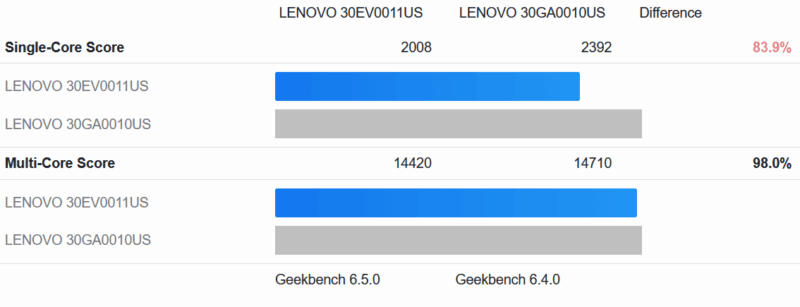
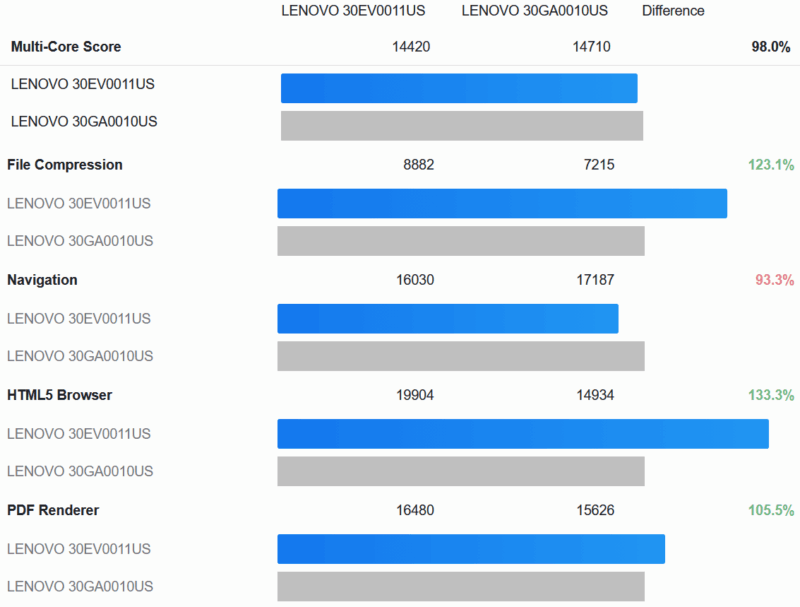
That said, with twice as many memory channels as the more restricted workstation chip, there are some workloads where even a basic 16-core Xeon Gold chip can pull ahead. Several of the multithreaded tests see the ThinkStation PX pull well ahead of the 4-channel Xeon 2495X despite being disadvantaged by 8 CPU cores, which is why the two chips are so close overall in multithreaded performance. File compression, PDF rendering, image processing, and object detection all greatly favor the Xeon Gold chip in the ThinkStation PX.
Geekbench GPU Compute
Shifting over to GPU-based tests, our ThinkStation PX is equipped with an NVIDIA RTX A6000, the most powerful pro video card of its generation. Whereas the ThinkStation P5 was configured with the RTX 4500, a card that is a step down in performance.
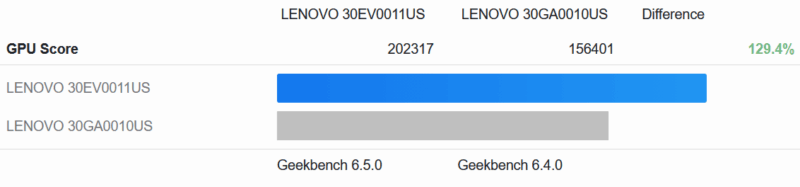
As expected, the RTX A6000-equipped ThinkStation PX has no trouble outpacing the ThinkStation P5 in GPU compute workloads. The average advantage here is 29%, though some tests give the A6000 a lead of 50% or greater.
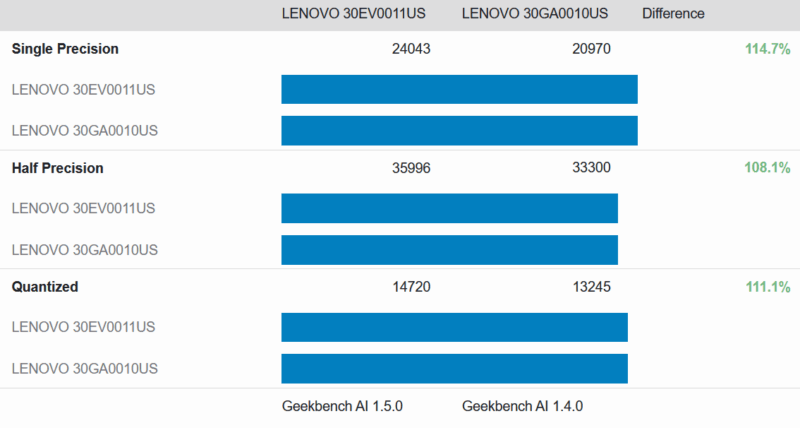
Geekbench AI also paints a similar picture. The A6000 leads by around 10-15% on AI workloads, with a couple of tests, such as style transfer, showing an advantage of over 25%.
MLPerf Client v1.5
We ran MLPerf Client v1.5 on the system as well.
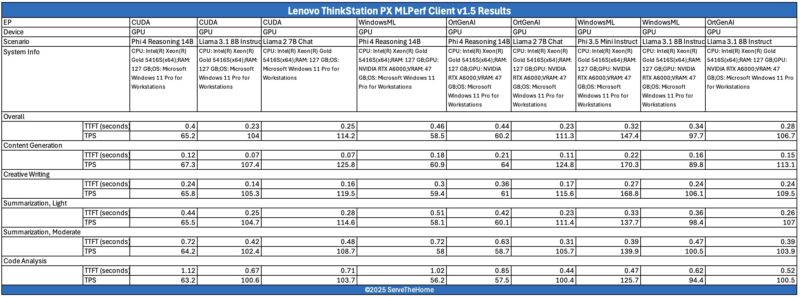
You can use these to directly compare it to your own system.
Next, let us get to the power consumption and noise.

 workstation performs and how it can be expanded)
No IPMI of any kind?
Ddr5 4400 is … terrible, to say the least.
@Codrut
Not by default. A BMC-on-a-card is an optional upgrade for the PX.
This system seems to have similar limitations as Dell’s Precision range; they don’t have much headroom above the PCIe cards for some of these current (non-workstation) videocards. I have a Precision 5820, 7920, and two 5860’s from Dell, and with some of these modern videocard sticking out an inch (or more) above the metal bracket, and then having the power connector ‘on the top’ (so you plug in the connector on the power cable and have to angle the cable itself, adding at least another half inch), you can’t close the lid on the system.
I am building my kid a system and had to specifically shop for an AMD GPU (going to run SteamOS on it, so Nvidia cards aren’t an option, and a 9060XT is about the same price as a 7600XT) that didn’t stick out over the metal bracket (which did significantly limited my choices).
There is an image showing the rear of the system, and it shows decent headroom, but on my 5820, to fit in a 1080GTX, I had to remove some kind of metal bracket from the lid, just to be able to close the lid.
@Ryan/Patrick. Any chance that on workstation reviews, you try some tall videocards to see what would fit in a system like this, as 2nd hand they make great mid-range (by the time they are 2nd hand they wouldn’t really be cutting-edge anymore) gaming systems.