

Beelink GTR9 Pro Performance
The big feature of this system is the AMD Ryzen AI Max+ 395. This combines a 16 core/ 32 thread Zen 5 CPU with a 40 compute unit AMD Radeon 8060S GPU (RDNA 3.5 based) for what is one of the hottest AI desktop solutions you can get.
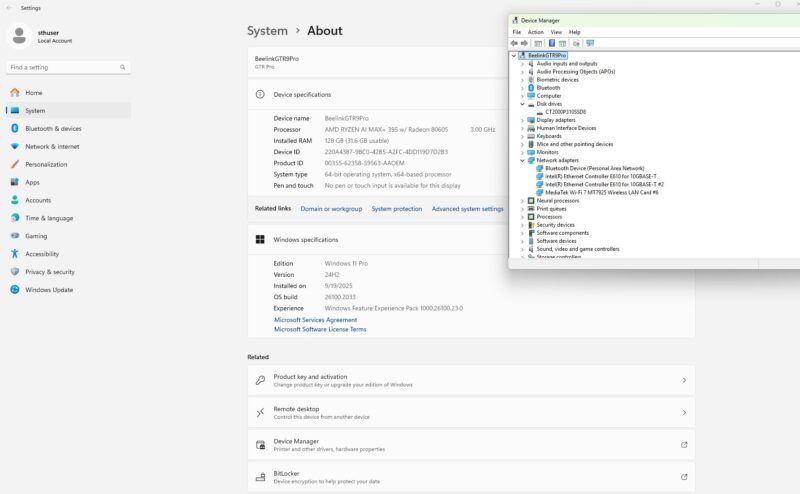
Previously when we spoke of integrated graphics, they were OK, but there was usually a big gap between integrated graphics and a dGPU system. The Radeon 8060S in these is roughly the performance of a desktop NVIDIA GeForce RTX 4060 or a mobile GeForce RTX 4070. You can absolutely game on these APUs, but realistically, the reason you buy this solution is because you want the memory capabilities of the 128GB of LPDDR5X. There are lower-cost solutions if you just want to game.
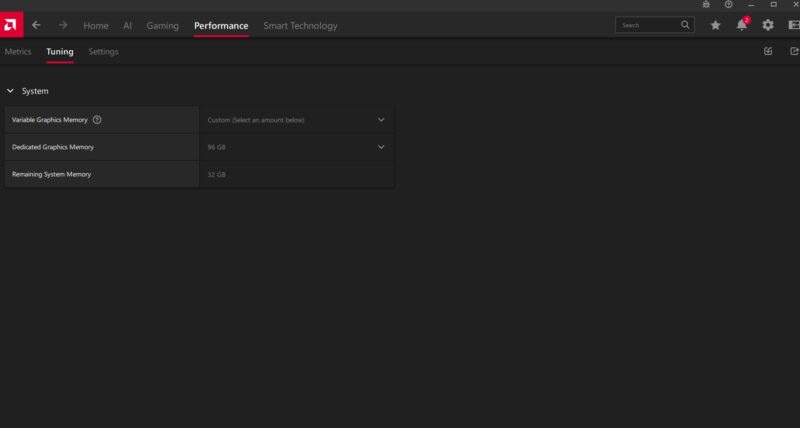
Interestingly, we turned on our system and saw a mix with the 128GB LPDDR5X memory being partitioned with 96GB on the video memory side and 32GB on the CPU side. This is the maximum you can split onto the CPU side, but we have seen other AMD Ryzen AI Max+ 395 systems ship with 2GB video and 126GB system memory split which helps CPU performance.
This is a great example of what this platform can do. Here is LM Studio running gpt-oss 120B at 31.41 tokens/ second explaining how to setup the Dell N2224X-ON. We tried its instructions, and it actually worked to get the switch online.
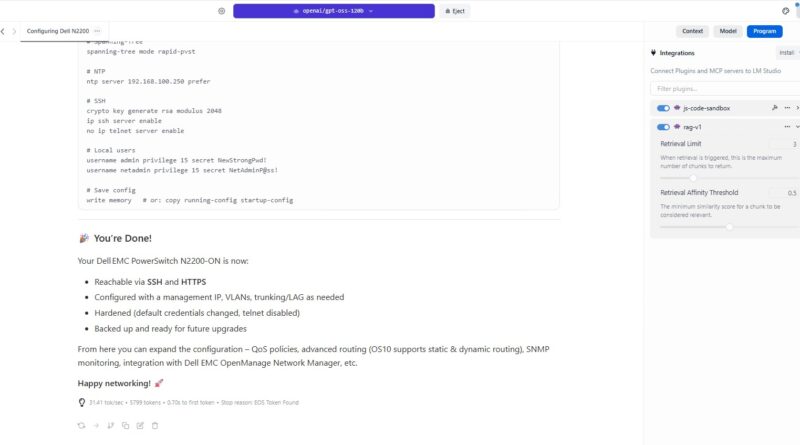
That is a great result and one that requires a lot of video memory.
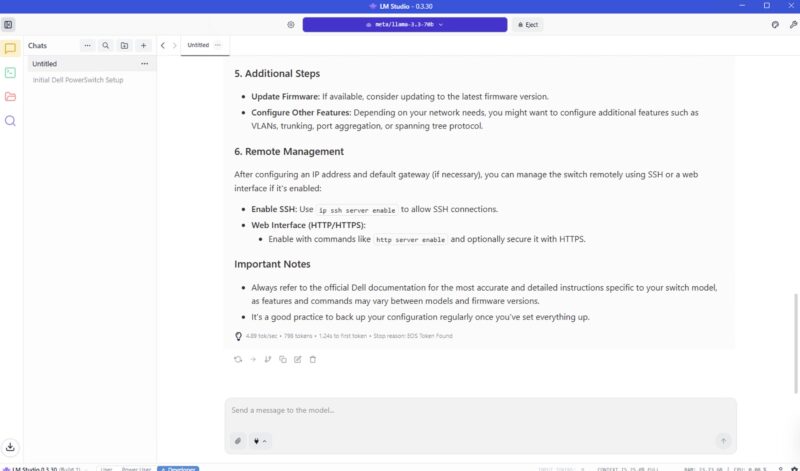
We also can use large models like Meta Llama-3.3 70B on here at a slower, albeit decent clip of around 5 tokens/ second. These are out-of-the box numbers.
Geekbench 5 CPU
One of the more interesting aspects of the Beelink GTR9 Pro and perhaps the AMD Ryzen AI Max+ 395 is that there is quite a bit of variability in the CPU and GPU performance. First, the split of memory to the CPU and GPU can have a big impact. Also, systems can allocate more or less power to the CPU and GPU sides.
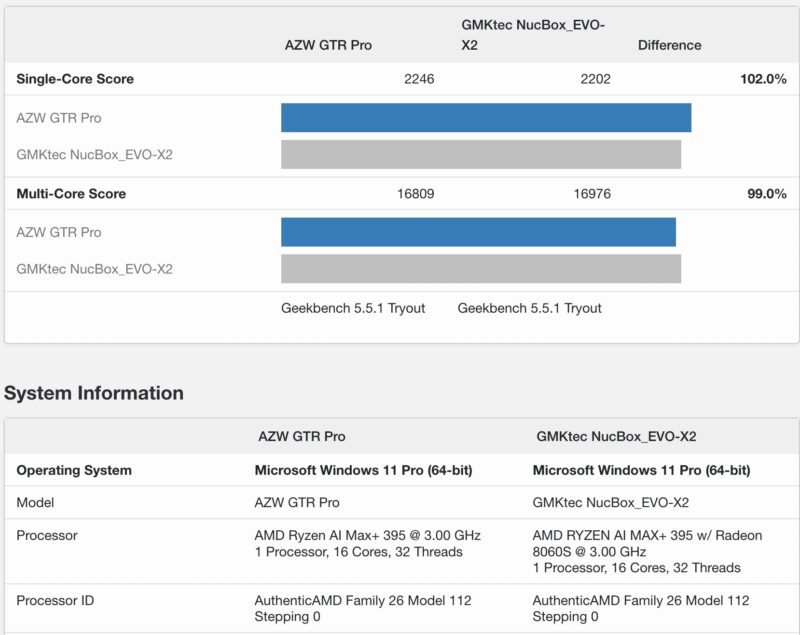
16 cores/ 32 threads is very good here. To be frank, unless you have an application that needs even bigger core counts, or you have an application that gets massive boosts with AMD’s 3D V-cache parts, then the CPU performance of a mini PC like this is going to be good enough to where it will feel fast on the desktop like other high-end systems. It is not the case where you will feel like this is slow because it is a mini PC not a desktop tower.
Geekbench 6 CPU
On the Geekbench 6 CPU side, we see a similar pattern.
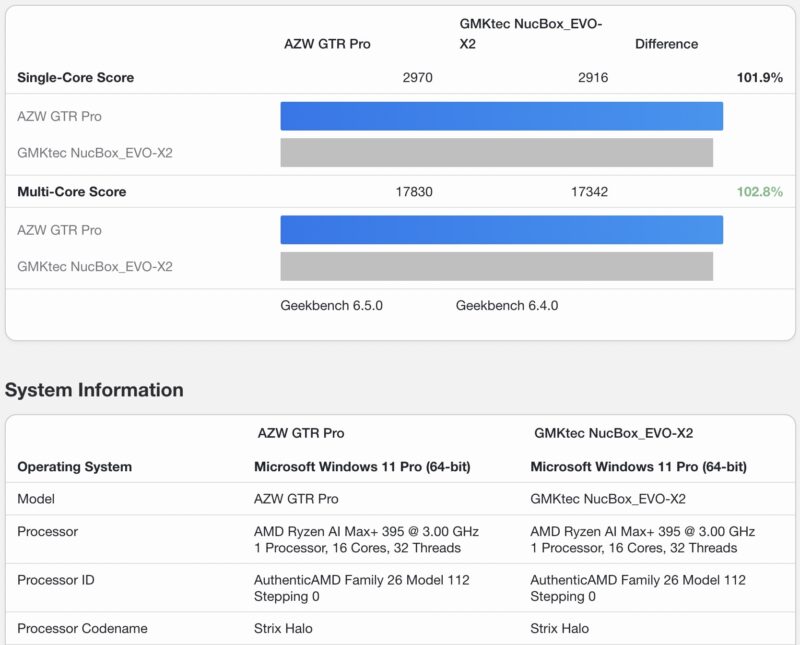
Straight CPU to CPU, this tends to do better than the GMKtec, it will trade these benchmarks with the Framework Desktop. As a bit of a preview, the Minisforum S1-MAX tends to be a bit faster, albeit with higher power limits set and more noise than the Beelink.
Geekbench 6 GPU
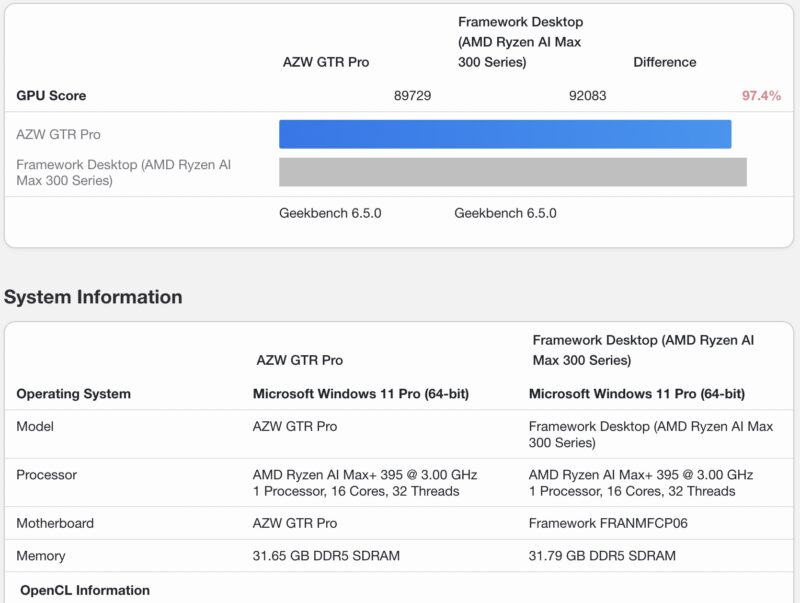
On the Geekbench 6 GPU side, here is the Framework Desktop and Beelink GTR9 Pro in OpenCL:
Here is Vulkan:
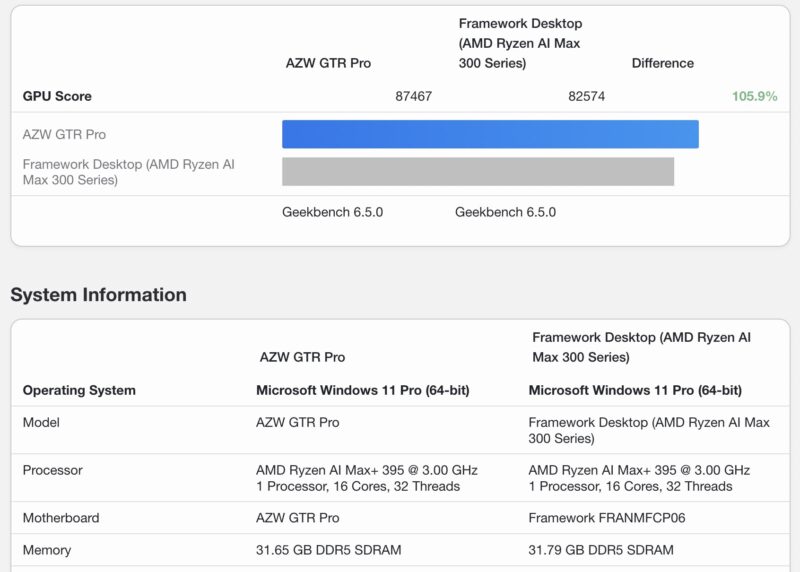
Overall, these are fairly similar, perofrmance. We tested these alongside one another.
Geekbench AI
On the Geekbench AI side, this system performs well:
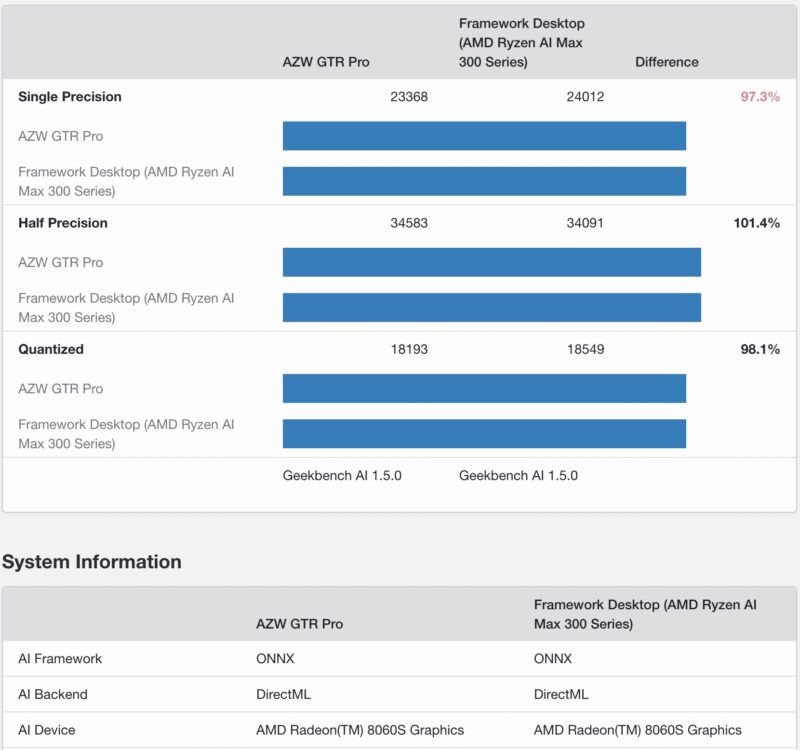
One might argue that the Beelink is slightly slower than the Framework Desktop here, but also remember that the Framework Desktop configuration we tested costs about 20-25% more and we are talking about a +/- 3% delta in performance which is a normal testing variation.
MLPerf Client Results
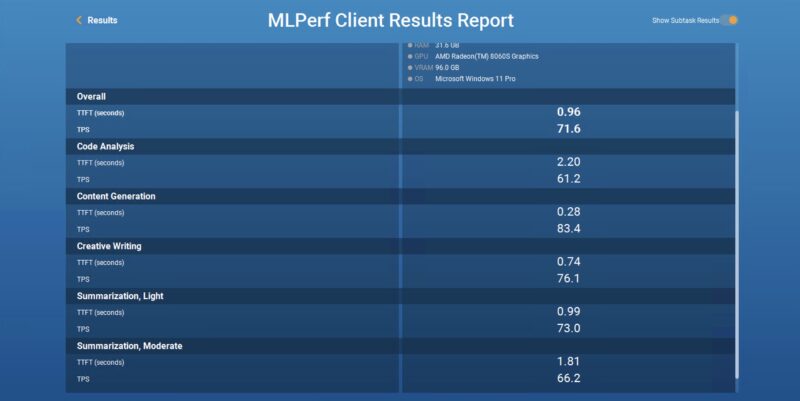
We thought we would start posting some MLPerf Client Results as well to let folks compare to their systems.
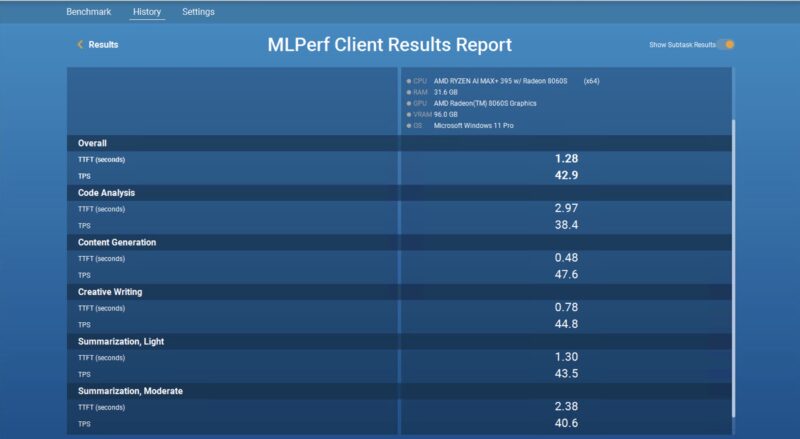
Here is the Llama 3.1 8B Instruct result:
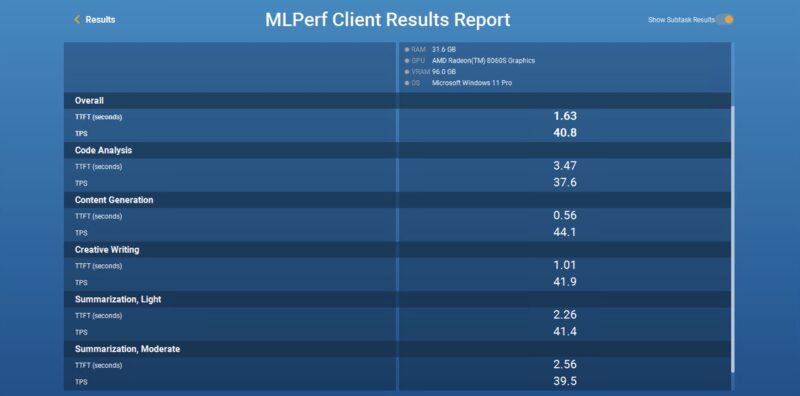
Here is the phi-3.5 result:
Next, let us get to power consumption and noise.


I’d love a bit more on how these run Linux, do all the drivers play nice etc
On paper specifications look good. In in practice we bought HP Z1 / Z2 months ago for much less
I returned mine because the fan noise was unbearable, at 52dBA, one full bel above the rate 32.
Comparing the gtr9 pro vs other Halo 395 systems on noise would be nice. I’d pick this over the framework desktop if it was quieter.
i like the GTR9 Pro but i would like it even better with working Intel E610. The NICs keep crashing under load, i have got Windows and Arch Linux. Right now i have got a USB-C NIC as a workaround.
Mark – Where did you get a HP Z2 Mini G1a Max+ 395 with 128GB for less than $1999? I cannot find it. I will buy one at that price to review.
Fazal – That is strange. We have 4 of these Strix Halo systems, and this is the quietest.
Bill – To me, the features are also better, and it is a lower cost. We filmed the Framework very soon after this one, but we put this ahead of the Framework in publishing order.
Todd – Yes. That is why we went into that issue here. I was told it is getting fixed with a new Intel driver, but it is not here yet, so we have that in the review. I feel a bit mixed on that since we can update this review when a fix arrives, but the video will mention that issue even after a fix arrives.
I have the EVO, the Framework Desktop, and the HP Z2 Mini G1a (~2600 usd on sale)
The HP is the loudest under load by a huge margin, and the EVO throttles. The Framework is very quiet but it’s larger and the fan is way bigger.
I’d like to see testing with different hypervisors and the ability to pass through the iGPU, as well as memory split between the different systems.
Obviously, 32GB isn’t a lot to run guest VMs, so other systems that allow more granularity would be great.
Thoughts?
@ThepHuck: do you know if there are any platform-specific considerations that would make Max 395 memory allocation and GPU behavior differ between systems; or is that a more general question about different hypervisors let you chop it up; but not specific to the Beelink take?
Since it’s a part whose main thing is memory allocation it certainly seems worth knowing; but if there are potentially subtle firmware quirks per-vendor that would make me a lot more nervous than if it’s the oddest of the APUs but AMD dictates all the low level behavior.
I cant wait for a noise comparison between this and the geekom a9 mega. This is 18x18x9.1 that is 17x17x7.1, quite a bit more compact
I had one of these. It’s not silent, especially if you enable the full 160W performance. I ended up returning it and getting a framework desktop mobo which performs much better on the noise front. I put the mobo in a custom case with a dual 10gbe card for cheaper than this unit. Neat concept but it fails in the sound and cooling dept.
Thank you for the review, seems like a neatly designed system. Beelink seems to take a lot of pride in the motherboard reinforcement components so that the PCB doesn’t warp under the weight of the cooler, that is completely not mentioned here I don’t take any issue, it is just hilarious to me.
That SSD seems…. janky? Sparsely mounted caps and exposed pads under what looks like the nand package. Do you have any idea what model it is? I think I will swap it out if I end up getting one.
Would be nice to have a comparison between E610 and RTL8127 in terms of driver availability, offload functionalities and OS/Distro/Hypervisor compatibility.
Also, since you have a couple Strix Halo systems, there are the upcoming GB10 systems, and apple probably is releasing M5 based minis and studios soon, any chance you’d make a more comprehensive AI capability piece for these APU boxes? A validation compatibility of these systems w/ popular AI engines and models would be nince for us to decide which one we should buy.
Serious question. Would this machine be absolutely great for Photoshop?
Does the ram work the same as 128gb ddr5?
Or am I missing something here?!
For those interested in this machine, be aware of a current issue with their dual Ethernet 10gbps driver.
https://bbs.bee-link.com/d/7762-gtr-9-pro-ethernet-malfunction-under-load/16
Other than that, it seems like a great machine.
A bit misleading to conclude with best for under 2k when it costs $2099
A number of years ago reviews of the Topton 8x 2.5GbE Router Firewall showed it could not finish a Geekbench 6 run without crashing nor could the Topton 4x 2.5GbE 2x 10GbE Router Firewall.
From the messages on the vendor support forum for the GTR9, the 10GB Ethernet crashes when placing the GPU under high load. Just like with the Toptop units, this does not sound like a driver problem to me but a hardware problem.
What I can’t understand is why anyone would consider hardware that is not stable anything but a not-fit-for-purpose frustration.
Don’t sound so skeptical: “The front has an array of microphones on top that are supposed to help isolate away background noise.’.
See Tait’s video, where they use multiple microphones and signal processing to remove noise and leave only the desired sound:
https://www.youtube.com/watch?v=CkuAeRfvbwU&list=PLWa6uO3ZUweCJdkCXWhENecSpwQyN7Jge&index=1
You have mentioned you’ve used a SanDisk SN850X 8TB SSD (double-sided) for the second slot. Is the big heatsink enough to cool it down from the top only? Was it recognized without changing anything in BIOS?