

Beelink GTi15 Ultra Power Consumption and Noise
With an internal power supply and hardware platform that is essentially taken from laptops, the GTI15 Ultra fares pretty well in regard to idle power consumption. Bouncing around between 9 and 12 Watts, the GTI15 Ultra comes in a bit higher than its GTi12 predecessor, but this is still pretty low on an absolute basis.
All the while, the minimal power load means that the mini-PC can stay virtually silent at idle. We measured it at 34.3 dBA in our normally 34 dBA noise floor testing lab and studio, meaning that you can almost not even hear it running at this point.
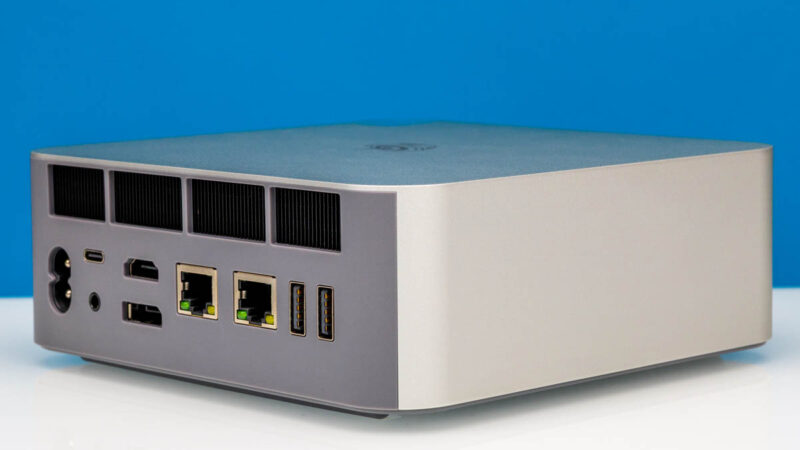
Shifting to a full CPU load, we were able to get the GTi15 Ultra up to about 75 Watts of power consumption. This goes to show the efficiency of the underlying Core Ultra 285H SoC and how Beelink has tuned the voltage/frequency curve for the mini-PC. If anything, we are accustomed to seeing mini-PCs such as this consuming over 100 Watts – the GTi12 Ultra did 105W – so this is a particularly impressive result in context. It also goes to show how much power headroom is available to the rest of the mini-PC, as the integrated PSU is able to deliver up to 145W.
This also makes the GTi15 Ultra look quite good in terms of load noise. As measured in our studio, the mini-PC only gets up to 37 dBa, 3 dB over our noise floor and roughly the same amount over how much noise the GTi15 Ultra produces at idle. Suffice it to say, the larger chassis seems to be quite useful for keeping down the amount of noise generated by the mini-PC.
Key Lessons Learned
This is a bit of a strange one. STH originally started reviewing mini PCs because we were using them as Ubuntu servers, Proxmox VE nodes, or even just Windows machines that could also run WSL. Back when we started this, a system with this many cores and a high-end dual 10Gbase-T NIC would have been excellent. While we absolutely love the Intel E610 in here, as it seems to be a better implementation than in the GTR9 Pro, the CPU is a bit of a mixed bag. It offers better performance across the CPU, iGPU, and NPU. On the other hand, we lose Hyper-Threading. For many who want high thread counts for vCPU alignment, this is not ideal. In many ways, this is a much better mini PC for desktop applications, and despite the great NIC, it is perhaps not as well-suited for server applications.
The most intriguing use case for this machine is, of course, adding an additional PCIe GPU via the EX Pro dock. Beelink’s design is proprietary, but it has worked well for us. On the other hand, if we are being honest, by the time you add the GPU dock and a GPU, it is right to take a step back and wonder why you are using the mini PC as the base form factor. Perhaps the reason is that you want a GPU in one location and to take the base with you. Or maybe you want to have multiple docks set up with multiple GPUs for some reason. Maybe the best use case is just that you bought the mini PC, but then realized you wanted a big GPU later, and so this gives an upgrade path. The last option, and a valid one, is that you might think it looks cool.

All of those are fair, but it was really interesting to see the evolution in this segment, and we generally prefer more expandability than less.
Final Words
Having seen mini PCs evolve for years, this is a great example of the evolution. Whereas five years ago the standard might have been a CPU, SODIMMs, a M.2 slot, WiFi, 1GbE, and a few USB ports integrated, the bar is now much higher. A high-end dual 10Gbase-T NIC, multi-microphone arrays, internal speakers, an internal power supply, an SD card reader, a fingerprint reader, and even the external GPU docking capability. The Beelink GTi15 Ultra shows how these mini PCs have evolved, and they have come quite far.
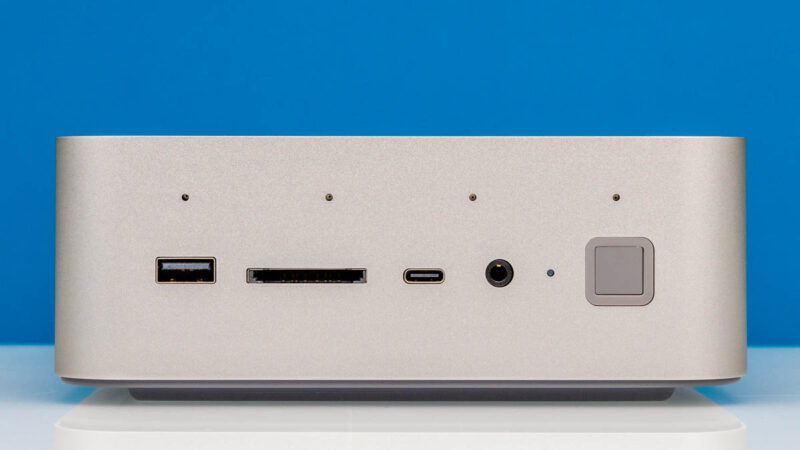
Overall, this worked well, and if you are looking for an Intel-based mini PC with the GPU expansion capabilities and the Intel E610 NIC, then this Beelink is an excellent option.
Where to Buy
You can find the unit on Amazon here: Affiliate link.


“To the right of that is the PC’s sole 40Gbps USB4 port, offering the fastest I/O connectivity for the box. Note that this is not a Thunderbolt port – users wanting external PCIe connectivity will need to resort to Beelink’s GPU dock (more on that in a bit).”
What? PCIe tunneling is a mandatory feature of USB4, so of course it would work with Thunderbolt-based GPU boxes.
The full reason why is a bit above my pay grade. What I do know is that the GTi15 is not Thunderbolt certified, Beelink does not advertise it as such, and PCIe tunneling is not a supported feature.
It is officially a 40Gbps USB-C port that is capable of USB Power Delivery and DisplayPort 1.4 alt mode.
@Robert
No, PCIe tunneling is an optional feature for USB4 hosts. Thunderbolt 3 compatibility is also optional for USB4 hosts including extended data rates of 10.3125G and 20.625G and extended power delivery (TB3 provides different voltages and more power than base USB4).
Both features are mandatory for USB4 hubs and docks.
Can you provide a picture of the idle power draw you mentioned? I do see more than 27W on my unit which is consistent with all other reviews published so far. It will be interesting to see how you achieved those numbers (e.g. bios and firmwares).
I understand that. However, it is labelled as a 40Gbps USB4 port. That is only possible if it supports PCIe tunneling, otherwise it would need to be a 10 or 20Gbps port, which is USB3.2 gen1/2 or gen1/2×2.
I’m not trying to fault the article or anyone here, I am just genuinely surprised, because I’ve never seen a USB4 implementation on any device that advertised the full 40Gbps speeds without PCIe tunneling and I’m not entirely sure how that’s possible. Without PCIe, it should just be a USB 3.x port with DP alt mode support.
And in any case, the CPU itself technically has four built-in Thunderbolt 4 controllers and even if they didn’t use any of those and opted for an external USB4 controller, that must connect via PCIe, so the option should be there. Which makes it seem like a software limitation. But again, I don’t know what they did there, it just doesn’t make much sense to me.
Pcie x8 slot, not 16
@Robert
No, 40 Gbit/s does not mandate PCIe tunneling either. USB4 defines its own third generation of USB tunneling capable of 20 Gbit/s (USB4 Gen 3×1) and 40 Gbit/s (USB4 Gen 3×2). USB4 v2.0 goes further with Gen 4 up to 80 Gbit/s.
Having Thunderbolt 4 controllers isn’t enough since TB itself requires periphery elements on the motherboard, especially around power delivery, tighter integration with the rest of the system, and of course paid certification. Those all cost money which Beelink doesn’t think is worth the potential benefits.
Have you tried to install pfsense or TNSR on it? It looks like it could be a fine router for 10Gbit