

Beelink GTi15 Ultra with EX GPU Dock
We have previously written about Beelink’s EX GPU dock in a separate article, but here is a quick look at the GTi15 Ultra installed into the dock.

Essentially a PCIe riser of sorts, the dock augments the GTi15 Ultra with a PCIe x16 physical slot/ x8 electrical, as well as an additional M.2 2280 slot and a Wi-Fi radio. While the GTi15 comes with its own radio, the dock serves as a pretty effective shield for radio signals, meaning an alternative arrangement is needed to get the best reception. Helping matters, the dock also features external antenna connectors, so there is everything needed to use larger antennas with better diversity and reception.
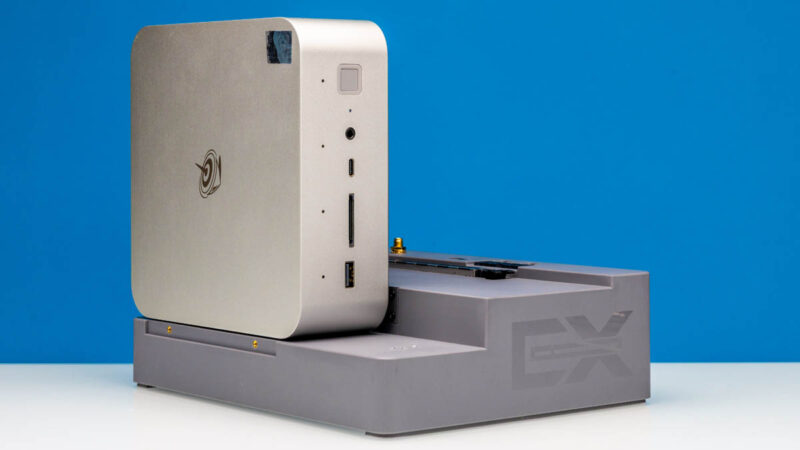
Thankfully, the dock does not have the same impact on airflow, so the GTi15 Ultra is still plenty capable of cooling itself when docked.


“To the right of that is the PC’s sole 40Gbps USB4 port, offering the fastest I/O connectivity for the box. Note that this is not a Thunderbolt port – users wanting external PCIe connectivity will need to resort to Beelink’s GPU dock (more on that in a bit).”
What? PCIe tunneling is a mandatory feature of USB4, so of course it would work with Thunderbolt-based GPU boxes.
The full reason why is a bit above my pay grade. What I do know is that the GTi15 is not Thunderbolt certified, Beelink does not advertise it as such, and PCIe tunneling is not a supported feature.
It is officially a 40Gbps USB-C port that is capable of USB Power Delivery and DisplayPort 1.4 alt mode.
@Robert
No, PCIe tunneling is an optional feature for USB4 hosts. Thunderbolt 3 compatibility is also optional for USB4 hosts including extended data rates of 10.3125G and 20.625G and extended power delivery (TB3 provides different voltages and more power than base USB4).
Both features are mandatory for USB4 hubs and docks.
Can you provide a picture of the idle power draw you mentioned? I do see more than 27W on my unit which is consistent with all other reviews published so far. It will be interesting to see how you achieved those numbers (e.g. bios and firmwares).
I understand that. However, it is labelled as a 40Gbps USB4 port. That is only possible if it supports PCIe tunneling, otherwise it would need to be a 10 or 20Gbps port, which is USB3.2 gen1/2 or gen1/2×2.
I’m not trying to fault the article or anyone here, I am just genuinely surprised, because I’ve never seen a USB4 implementation on any device that advertised the full 40Gbps speeds without PCIe tunneling and I’m not entirely sure how that’s possible. Without PCIe, it should just be a USB 3.x port with DP alt mode support.
And in any case, the CPU itself technically has four built-in Thunderbolt 4 controllers and even if they didn’t use any of those and opted for an external USB4 controller, that must connect via PCIe, so the option should be there. Which makes it seem like a software limitation. But again, I don’t know what they did there, it just doesn’t make much sense to me.
Pcie x8 slot, not 16
@Robert
No, 40 Gbit/s does not mandate PCIe tunneling either. USB4 defines its own third generation of USB tunneling capable of 20 Gbit/s (USB4 Gen 3×1) and 40 Gbit/s (USB4 Gen 3×2). USB4 v2.0 goes further with Gen 4 up to 80 Gbit/s.
Having Thunderbolt 4 controllers isn’t enough since TB itself requires periphery elements on the motherboard, especially around power delivery, tighter integration with the rest of the system, and of course paid certification. Those all cost money which Beelink doesn’t think is worth the potential benefits.
Have you tried to install pfsense or TNSR on it? It looks like it could be a fine router for 10Gbit