

ASUS ZenScreen MB16ACE Monitor Performance
For our monitor testing, we use a Datacolor SpyderPro (Amazon Affiliate) to measure the monitors’ color performance. This is not the fanciest test equipment by any means, but we just wanted to get some general sense of performance.
ASUS rates the MB16ACE at 220 cd/m2 typical brightness. Official specs also list 260K colors, which means this is not positioned as a wide-gamut creator display.
Below is the measured color gamut from our Datacolor run.
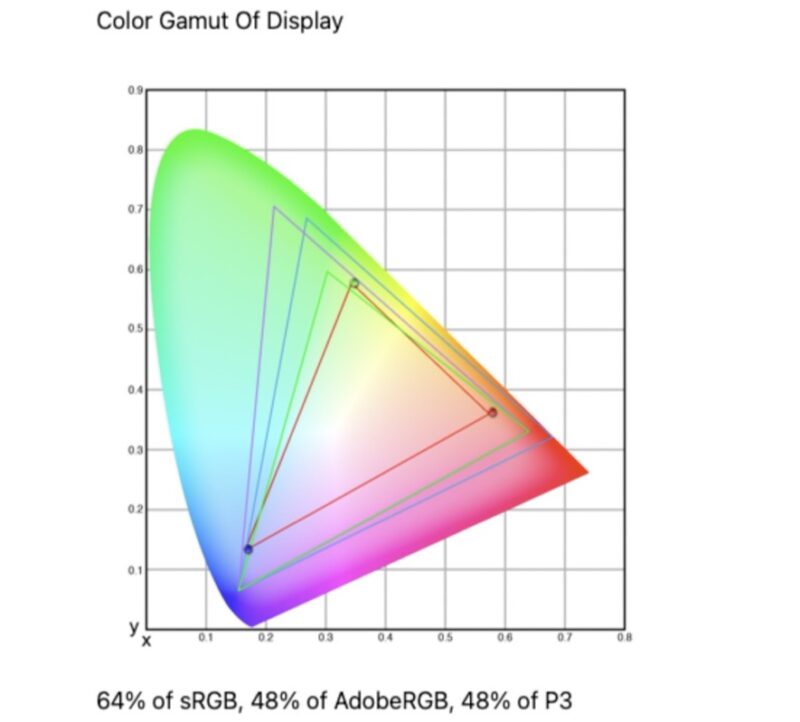
We measured 64% of sRGB, 48% of AdobeRGB, and 48% of P3. That is closer to the lower-cost budget portable monitors than to the better QHD and higher-refresh panels we have tested recently.
Below is the color accuracy result from the same run.
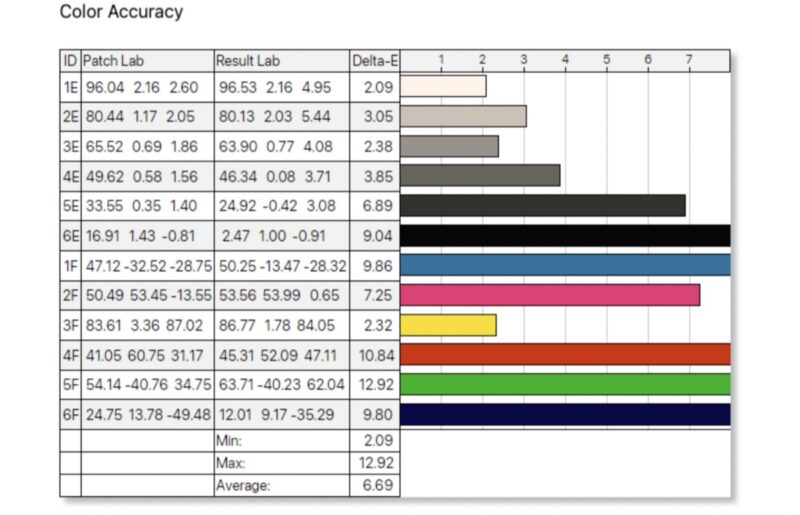
Color accuracy was not a strength. We measured a minimum Delta-E of 2.09, a maximum of 12.92, and an average of 6.69. For spreadsheets, terminals, browser windows, and travel productivity, that can still be usable. For color-sensitive photo or video work, this is not the monitor we would pick.
Power Consumption, Brightness, and Contrast
We have found that the monitors often do not scale power and brightness to match the settings. That is important because, as a portable monitor, it may be powered by a battery, making power and brightness important trade-offs. Here is what we captured for monitor power on the Type-C power input at different brightness levels.
- 0% (15.0 nits) is 2.8W
- 25% (79.1 nits) is 3.6W
- 50% (140.7 nits) is 4.5W
- 75% (204.5 nits) is 5.4W
- 100% (263.6 nits) is 6.5W
In case you were wondering about what we saw for the brightness and contrast:
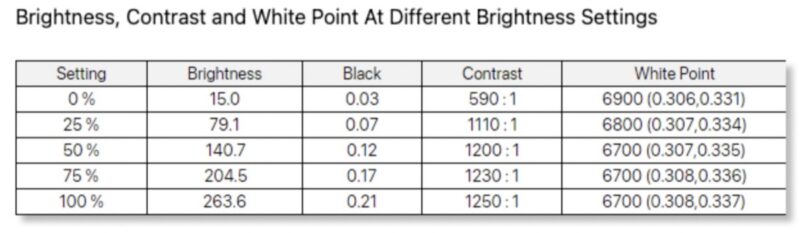
Maximum brightness measured 263.6 nits, which is above the 220 cd/m2 typical figure and slightly above ASUS’ 250 cd/m2 maximum note for USB-C DisplayPort Alt Mode. That is the good news. Contrast ranged from 590:1 at minimum brightness to 1250:1 at full brightness, while the white point stayed in the 6700K to 6900K range.
Here is the measured tone response.
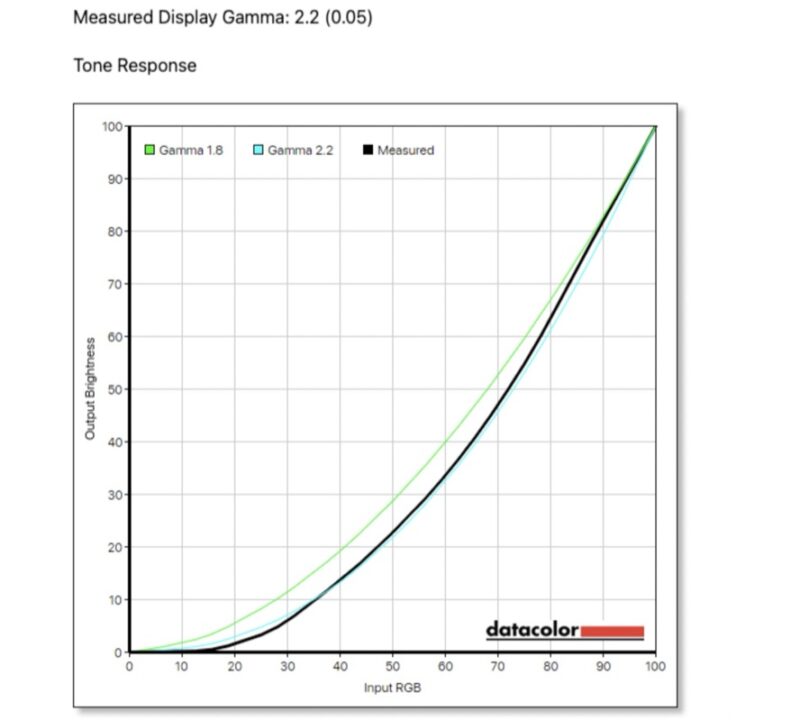
Gamma measured 2.2 with 0.05 variance, which is a solid result for this class, even if the color gamut and color accuracy are not standout results.
Final Words
ASUS’s ZenScreen MB16ACE is best understood as a slim, branded travel display rather than a high-performance portable panel. Its biggest advantages are the thin chassis, smart cover, a single USB Type-C cable operation, and a measured maximum brightness that exceeded ASUS’s own typical rating in our testing.
Trade-offs are clear. A single USB-C input is less flexible than the dual USB-C plus mini HDMI layout we see on many portable monitors, and measured color coverage of 64% sRGB is limited. Anyone expecting the color performance of newer QHD or high-refresh portable monitors will be disappointed.
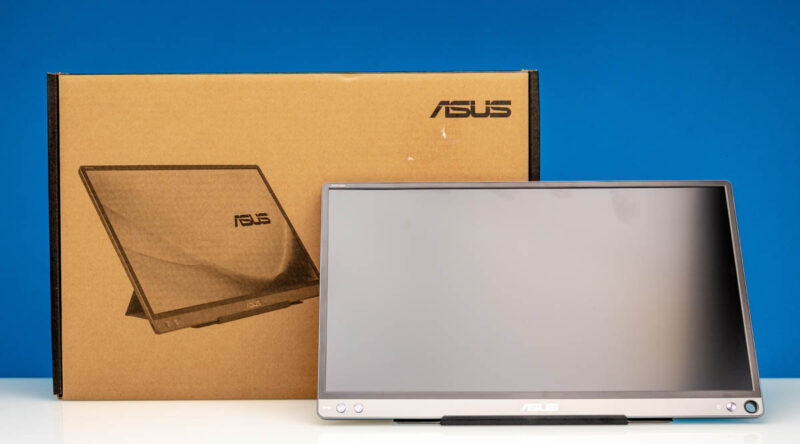
Still, this kind of monitor can make sense if the host system has the right USB-C output and the buyer values a light, simple second display. We would view the MB16ACE as a productivity travel monitor first, not a media creation display or a gaming-oriented portable panel.
Where to Buy
If you just want to pick one of these up, here is the Amazon affiliate link to where we purchased this unit.


Given “pen or stylus use”, is this also a touch-screen?
Suitability for server aisle crash cart use?
Honest question … for all I know, Dsub15/VGA is still necessary.
How is this better than the $50 options? Seems excessively expensive for the performance figures.
@ splifingate
It is not a touch screen. The hole is for putting in a pen when not using the stand. Great engineering ;-(
ASUS Says: “ZenScreen MB16ACE is designed in a smart pen hole in the bottom right hand corner, where you can insert a pen to prop the screen up when not using the smart case.”
@ Bob Niland
A much better choice is using the Arzopa Z3FC QHD Portable Monitor.
https://www.servethehome.com/arzopa-z3fc-16-1in-180hz-2-5k-portable-monitor/#comments
It has 2x USB-C ports (one for power & one for signal) and 1x HDMI Mini port.
But you would still need a VGA to HDMI Adapter.
1. Get a VGA to HDMI Adapter at Amazon.com: Search for FOINNEX-Converter-Computer-Projector-Portable
2. Connect the supplied HDMI Full/Mini cable
The drawback is that you would also need USB power for the adapter to work. One more cable.