

When Intel announced the i3-530 and i5-6xx family, I was full bore on building the Big WHS which included an LGA-1366 i7-920 CPU. The new i3-530 and i5-650 are based on the 32nm Clarkdale core with an integrated, on package GPU. For the home server world, read low power consumption and integrated graphics. To say the least that combination, along with the low cost of the parts + motherboards had me eagerly purchasing a $99 i3-530 from Microcenter and a $99 Intel BOXDH55TC mATX H55 chipset motherboard. To keep with the low power theme, I also ordered some G.SKILL Ripjaw DDR3 that runs at 1.5v.
After salvaging an extra Patriot PS-100 32GB SSD, an ancient Silverstone case (Athlon64, Radeon AGP graphics, and DDR era), and an 850w Coolermaster RS-850-EMBA power supply I hooked everything up to my trusty kill-a-watt and saw 63w being pulled at the wall. This is quite good as my Intel Atom N330 + NVIDIA ION Asus board pulls about 38w with the same SSD (no other drives installed). A day later the Newegg box arrived with a 500w OCZ 500w 500MXSP and Sony DVD writer, and just to make it easy I added an Intel Gigabit CT PCIe x1 NIC to the board. Interestingly enough, power consumption went down to 50w at idle. While installing Windows Server 2008 R2 on the box, I never noticed the power meter read above 67w.
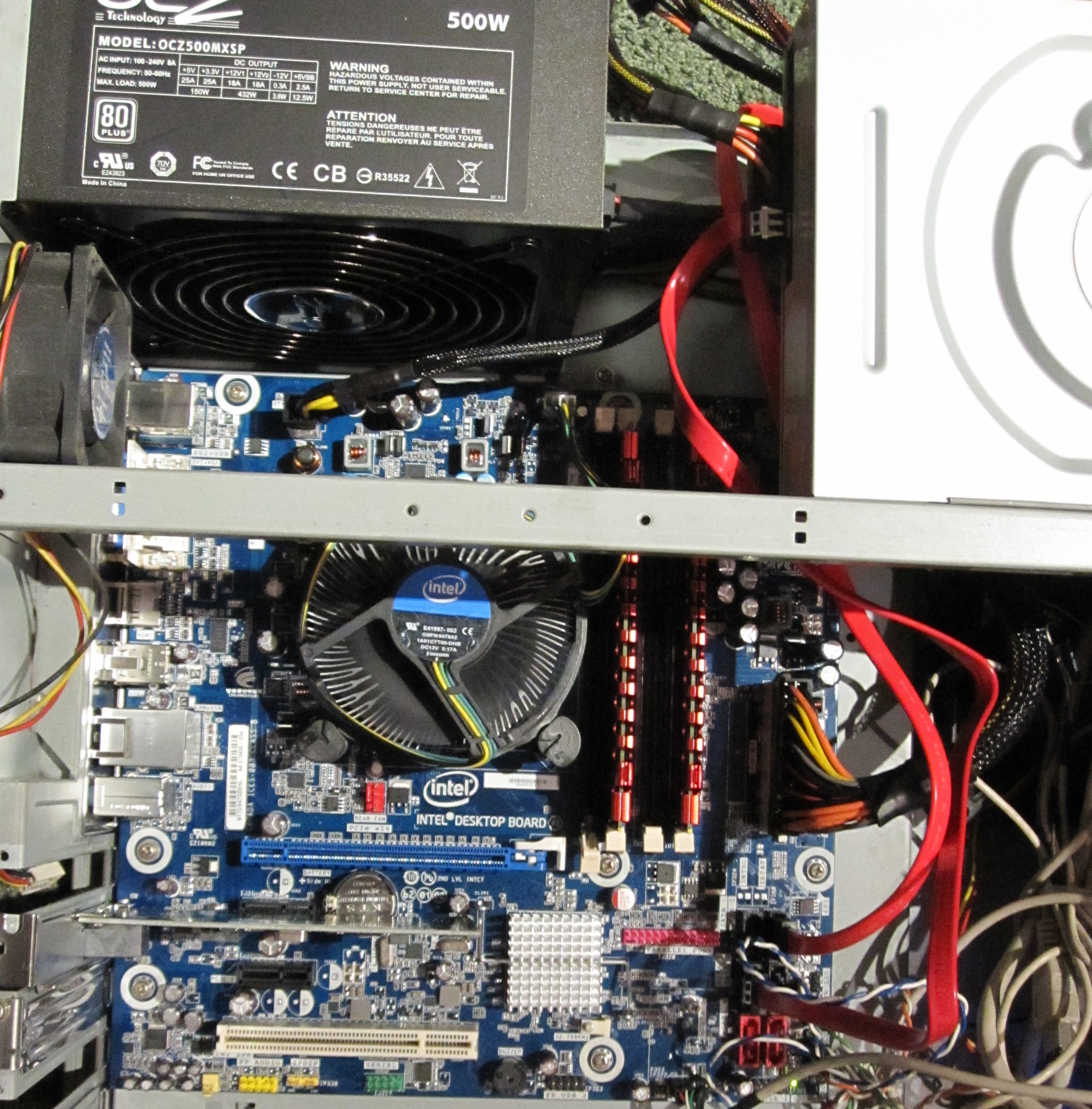
The i3-530 is a bit disadvantaged compared to its i5 family members because it has no Turbo Boost (v2). Luckily, it does retain hyperthreading and virtualization support making it an interesting proposition for the DIY WHS market. The first obvious question is, can one run VM’s on the i3-530? Answer is yes, it works fine. The second question is performance.
Performance is one of those oft debated WHS topics. Clearly WHS does not require amazing amounts of speed. On the other hand, many users want to do more than simple file sharing with their WHS machines. One common task for home servers is video encoding. Handbrake v.0.9.4 is an excellent x264 encoder that is both popular, and useful for WHS machines. Here’s a quick look at what I was seeing doing DVD quality to iPod quality:
| x264 Handbrake Encode | |
| CPU | fps |
| Atom N330/ION | 21fps |
| Q6600 | 84fps |
| i3-530 | 90fps |
| i5-650 | 97fps |
Although that may not surprise a lot of people, it surprised me. My initial thought was that the Q6600 would still be faster. This may be because mine ran at 3.8ghz which was significantly faster than the 2.4ghz stock speed.
Here’s a shot of the i5-650 on a Gigabyte H55M-UD2H (aka $200 Fry’s combo) + two Intel Pro/1000 GT PCI NIC’s ($15 each shipped):

Note that’s three onboard Gigabit NIC’s, and two PCIe x16 slots which can be used for drive connectivity (the one closest to the CPU is x16 electrical, the one furthest is x4). The board has four internal SATA, one eSATA, and even and IDE port.
It is quite obvious that these new chips bridge the power efficiency gap between the old Core 2 series and the Atom, while at the same time offering a significant power advantage. WHS will run on almost anything (until WHS V2 is officially released), but these chips offer great encoding performance, power consumption, and VM support today and will support x64 for WHS V2 in the future.
With these chips being widely available, it is hard to imagine using an Atom based or a Core 2 based system unless the hardware has already been purchased.
I’ll post some more information including some WEI scores for the i3-530 and i5-650 this weekend.


How is the Intel vs. Gigabyte motherboard? Are they both mATX? Going to buy a clarkie today for my new WHS build.
Why so many NICs? Does the onboard one suck?
Nice article. I just picked up a i3-530 and Gigabyte H55 board for a DIY WHS. I am excited to see your reported encoding benchmarks. I am hoping for even lower consumption with some undervolting.
Erikk: Yes both are mATX. I’m starting to get a bit partial to the Gigabyte board that has been running the i5-650. Raid card + SAS Expander + 2x Intel Pro/1000 GT’s = 36 drives of connectivity with 3 GigE ports and Raid 6 for $660? Can’t really beat that.
Paul: I like the base OS and the VM to have their own NICs generally. Using the Intel’s for throughput, Realtek for management.
BW: Sweet! I’m probably going to try that soon. The Gigabyte board has some nice power saving features that the Intel board doesn’t have.
What is the power consumption on the i5-650? How does it compare to ion?
I will post an update to the power consumption shortly. I was shocked to see the results.
Are you using the AES-NI encryption on the home servers? If so, if there a huge difference between the i3 and i5?
hi. i just installed whs on asus h55 pro matx, and i can’t get connected, nic problem, seems to be driver. All asus could give me was a general dos driver, i have to tweak, like johnny best programmer In the World. I can’t do this. I’m gonna look into the nas, it was mentioned network sharing, cuz i just want a mp3 jukebox hooked up to my stereo. All my photos and videos, they stay the same, so each pc has a copy. Pls tell me what you think about the no driver for connecting to internet from server. I made the connect iso cd, but my pc’s can’t find the server. This is horrible. I’m gonna throw it down. You have a good article, btw.
I never used the Asus board however I think it uses the Realtek 8112L chipset for onboard GigE. You might want to try finding another board with the same NIC and installing the driver from a different source.
Also, I’m a HUGE fan of Intel NIC’s now. Streaming video there is a big difference. For PCI the Intel Pro/1000 GT’s cost me, on average $15 these days, and for PCIe x1 I’m using PT or CT single port NICs which run about $28 on average. The Intel NIC’s just work, and work very well.
Tom L. – Don’t give up hope young man. Just go to the ASUS web site and download the Realtek LAN driver and all will be well. You can also get it from the CD included by ASUS… just navigate to the Driver/Lan directory and run the setup.exe rather than the Asussetup.exe and it will install.
I’ve tried to build up a DIY WHS based on the MSI H55M-ED55 Board with Intel I3 530.
The Intel HD graphics is still not running propperly. What kind of driver did you use?
With the standard VGA driver no Standby and Hybernation is available.
With Intel HD driver there are horizontal error lines on the screen or even worse, the screen get frozen.
Any idea?
Thanks
I had to use the drivers that came on the motherboard driver DVDs. I would suggest trying that or downloading the latest compatible Intel driver from MSI.
The drivers from the MSI DVD and Intel Download (XP-Driver) I tried. Problem still there.
Carpoffel you should try calling or e-mailing MSI. Not being able to standby/ hibernate are usually motherboard/ BIOS level issues.
I’m a “little” late (over a year!) to this post, but was considering this same (Intel BOXDH55TC) board as the basis for a new Windows Home Server 2011 box and was wondering what driver issues you had getting the board up and running knowing that Intel does not officially support any Windows Server 2008 drivers on the board.
Thanks,
WHS 2011 is Windows 2008 R2 at its core. Probably the one big thing you need is to have a CD/DVD/USB Drive for the NIC drivers.
With no official support by Intel for Win 2008 R2 on this borad, do you recall how you accomplished installing the NIC drivers?
Thanks,