

Minisforum MS-S1 Max Internal Hardware Overview
Opening up the Minisforum MS-S1 Max, one of the things that pictures do not capture very well is just how easy it is to get inside of this mini-PC. Removing two screws from the rear of the system is all it takes to release the chassis, allowing it to slide right off to access the internals.
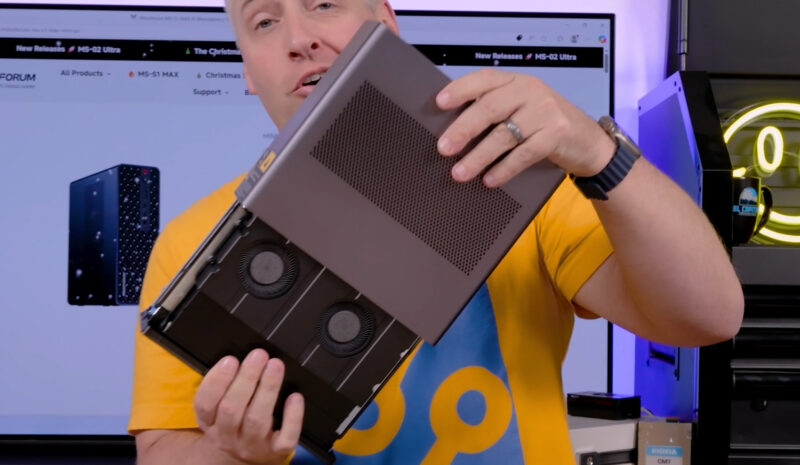
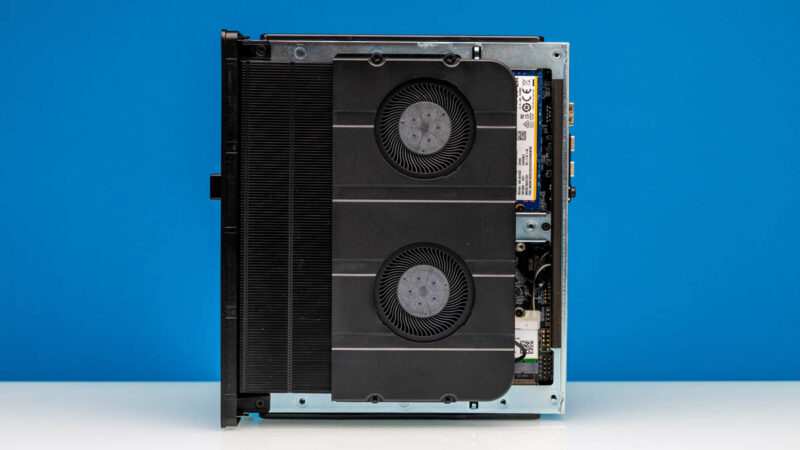
Once inside, we can quickly see what Minisforum has put so much of the space within the PC to use on: cooling. A pair of powerful blower fans and a similarly large heatsink, only hinted at from the outside, are in play here to keep the system cool.
Digging a bit deeper, removing the fans exposes the heatpipes used to route heat from the various chips on the motherboard to the heatsink. Because Strix Halo hardware is designed to be soldered down – particularly with its use of LPDDR5X memory for maximum memory bandwidth – there are no user-serviceable parts beneath those heatpipes. The SoC, memory, and various on-board controllers are all there for life. With Minisforum (currently) only offering a single configuration of the MS-S1 Max with a Ryzen AI Max+ 395 with 128GB of LPDDR5X memory, the company only needs to produce a single board design here.
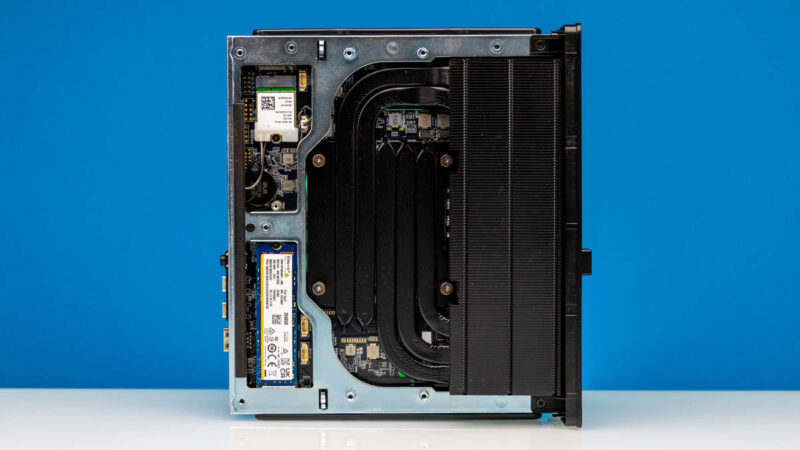
As for the components that are user-serviceable from this side, all three of the M.2 slots are within easy reach – you do not even need to remove the fans. The smaller card is the customary Wi-Fi + Bluetooth adapter, provided via a MT7925B controller. This supports both Wi-Fi 7 (2×2) and Bluetooth 5.4, making it current for wireless connectivity.
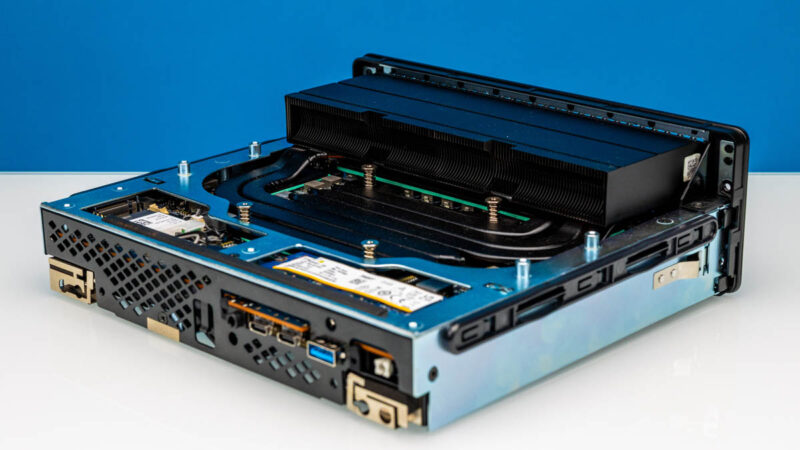
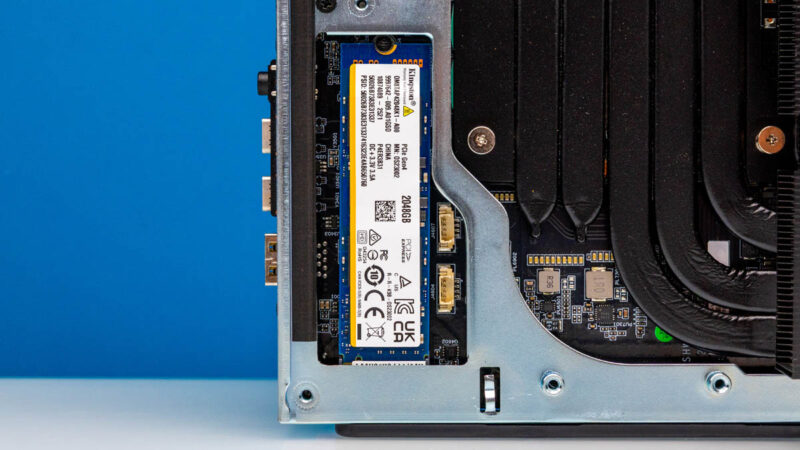
Meanwhile, directly above this slot is one of the mini-PC’s two M.2 slots for SSDs. The default configuration ships with this slot empty, as owing to a lack of PCIe lanes coming from the SoC, this is a relatively paltry PCIe 4.0 x1 slot. The single lane still leaves it as a decent place to chuck some additional storage, but it’s not a good slot for high performance storage.
Otherwise, the primary M.2 slot is found towards the other end of the PC, and offers full PCIe 4.0 x4 connectivity. Our sample shipped with a 2TB SSD made by Kingston, whose use of QLC makes it one of the only areas where we can knock the otherwise high-end M1-S1 Max.
We can also flip over the MS-S1 Max to get access to the other side of the system, which contains another set of user-serviceable components.
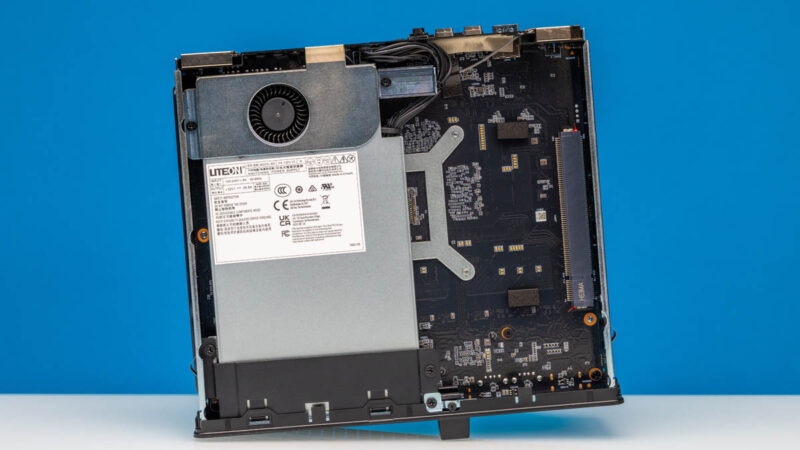
First up is the integrated power supply, a 320 Watt model produced by Lite-On. At first glance such a powerful PSU for a SoC with a peak power consumption of 160W may seem like overkill. But the PSU also needs to provide power for multiple USB-C ports, cooling, and the PCIe slot. So Minisforum’s peak power needs are higher than they may first appear.
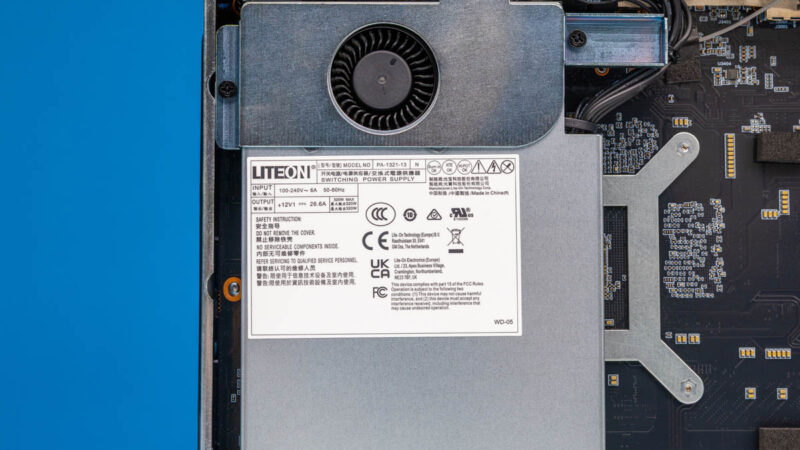
Meanwhile, since it is separated from the system’s primary cooling loop by being on the backside of the system, the PSU also comes with its own fan.
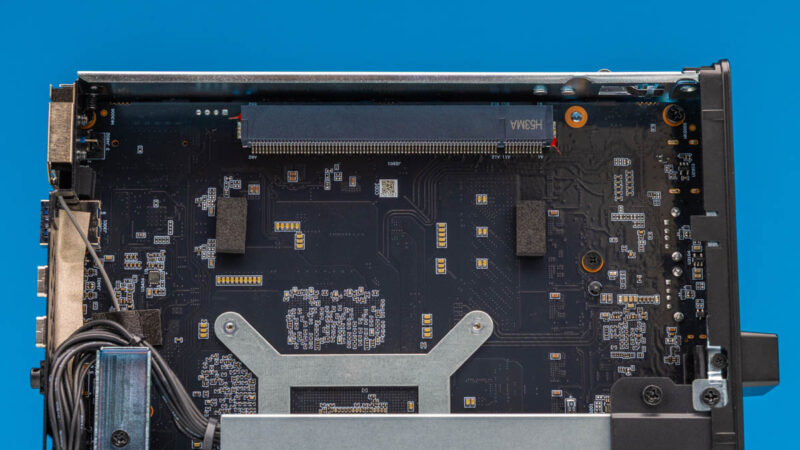
Finally, towards the right of the case is the PCIe slot we previously mentioned. The MS-S1 Max is designed to accommodate a half-height full-length PCIe card for further expandability. Do note, however, that while the slot is physically a x16 slot, electrically it is only a PCIe 4.0 x4 slot. As such the system is not engineered to handle high-performance cards needing a great deal of PCIe bandwidth. Also, there is limited airflow on the bottom side of the chassis because the primary fans are on the other side. We usually suggest actively cooled cards in these Minisforum slots.
Our tour of the hardware is complete. Let us talk about performance.

Is there a block diagram of how all the things are connected? My understanding is of the PCI-E lanes on Strix Halo makes me think there are must be switch chips in this.
Any chance of testing the USB4 v2 ports since that is what sets this apart imho.
Thanks for the review!
Any hardware or software with “AI” is a “NO SALE” here.
I just don’t see the “value proposition of AI” … except to the shysters & hucksters that are promoting that snake oil hair tonic.
Why is they an HDMI instead of displayport? Are people using these in the living room? Just seems like an odd choice. USB to displayport mostly works, but can be glitchy in my experience.
The second M.2 storage slot is *not* PCIe gen4 x4. It’s an x1 slot. See https://store.minisforum.com/products/minisforum-ms-s1-max-mini-pc . I assume this is how they can cram all that other I/O in given Strix Halo has limited PCIe lanes available.
(Also, please support + signs in email addresses.)
According to the official product page for this, the second M.2 SSD slot isn’t gen4x4 but gen4x1. You might want to fix that in this review (or get Minisforum to fix their product page if they got that wrong).
Sigh. Once again, it would be great to see comparisons with other system types (Spark and Mac, primarily).
It’s actually getting pretty interesting now! The DGX Spark has 200gbps Ethernet, and the Ryzen has dual 80gbps USB4 (can it use them natively? Or do you need some TB5Ethernet? Do they have full bandwidth to the CPU?). Meanwhile the Mac Mini Pro has TB5, and the new RDMA-enabled drivers. Which is faster?? The answer isn’t obvious, nor likely the same for all cases.
Unfortunately, as with many of the other recent reviews, this just covers the surface issues.
Grrr, the comment system ate some of my text. “TB5Ethernet” should be read as “TB5 to Ethernet adapters”.
Thanks Manoj. I’m not sure how we missed that since it was in the notes, but that’s a definite error on our part. The article has been updated accordingly.
As for the plus signs, I hear you. That’s a site software thing; I’m afraid I don’t have an answer for you.
Sorry about that, George. As nice as it would be to have, the lab boys didn’t put together a block diagram for this PC. And with everyone out on assignment right now, we won’t have an opportunity to put one together this week.
Biggest deficit vs the nvidia spark would be having “only” 2x 10gb ethernet (which wouldn’t be too shabby except afaik it won’t do RDMA).
I’m playing with 3 of these in my homelab. Has anyone gotten a >10gb ethernet with ROCEv2 to work in one?
Which USB4v2 80Gbps chipset does it implement? Is Intel JHL9580 TB5 in compatibility mode? Cannot find any native USB4v2 chipset on the market.
Cant wait to see the breakage reports on Reddit because some butchgeek tried to shoehorn an oversized, megafanned GPU into that case at the same time loading up every M.2 slot, maximum accessories on the USB ports and run both 10GbE all out with Proxmox. After all one has to prove they can game, mine, route, firewall, VPN, NAS and who knows what else on a single box.
He who can overload the smallest PC with the most active programs and accessories wins and will be awarded the trophy with a golden broken PC on it.
@Otto says:
“Which USB4v2 80Gbps chipset does it implement? Is Intel JHL9580 TB5 in compatibility mode? Cannot find any native USB4v2 chipset on the market.”
Its built in the AMD Strix Halo. 4 PCIe Gen 4 lanes are reserved for each USBv2 port. They also support PD3.1 (up to 240W) per port but honestly with that 320W PSU, anyone trying to draw that much on that USB4v2 port will probably crash the system or get an auto shutdown.
@Chris Green
“I’m playing with 3 of these in my homelab. Has anyone gotten a >10gb ethernet with ROCEv2 to work in one?”
The Realtek RTL 8127 10GbE chipset does not support ROCEv2. It is a low end consumer grade ethernet chip. It will never work.
@spuwho: I know that. I meant via an add on card in the pci slot.
@spuwho Unfortunately that isn’t true, Strix Halo does not provide native USB4v2 support. If you had read the review, you would have noticed this excerpt: “Rather than just using 40Gbps ports, the company has installed a discrete USB4 V2 controller on the motherboard, allowing it to drive a pair of USB4 V2 80Gps ports”.
@sheldonross I totally agree, it is odd. Computers should have DisplayPort, then optionally HDMI. Not the other way around. As you said, most are not connecting this to a TV. I’d probably run it headless once Linux was installed.
Patrick, are your substack subscriptions affordable for us mere mortals yet? The content is always interesting but it’s very frustrating that the price is so high.
AMD Strix Halo have a total of 16 PCIe gen4 lines, no more.
– 4 are use for 1 nvme
– 2 are use for the 2 10Gbs
– 1 for Wifi
– 1 for the 2e nvme
– 4 for the PCIe 16x port
=> so at best this left 4 lines for the USB4v2 ie 2 lines per USB Port…
2 line PCIe gen4 is 32Gb/s you never will have 80Gb/s of data on the USB4v2 port, most of the bandweight is for Display, not data.
If we can have more than 20Gb/s of data it will be not that bad … but don’t dream for 80Gb/s
USB4v2/TB5 has 4x lanes shared, it does full speed (80Gb) I run a eGPU and it gets just under 6000MB/s on memory read/write (thus indirectly measuring the link speed). Oculink gets 6800MB/s and has no meaningful performance difference. I found the fps difference in link saturating games be smaller than that read/write would suggest while tb4 is at least 30% lower.
With latest bios I have to say at least on windows TB4/5 is amazingly stable and works. Plugging tb4 or 5 or directly hdmi on machine all just works arbitrarily on intel TB5 chip on the dock. I think this was not the case earlier. Linux I have not tested since bios update.
Overall considering minisforum absolutely maxed out the options on this I think it was worth the extra price which was about 300-500e over the generic sixunited motherboard machines last year. Now the price has gone up a lot.
Power consumption on idle without desktop goes down to 5-6W, windows as mentioned is closer to 10W (with desktop obviously). Gaming runs about 150-160W on power meter. Synthetic goes up to 220W or so and drops to about 200W which i think it will sustain. Gaming with eGPU drops it down to 50W or so, this would suggest the iGPU can draw serious power.
https://live.staticflickr.com/65535/54768547167_bfa91a993d_b.jpg
Is a diagram of the Strix Halo PCIe lane chart.
My AMD USB4 controller says (Ryzen 9 6900HX)
[AMD] Rembrandt USB4/Thunderbolt NHI Controller
There are no other USB4v2/TB5 chipssets beyond Intel, Asmedia and Via says they wont be going to fab with their discrete controllers until late 2026/early 2027 . So it must be an internal AMD configuration. NHI is what Intel uses to perform TB device control. (Native Host Integration)