

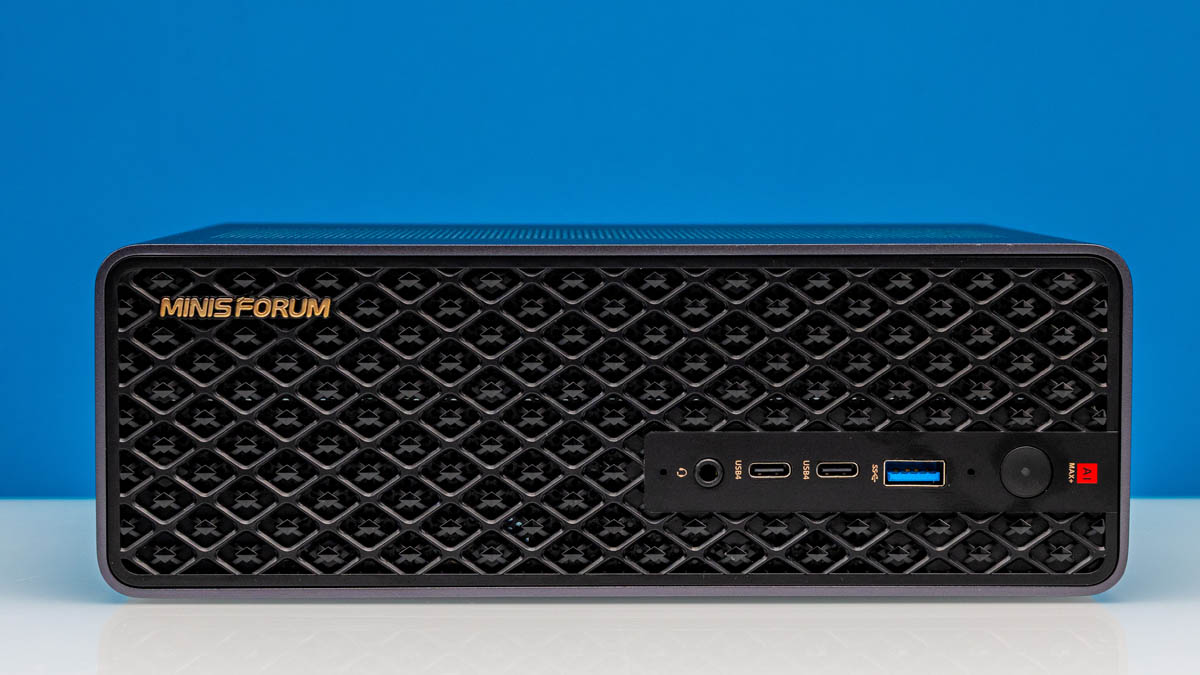
A name that needs no introduction in the mini-PC space, Minisforums recently released what is arguably one of its most interesting designs in ages: the MS-S1 Max, a mini-PC based around AMD’s Ryzen AI Max hardware. Designed to tap into the AI developer market that’s enabled by the system’s powerful integrated GPU and attached 128GB of high-bandwidth LPDDR5X memory, Minisforum has taken things one step further by putting together a high-end mini-PC that flanks AMD’s chip with tons of expandability and extra features. The end result is that the MS-S1 Max is a Ryzen mini-PC with few rivals, and a lot of headroom for its users.
| Minisforum MS-S1 Max Key Specs | |
| Processors | AMD Ryzen AI Max+ 395 (5.1GHz) |
| Operating System | Windows 11 Pro |
| Memory | 128GB LPDDR5X-8000, Soldered |
| Storage | 2TB SSD (2TB PCIe 4.0 M.2 2280, QLC) |
| GPU | Radeon 8060S Graphics (40 CUs) |
| PSU | 320W Internal PSU |
| Form Factor | Mini-PC |
| Dimensions | 222.1mm x 206.3 x 77.1 mm (8.74 x 8.12 x 3.04 in) |
| Weight | 2.8kg (6.2 lbs) |
| Wireless | Wi-Fi 7 (2×2) + Bluetooth 5.4 |
| Color | Black |
| Ports | Front: 1x USB-A 10Gbps, 2x USB-C 40Gbps, 1x Combo Audio Rear: 1x HDMI 2.1 FRL, 2x USB-A 480Mbps, 2x USB-A 10Gbps, 2x USB-C 80Gbps, 2x 10GbE LAN (RJ45, RTL8127) |
Minisforum has based this PC around AMD’s most powerful Ryzen AI Max chip, the Ryzen AI Max+ 395. A fully enabled “Strix Halo” chip, the 395 delivers every bit of performance that AMD’s Zen 5 CPU and RDNA 3.5 GPU architectures can provide in a single chip SoC. For AI developers in particular, the iGPU coupled with the 128GB of LPDDR5X memory attached on a larger-than-normal 256-bit memory bus makes for a very potent combination for local model development and inference.
While there are numerous Ryzen AI Max systems on the market today, few aim as high as Minisforum’s MS-S1 Max. Along with AMD’s chip, the system is equipped with dual 10GbE ports, USB4 v2 ports, and an internal half-height PCIe slot. As a result, the MS-S1 Max brings a lot to the table, not just with AMD’s SoC, but with everything Minisforum has added to it. Consequently, as we will go through in this review, the MS-S1 Max has become our favorite Ryzen AI Max mini-PC to date.
If you wanted to find the Minisforum MS-S1 Max online, here is an Amazon Affiliate link.
Minisforum MS-S1 Max External Hardware Overview
Starting things off at the front, the design of Minisforum’s MS-S1 Max marks a clean break for the company in terms of design. Owing in part to a larger cooling system to accommodate the relatively high-powered Ryzen AI Max SoC as well as Minisforum’s decision to integrate an internal PSU, the MS-S1 Max does not use any of the company’s existing case designs. As a result, there is quite a bit new here, while other parts have been rearranged in the new design. The overall aesthetic has taken on a grated look from the front, and on the whole, we feel that this is Minisforum’s best industrial design yet.
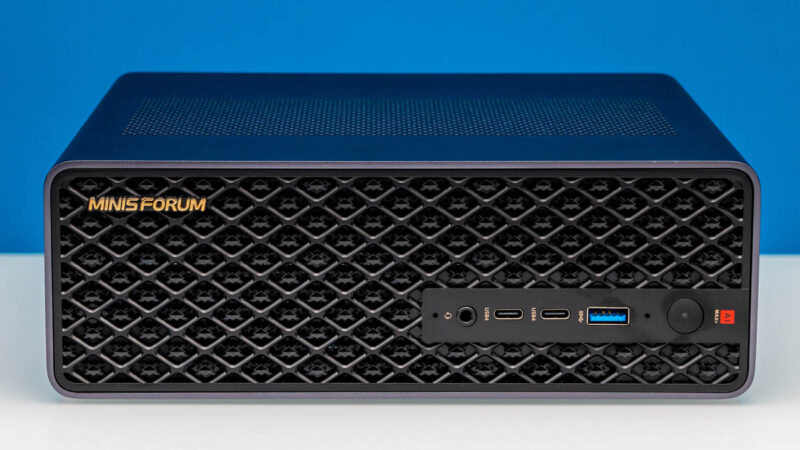
For their Ryzen AI Max box, Minisforum has opted for a mix of USB Type-A and Type-C ports on the front of the system, a notable distinction since some of their recent systems have still been entirely Type-A. Both front USB-C ports support USB4 40Gbps, providing ample I/O bandwidth for front-facing peripherals.
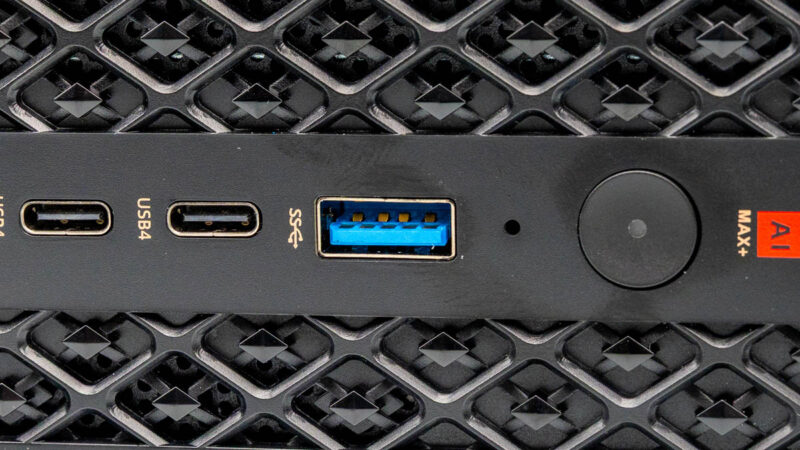
Otherwise, the front panel of the system rounds things out with the usual combo audio jack, microphone, and a power button.
Rotating the mini-PC a bit, we can immediately spot one of its other notable design elements: rubber feet on the side.
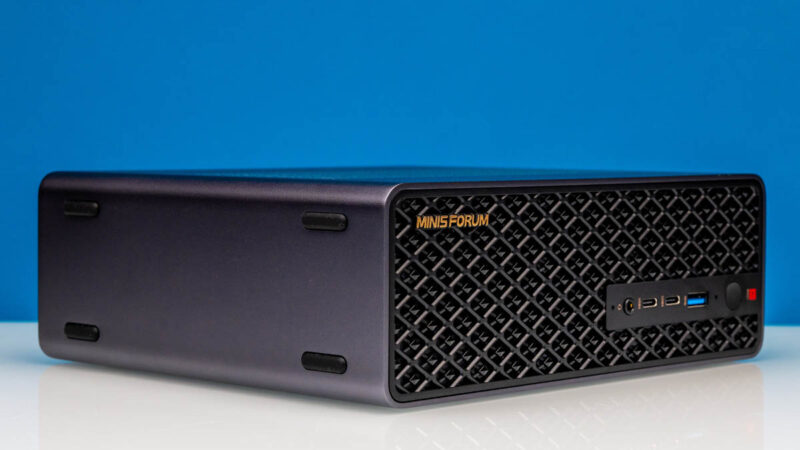
Not only can the MS-S1 Max be laid flat like typical mini-PCs, but this one is also designed to fully support being laid on its side, with rubber feet on both the bottom and the side to accommodate either.
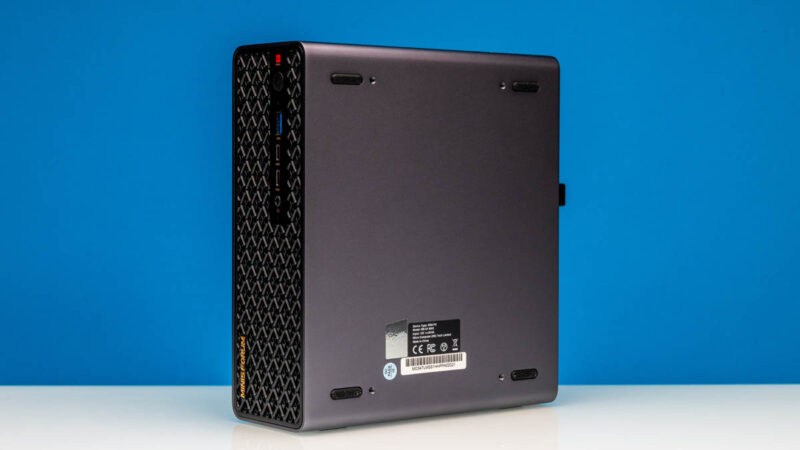
While we are looking at the bottom, we can see that it is completely sealed along the bottom. All of the air intake in this system is through the front as well as the top, where we can see an intake vent.
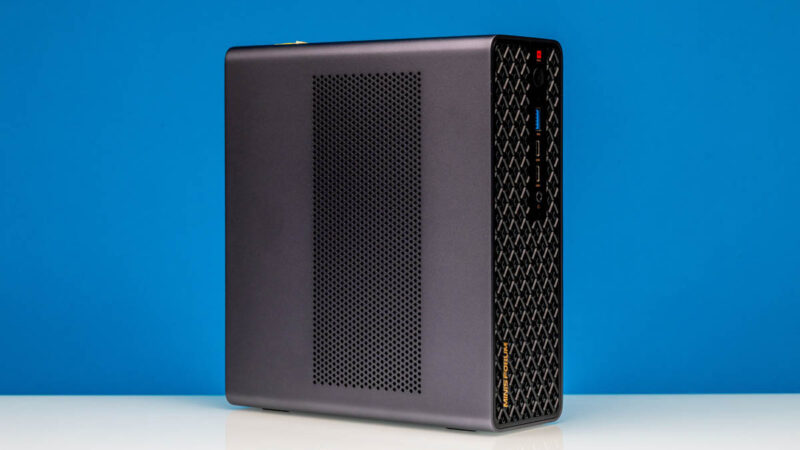
On a side note, while the MS-S1 Max is first and foremost designed to work as a desktop mini-PC, Minisforum has built in some additional flexibility here as well. Presumably, in a nod to customers using whole clusters of Ryzen AI Max systems, the MS-S1 Max can also be rack-mounted in a 2U configuration.
Flipping over to the rear of the mini-PC, we find the rest of the MS-S1 Max’s various ports and, really, a summary of just what this high-end mini-PC is all about.
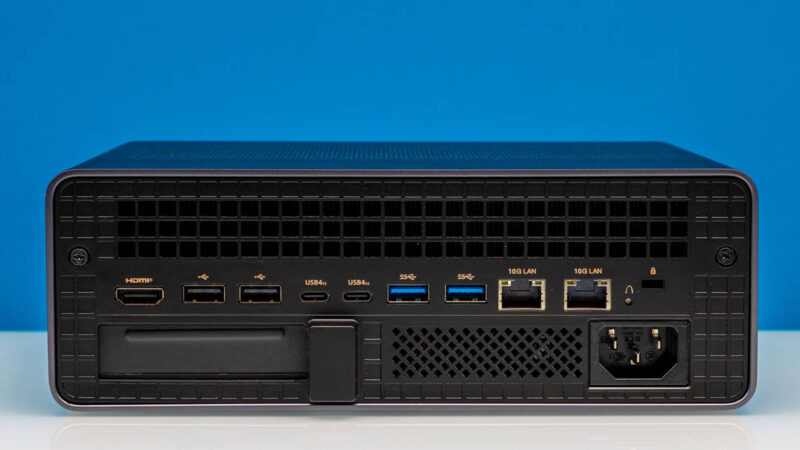
With 6 USB ports flanking the system, four USB-A and two USB-C, the MS-S1 Max is a rather I/O-heavy system. While the USB-A ports are relatively unremarkable, with a pair of USB 3.2 10Gbps ports and a pair of USB 2 480Mbps ports for basic peripherals, Minisforum is aiming high with the USB-C ports. Rather than just using 40Gbps ports, the company has installed a discrete USB4 V2 controller on the motherboard, allowing it to drive a pair of USB4 V2 80Gps ports. As a result, the MS-S1 Max should have no trouble working at full speed with even the newest and fastest USB devices, even years down the line.
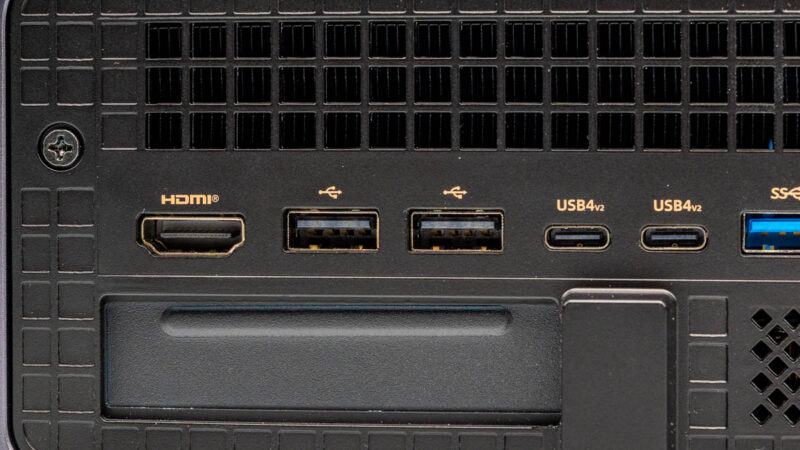
The USB-C ports also double as the DisplayPort outputs for this mini-PC. Minisforum did not include a dedicated DisplayPort of any kind, so instead, that task falls to DisplayPort Alt Mode on the USB-C ports. So there is quite a lot of hidden flexibility in the MS-S1 Max’s display output capabilities courtesy of USB-C.
As for those users who need a more classic connectivity option, there is a dedicated HDMI 2.1 port. According to Minisforum, it supports resolutions up to 8K@60Hz. Linux users, however, will want to keep in mind the current limitations of using HDMI 2.1 modes on AMD hardware under Linux.
We also briefly see the cutout for a low-profile PCIe slot here. We will go into that a bit more when looking at the internal hardware, but this is where the I/O backplate of any such installed card would be.
On the right side of the MS-S1 Max, we find another of the PC’s high-end features: a pair of 10Gbps RJ45 Ethernet ports. Minisforum has been no stranger to including high-performance networking options with its mini-PCs- the MS-01 even included SFP+ ports, so the Max continues that trend with 10GbE.
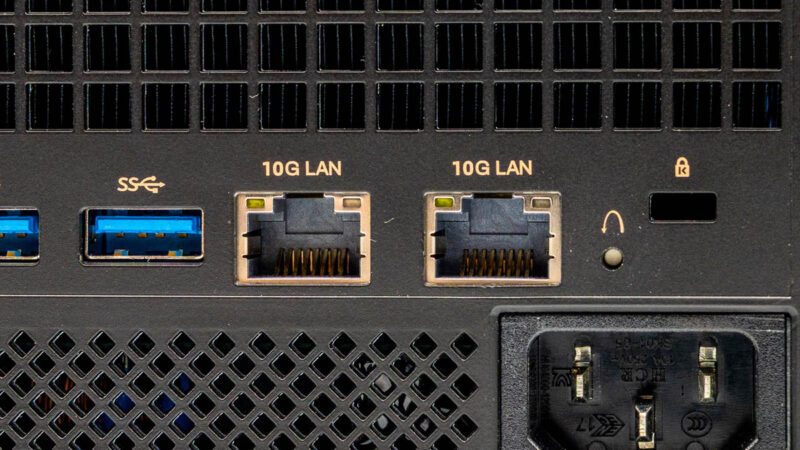
Like a rush of other recent devices shipping with 10Gbps Ethernet support, Minisforum is using Realtek’s recently released RTL8127 controllers here. So far, we have found to be reliable and relatively low power. The main potential downside is that the hardware is so new that, if you are installing the OS from scratch, you may need to locate Realtek’s drivers.
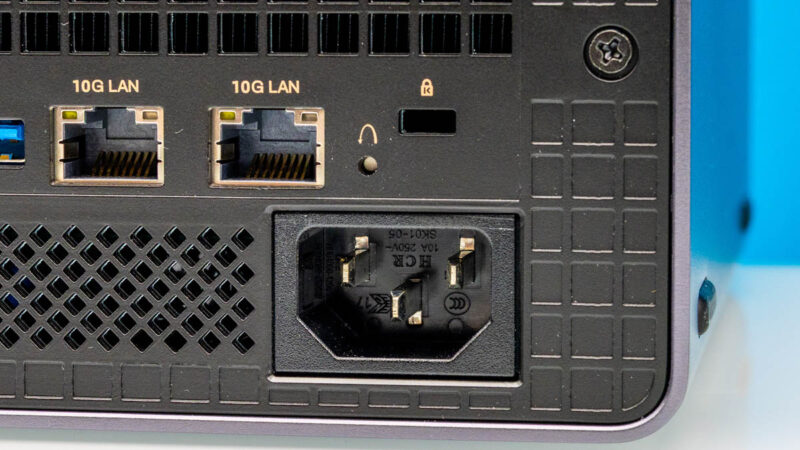
A quick look to the right of that finds the system’s CMOS reset button, thankfully embedded so that it cannot be accidentally triggered.
Finally, thanks to the switch to the use of an internal power supply with this system, Minisforum’s system ditches the barrel connector for a C14 AC power connector. Ironically, by moving the PSU inside the PC, Minisforum has needed to use a larger connector – but it is certainly nice to ditch the brick. The C14 in turn is an uncommon plug on mini-PCs, but with the MS-S1 Max utilizing a 320 Watt power supply, it is required by electrical code as the smaller C6 connector we normally see here is only rated for 300W (120V@2.5A).
Having completed our tour of the outside of the MS-S1 Max, let us dig into the internals.

Is there a block diagram of how all the things are connected? My understanding is of the PCI-E lanes on Strix Halo makes me think there are must be switch chips in this.
Any chance of testing the USB4 v2 ports since that is what sets this apart imho.
Thanks for the review!
Any hardware or software with “AI” is a “NO SALE” here.
I just don’t see the “value proposition of AI” … except to the shysters & hucksters that are promoting that snake oil hair tonic.
Why is they an HDMI instead of displayport? Are people using these in the living room? Just seems like an odd choice. USB to displayport mostly works, but can be glitchy in my experience.
The second M.2 storage slot is *not* PCIe gen4 x4. It’s an x1 slot. See https://store.minisforum.com/products/minisforum-ms-s1-max-mini-pc . I assume this is how they can cram all that other I/O in given Strix Halo has limited PCIe lanes available.
(Also, please support + signs in email addresses.)
According to the official product page for this, the second M.2 SSD slot isn’t gen4x4 but gen4x1. You might want to fix that in this review (or get Minisforum to fix their product page if they got that wrong).
Sigh. Once again, it would be great to see comparisons with other system types (Spark and Mac, primarily).
It’s actually getting pretty interesting now! The DGX Spark has 200gbps Ethernet, and the Ryzen has dual 80gbps USB4 (can it use them natively? Or do you need some TB5Ethernet? Do they have full bandwidth to the CPU?). Meanwhile the Mac Mini Pro has TB5, and the new RDMA-enabled drivers. Which is faster?? The answer isn’t obvious, nor likely the same for all cases.
Unfortunately, as with many of the other recent reviews, this just covers the surface issues.
Grrr, the comment system ate some of my text. “TB5Ethernet” should be read as “TB5 to Ethernet adapters”.
Thanks Manoj. I’m not sure how we missed that since it was in the notes, but that’s a definite error on our part. The article has been updated accordingly.
As for the plus signs, I hear you. That’s a site software thing; I’m afraid I don’t have an answer for you.
Sorry about that, George. As nice as it would be to have, the lab boys didn’t put together a block diagram for this PC. And with everyone out on assignment right now, we won’t have an opportunity to put one together this week.
Biggest deficit vs the nvidia spark would be having “only” 2x 10gb ethernet (which wouldn’t be too shabby except afaik it won’t do RDMA).
I’m playing with 3 of these in my homelab. Has anyone gotten a >10gb ethernet with ROCEv2 to work in one?
Which USB4v2 80Gbps chipset does it implement? Is Intel JHL9580 TB5 in compatibility mode? Cannot find any native USB4v2 chipset on the market.
Cant wait to see the breakage reports on Reddit because some butchgeek tried to shoehorn an oversized, megafanned GPU into that case at the same time loading up every M.2 slot, maximum accessories on the USB ports and run both 10GbE all out with Proxmox. After all one has to prove they can game, mine, route, firewall, VPN, NAS and who knows what else on a single box.
He who can overload the smallest PC with the most active programs and accessories wins and will be awarded the trophy with a golden broken PC on it.
@Otto says:
“Which USB4v2 80Gbps chipset does it implement? Is Intel JHL9580 TB5 in compatibility mode? Cannot find any native USB4v2 chipset on the market.”
Its built in the AMD Strix Halo. 4 PCIe Gen 4 lanes are reserved for each USBv2 port. They also support PD3.1 (up to 240W) per port but honestly with that 320W PSU, anyone trying to draw that much on that USB4v2 port will probably crash the system or get an auto shutdown.
@Chris Green
“I’m playing with 3 of these in my homelab. Has anyone gotten a >10gb ethernet with ROCEv2 to work in one?”
The Realtek RTL 8127 10GbE chipset does not support ROCEv2. It is a low end consumer grade ethernet chip. It will never work.
@spuwho: I know that. I meant via an add on card in the pci slot.
@spuwho Unfortunately that isn’t true, Strix Halo does not provide native USB4v2 support. If you had read the review, you would have noticed this excerpt: “Rather than just using 40Gbps ports, the company has installed a discrete USB4 V2 controller on the motherboard, allowing it to drive a pair of USB4 V2 80Gps ports”.
@sheldonross I totally agree, it is odd. Computers should have DisplayPort, then optionally HDMI. Not the other way around. As you said, most are not connecting this to a TV. I’d probably run it headless once Linux was installed.
Patrick, are your substack subscriptions affordable for us mere mortals yet? The content is always interesting but it’s very frustrating that the price is so high.
AMD Strix Halo have a total of 16 PCIe gen4 lines, no more.
– 4 are use for 1 nvme
– 2 are use for the 2 10Gbs
– 1 for Wifi
– 1 for the 2e nvme
– 4 for the PCIe 16x port
=> so at best this left 4 lines for the USB4v2 ie 2 lines per USB Port…
2 line PCIe gen4 is 32Gb/s you never will have 80Gb/s of data on the USB4v2 port, most of the bandweight is for Display, not data.
If we can have more than 20Gb/s of data it will be not that bad … but don’t dream for 80Gb/s
USB4v2/TB5 has 4x lanes shared, it does full speed (80Gb) I run a eGPU and it gets just under 6000MB/s on memory read/write (thus indirectly measuring the link speed). Oculink gets 6800MB/s and has no meaningful performance difference. I found the fps difference in link saturating games be smaller than that read/write would suggest while tb4 is at least 30% lower.
With latest bios I have to say at least on windows TB4/5 is amazingly stable and works. Plugging tb4 or 5 or directly hdmi on machine all just works arbitrarily on intel TB5 chip on the dock. I think this was not the case earlier. Linux I have not tested since bios update.
Overall considering minisforum absolutely maxed out the options on this I think it was worth the extra price which was about 300-500e over the generic sixunited motherboard machines last year. Now the price has gone up a lot.
Power consumption on idle without desktop goes down to 5-6W, windows as mentioned is closer to 10W (with desktop obviously). Gaming runs about 150-160W on power meter. Synthetic goes up to 220W or so and drops to about 200W which i think it will sustain. Gaming with eGPU drops it down to 50W or so, this would suggest the iGPU can draw serious power.
https://live.staticflickr.com/65535/54768547167_bfa91a993d_b.jpg
Is a diagram of the Strix Halo PCIe lane chart.
My AMD USB4 controller says (Ryzen 9 6900HX)
[AMD] Rembrandt USB4/Thunderbolt NHI Controller
There are no other USB4v2/TB5 chipssets beyond Intel, Asmedia and Via says they wont be going to fab with their discrete controllers until late 2026/early 2027 . So it must be an internal AMD configuration. NHI is what Intel uses to perform TB device control. (Native Host Integration)