

Minisforum MS-A2 Performance
The CPU in our system is the AMD Ryzen 9 9955HX 16-core/ 32-thread Zen 5 processor, but there is also a Zen 4 16-core/ 32-thread AMD Ryzen 7 7945HX option.
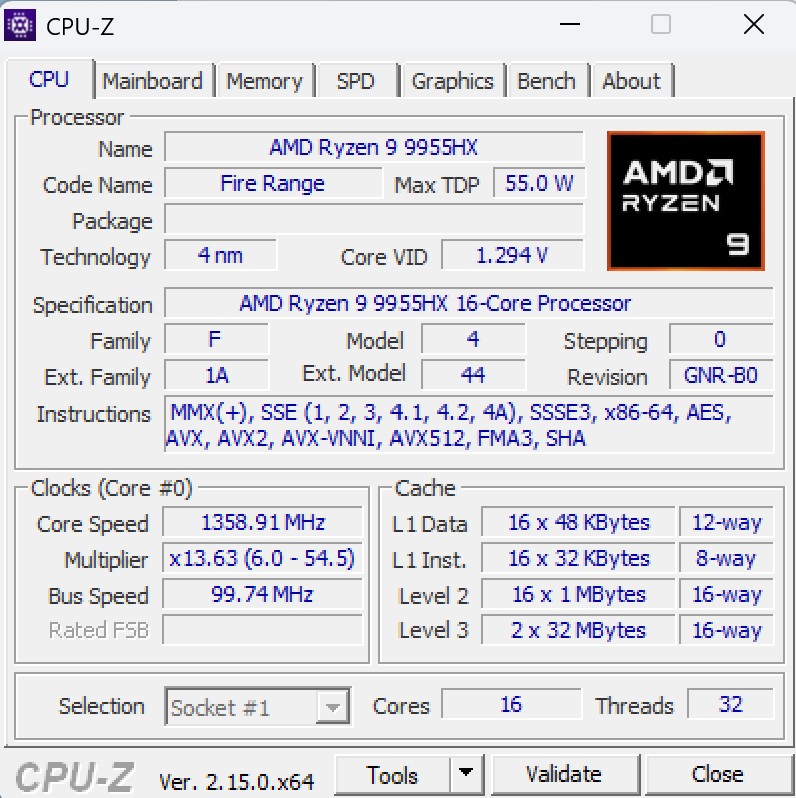
For this, we thought it might be more interesting to use Geekbench so folks can compare to their own setups.
Minisforum MS-A2 to MS-01 Performance
In terms of CPU performance, here is the Minisforum MS-A2 to the MS-01 in terms of Geekbench 6.
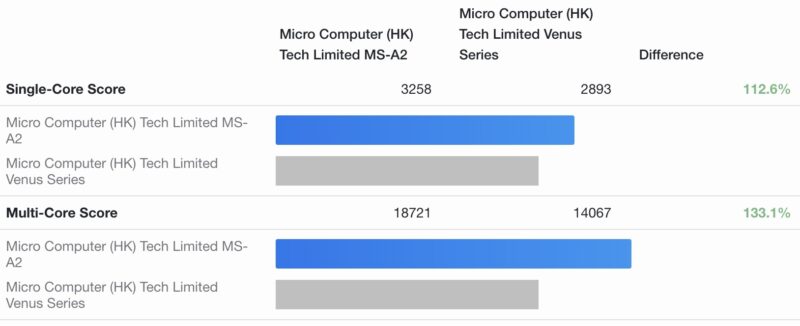
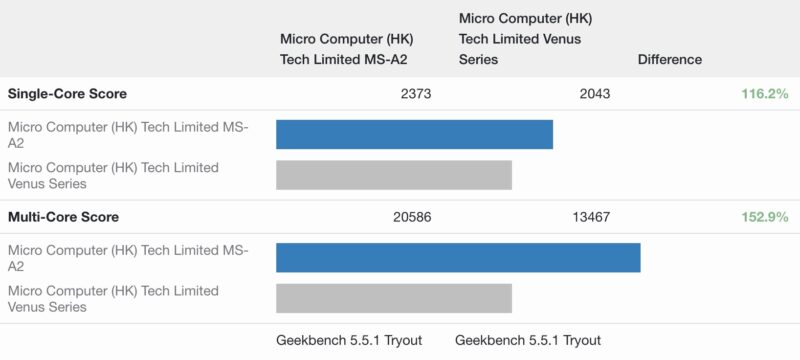
Geekbench 6 is not great on higher-end multi-core CPUs so Geekbench 5 tends to show differences better:
On the GPU side:
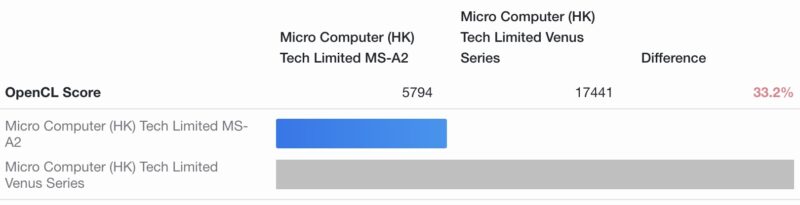
From a CPU perspective, you get a lot more with the MS-A2’s AMD CPU. On the GPU side, however, the MS-01 is actually a bit better.
Other Interesting Comparisons to Systems on STH
Just for some other interesting comparisons, let us start with the CPU and GPU performance of the MS-A1 to MS-A2:
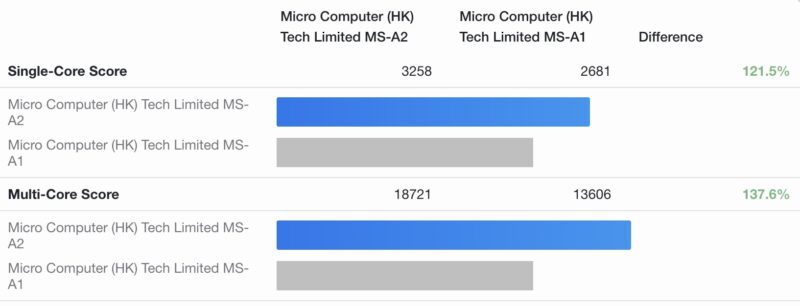
Here are the GPU results:
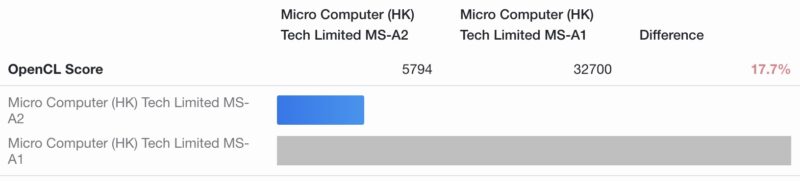
Here again, the 16-core CPU shines compared to the MS-A1. On the other hand, the AMD Ryzen 7 8700G in the MS-A1 is a much faster GPU. As an aside, we are not sure how the Geekbench browser gets the difference figures, but our math skills may be off today.
Looking at the AMD EPYC 4004 series 12-core AMD EPYC 4464P that we recently featured in the $899 Gigabyte R113-C10 barebones deal here is the CPU performance:
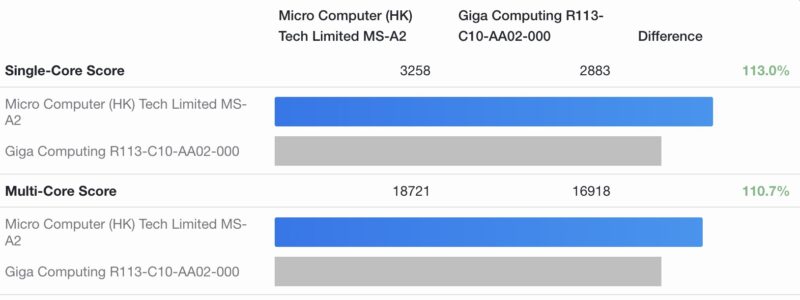
The 16-core Ryzen is faster with its Zen 5 cores, but realistically, it is in a similar ballpark of performance to the 12-core 65W TDP Zen 4 EPYC. We did not have the Zen 4 MS-A2, nor the 65W TDP 12 core or 16 core EPYC 4005 Zen 5 parts, but it feels like they would be similar. If you really want a rackmount server, then that Gigabyte server is in a similar price bracket, but it has a better rack form factor, ECC support, and out-of-band management. The MS-A2 clearly wins on onboard networking though.
One final comparison we thought was interesting is versus the Acemagic F3A an AMD Ryzen AI 9 HX 370.
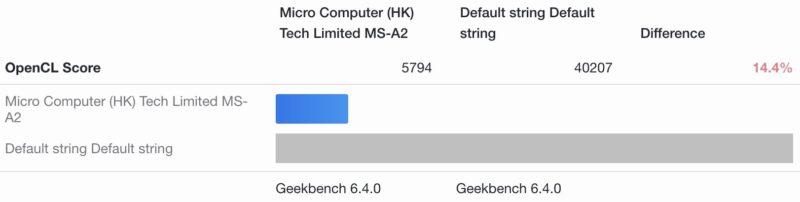
From a GPU perspective, the Ryzen AI parts can be much better. If you are playing games or want to do AI work, then the bigger GPU is great. Also, the Ryzen AI parts have decent NPUs which may be useful.
Something that is also important here versus some of the server-only Intel Xeon E-2400 and Xeon 6300 series alternatives in low-end servers, as well as the EPYC 4000 series and other mini PCs is that this has a lower-end GPU in the AMD Radeon 610M. This GPU provides basic desktop functionality and has some media encode/ decode capabilities, but it is nowhere near what we would find in the Radeon 890M in a system like the Acemagic F3A an AMD Ryzen AI 9 HX 370 Mini PC.
Next, let us get to the power consumption and noise.


An important note for anyone considering a 3-node HCI cluster, this lacks the MS-01’s dual thunderbolt ports which could be used for near-40gbps thunderbolt networking in ring topology. The half-height PCI-e slot could be used for 25gbe NIC or better, just make sure it’s kept cool enough.
It’s ugly, but setting a USB fan on top of the MS-01 works fine for relatively high powered NICs, like a ConnectX-5 (~25W). I’d assume that the -A2 will also work fine that way.
I tried running a ConnectX-5 100gbe nic in a shuttle sff for portable trex boxes (ixia/sprient-lite), and they’d overheat within minutes to shut down the box.
I’d be curious how these hold up under load, complaints on amazon were for heat and failures within a year for the , or I’d have tried one already, looking at these a few weeks ago to replace my failed lab precision 7900 desktop I used for 10 years with dual xeons.
Hey Patrick – have a link to the Oculink adapter?
The negative reviews on Minisforum on Reddit are growing just as fast as their sales. Mostly around QA issues and warranty returns.
As for this model, MF responded to all the tech heads trying to shove GPU’s and high heat accessories in the first model with higher rated PSU. But it’s never enough I see as people here and on Reddit are trying to shoehorn yet higher power, higher heat accessories into what is really a low power workstation.
Ignore the oculink at your risk.
The performance comparison is missing the CPU configuration of the MS-01. Does is have the i9-12900H, or is it the i5 version?
@Hurhur i9-13900H https://www.servethehome.com/minisforum-ms-01-review-the-10gbe-with-pcie-slot-mini-pc-intel/
I’m using a MS-01 with a ConnectX-5 and VyOS as my home router (10G fiber). It’s been up for 139 days so far. The CX5 is running around 55C, far below their shutoff temp of 115C. I added an extra fan just sitting on top of the MS-01 blowing air into the NIC through the existing holes in the case. I’ve done this a few different ways with different MS-01s, with either a relatively large AC fan underneath the box or a smaller USB fan on top. It doesn’t really take a lot of air movement to keep the CX5 cool, but it has to have *some*. This isn’t a unique problem with the MS-01 — my desktop has a CX6 that kept shutting down from overheating until I added an extra fan just for the NIC. Mellanox cards need active cooling or they overheat. That’s fine in servers with a wall of fans, but they’ll usually need help in other environments.
Here’s the start of a writeup on using an MS-01 as a router: https://scottstuff.net/posts/2025/01/12/vyos-on-a-minisforum-ms-01-part-1/. With a CX5 (which draws more power at idle than the rest of the MS-01!), it draws around 34W at idle and didn’t have any real trouble handling 36 Gbps of IMIX traffic or 12 Mpps of 64-byte UDP packets. With 1500-byte packets, it managed to outperform my load generator (!), pushing 90 Gbps without trouble and still having some room for more traffic.
I have an MS-A2 w/ 7945HX in FedEx’s hands right now, and I’m planning on doing a bunch of performance testing with it before I decide what I’m doing with it. It’ll probably end up replacing my router.
FWIW, I’m also using a pair of MS-01s (without an extra NIC) as web servers at home, so that link goes through 2 or 3 MS-01s between here and there. They’be been up 60 days since the last reboot each.
Also — I’m not sure what Patrick’s MS-01 test system was doing to see 25-29W, but I see 13-14W with both the i5-12600H and i9-13900H models with Ubuntu 24.04 and a pair of SFPs. I don’t have a 12900H, but I doubt it’d be more than an extra 1-2W in an identical setup.
Not really *trying* to spam with blog links, but here’s data and context: https://scottstuff.net/posts/2025/01/08/minisforum-ms01-power/
So, yeah — there are a lot of gripes from people on Reddit about Minisforum support, overheating, and lifecycle problems, but they’re far from universal, and my 4 MS-01s have performed really well over the past ~year, even with a hot NIC in some of them. My biggest problem with them has been weird performance as they approach 100% load, probably due to the mix of P and E cores and Linux’s scheduler. Other than that, they’ve been nearly perfect. I can’t wait to see how the MS-A2 compares.
Now if they’d just make a 1U version…
(ugh, sorry — that last comment was a follow on to 2 other comments that are in the moderation queue, it’ll make sense eventually)
Fair warning as an owner of multiple ms-01s that have failed – the company will offer to replace faulty units, have you ship them back to their warehouse on your own dime, and then hold the replacement hostage until you pay them more money. Their warranty/return policy is fiction.
Patrick, on page 3, instead of “out-of-band memory”, maybe you meant out of band mamagement?
And speaking about it, does it has inside reset and power pins fot connecting to pikvm’s ATX power?
Just wanted to add to what other people have said here regarding the return process at Minisforum. We had a UM790 Pro which needed returned under warranty and the process was hellish.
They initially weren’t going to charge a depreciation fee for a warranty repair but a few weeks after we sent it to them suddenly we needed to pay it. Then after we paid it still took weeks to get the replacement.
It’s a shame since they are making interesting devices but if something goes wrong you could easily be left high and dry. If possible I would definitely buy through someone like Amazon instead of Minisforum direct.
Thanks for the info Scott, good to know. When I was testing the Connectx-5 in my shuttle xh110g sff, I too just left the top off and used a portable fan as well for testing, but really didn’t want to consider bringing that to a customer site if ever needed. Otherwise my x710 10 or 40G nics worked fine otherwise with the case on it for loop testing with trex.
I really wanted to buy the MS-A2 as the 10g ports had me salivating, but seems just too much to cram into that system, and I really worry about reliability. Reviews of the A1 were not encouraging, and there was already reports of overheating from another review prior to the STH one.
I’m actually looking at the Lenovo ThinkCentre M75q Gen 5 as being more widely manufactured and having parts available for them. They’re only available up to an 8700GE proc, but I’m really curious if I could replace the cpu with a 9700X, another 65W TDP proc, and expect it to work with the AM5 slot and bios, or maybe even bigger TDP since using a standard Lenovo power slot (I think), and I’ve got a 240W brick for my personal laptop with a 3080RTX in it.
Ahem, hint hint STH team if you still have your M75q collecting dust, pretty please…
It’s got 2x M2’s for redundant drives (check), and I think there’s enough space I could use a 2230 extender to mount another m.2 2280 AQC 10g nic in there to use the module port out.
I’m not a big fan of Lenovo, but my T15G G2 has been pretty good to me, and I need a smaller, more portable, less heat than my old home server that was dual xeon beast precision desktop.
Please keep us updated on your use of the MS-A2 STH!
The power consumption is not clear if it is CPU GPU or simultaneous?
In these reviews is power consumption measured at the wall or before power supply?
If i just want to use WIFI, Is there a way to disable the power guzzling NIC, in BIOS so it will be off? Sounds like it is very inefficient
WARNING:
I strongly recommend not buying anything from Minisforum. Yes, they’re great machines at great prices, and a lot of people have had no problems with them. But they do NOT honour their warranty obligations. First, they spend a couple weeks giving worthless replies to your emails (taking 2 to 4 days to reply each time). Then they charge you a depreciation fee on a product that’s still under warranty. Then they have you ship the unit to a depot at your cost. Then they take a long time to acknowledge receipt. Then they say they’ll ship a replacement in “a few days”. But they do not. They will reply to your follow-up emails with ridiculous excuses and say “hopefully you can wait a few more days” — every time from then on, until you give up and accept the loss, or they decide to stop replying. Look up “Minisforum customer service issue” and see for yourself.
In my case I had a UM790 Pro that died in February after one year (into a 2-year warranty). I returned it in February and have been trying ever since to get them to ship the replacement they charged me for and promised to ship. I’ve had my RAM and SSD sitting here waiting to reinstall in a replacement unit, but now it’s looking like I’ll need to buy something else that’s compatible with this specific RAM and completely redo the OS and other setup from scratch. I’ll try to get them to give me some kind of refund but I’m sure they’re going to give me more ridiculous excuses, delay, and an unfair refund amount. I’ve never been more frustrated with a group of people who claim to be a company.
Interesting comments. I bought an MS-01 last year, with no issue so far – touch wood – other than the long shipping times.
Im considering an MS-02, to avoid virtualisation issues with the P and E cores. Annoyingly, whilst the 32GB/1TB model is available “now”, a barebones system will not ship until mid-July.
All I can recommend in respect to warranty issues, for those in the UK, is to purchase using a credit card, which provides Section 75 protection as Visa is jointly liable.
I know that this comment will be filtered… but. guys. its a tech article. no picture without the case cover? are you that cold? really?
You mention in the video that the 3 NVME slots are at different speeds. Do you know which slot is which speed? On the motherboard all I see is NVME_1, NVME_2 and NVME_3, but no speed specifications.
Does anybody have a suggestion on working sfp+ rj45 10g module that wold work in the MS-A2 sfp slots?
So I dropped the wallet hammer and bought a barebones MS-A2, for Proxmox / Eve-ng usage and be away with the p and e core issues.
Has anyone any recommendations on SODIMM pairs for 96GB or 128GB, based on experience? Or SODIMMS to avoid?
@Alan
Crucial CT2K64G56C46S5 should work fine according to William Lam at least.
I was interested in this but ultimately need an ECC box.
Can anyone, either here in the comments or at STH point me to a similar form factor ECC-capable unit? I really like the connectivity of both this MS-A2 and the MS-O1, the MS-A1 lacks all that so it’s out (along with the returns situation the other posters described).