

Corsair EX400U 4TB USB4 Portable SSD Performance
For this, we wanted to run through our standard benchmarks. We plugged this into our Framework Desktop because it had USB4, and it had the fastest memory we had access to in a system at the time.
CrystalDiskMark Benchmark
CrystalDiskMark is used as a basic starting point for benchmarks as it is something commonly run by end-users as a sanity check. We use both 1GB and 8GB test sizes.
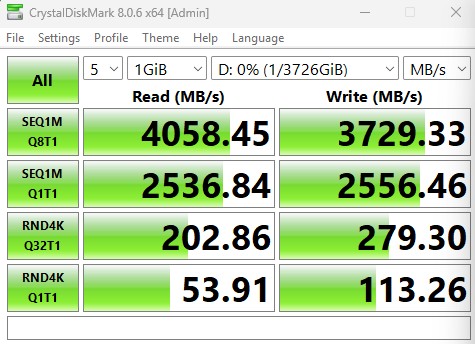
Here is the 1GB test size.
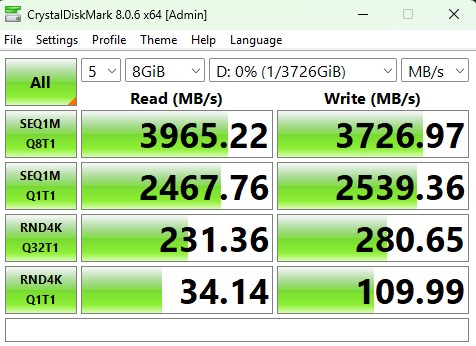
Here is the 8GB result:
Here is the side-by-side:
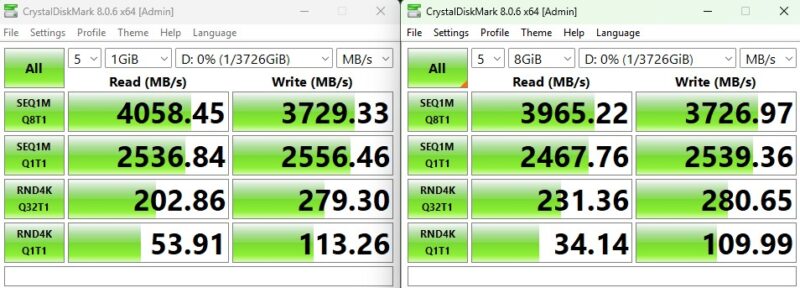
Those two results are very close, except the 1TB’s RND4K Q1T1 results are much higher on the 1GB test. The drive also offers performance in-line with the rated specs.
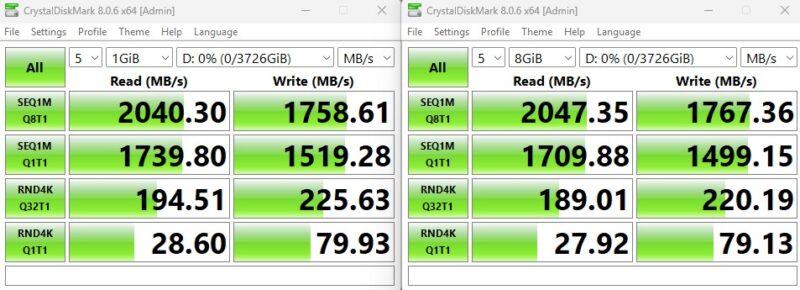
Just for some comparison, above is the Crucial X10 Pro 4TB USB Type-C SSD we reviewed. You can see the massive jump in sequential performance, but the 4K random gains are much more muted.
ATTO Disk Benchmark
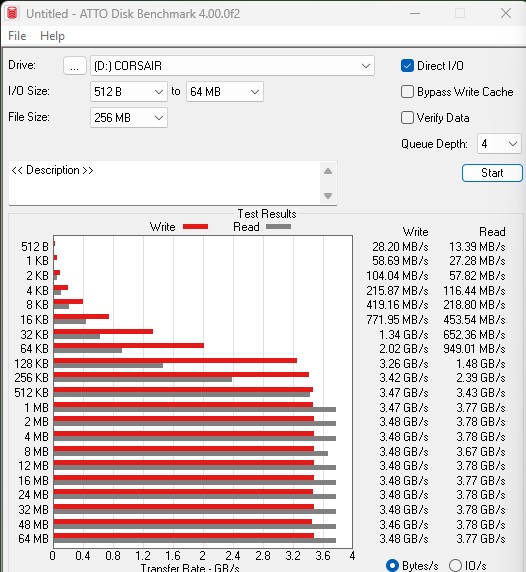
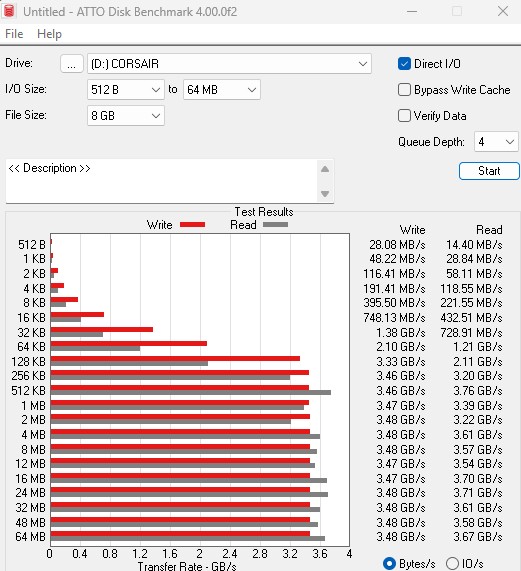
The ATTO Disk Benchmark has been a staple of drive sequential performance testing for years. ATTO was tested at both 256MB and 8GB file sizes.
Here is the 8GB:
Here is the side-by-side:
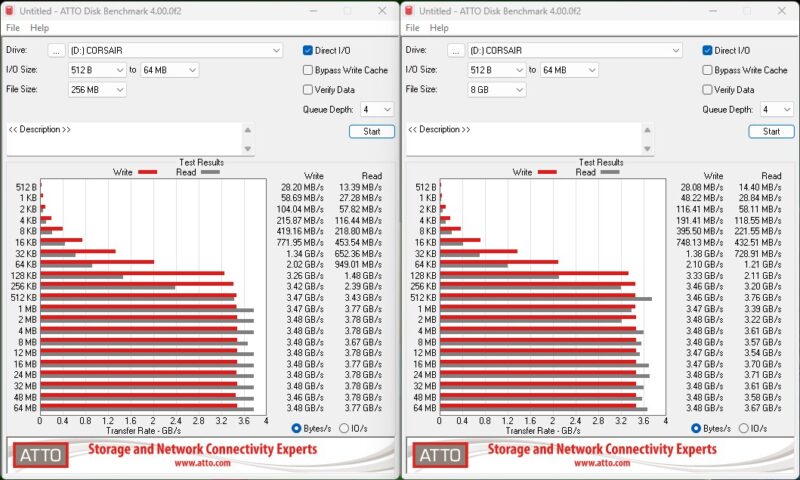
We got a bit lower than the rated 4GB/s and 3.6GB/s read/write speeds, but we are only a single-digit percentage off, so this feels about right. Still, this is a USB drive, so that is awesome performance.
Anvil’s Storage Utilities
Anvil’s Storage Utilities is a comprehensive benchmark that gives us a very in-depth look at the performance of the drives tested. This benchmark was run with both a 1GB and 8GB test size.
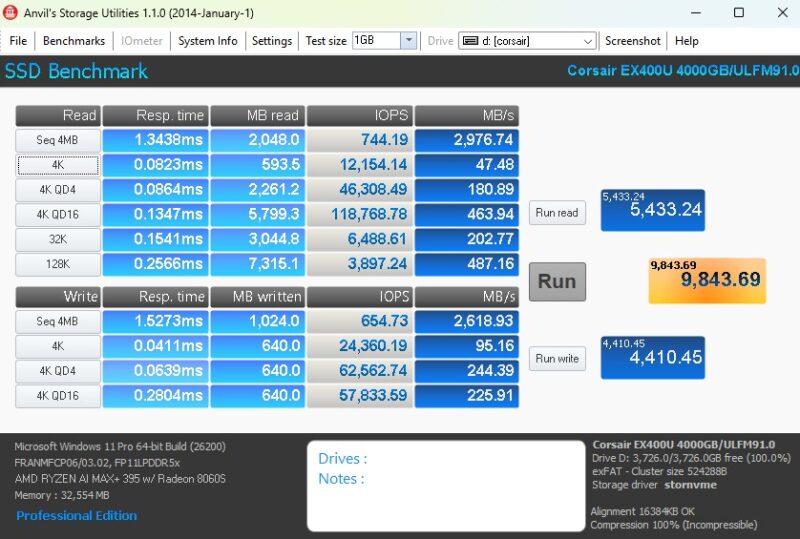
Here is the 8GB:
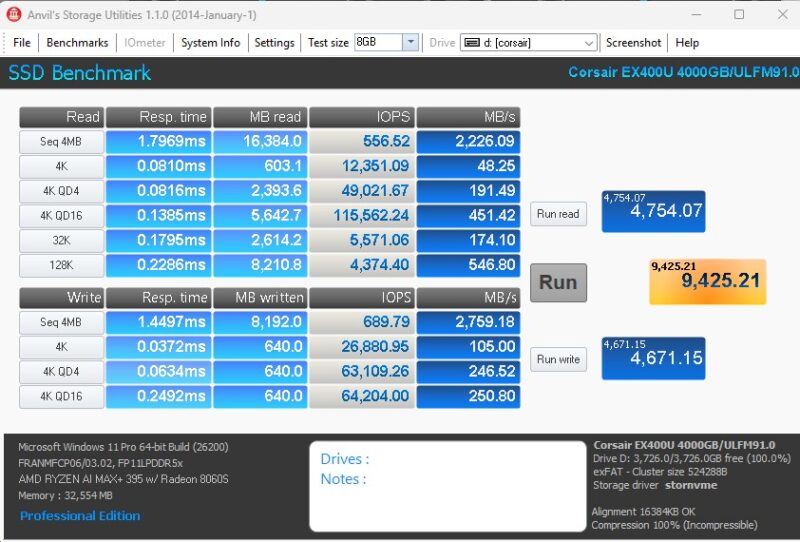
Anvil tends to show lower maximum sequential performance, but we got decent results here.
AS SSD Benchmark
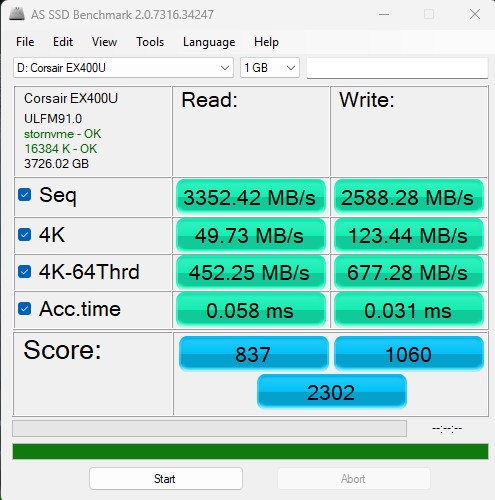
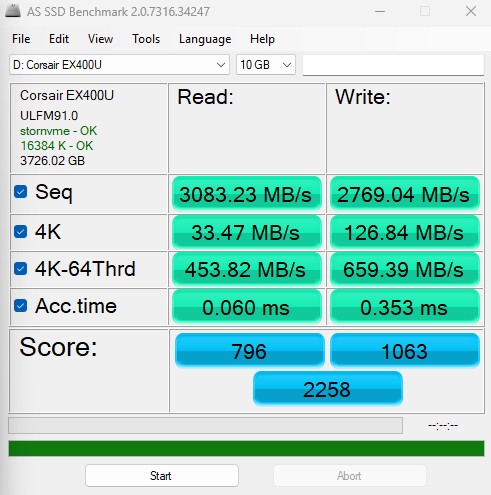
AS SSD Benchmark is another good benchmark for testing SSDs. We run all three tests for our series. Like other utilities, it was run with both the default 1GB as well as a larger 10GB test set.
Here is the 10GB result:
Here is the side-by-side:
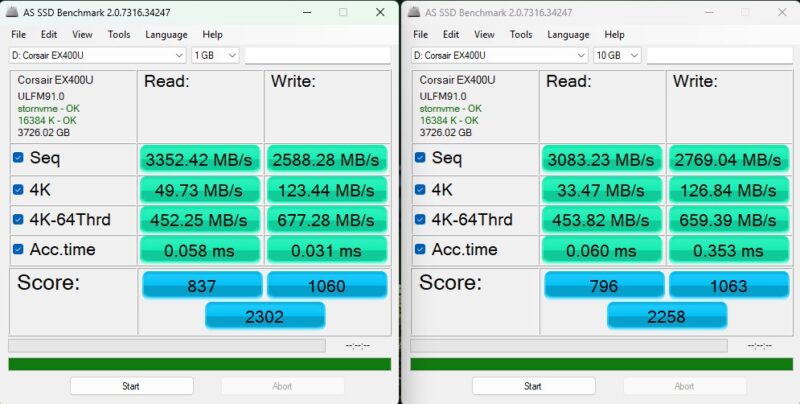
AS SSD had lower results than CDM and ATTO, but still solid numbers.
BlackMagic Disk Speed Test
BlackMagic Disk Speed Test is focused on testing storage for use in video workflows.
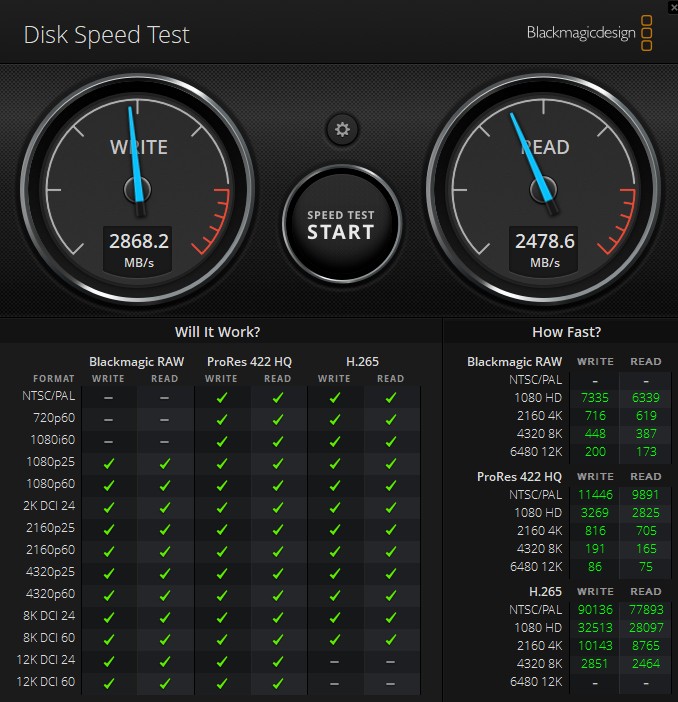
For video work, this is great. That 12K DCI 60fps footage will fill up this drive very quickly. Still, this is an all green check result, which is great.
A Quick Note on Firmware
One item that is important with these is that there was an earlier version of the firmware that had issues with MacOS. Corsair has a utility to update those older drives, but it is PC only. That is certainly not ideal.
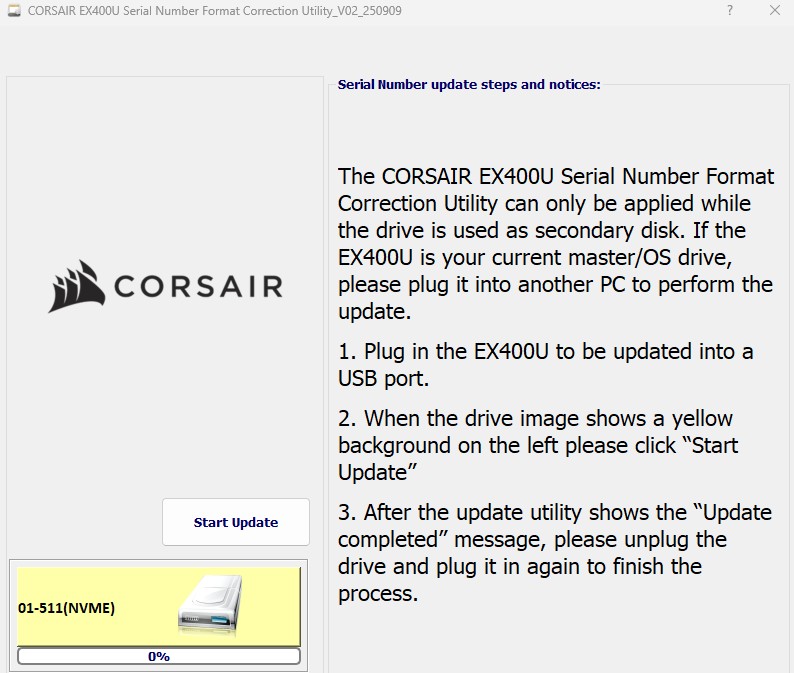
Our drive came with the latest firmware and we tried it on the Apple Mac Studio M3 Ultra, Mac Mini M4, and a MacBook Pro M4 Max and the drive worked without issue. Still, this was a challenge on older drives.
Final Words
We have been on a mission to find storage that we use carting footage around to STH’s video editors, especially when we do tour projects. We have two tours filmed that are not live yet as examples, but we are getting so much footage these days that 1-2TB even after we transcode footage is normal. That means we need larger and faster drives as sometimes it can be faster to just pass drives in-person or FedEx them. This Corsair EX400U seems to be a good option.
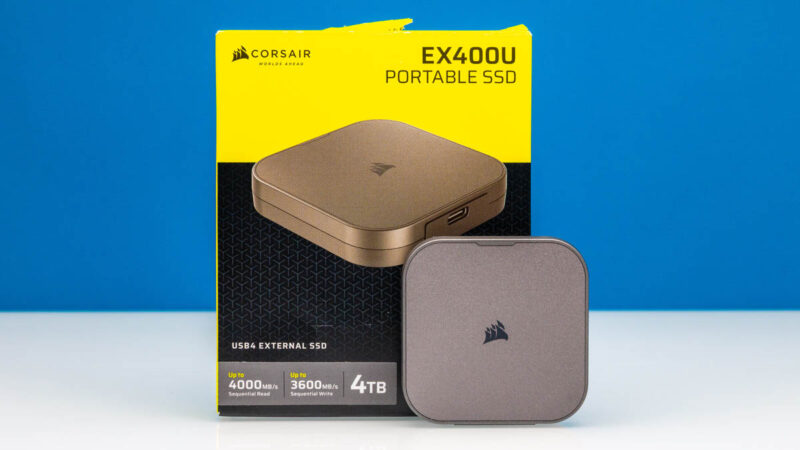
The addition of the magnetic MagSafe-compatible mount on the bottom might add another dimension to the drive if you are shooting video often on a phone like an iPhone 17 Pro Max or iPhone 16 Pro Max and are using the ProRes recording option. Corsair’s price per TB of storage is much lower than Apple’s. That is also why it was a bit strange that the early firmware that came on these drives had issues working with Macs.
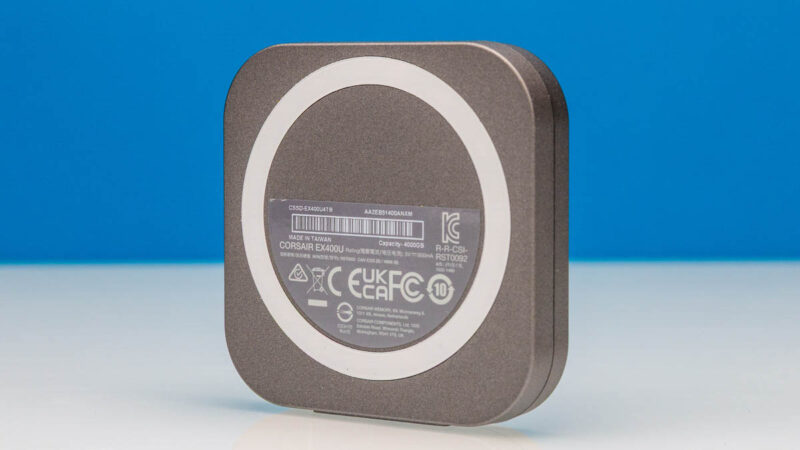
Still, this performed well as a USB4 drive and is small enough to easily carry around, so this seems like one we will purchase more of for our studio’s use.
Where to Buy
If you want to check current pricing or purchase this SSD, here is an Amazon Affiliate link.



Nice! Thank you.
Did you ever open-it-up?
>we are promised read speeds at up to 4GB/s and write at 3.6TB/s
typo, should be GB/s for write
I’m also impressed by the performance claims with USB4, especially the read/write speeds that rival early NVMe SSDs. It’s great that the review combines both hardware design insights and real-world use cases, like shooting 4K ProRes video. Definitely makes me consider this drive if I’m looking for a fast, portable solution for high-capacity storage.