

ASUS ZenScreen MB169CK Monitor Performance
For our monitor testing, we use a Datacolor SpyderPro (Amazon Affiliate) to measure the monitors’ color performance. This is not the fanciest test equipment by any means, but we just wanted to get some general sense of performance. ASUS rates the MB169CK at 250 cd/m2 typical brightness and 800:1 typical contrast. Below is the measured color gamut.
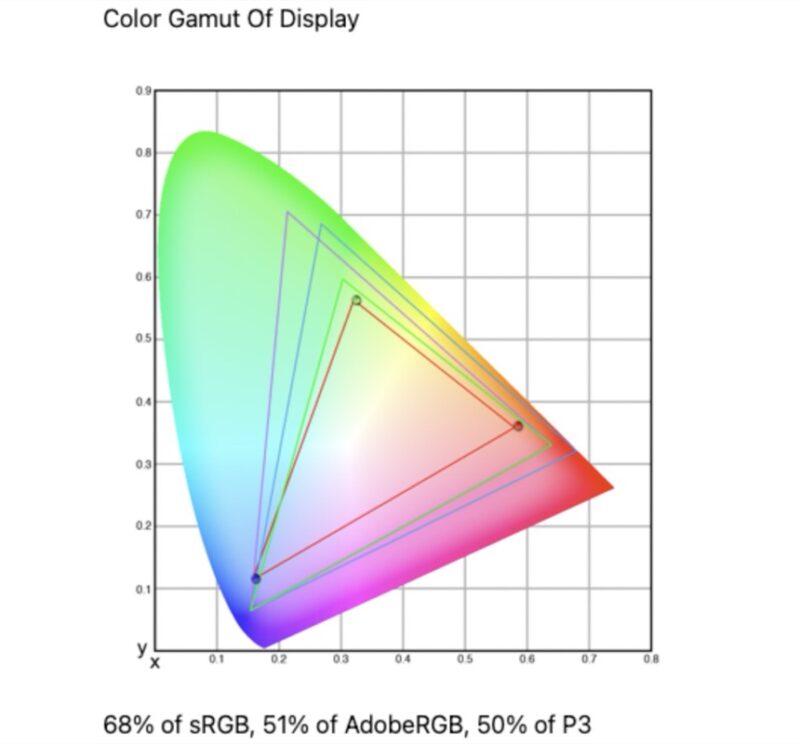
We measured 68% of sRGB, 51% of AdobeRGB, and 50% of P3. That is a little better than the MB16ACE result, but still far below the better panels we have seen in newer QHD and high-refresh portable monitors.
Below is the color accuracy result from the same Datacolor run.
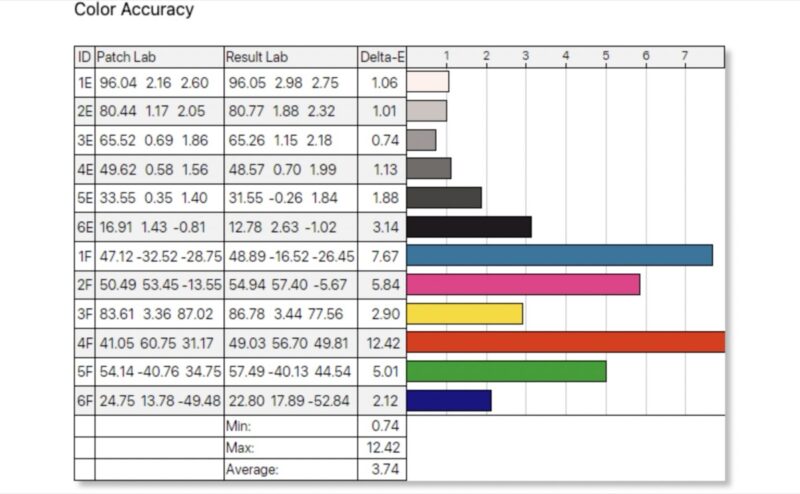
Color accuracy was also on the budget side of the range. We measured a minimum Delta-E of 0.74, a maximum of 12.42, and an average of 3.74. That average is usable for general productivity, but it is not where we would want a monitor to be for color-sensitive work.
Power Consumption, Brightness, and Contrast
We have found that the monitors often do not scale power and brightness to match the settings. That is important because, as a portable monitor, it may be run off of a battery, making power and brightness an important trade-off. Here is what we captured for monitor power on the Type-C power input at different brightness levels.
- 0% (15.6 nits) is 2.9W
- 25% (47.4 nits) is 3.5W
- 50% (79.1 nits) is 4.0W
- 75% (109.5 nits) is 4.6W
- 100% (140.2 nits) is 5.3W
In case you were wondering about what we saw for the brightness and contrast:
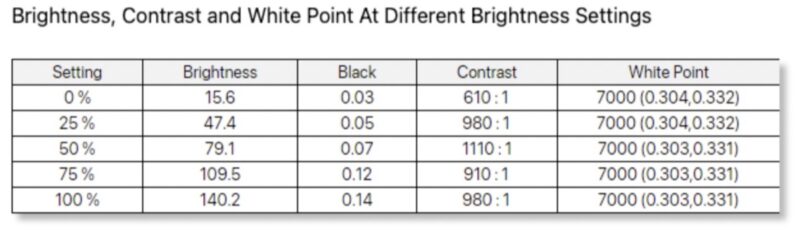
Maximum brightness measured only 140.2 nits, far below the 250 cd/m2 typical brightness ASUS lists. Contrast ranged from 610:1 at minimum brightness to a peak of 1110:1 at the 50% setting, then settled at 980:1 at maximum brightness. White point was consistent at 7000K across the brightness range.
Here is the measured tone response.
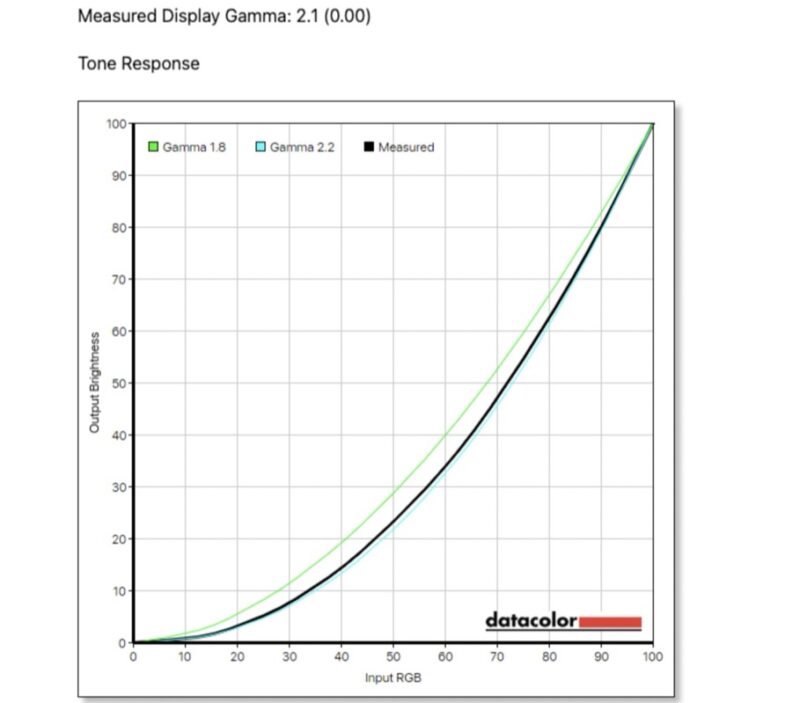
Gamma measured 2.1 with 0.00 variance. That is fine for general office use, but the low maximum brightness is the bigger practical issue if this monitor is used in a bright room.
Final Words
ASUS’s ZenScreen MB169CK has a better physical feature set than the MB16ACE. Dual USB-C inputs, mini HDMI, a detachable stand, a tripod socket, a sleeve, and bundled HDMI cabling make it easier to use with more systems. Panel performance is the trade-off. Measured brightness topped out at 140.2 nits, which is well below ASUS’s official 250 cd/m2 typical figure. Color gamut and color accuracy are also modest, so the MB169CK is best viewed as a productivity display, not a creator monitor.
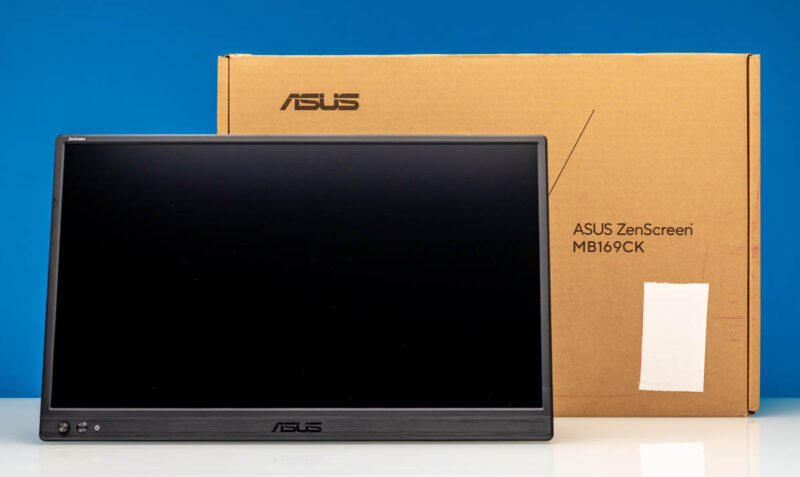
For buyers who want a portable second screen for email, terminals, dashboards, documentation, and browser windows, the MB169CK’s port selection is useful. If panel quality is the priority, especially brightness or color coverage, some of the more expensive portable monitors we have reviewed are a better direction.
Where to Buy
Here is the Amazon affiliate link to where we purchased this unit.



I may have missed it but how did portable monitors become a thing that STH now reviews so regularly?
Also interested in why you havent come across Espresso Displays yet, I have one and really really like it.
Adam – Not really sure. We started with a quick look, now it tends to be some extra weekend content. Perhaps a part of this is just running more big projects has become challenging due to memory pricing. It now costs us like $48K to get a 2P 2DPC server filled with 64GB DIMMs so we cannot support that.