Tag Archive | "Raid 1"

How to Setup a RAID 1 Array on Intel ICH Chipsets Using Matrix Storage Manager

How to Setup a RAID 1 Array on Intel ICH Chipsets Using Matrix Storage Manager

With Windows Home Server 2011 and Windows Small Business Server 2011 Essentials both having recent release candidates indicating an imminent release, I thought it would be wise to take a minute to show how to setup a RAID 1 array using the Intel ICH which is found on most modern LGA 1155, LGA 1156 and LGA 1366 Intel motherboards. With very widespread support, the Intel RAID 1 provides at least a decent solution for Windows Home Server 2011 users that would like redundancy under the new operating system. Using RAID 1 arrays, users can setup redundant mirrors of disks so that if one fails, the other disk can be used (oftentimes called mirroring.) Be forewarned, this is a very simple guide, and there are a lot of other options out there in the world of RAID, but this is the easiest way to setup a RAID 1 array for a lot of users. Read the full story

Posted in RAID Controllers/ HBAsComments (4)

IBM ServeRAID BR10i is a LSI SAS3082E-R

IBM ServeRAID BR10i LSI SAS3082E-R PCI-Express SAS RAID Controller

A lot of users on this site, and of Windows Home Server, FreeNAS and OpenSolaris look for compatible RAID controllers that are both supported and inexpensive. For these users, both the older SAS 3.0 and SATA II LSI 1068e chipet and the newer LSI SAS 2008 are favorites. The LSI 1068e was an extremely popular RAID chipset that has the ability to be flashed to IT firmware to turn the controllers into (more or less) SAS Expander aware host bus adapters (HBAs). It is supported under most operating systems and was used by many OEM vendors. Read the full story

Posted in RAID Controllers/ HBAsComments (14)

Intel SASUC8I and LSI SAS3081E-R LSI 1068e Based RAID Controller Review

Intel SASUC8I and LSI SAS3081E-R LSI 1068e Based RAID Controller Review

With the rise of Windows Home Server, VAIL, Aurora, the venerable Linux file servers (e.g. ones based on CentOS and Openfiler), and ZFS enabled OSes such as FreeBSD and OpenSolaris with their NAS derivatives (e.g. FreeNAS and EON ZFS Storage), users have a strong alternative to hardware RAID controllers. These operating systems have the ability to use raw disks and manage data redundancy without the use of RAID controllers.

For smaller installations, such as 2-6 drive configurations, onboard Intel ICH10 or ICH10R controllers are a best bet due to their compatibility and very low cost. When drive counts expand, so must the servers SATA port count. With traditional RAID controllers, a user is limited to including ports physically located on the storage controller. Therefore to connect fourteen drives a user typically needs a sixteen port or greater RAID card because hardware RAID arrays generally cannot span different controllers. Using a software RAID or RAID-like solution one is not limited by these barriers and can utilize ports on motherboards as well as on add-in controllers. Read the full story

Posted in RAID Controllers/ HBAsComments (9)

The RAID Reliability Anthology – Part 1 – The Primer

The RAID Reliability Anthology – Part 1 – The Primer

Reliability is, perhaps, one of the biggest concerns for any data storage system. Many users understand how redundancy schemes like RAID and Windows Home Server’s Drive Extender technology protect them from data loss. These systems of data storage generally protect against hard drive failure, which is bound to occur at some point. Perhaps the best way to start off this article is to remind one that it is not if a disk will fail, but when. That “when” usually occurs at the worst possible time for a user so it is recommended that valuable data is held in redundant systems and backed-up. This article will go into the basics of redundancy. Rest assured, I have been working on something much more comprehensive, so this is just a primer. The often cited Wikipedia RAID entry is a great resource, but it is time for something a bit more detailed.

Standardizing Terminology

What does RAID Stand for?

First off, RAID stands for a Redundant Array of Independent Disks. For many users, this definition of the acronym sits juxtaposed to RAID 0′s existence as a RAID level, since RAID 0 has no redundancy. That and more will be described below.

Now that RAID is defined, here are a few more one will need while reading this article:

  • MTTDL –Mean Time To Data Loss which in the below examples is simply the mean time until drive failures cause data loss in the array. Note: The below examples are perhaps the most simplistic way to view this, but the equations help.
  • MTBF – Mean Time Between Failures is the mean time between hard disk failures.
  • MTTR – Mean Time To Recover is the mean time to rebuild redundancy in the array.
  • #Disks – Number of disks present in the array.
  • k is the number of RAID 5 or RAID 6 sets that underlie a RAID 50 or RAID 60 configuration. The higher the k value, the more redundancy is built into the array.
  • UBER – Unrecoverable Bit Error Rate is basically a RAID 4 or RAID 5 array’s worst enemy as an error bit could cause a failed array rebuild.

Also, I know a lot of people are going to want to take the formulae in this article and create their own Excel spreadsheet. I am on my third iteration of modeling the above and am currently adding in UBER failure to this model. Once this is added I will let everyone have a tool to do the calculations themselves. Just to give you some initial sample model output I will be including failure (disk failure related only) graphs with the following assumptions:

  • Unlimited hot spares (i.e. this assumes having drives in the system to immediately start the rebuild)
  • A 5 year MTBF for drives because I do not believe modern SATA drives have a 24×7 duty cycle MTBF of longer as manufacturers claim.
  • A 50MB/s constant rebuild rate for all RAID types
  • 15TB stored on 20 2TB drives (the 20 drives is total including the ones used for data instead of redundancy.)

There are huge faults with these assumptions, but they will at least illustrate failure rates for people. Expect more to come. You will see why big RAID 0, 4, 5, and 50 arrays scare me. Here is a quick preview using the maximum drive capacity of a Norco RPC-4020 (twenty hot swap drives with two internal drives as hotspares providing “unlimited” hotspares):

RAID Failure by RAID level using 5 year MTBF 100% Power On

RAID Failure by RAID level using 5 year MTBF 100% Power On

Update: The above used a 5 year MTBF. Just to give one an idea, a lot of studies find MTBF of drives in real world conditions where power supplies are not perfect, the enclosures transmit vibration, hot spares are added jostling the installed disks, and etc. Quite a few studies peg AFR at about 6%. A Seagate explanation of predicting MTBF for consumer drives shows a few characteristics of large storage systems that negatively effect drive longevity. First, to get maximum price/ capacity, people often use consumer SATA drives where the MTBF is based on a low annual power on hour rate. Increasing the power on hours to 8760 for 100% up-time over a year greatly reduces MTBF. Second, the tendency is to use large drives, making three and four platter designs more common. Oftentimes, a high density enclosure such as a Norco RPC-4220 will also have fairly warm drives due to the high density and restricted airflow. Oftentimes, drives run 15C-20C over ambient. In home and office environments with 71F and 22C temperatures that makes the drives run at 37-42C, but I have seen many installations running much warmer after disk activity and the enclosure starting to suffer from heat soak. Duty cycles depend on individual situations, but high-capacity home servers tend to have a lot of risk factors that tend to decrease MTBF significantly. Just to give one an idea of how dramatic of a change MTBF makes in Poisson models, here is a graph with a 10 year MTBF instead of a 5 year MTBF.

RAID Failure by RAID level using 10 year MTBF 100% Power On

RAID Failure by RAID level using 10 year MTBF 100% Power On

That is a really big difference. Apologies if the original numbers were confusing but I have seen this quite a bit.

RAID Levels Not Requiring Parity Calculation

Three types of RAID levels work well on almost any modern RAID controller, RAID 0, 1, and 10. The reason for this is that all of these RAID levels do their work with no need to calculate parity.

RAID 0, in a simple sense, works by taking a piece of data and parsing it out to different drives. This allows the storage controller to request data from multiple disks simultaneously, thereby circumventing the performance limitations of a single drive. In theory the sequential transfer performance is the numbers of disks multiplied by the sequential read or write speed of each disk up to the maximum speed the storage controller can handle. There is no redundancy with RAID 0 so one drive failing will render the array inaccessible and destroyed. Generally speaking, RAID 0 should only be used for data sets that one expects to fail as the chance of data loss is very high. Best practice is to have a mirror of some sort and very frequent backups of RAID 0 arrays, unless they are used solely for a cache style application where the data stored is not master data.

Minimum number of disks: 2

Capacity = Drive Capacity * #Disks

MTTDL = MTBF/ #Disks

One can see why 20 drives in RAID 0 is fairly risky, and also why nobody would do this for critical data in a live environment:

Simple MTTDL for RAID 0

Simple MTTDL for RAID 0

RAID 1 is perhaps the king of reliability when it comes to the simple RAID types. In RAID 1, the controller sends complete information to each disk which in turn stores a (hopefully) identical copy. Performance on most controllers is about equal to a single disk’s performance and there is little strain on modern controllers. The negative is that performance is limited to that of a single disk. When rebuilding an array however, RAID 1 arrays tend to be rebuilt relatively quickly.

Minimum number of disks: 2

Capacity = Drive Capacity / m (where m is the number of mirrored disks being used, this is usually 2)

MTTDL = (MTBF ^ #Disks) (if no time to replace is taken into account)

MTTDL = (MTBF ^ 2) / ((#Disks) * (#Disks – 1) * MTTR) (two drive mirror including time to replace)

A quick Windows Home Server note here, WHS V1 is very similar to RAID 1 in terms of redundancy. The main benefit is that files are duplicated on different drives rather than two drives being exact copies. Hence, if two drives fail in a three drive or larger system, data loss will not be 100% of the information stored on each drive. A downside to WHS technology is that the duplication of data is not always real-time. Newly written files can have duplication lag so if someone were to write a  40GB file to a WHS array, it is highly likely a single drive failure (on the disk containing the file) could cause that file to be lost if it occurs in the first few minutes or hours after that 40GB is written. Also, if one turns duplication off for a share location in WHS, that data will be susceptible to the disk containing the data’s failure. In this case the failure for non-duplicated data is simply: MTBF

Here is what RAID 1 looks like from a MTTDL perspective:

Simple MTTDL RAID 1

Simple MTTDL RAID 1

RAID 10 combines performance and redundancy by including both the striping features of RAID 0 with the redundancy of RAID 1. This is another widely used RAID level because it requires little computation on the part of the storage controller, maintains redundancy, and gives much better performance than a standard RAID 1 array.

Minimum number of disks: 4

Capacity = (Drive Capacity * #Disks) / 2

MTTDL = (MTBF ^ 2) / ((#Disks) * (#Disks – 1) * MTTR) (this is a bit too simplistic but for this article’s purpose it is close enough)

It should be noted that RAID 0 + 1 is another commonly supported RAID level. Here two RAID 0 arrays are mirrored but because the underlying arrays are RAID 0, one ends up having a fairly high chance of failure.

RAID 10′s simple model output looks like the below:

Simple MTTDL RAID 10

Simple MTTDL RAID 10

RAID Levels Requiring Parity Calculation

Other types of RAID are more strenuous on storage controllers. These arrays require the calculation of parity information for all of the data. As the number and size of disks grow, so does the potential strain on the storage controller. The trade-off is that, with a fast storage controller, these types of arrays allow for very strong performance with fewer disks overhead for redundancy. In these RAID modes, disk failure puts the array into “degraded” state meaning that upon replacement of a drive, the array will rebuild redundancy. As a result, all disks will have spare cycles dedicated to the necessary read and write operations while redundancy is restored. Further, additional disk failures, depending on RAID level, can cause all data on all disks to be lost, similar to a RAID 0 array (except initially protected from a set number of drive failures).

Single Disk Failure Redundancy

RAID 4 stores information on each disk in parallel yet calculates and stores parity information on a single disk and is considered a single parity RAID level. Single parity means that the RAID 4 array can continue to be used, data intact, after sustaining a single disk failure. This parity storage for the single disk, practically speaking, allows each member disk (aside from the one with the parity data) to be read independently of the RAID array. In catastrophic controller or other failure scenarios, partial data recovery will be facilitated by the ability to read data directly off each drive. Also, in a two drive failure scenario, RAID 4 allows the other member disks to have data recovered resulting in only, at most, two drives of data loss. Performance wise, RAID 4 generally fares poorly. Reads and writes are done to individual disks meaning the maximum throughput for copying a single file is limited by single drive speed. Furthermore the use of a single parity drive can be a bottleneck.

RAID 4 is currently used by two vendors in the home and small business space. NetApp Inc. is a major storage vendor that made RAID 4 popular alongside its proprietary Write Any Where File Layout (WAFL) system and custom made appliances to mitigate the performance issues. While NetApp still supports RAID 4 for backwards compatibility reasons, it highly encourages the use of RAID-DP, its RAID 6 implementation which will be discussed shortly. The other, significantly smaller, RAID 4 vendor is Lime Technology which uses a modified Slackware Linux core, and no custom file system, to provide a RAID 4 based NAS operating system that can be run on commodity hardware and a USB flash drive. Lime Technology is also pursuing a dual parity implementation. Performance is significantly lower than Windows Home Server, RAID 1 or other forms of RAID, but some users value the ability to recover from unaffected disks in a disaster scenario rather than use another form of RAID.

Minimum number of disks: 3

Capacity = Drive Capacity * (#Disks – 1)

MTTDL = (MTBF ^ 2) / ((#Disks) * (#Disks – 1) * MTTR) (note MTTR for RAID 4 can be fairly high because the rebuild speed is slower than fast controllers with RAID 5 or RAID 6)

Although one basically is left with a non-funtional array of disks that can be covered, and only up to two drives of data loss (assuming all other data is retrieved before the other disks fail), here is the RAID 4 simple MTTDL model graph:

Simple MTTDL RAID 4

Simple MTTDL RAID 4

There is a reason NetApp supports RAID 4 only for legacy purposes.

RAID 5, like RAID 4 is a single parity RAID level meaning that data will remain accessible through one disk failure. Unlike RAID 4, the parity information is distributed to member disks, as is the data information (in a way analogous to RAID 0 in that it distributes data). RAID 5, or a close derivative thereof, is widely adopted and implemented in hardware and software. Read performance is oftentimes very good as data is retrieved from multiple disks simultaneously. Write performance is mainly dependent on the speed at which the RAID controller (hardware and software) can calculate parity information and then the write speeds of the member disks.

One drawback of RAID 5, and RAID 4 to some extent, is the susceptibility to bit error rates (BER). With only one set of parity information, if a drive fails, and there is an error that prevents proper rebuild by using parity information, the rebuild may fail causing complete data loss even in the event of a single disk failure. With larger capacity drives, the chances of having an error rise and BER compared to drive capacity becomes a primary reason RAID 5 and RAID 4 are significantly less “safe” RAID levels than RAID 6. To put this in perspective, if a drive has an uncorrected bit error rate (UBER) of one error every 12TB that is not much for a 100GB drive. However, in a six 2TB disk RAID 5 array that has 10TB of data and 2TB of parity information, the UBER of a RAID array becomes more important.

Minimum number of disks: 3

Capacity = Drive Capacity * (#Disks – 1)

MTTDL = (MTBF ^ 2) / ((#Disks) * (#Disks – 1) * MTTR) (note this excludes the UBER portion of the calculation to keep this simple)

RAID 5′s simple MTTDL model will look just like RAID 4, except remember that a two drive RAID 5 failure means all data is lost:

Simple MTTDL RAID 5

Simple MTTDL RAID 5

77% 10 year failure chance… just say no to big arrays and RAID 4 or RAID 5. Just as a sneak preview, the above numbers get much worse when UBERs are factored in, so all of these numbers are more or less “best case.”

Double Disk Failure Redundancy

RAID 6 is probably best described as RAID 5 except with two sets of parity information being stored. This makes UBER less important because there are two sources of information if one drive fails and an error is encountered. Furthermore, RAID 6 can sustain two drive failures and still have data accessible. A downside is that twice as much parity information must be calculated by the storage controller, and an additional write must occur. RAID 5 writes data + one parity write while RAID 6 writes data plus two parity writes. Read speeds can be very high since data is striped across multiple drives as it is in RAID 5. For most storage arrays, given today’s drive capacities, I recommend RAID 6 over RAID 5 (but not necessarily over RAID 1 and RAID 10) for all modern SATA disks due to reliability concerns with RAID 5 and large drives. As mentioned earlier, NetApp’s RAID-DP is another example of RAID 6 and shows the move away from single parity configurations.

Minimum number of disks: 4

Capacity = Drive Capacity * (#Disks – 2)

MTTDL = (MTBF ^ 3) / ((#Disks) * (#Disks – 1) * (#Disks – 2) * MTTR^2) (note, again, this excludes the UBER portion of the calculation to keep this simple)

Simple MTTDL RAID 6

Simple MTTDL RAID 6

What a difference an extra drive makes! At mid-2010 prices of $100-$120/ 2TB, going RAID 6 over RAID 5 is a “no brainer” at this point. Another preview point, RAID 6 does much better dealing with the UBER part of the model.

Triple Disk Failure Redundancy (using a non-standard RAID type)

RAID-Z3 is a popular “unofficial” raid level that is worth mentioning. Basically, this is a ZFS file system (OpenSolaris and FreeBSD) exclusive RAID level that is essentially like RAID 5 or RAID 6, except with a third set of parity information. If you were wondering, RAID-Z is the RAID 5 single parity equivalent and RAID Z2 is the RAID 6 double parity equivalent. Again this is not an official RAID level, but it is popular and I wanted to show a triple redundant array type for illustrative purposes.

Minimum number of disks: 5

Capacity = Drive Capacity * (#Disks – 3)

MTTDL = (MTBF ^ 4) / ((Disks) * (Disks – 1) * (Disks – 2) * (Disks – 3) * MTTR^3) (note, again, this excludes the UBER portion of the calculation to keep this simple)

Of course, one needs to be running OpenSolaris or FreeBSD and ZFS for RAID-Z3, but triple parity is a really strong option for large consumer SATA drives.

Simple MTTDL RAID-Z3

Simple MTTDL RAID-Z3

Also, ZFS does background scrubbing so that helps a lot when it comes to weeding out errors during rebuilds. More on that later, but 0.172% 10 year failure rate versus 77.25% for RAID 4 and RAID 5. Sure it costs another $200-$240, but for a few hundred times the survival rate, it is probably worth it. The bad thing is that RAID-Z3 does use a lot more computing power, but with the focus on low power CPUs today, this will be less of an issue.

More Complex RAID Levels Requiring Parity Calculation

Two fairly common forms of RAID implementations are RAID 50 and RAID 60 whereby underlying RAID 5 or RAID 6 arrays are striped together essentially in RAID 0.

RAID 50 is simply two RAID 5 arrays striped in a RAID 0 configuration. Unlike RAID 0 where there is no redundancy, in this case each of the underlying arrays have single redundancy built-in thereby reducing the chance of failure. One major advantage of RAID 50 over RAID 5 is that one essentially doubles the number of parity disks with a minimum of two RAID 5 arrays. The negative with RAID 50 is that each RAID set is still susceptible to UBER based failure, which is not modelled in the MTTDL equations below. Some system administrators implementing RAID 50 will stripe more than two RAID 5 arrays of three drives each to provide speed and redundancy.

Minimum number of disks: 6

Capacity = Drive Capacity * (#Disks – k)

MTTDL = ((MTBF ^ 2) / ((#Disks / k) * (#Disks / k – 1) * MTTR)) * k

This is where k is equal to the number of RAID 5 arrays striped (RAID 50 requires at least two).

Simple MTTDL RAID 50

Simple MTTDL RAID 50

Much better than RAID 5 simply because there are fewer disks in the array and twice as many disks used for redundancy. Performance will be fairly good, but that is still a fairly high data loss rate.

RAID 60 is very similar to RAID 50, but with RAID 6 arrays underlying the RAID 0 stripes. As one can imagine, this setup is much more durable because it is less susceptible to the single drive failure plus unrecoverable bit error scenarios which currently endanger large SATA disks.

Minimum number of disks: 8

Capacity = Drive Capacity * (#Disks – (2 * k))

MTTDL = (MTBF ^ 3) / ((#Disks / k) * (#Disks / k – 1) * (#Disks / k – 2) * MTTR ^ 2) * k (note, again, this excludes the UBER portion of the calculation to keep this simple).

This is where k is equal to the number of RAID 6 arrays striped (RAID 60 requires at least two).

If you have read this far, you may have guessed that RAID 60 is going to look fairly great, and you would be correct:

Simple MTTDL RAID 60

Simple MTTDL RAID 60

More parity disks (four in the above model) and one gets a much better result than RAID 6 or RAID 50. An important difference between RAID 60 and RAID-Z3 is that RAID 60 is supported by lots of add-on RAID card manufacturers, making it usable in many OSes versus RAID-Z3.

Redundancy and Capacity

As a quick note, here is what the formatted capacity looks like with all of the arrays with 40TiB over 20x 2TB drives. Note, I just used a simple 92% calculation to get to the below numbers.

RAID Level Capacity

RAID Level Capacity

One can see that one loses very little capacity for RAID 6, RAID 60 and RAID-Z3 for the extra failure protection in large arrays. RAID 1 and WHS’s duplication feature, as one can see, basically end up becoming very expensive at large array sizes. Here is a view with just disks used for redundancy:

Drives Used for Redundancy by RAID Level

Drives Used for Redundancy by RAID Level

As one can see there is a big difference, in large arrays, between RAID 1 and other RAID types in terms of cost for redundancy. On the other hand, combined with the graphs above, one can see why it would be fairly crazy to use a 20 drive RAID 4 or RAID 5 array given the chance of failure versus the cost of todays consumer SATA drives.

Conclusion

This article will be updated and augmented as time progresses. I will also provide an online calculator to help determine some of the variables above. MTTDL is not a great indicator of RAID system reliability but I did want to provide some context so people can begin to understand why different RAID levels are used. Please feel free to make any comments, corrections, and/or suggestions either in comments or via the contact form. I will incorporate them as I can. Expect an improved model and tool soon!

Posted in Storage ReliabilityComments (28)

Vail fails installation check with a 120gb drive which is less than the 160GB requirement

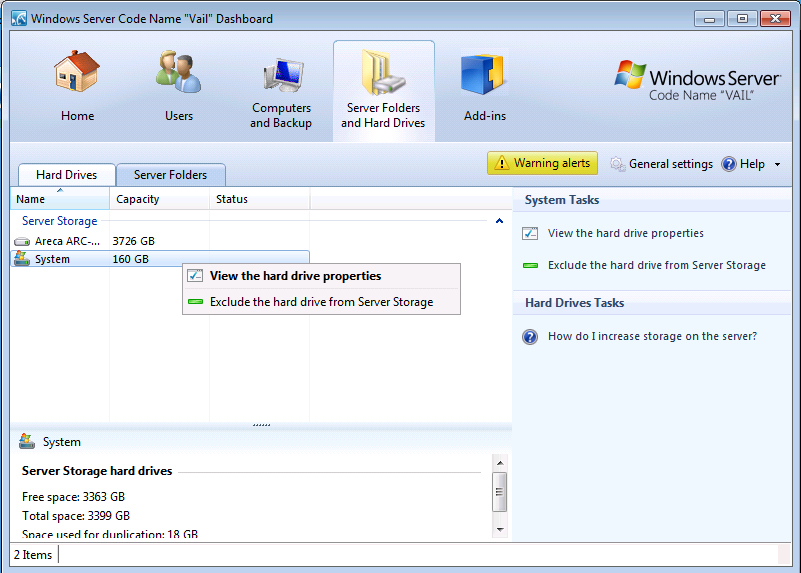
Exclude System Disk from Server Storage in Windows Home Server (WHS) V2 Vail

Many Windows Home Server machines utilize a smaller OS disk (oftentimes in Raid 1 for redundancy) and then large SATA 3.5″ disks for storage. Common 2.5″ disks are laptop drives as well as SSDs. Another factor influencing their popularity in home-built WHS boxes is the fact that the Norco RPC-4220 (a popular home server 4U rackmount enclosure) has the ability to house two 2.5″ hard drives in addition to 20 SAS or SATA drives. Smaller form factor drives tend to be of lower capacity than larger 3.5″ counterparts, so some users may be wondering with the new requirement of a 160GB Operating System (OS) disk in Windows Home Server (WHS) V2 Vail if it is possible to lower the OS disk space requirement.

Posted in Windows Home ServerComments (0)

DuplicationInfo No Duplication

DuplicationInfo: WHS Add-in Review

DuplicationInfo is a small Windows Home Server (WHS) add-in that allows one to see what Drive Extender is doing. More specifically, DuplicationInfo allows a user to map a specific file stored on the WHS to the drives being used.

Read the full story

Posted in Windows Home ServerComments (1)

The Big (30+ drive) Windows Home Server (Part 2) Hardware Selection

First off, this is not a typical WHS build, and it was not meant to be. For the majority of users, a HP MediaSmart (by far the WHS to get if you do not DIY the build) is the way to go. For my purposes, I have seen a consistent, but increasing 500-600GB/mo of extra disk usage. Just for the record, unlike the opinion of certain Seagate executives, it is not for material of questionable moral value. Alas, I needed a solution that would allow me to have one box that could be upgraded and used for up to 24 months. As mentioned in Part 1, this project is an upgrade project and therefore I had some parts, and had a good idea of what I was doing before embarking on the project.

Read the full story

Posted in The Big WHSComments (6)

The Big (30+ drive) Windows Home Server (Part 1)

The Big (30+ drive) Windows Home Server (Part 1)

About 10 months ago I decided to enter the world of the Windows Home Server. My storage arrays had outstripped my Cosmos S’s capacity, and running multiple controllers for all of the SAS drives as well as SATA storage became too much. My decision to build a WHS v. buy one was made due to sub-$100 Seagate 1.5TB 7200.11 drives (at the time very inexpensive) so I bought another eight drives just to fill up an 8 port raid controller.

Read the full story

Posted in The Big WHSComments (9)

Dell Perc 5/i Raid Controller: Cheap Raid 5

Introduction

For Small Business Servers and home servers, one thing becomes apparent, the need to use raid with large data sets. Raid 1 and software mirroring technologies like Windows Drive Extender are too cost ineffective for large storage arrays. For example, if one has 1 TB of storage need and uses one of these mirroring redundancy option, they need 1TB extra storage for a complete backup. Likewise, if an administrator uses four 1TB drives for data storage, then another four 1TB drives would be needed for redundancy. Raid 5 offers a user with both more performance than Raid 1 and lower “lost” capacity due to redundancy storage. Instead of effective storage capacity of n/2 for Raid 1, Raid 5 allows for n-1 of storage capacity.

Read the full story

Posted in Disk Subsystem Performance, Server PartsComments (0)

Raid 1 ICH10R

7200.11 1.5TB on ICH10R in Raid 1

Two 1.5TB Seagate 7200.11 drives on the ICH10R in raid 1 make a nice setup. The ICH10R is an on-board semi-hardware raid controller making it a very cheap option to use in any home server. The Seagate 1.5TB drives are one of the highest capacity drives readily available in Q1 2009 and have the best price/GB available. Raid 1 is probably the best way to gain redundancy when there are two disks in the system.

Intel ICH10R Raid 1 w/ 2x Seagate 7200.11 1.5TB 7200rpm drives

Intel ICH10R Raid 1 w/ 2x Seagate 7200.11 1.5TB 7200rpm drives

Read the full story

Posted in Disk Subsystem PerformanceComments (0)

Server Parts by Amazon.com

Image of 4GB 1333MHZ DDR3 Ecc CL9 Dimm Kingston ECC DDR3 UDIMMs
Image of Xeon Qc E3-1235 Processor Intel Xeon E3-1235
Image of Hitachi Deskstar 3.5 inch 3TB 7200RPM SATA III 6Gbps 64MB Cache Internal Hard Drive 0S03086 Hitachi 3TB