

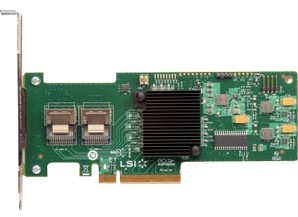
One of the most popular SAS 6.0gbps/ SATA III controllers for enthusiasts is the IBM M1015. In its native form, it is a very capable host bus adapter (HBA) based on the LSI SAS2008 chip. With the low price on places such as ebay (see here for an ebay search for the M1015) and an enthusiastic community that has learned to unlock many features, it has quickly become a go-to choice for low-cost SATA III connectivity. This series of articles was written by Pieter Schaar perhaps best known as the one behind laptopvideo2go.com. He has been a regular contributor in the STH forums and has been detailing his learning in threads such as these. I do want to note that these modifications are not endorsed by this site, LSI, IBM or others and the information herein is purely for educational purposes. If you do encounter problems, you are solely responsible for those consequences.
There are now quite a few parts to this piece including:
Why crossflash?
In the previous 3 articles I’ve discussed the ins and outs of what the IBM M1015 is capable of in various modes. Now if you were to proceed and purchase an IBM M1015 and wanted to use it in other than it’s default LSI9240/9220 mode you will need to crossflash the card to a LSI9211 HBA 6.0gbps SAS / SATA III adaptor.
To recap:
LSI9211-IT = Straight pass through no RAID, best for ZFS file system etc
LSI9211-IR = Pass through as in IT mode, but you also have RAID options (RAID 0, RAID 1, RAID 1e and RAID 10), better for RAID 0 Windows boot SSDs etc, and possibly run Software RAID 5 on the other drives.
LSI9240 = default mode, only really useful feature this mode has is RAID1/ RAID 10, drives have to be set to JBOD (single) or RAID to be seen by OS, can be annoying when adding removing drives often.
How to cross flash
First things first, we take no responsibility for anything going wrong.
Please read carefully, don’t take shortcuts, and BE CAREFUL.
If in doubt or you can’t afford a replacement should it go wrong then ‘walk a away’
Warnings are done, lets flash:
Make a bootable USB stick, needs to be DOS bootable for the flasher etc to work, there are number ways to do it, ask Google
Download the files I have compressed over here
Self Extract the files somewhere, then place onto the USB stick
Turn machine off grab the SAS address of the card, it’s on the back on a green sticker (ie 500605B0xxxxxxxx)
Turn machine on (with card back in) choose USB stick at boot option, for all the below it is assumed you are booted to USB stick in the directory with the files from download.
Convert LSI9240(IBM M1015) to a LSI9211-IT mode
Type in the following exactly:
megarec -writesbr 0 sbrempty.bin
megarec -cleanflash 0
<reboot, back to USB stick >
sas2flsh -o -f 2118it.bin -b mptsas2.rom (sas2flsh -o -f 2118it.bin if OptionROM is not needed)
sas2flsh -o -sasadd 500605bxxxxxxxxx (x= numbers for SAS address)
<reboot>
Done!
Convert LSI9240(IBM M1015) to a LSI9211-IR mode
Type in the following exactly:
megarec -writesbr 0 sbrempty.bin
megarec -cleanflash 0
<reboot, back to USB stick>
sas2flsh -o -f 2118ir.bin -b mptsas2.rom
sas2flsh -o -sasadd 500605b0xxxxxxxx (x= numbers for SAS address)
<reboot>
Done!
Convert LSI9211-IT or IR to LSI9211 IR or IT
Type in the following exactly:
Megarec -cleanflash 0
<reboot, back to USB stick>
sas2flsh -o -f 2118ir.bin -b mptsas2.rom (2118it.bin = IT mode Firmware, change according to which way to flash)
sas2flsh -o -sasadd 500605bxxxxxxxxx (x= numbers for SAS address)
<reboot>
Done!
Convert LSI9211-IT/IR back to LSI9240 (IBM M1015)
Type in the following exactly:
Megarec -cleanflash 0
Megarec -writesbr 0 sbrm1015.bin
<reboot, back to USB stick>
Megarec -m0flash 0 0061_lsi.rom (for latest LSI firmware, also included 2x IBM roms too, just change name)
<reboot>
Done!
Tweaks
Of possible use to ZFS fanatics, when flashing the card to IT mode, do not flash the mptsas2.rom, this then will not load the boot BIOS
Any SAS or SATA IIIdrives added will just passthrough as normal, as there is nothing to see or do in the BIOS in IT mode, you may as well not load it. This makes boot and reboot time faster as it doesn’t have to load the BIOS and wait for a key press. BUT you will need it if you are booting from one of the drives attached to the IBM M1015. You will also need it if you are running IR mode to access to the BIOS to setup RAID functions. This might be of use to some users.
Conclusion
I will probably run my 4x SSDs in LSI9211-IR mode to have the best of both worlds. It has great performance with RAID 0 and my 4x SATA III SSD’s and add other drives at will. Any drive added just shows to the OS no need to make it a Virtual Drive or JBOD first. ZFS folk seem to be very happy with LSI9211-IT mode with no RAID functionality at all on the IBM ServeRAID M1015. SMART passes through in either mode but NOT with RAID of course. Overall the IBM M1015 is a great card, now will the IBM M5015 be just as satisfying it’s next on the block…

Your link to the files is broken
http://files.laptopvideo2go.com/hdd/m1015.exe
gives a 404 not found error.
Cheers John for pointing that out.
Got a wee .htaccess bug going on there I’ve discovered.
The link above now takes you to my website where I’ve made a holding page with link to the Firmware files.
May as well get some benefit for hosting the files :)
Apologies for any inconvenience caused.
Have updated the 7zip package with new P12 Firmware and BIOS.
Also updated to the latest version, sas2flsh (DOS) and sas2flash (win x64)
And included the txt files with commands and also sas2ircu app
Great post for ZFS users! Bookmarked it.
A question, is there a program that tells me the identity number on the card? It is a pain to open up the computer just to get the identity number…
Hi,
Using the M1015->9211-IT section,
first two steps completed ok.
Rebooted back to usb stick.
first sas2flsh command resulted in:
ERROR: Failed to initialise PAL. Exiting Program.
Any ideas?
( If I’ve bricked the card, no problems, you gave a very fair warning, but it’d be nice to recover if possible )
( To Michael: the command megacli -adpallinfo -page -a0 will get you the number, it’s about 2 or 3 pages in )
Further to the last post, I have been able to restore the card to the beginning state following the ‘back to LSI9240’ section.
Please note that some of the file names in the above instructions differ from those in the downloaded archives, eg emptysbr.bin sbrempty.bin.
There’s also a 0 missing in the final megarec command in the ‘back to LSI9240’ section.
Ken – let if you happen to know what edits need to be made let me know and I can get that updated.
I had to amend your instructions for cross flashing to 9211-8i IR mode.
megarec -writesbr 0 sbrempty.bin
megarec -cleanflash 0
sas2flsh -o -f 2118ir.bin -b mptsas2.rom
sas2flsh -o -sasadd 500605B0xxxxxxxx (x= numbers for SAS address)
with a shutdown/reboot after the -cleanflash (for some reason it took that line out of my comment above)
Thanks! I’m currently building a FreeNAS box and after buying 3TB drives I realized that my SASUC8I controllers have a 2TB limit. The controllers BTW that I flashed to LSI IT firmware using instructions from this site!
I already have drives and backplanes that are SASII/SATAIII 6.0 GBps and even though I don’t expect much of a performance boost I desperately need to access the whole 3TB that I purchased. Especially since prices have risen so suddenly. Thanks, global economy!
I’ll be back here when I’m ready to flash and I’ll post if I wind up with any good info or tips. Thanks so much to everyone here I wouldn’t be as far along without the great info here.
Patrick,
As Rob noted, emptysbr.bin needs to be changed to sbrempty.bin wherever it occurs.
m1015sbr.bin needs to be changed to sbrm1015.bin
Megarec -m0flash 0061_lsi.rom needs a change to:
Megarec -m0flash 0 0061_lsi.rom
Regards
A couple more edits needed:
The “sasadd” parameter to sas2flsh needs changing to “-sasadd” wherever it appears.
how soon before you publish the M5015 instructions?
looking forward to it.
Sorry guys been out of town and no interweb where I was.
For some reason I cannot edit the post above any more.
I have how ever fixed the small typo’s on the download page
Patrick if you could please copy and past the text and replace the above.
I hope to be home more now, quite over being on the road, so I can finally get onto the M5015 write up, and make less booboo’s with notes I do on the desktop then write up on laptop.
The M5015 is proving quite a curse with the BBU.
I’m going to have pass judgement with it not working 100%
If I don’t want to flash the boot bios back in, is the proper command:
sas2flsh -o -f 2118it.bin
Took a chance and succeeded in changing the M1015 from “factory’ to IT Mode..
Pieter, a BIG thank you for taking the time to compile and document this.
Ken, thank you for your posts here also. Yea, I’m probably one of a few that reads through to the end
To you both my flashing just now went off without much of a hitch. Again, thanks.
OK, some notes.
Pieter, the four M1015’s I just received were stickered 2011-10-12 and my SAS address on the cards are formatted as 0-0nnl-nnln, 9 digits in length. As 9 digits, I received a “”SAS address must be 16 numbers” error at using the command “sas2flsh -o -sasadd 500605b0. “Your’ 8 digits(500605b0) plus my nine equaled 17 digits :) Undeterred, and while still starring at the error on screen I typed it out dropping one of the 0’s between your posted command and my beginning SAS address and then it continued on to success.
Can I suggest you revisit the trailing 0 as is currently posted. Using as posted made my SAS address flash 17 digits and generated the above error.
Also, for the record what I asked above of not flashing the boot bios back in, the cmd is:
sas2flsh -o -f 2118it.bin
————————-
What I used to get these cards working here:
DOS bootable USB pen drive with the LSI9211 P12 files provided here.
First checked that USB stick was bootable
Rebooted again back onto the USB stick
megarec -writesbr 0 sbrempty.bin
megarec -cleanflash 0
sas2flsh -o -f 2118it.bin
sas2flsh -o -sasadd 500605bxxxxxxxxx (x= “MY’ 9 digits on sticker for SAS address)
Took a chance and succeeded in changing the M1015 from “factory’ to IT Mode w/o the boot bios being re-flashed back in.
Pieter, a BIG thank you for taking the time to compile and document this.
To the other posters here, thank you for your continuing addendum posts here also.
OK, some notes I observed here.
Pieter, the four M1015’s I just received were stickered 2011-10-12 and my SAS address on the cards are formatted as 0-0nnl-nnln, 9 digits in length. As 9 digits, I received a “”SAS address must be 16 numbers” error at using the command “sas2flsh -o -sasadd 500605b0. “Your’ 8 digits(500605b0) plus my nine equaled 17 digits :) Undeterred, and while still starring at the error on screen I typed it out dropping one of the 0’s between your posted command and my beginning SAS address and then it continued on to success.
Can I suggest you revisit the trailing 0 as is currently posted. Using as posted made my SAS address flash 17 digits and generated the above error.
Also, for the record what I asked above of not flashing the boot bios back in, the cmd is:
sas2flsh -o -f 2118it.bin
Now I don’t see anything of the cards bios during boot. Flies right to Win 7.
————————-
What I used to get these cards working here:
Began with bare cards in slot w/o any drives connected.
DOS bootable USB pen drive with the LSI9211 P12 files provided here.
First checked that USB stick was bootable
Reboot again back onto the USB stick
megarec -writesbr 0 sbrempty.bin
megarec -cleanflash 0
sas2flsh -o -f 2118it.bin
sas2flsh -o -sasadd 500605bxxxxxxxxx (x= “MY’ 9 digits on sticker for SAS address)
No probs Rick, good to have a place with all the flash info at hand.
Added a command line for flashing with no OptionROM
Changed the ‘0’ to a ‘x’ in the sasadd command line, the cards I’ve had access to all had a ‘0’ on the 9th digit.
It actually doesn’t matter what address you give the card as long as it’s unique in your system
The label on the card is just to make it unique in the world.
Yes removing the OptionROM will not display anything and happily boot to any OS
The drives will just be passed through, and think of the extra time you can spend with your loved ones not waiting those aprox 15 extra seconds at every boot :)
Just followed your guide for converting the M1015 to a LSI9211-IR mode and it worked perfectly. Thank you so much for posting all this information.
Pieter,
I’ve been running mine in IT mode for a while, with a mixture of SSDs & HDDs (8 drives total). What benefits will I gain if I went with IR mode? Thanks.
Have updated the article above
CK13, going to IR mode will allow you to use RAID 0, 1 or 10
If you don’t need/want RAID then stick with IT mode.
Thanks alot for this post, it helped me tremendously.
For those interested in mass update I’ve scripted the install (msdos oldies)
First BRAVO for this article !!
Second usual disclamer….
Third get choice.com and reboot.com (google it please) and put them on your usbkey
the erasing :
_______________________________________________________
@ECHO off
cls
rem LSI9211-IT
ECHO.
ECHO.
ECHO.
ECHO.
ECHO -= Erasing flash of M1015 ibm Mode =-
ECHO -= To prepare X-Flashing =-
ECHO -= Thanx to Pieter Servethehome =-
ECHO -= Ctrl-c to abort =-
ECHO.
ECHO.
Pause
megarec -writesbr 0 sbrempty.bin
megarec -cleanflash 0
ECHO -= Erase of M1015 ibm Mode finished REBOOTING =-
Pause
reboot
_______________________________________________________
the flash IT-IR on selection
_______________________________________________________
@ECHO off
cls
REM Flashing LSI-IT : LSI9211-IT (JBOD style) of M1015 ibm Mode.
REM Echo sas2flsh -o -f 2118it.bin -b mptsas2.rom (sas2flsh -o -f 2118it.bin if OptionROM is not needed)
REM Echo sas2flsh -o -sasadd 500605bxxxxxxxxx (x= numbers for SAS address)
ECHO.
ECHO.
ECHO.
ECHO.
ECHO.
ECHO.
ECHO * verify SAS adress (After 500605b0-%1-) *
ECHO.
ECHO -500605b0%1-
ECHO -11111111111111111-
ECHO.
ECHO * there must be 17 digits !! *
ECHO * If you only have “1” SAS card in your system*
ECHO * this number isn’t important *
ECHO.
ECHO.
ECHO.
ECHO.
ECHO.
ECHO.
ECHO.
ECHO ctrl-c to abort
pause
cls
ECHO.
ECHO.
ECHO.
ECHO.
ECHO.
ECHO.
ECHO.
ECHO.
ECHO.
ECHO * Press”1″: IT mode no option rom save boot time(LSI9211-I*T* mode)
ECHO.
ECHO * Press”2″: IT mode with option rom (LSI9211-I*T* mode)
ECHO.
ECHO * Press”3″: IR mode with option rom(with raid..)(LSI9211-I*R* mode)
ECHO.
CHOICE /N /C:123 PICK A NUMBER (1, 2, or 3)%2
IF ERRORLEVEL ==3 GOTO THREE
IF ERRORLEVEL ==2 GOTO TWO
IF ERRORLEVEL ==1 GOTO ONE
GOTO END
:THREE
ECHO YOU HAVE PRESSED : IR mode with option rom(with raid..)(LSI9211-I*R* mode)
ECHO ctrl-c to abort
pause
sas2flsh -o -f 2118ir.bin -b mptsas2.rom
sas2flsh -o sasadd 500605b0%1
GOTO END
:TWO
ECHO YOU HAVE PRESSED IT mode with option rom (LSI9211-I*T* mode)
ECHO ctrl-c to abort
pause
sas2flsh -o -f 2118it.bin -b mptsas2.rom
sas2flsh -o sasadd 500605b0%1
GOTO END
:ONE
ECHO YOU HAVE PRESSED IT mode no option rom save boot time(LSI9211-I*T* mode)
ECHO ctrl-c to abort
pause
sas2flsh -o -f 2118it.bin
sas2flsh -o sasadd 500605b0%1
:END
ECHO Flashing LSI-Ix of M1015 ibm Mode finished
ECHO REBOOTING
Pause
reboot
_______________________________________________________
Once again BRAVO for this job…
I urge to crossflash my m5014 !!
Hi,
Thanks, good write up. I’m using one of these cards in IT mode to present more disks to windows server 2008.
Has anyone managed to get disk spin down working in windows?
I know the linux world has used hdparm to do this, but the windows binary i have found state disks on the IBM card arn’t supported.
I *think* I have had some success with hdscan.exe but I wondered if anyone else has a way to make these disks spin down when not used for a period of time in windows?
Thanks
Tony
For anyone getting this error:
“ERROR: Failed to initialise PAL. Exiting Program.”
The UEFI bios is the issue. You will need to boot into the UEFI shell and run the SAS2FLASH.EFI executable instead.
More info can be found here:
http://brycv.com/blog/2012/flashing-it-firmware-to-lsi-sas9211-8i/
Pieter, would it be possible to include this in your 7zip file? Also, firmware version P13 is out.
Thanks for the great tutorial and everyone’s comments! :)
I am using sdparm to get the disks to spin down. this works on windows too. Make a batchfile which will be executed on startup which contains the disk spindown timeout value. the only problem here is, windows will not know that and there may be high access times on those disks.
Awesome! bought a few of them for 75$ on eBay!
I do have 2 questions:
1- once flashed, will I be able to use future released firmware directly from LSI? (or do I have to wait/check until the author has the firmware modded)
2- If I flash to IT mode without the OptionROM then would all the hard drive connected to the controller kick in at the same time (no staggered spinup?)
Thanks!
Try the forums @ http://forums.servethehome.com/showthread.php?433-IBM-M1015-Experiences or another thread. Lots of people to answer all of you questions.
when doing it with efi shell, you have to flash it step by step or you geting an error on bios upload.
make
megarec -writesbr 0 sbrempty.bin
megarec -cleanflash 0
sas2flash -o -f 2118ir.bin
sas2flash -b mptsas2.rom
sas2flsh -o -sasadd 500605b0xxxxxxxx (x= numbers for SAS address)
I purchased a m1015 off of ebay, I do not know if it has been previously flashed, does any one know how I can read the Firmware and get a report of what is currently installed on the device?
Joseph: Try the forums. Lots of info there and it is monitored often.
need the UEFI version of sas2flash for my X9SCM-F-O
sas2flash.efi is no longer in “Installer_P12_for_UEFI.zip”
it was forcibly removed out of the zip file by LSI’s own Microsoft Forefront Protection installation:
—————-
FILE QUARANTINED
Microsoft Forefront Protection for SharePoint removed a file since it was found to be infected.
File name: “Installer_P12_for_UEFI.zip->sas2flash.efi”
Malware name: “Suspicious!SA”
—————-
anyone have a copy of sas2flash.efi they can share?
Finally found sas2flash.efi by digging through all of LSI’s downloads.
As of current time, the file still exists in:
Installer_P13_for_UEFI.zip
Installer_P10_for_UEFI.zip
via this search: http://www.lsi.com/Search/Pages/downloads.aspx?k=sas2flash.efi
Installers numbered P8, P9, P11, and P12 have the text file with the quarantine message in place of the .efi file. No good!
Anyway, in case the sas2flash.efi file is removed again in the near future, I’ve made a copy available here: http://www.mediafire.com/?z66is5rrdui6rc3
Hi, does this guide works for M1115? I’m bought a M1015 but the seller is OOS on M1015 and send me an M1015 instead, am I screwed?
sorry, I mean “send me a M1115 instead”
“sas2flsh -o -f 2118it.bin -b mptsas2.rom (sas2flsh -o -f 2118it.bin if OptionROM is not needed)”
I dont understand this. What does it mean? What is OptionROM? If I want IT mode, should I enter the (…) too? Can you please explain?
“Dont flash BIOS, so startup is faster”, should I omit the whole line above to achieve this?
So it will look like:
“Convert LSI9240(IBM M1015) to a LSI9211-IT mode
Type in the following exactly:
megarec -writesbr 0 sbrempty.bin
megarec -cleanflash 0
sas2flsh -o -sasadd 500605bxxxxxxxxx (x= numbers for SAS address)
Done!”
And the line above is omitted? Is this correctly understood?
Thanks fior the script akelku I used it and it worked a treat. There is one error a dash missing before sasadd here
{quote}
sas2flsh -o sasadd 500605b0%1
:END
ECHO Flashing LSI-Ix of M1015 ibm Mode finished
ECHO REBOOTING
Pause
reboot
{quote}
Just wanted to say that P14 is out since september 18
great blog post and help .. will try your suggestion when I get home, since I dont want to try it over the management console of my NAS ^^
After flashing from the standard M1015 firmware to the IR firmware, will existing (pre-IR) volumes (raid-1, mirror) be still usable?
Since the P14 firmware is out, what would be the process of flashing that, instead of the firmware bundled in your zip file?
I was looking at a ServerRAID m1115 which is suppose to be the new version of the ServerRAID m1015.. will this crossflashing work on the new card?
gav
Patrick, do you know if you need the OptionROM if you are using expander backplanes with this controller?
I’ve flashed successfully with P14 IT and will test over the next few days.
Just replace sas2flsh, 2118it.bin, and mptsas2.rom with the newer versions.
major problem with these in IBM x3630M3 – the eufi boot hangs unless the card’s bios is disabled.
Tried P12 & P14 firmware for the same issue.
:(
If you say that one needs to follow the instructions exactly, please fix the addresses in the instructions, they are bit ambiguos.
Compare your instructions for flashing IT and IR:
sas2flsh -o -sasadd 500605bxxxxxxxxx (x= numbers for SAS address)
sas2flsh -o -sasadd 500605b0xxxxxxxx (x= numbers for SAS address)
Other on has 9 x’s, other 8. Obviously the address has to be 16 digits and the 9th digit is most likely always 0, but one has to realize that actually you HAVE to go against the instructions to be succesfull.
Anyways thanks for the great writeup, I’m just about to flash with IT firmware :)
To get the SAS address of the card without looking at the label:
megacli -AdpAllInfo -aAll
I crossflashed sucessfully my IBM M1015 to LSI IT mode, but I have a problem that is messing my system:
– disks are not detected in the right order on linux. And each time I reboot, the disks are usually detected in a diferent order. I want to use mdadm to create a raid6 array and this can be very bad, because if one disk fails, I will never know what disk it is. Is there anything that can be done to have linux detect the disks in the right order ?
thanks!!!
It worked. I did the crossflash on an older Asus P5Q motherboard, and the process took no more than 2 mins. Happy days ahead!
Great article! I just bought this controller on ebay and replaced my old PCI-X LSI SAS3080X to free up a slot and get a faster, more flexible adapter. Flashed to a LSI 9211 (IR mode) according to your instructions and it works great. Thanks!
For people with disk order problem under linux; mount your disks with UUID (or label) and problem solved! The blkid command shows UUID, label and linux device. Smartctl will output the serial number of the drive. So in short, UUID ties it to the linux device and through smartctl you get the disk serial number.
A hardware controller should also be able to detect failed disks. I’m not sure about this case, though. A simple way to try to detect healthy drives would be to execute find / -type f -exec cat {} \; >> /dev/null and check which one lights up.
I am stuck in step 1 when trying to flash to IT mode. After I type in step 1 I get two lines about DOS/32a protected run time version etc supernar syatems and then blinking cursor. Nothing else and cannot type anything after that. Please help.
Hi,
Tried to flash my M1015 (which was sold to me as a M1115 ?) to LSI 9211 IT mode.
Got the PAL error message when using a ASUS Crosshair formula V motherboard.
When attempting to flash it on my old gigabyte GA-MA790X-UD3P, it worked like a charm.
Now I read about IR mode and that it still allows straighttrough, so back from IT to IR mode. Hope it works.
Thanks a lot for your excellent instuctions, comments and scripts.
I just successfully flashed my M1015 with LSI IT. It worked like a charm. I did noticed some comments about issues trying to do it on Intel DQ77MK, So I did it on a Asus P7H55D-M EVO. Thanks a lot for the article.
Hi everyone.
I need to flash a Dell Perc H310 to IT mode to be able to use in ESXi and pass the drives directly to unRAID. I have 2 quesitons…
1. Does the H310 use the same exact LSI chipset as the M1015?
2. The card does not have a green sticker with the SAS address. Is there another way to find it…maybe in ESXi (or a putty command)?
TIA!
John
So, I pulled the heatsink off of the LSI chip on the card and this is what I see…
LSI
500002730
LSISAS2008
1221
EAP21C82
Taiwan
My question…is the SAS Address a combination of 500002730 + EAP21C82 = 500002730EAP21C82?
John
Did you ever find a solution to this? I’m at the same point and can’t continue!
Is it still required to flash LSI 9211-4i HBA to IT mode in order to disk clone from the old Vertex 2 SSD on the Intel X58 Express (Dell T3500) to SATA III SSD (JBOD) connected to the 9211-4i with the IR firmware. Is it true that the cloning will only work if I would 2+ SSDs in RAID 0?
Does anyone know if it’s possible to force an M1015, in any firmware mode, to do write-back rather than write-through? Write speeds are killing me and data integrity does not matter *AT ALL* for the application I’m working with.
Thanks!
Hi,
Thanks for this great post, and I see youve also posted on UEFI installs too. My question is with regards to Server2012 UEFI install on a GPT partitioned virtual disk of the M1015.
I crossflashed the card to IR mode yesterday using this procedure but updated the files in the download with the latest bin and rom from the LSI site. All went well. I hit CTRL+C and created my RAID10 virtual disk across my 4x 2TB Seagate drives, however when trying to install Server 2012 I still see unavailable unpartitioned space as if its defaulting to MBR.
I saw this ‘unavailable unpartioned space’ problem before when trying to install 2008R2 server to the RAID10 virtual disk I created befre I crossflashed. I decided to try 2012. I also changed the DH67CL Mobo I was using (which has a UEFI option in the BIOS, but doesnt appear to do anything) today a for an Asus P8Z77-V which definitely has UEFI bios as I shelled out to it to update the M1015, however I still see this same problem during the OS installation. I guess its down to the Boot settings in the mobo BIOS. Please can you let me know how you have yours set up to get this all working together?
TIA
My new M1015 (IBM PN 90Y4556) is capable of JBOD out-of-the-box, no more need to flash just to get rid of the extra Layer for “Unconfigured Good”.
Or am I missing something?
http://forums.servethehome.com/raid-controllers-host-bus-adapters/2008-m1015-9211-no-disks-detected-please-help.html#post17227
I have both a M1015 and M1115 cards. Can i cross flash them to both have the same FW and have a single system see both? At the moment on default factory settings with both plugged in my system see’s the M1015.
Thanks in advance.
A
Thank you so much for all the info.
I am completely new to all of this.
I have now flashed successfully after finding the SAS2FLASH efi from the LSI site and booting to efi shell – after the terror of getting the PAL error with a DOS boot.
Now to get NAS4Free up and running!
Thanks again.
Thank you very much for this explanation, but I think I’ve brick my controller.
I’ve create a DOS USB Stick, and try to convert LSI9240(IBM M1015) to a LSI9211-IT mode with
> megarec -writesbr 0 sbrempty.bin
> megarec -cleanflash 0
reboot, back to USB stick
> sas2flsh -o -f 2118it.bin -b mptsas2.rom
and I got an error message “Failed to initialize PAL”. I solve this with a copy of the UEFI installer on USB Stick
http://www.lsi.com/downloads/Public/Host%20Bus%20Adapters/Host%20Bus%20Adapters%20Common%20Files/SAS_SATA_6G_P16/Installer_P16_for_UEFI.zip
reboot into UEFI console and make an
> sas2flash -o -f 2118it.bin -b mptsas2.rom
> sas2flash –listall
> sas2flash –list
Show me the informations about the succssesful installation
>sas2flash -o -sasadd 500605bxxxxxxxxx with the right characters from the card do not work and
Show me a message like “sasadd parameter unknown”
I try to reboot without the controller address…
The result is a hanging system (blank screen) with no chance to come into the bios.
Has anybody a shortcut or an hint to solve or reflash this card?
THX!
I have just 1 small question before i will flash my 2 cards to IT mode.
As Stated i have 2 of the M1015 cards and i have 4 Chenbro CK12804 24x SAS-/SATA-Expander. This combination is working perfectly but i was wondering; What will happen if i flash into IT mode? Will the M1015 still be able to adress the drives connected to the SAS Expander? Cause if i loose expander connectivity flash will not be an option for me ( loosing 96 drives connected by expanders seems not to be the best option ;) )
To give a little inside info about the setup:
1x SSD boot to ZFSguru connected to a SATA port on the MotherBoard
2x M1015 SAS cards connected by PCI-E
2x Chenbro CK12804 24x SAS-/SATA-Expander connected to the 2 ports of EACH M1015 (4 expanders in total)
Drives are connected to the system as follows: “Drive -> SAS Expander -> M1015”
Hope you can clarify this.
I just bought the M1115 and it flashes to 9211-8i IT firmware just fine using the M1015 commands in this post. FreeBSD 9.2-rc4 with this thing is frickin’ awesome; 6 x 3TB disks in raidz2 working rock solid :-))
(I got the M1115 because the M1015 is hard to get in Denmark right now plus the M1115 was 15$ cheaper. I used the FreeDOS 1.1 USB stick image from http://derek.chezmarcotte.ca/?p=340 )
Something I did not find obvious, is that sas2flsh.exe won’t detect the card until you run the megarec commands to clear the flash and then reboot. Only then will sas2flsh see the card. Made me a bit nervous at first… Thanks, Pieter!
I’m going to take the plunge with a Dell 310 card for my FreeNAS box. My question is why can’t I just use the tools from LSI (http://www.lsi.com/products/storagecomponents/Pages/LSISAS9211-8i.aspx#four) to flash the firmware? it seems that the latest release (Aug 9th) lists both IR and IT modes. I’m sure there is a reason but I don’t know what it might be, hence my question.
Thanks.
Thanks, handy post and handy comments. I was able to crossflash my m1115 with what I found here.
Thank-you, I was also able to flash my M1115 on an ASUS P6T.
I used the latest LSI 9211-8i P17 (2118it.bin and mptsas2.rom)
Which can be found here: http://goo.gl/JDfOuG
Hello,
we are having weird issue with M1115 and Lenovo TS440 server combo:
– M1015 and M5014 work perfectly in any configuration of memory
– M1115: only 2 out of 4 DIMM slots can be used when M1115 is present. If 3rd or 3rd + 4th slots are used, server beeps and does not start
We did not try to flash 9211-8i IR mode yet (we need RAID), so FW is original IBM.
Any idea how to solve issue?
Hi Marko – check out this forum thread: http://forums.servethehome.com/raid-controllers-host-bus-adapters/2664-ibm-m1115-sas9223-8i.html
May be worth asking on the forums.
Patrick thank you for advice, will try there.
I got today my M1015. I tried to flash the IR Firmware. Everything worked fine during the Flash.
I was flashing like this:
megarec -writesbr 0 sbrempty.bin
megarec -cleanflash 0
sas2flsh -o -f 2118ir.bin -b mptsas2.rom
sas2flsh -o -sasadd 500605b0xxxxxxxx (x= numbers for SAS address)
After the last reboot the PC stopped working. It shows MPT SAS2Bios….
Press CTRL-C for the LSI Utility.
After this i get a flashing cursor in the left corner. I cannot boot anymore from the usb stick. Also its not possible to enter the Bios.
If i press CTRL-C also the cursor is flashing in the left corner.
What was going wrong?
Grettings Christoph
I had some problems with crossflashing IBM M1015 to IT-mode on a supermicro X10SAT mobo, but finally succeeded.
I had to try different boot options, when booting into the USB “boot into UEFI” etc. And then I could do the two “megarec…” commands. Immediately it said “warning high bios adress” or something similar and I solved it by googling. It was easy to solve, I dont remember how.
Then I rebooted and tried the sas2flsh commands and it failed with “failed to initialize PAL” or something similar. So I booted into “UEFI shell” and from within a UEFI shell, I could continue flashing. But I needed to use “sas2flash.efi” command instead of “sas2flsh” command.
I am having issues as it seems like I did everything correctly the flash says its LSI2008 now, but the 4 4tb drives are not showing up. Any suggestions would be appreciated.
You’re a life-saver. I got one of these drives, and was having an awful time getting it flashed for IT for freenas. I even called LSI and they said “It’s oem. We don’t support it.” Without your page, I never would’ve gotten it working.
Download the http://www.lsi.com/Search/Pages/downloads.aspx?k=sas2flash.efi
an put it on the usb.
I did not even work on my nas server, I had to take the card and flash it on an old PC at work.
Maybe it was because I ran amd 3.6 GHz 6 core processor on my nas
Convert LSI9240(IBM M1015) to a LSI9211-IT mode
Type in the following exactly:
megarec -writesbr 0 sbrempty.bin
megarec -cleanflash 0
sas2flsh -o -f 2118it.bin -b mptsas2.rom (sas2flsh -o -f 2118it.bin if OptionROM is not needed)
sas2flsh -o -sasadd 500605bxxxxxxxxx (x= numbers for SAS address)
Done!
When I click on the link you posted it just leads me to a search page? Is there anywhere else I can get the sas2flash,efi file?
Do you remember how you solved the high bios address? I googled it and could not find any info on the problem.
I have an LSI MegaRAID 9240-8i (B) Manufacture date May 2014 and am having a problem cross flashing for IT mode. Following is the method I used,
“Convert LSI9240(IBM M1015) to a LSI9211-IT mode
Type in the following exactly:
megarec -writesbr 0 sbrempty.bin
megarec -cleanflash 0
sas2flsh -o -f 2118it.bin -b mptsas2.rom (sas2flsh -o -f 2118it.bin if OptionROM is not needed)
sas2flsh -o -sasadd 500605bxxxxxxxxx (x= numbers for SAS address)
Done!”
First two steps are no problem, but after reboot I get the following error when trying the following step, “sas2flsh -o -f 2118it.bin”
“Error: Firmware image does not support Target Adapter Chip Revision (1)”
Not sure if I missed something important or if this perhaps is a new revision of card causing problems. Could really use any help as I am stumped here.
Hoping if I follow these steps I can at least fix to stock,
“Convert LSI9211-IT/IR back to LSI9240 (IBM M1015)
Type in the following exactly:
Megarec -cleanflash 0
Megarec -writesbr 0 sbrm1015.bin
Megarec -m0flash 0 0061_lsi.rom (for latest LSI firmware, also included 2x IBM roms too, just change name)
Done!”
Pictures of error and product box at my post here – http://forums.laptopvideo2go.com/topic/29059-sas2008-lsi92409211-firmware-files/?p=148424
A warning for anyone who wants to use the latest LSI firmware for this; don’t use P20.
P20 causes excessively slow reads in any sort of multiple disk access situation like raid or zfs.
In my case a 4-way sata3 raid0 was giving 1.4GB/s write, and only 30MB/s read.
The previous P19 version doesn’t exhibit this problem.
To the moderator:
It might be nice to add a warning about this in the article.
I ended up doing it in the UEFI Shell. The DOS wasn’t recognizing the card after I cleaned out the ROM. The UEFI Shell was much easier (if your motherboard support UEFI). All the command are the same. except you will be using ‘sasfla~1.efi -o -f xxxxxx.bin’ if you formatted your USB using DOS. (8 character limitation)
Hope this helps others that has UEFI
I had several problems with the flashing:
megarec -cleanflash 0 responded with “Error while downloading firmware” and later it said “Error code = 64” and “Flash not programmable”.
Both solved by turning off UEFI boot options in BIOS.
Hit my head against the wall (a lot) on this. For me, solved it by:
– Formatting the USB as freedos (using Rufus) – https://www.all4os.com/windows/create-a-bootable-ms-dos-or-freedos-usb-drive.html
– Downloading the Shell_full.efi, renaming to shellx64.efi, and putting it on the root of the drive – https://svn.code.sf.net/p/edk2/code/trunk/edk2/EdkShellBinPkg/FullShell/X64/Shell_Full.efi
– Downloading the sas2flash.efi – http://www.lsi.com/products/host-bus-adapters/pages/lsi-sas-9211-8i.aspx#tab/tab4
– Booting to the ASUS bios and loading EFI shell (it’s the last step, in the last page on the advanced screen on the bottom of the page, same page as “Save and Reset”
– Follow the rest of the instructions on this page:
http://digitalcardboard.com/blog/2014/07/09/flashing-it-firmware-to-the-lsi-sas-9211-8i-hba-2014-efi-recipe/
More instructions here to compare: http://brycv.com/blog/2012/flashing-it-firmware-to-lsi-sas9211-8i/
Needing some help here….
I get the Failed to Initialize PAL error on a TS440. Currently have and SSD directly connected to the motherboard via SATA. Got through the first two steps of flashing the LSI 9240 just fine. After the reboot, I get the error.
Tried going into the BIOS and selecting UEFI boot only and making sure that I put BOOTX64.efi on the flash drive. No dice as it says no operating system available. in the DOS prompt, I just get the PAL error.
Suggestions on what to do here? I just want to use this card as HBA for a bunch of individual drives.
Hi,
I did this reflash a while ago to get this into IT mode. I’m looking to update the firmware now to version 16 (from 15) and I’m curious if I can just do:
# sas2flsh -o -e 6?
# sas2flsh -o -f 2118it.bin
or if I need to repeat the steps since it was technically a conversion.
thanks! that really helped, much appreciated.
I have a M5014.. I hear these are similair to M1015 but less cache – Is this true?
If this is the case, I can crossflash to enable JBOD (Passthrough) mode?
Does passthrough mode bypass the onboard cache?
I have IBM ServeRAID M1015 (SAS9220-8i) controller.
I have flashed to 9210-8i without any problem.
I have later wished to flash it to 9240-8i, well, done OK!
But, at the boot screen, it says ServeRaid M1015 SAS/SATA Contoller, with the latest build of firmware I load named: imr_fw.rom
But, I don’t want to see ServeRaid M1015 SAS/SATA controller at the boot screen! I want to see, it is an LSI!
So, instead of loading sbrm1015.bin, there must be sbrlsi.bin which is not present at the sas2008.rar file.
Can anyone upload sbrlsi.bin for LSI 9240-8i card please?
Here is the latest firmware by IBM for M1015 (9210-8i) and M1115 (9211-8i) maybe I will retract, maybe not!
https://www-947.ibm.com/support/entry/portal/docdisplay?lndocid=MIGR-5082826
By the way, I have managed to find LSI 9240-4i bin, but not 9240-8i!
One interesting thing is that:
IBM original firmware image rom file is 4.352 KB, but 9210 firmware is 966 KB for IR, 706 KB for IT!
LSI 9240-8i firmware is also 4.352 KB named “20-13-1-0208_SAS_2008_FW_Image_APP_2-130-404-3836”
So, logically, do not install 9210 or 9211 firmware, go through 9240-8i or original IBM firmware, it seems there is no need to modify IBM card at all!
ibm_fw_sraidmr_1000-20.11.1-0184_windows_32-64.exe file can be opened by using 7zip to see inside /image directory named “m1000fw.rom” which is, as I have previously said: 4.352 KB.
Below is the latest firmware by IBM for M1015 (9210-8i) and M1115 (9211-8i)
https://www-947.ibm.com/support/entry/portal/docdisplay?lndocid=MIGR-5082826
By the way,
I have managed to find LSI 9240-4i bin, but not 9240-8i!
Therefore, some people may prefer using their original software instead 9240-8i, because of nothing more that it seems.
https://www-947.ibm.com/support/entry/portal/docdisplay?lndocid=MIGR-5082826
Below is the latest firmware by IBM for M1015 (9210-8i) and M1115 (9211-8i)
www-947.ibm.com/support/entry/portal/docdisplay?lndocid=MIGR-5082826
By the way,
I have managed to find LSI 9240-4i bin, but not 9240-8i!
Therefore, some people may prefer using their original software instead 9240-8i, because of nothing more that it seems.
Hi guys,
thanks for this valuable information, it saved me a lot of fiddling. I purchased a Serveraid M1015 recently, and flashed it to LSI9211 IT mode, without BIOS. It worked great, 6 disks appreared as JBODs, like intended. The only problem I had was that in the original machne (Biostar Mainboard) I got the dreaded “Failed to initialise PAL” error. I moved the controller into an older Gigabyte Socket 775 mobo and the flash process went well.
It seems, however, that I don’t get the spindown feature working. I already checked that the disks support it (Samsung HD204IU, spins down fine if attached to the mobo built-in ICH controller). If attached there, I can use the HDDScan utility and spin down the disks using the “Features” – “IDE Features” menu, there is a button to spin down/up a disk. When I attach the same disk to the ServeRaid, the option is displayed to be available, but if I press the button nothing happens. If attached to the mobo controller, the WIndows OS will also spin down the disk after a while, like set in the Energy-Saving profile (Windows Server 2008 R2). If attach the disk to the ServeRaid controller, this will not happen too.
Did anyone get disk spjndown with this controller working? I wonder whether I get this if I re-flash the controller to include a BIOS, but since I have to move it to a different board again Id like to know whether there is a chance at all to get spindown, before I take my server apart once more. I’ve also used the firmware conveniently provided by the link at the top of this page, it seems that there is newer firmware available – is it worth trying the newer version?
Thanks for any info on this subject,
Armin.
Thanks, found this very useful.
Here are a few of the problems I encountered and their solutions. This is all information I found online, but hopefully collating it here in a format that’ll be friendly for web indexers will save someone some time in the future.
Q1) Which DOS image should I use?
A1) I used the images from http://www.chtaube.eu/computers/freedos/bootable-usb/ successfully for the “megarec” part of the process. I put the image across to a USB stick, mounted it and copied across the files in the zip file above.
Q2) megarec crashes when run
A2) Pick boot option 4, which doesn’t load any drivers
Q3) sas2flash grumbles with “ERROR: Failed to initialize PAL. Exiting program.”
A3) Use the efi version of sas2flash, and run it from an efi shell.. I ended up starting from scratch with a freshly formatted USB stick. I then added:
o the UEFI shell v1 binary from https://wiki.archlinux.org/index.php/Unified_Extensible_Firmware_Interface#Obtaining_UEFI_Shell
o the firmare (sas2118it.bin) and rom (mptsas2.rom) (I took these from the LSI site to be sure of the version numbers, but there this a version in sas2008.zip as above)
o sas2flash.efi (Again, I took this from the LSI site to be sure of getting the most recent version, but there is a version in sas2008.zip).
Having prepared the USB stick, I selected the UEFI boot option provided by the BIOS. Typing fs0: at the prompt left me in a unix like shell with cwd in the root of the USB file system. The there, I could invoke sas2flash.efi with the same command line arguments as above.
Q4) My ASUS BIOS won’t boot my USB stick in UEFI mode. The screen just flickers blank.
A4) It seems like the BIOS expects the file to boot to be located at /efi/boot/bootx64.efi. If it’s not there, you get the above behaviour.
With the same BIOS, I found that I needed to change ‘boot type’ from “Windows” to “Other OS”. By the time I got everything working, I’d also disabled secure boot (by removing the keys from the BIOS), but I’m not sure if this was actually required.
Q5) sas2flash.efi grumbles about “InitShellApp: Application not Started from Shell”
A5) Are you using the v1 UEFI shell? I saw this message when I initially tried to use the v2 UEFI shell.
I installed my IBM Serveraid M1015 controller 46M0831 in my machine, boot to DOS, and enter the first command ‘megarec -wreitesbr 0 sbrempty.bin’ and the get:
DOS/32A — Protected Mode Run-time Version 7.35
Copyrighte (C) Supernar Systems, Ltd. 1996-2005
_
And the system hangs. Does it take a long time to flash?
I used Rufus to make the bootable USB drive.
Is it possible to flash a LSI 9211-8i into a 9240-8i
I know the 9211 doesn’t do raid 5
If anyone can help that’d be great
Pieter – I must have JBOD JBOD on 9260 ! I don’t care if I must crossflash into whatever, can you please help ???
the link on the forum that this points to doesnt work.
Your link to your compiled files doesn’t work anymore, could you re-upload somewhere please? Notify me if this ever gets done or if anyone has a link dump@elrath.co.uk thanks in advance.
This started out talking about IBM ServerRAID M105 SAS9220-8i, but ended with instructions for an IT Flash to 9211-8i.
Q1. Am I correct in that it is safe to FLASH my IBM ServerRAID M1015 46M0861 LSI SAS9220-8i to the LSI9211-IT mode ?
Q2. If something Goes wrong how do I FLASH it back to original Out-Of-The-Box version?
I’m New to all this and I was following the instructions well until I realized it changed from 9220-8i to 9211-8i. I don’t want to make a mistake and kill a brand new card.
Thanks
Fred
Anyone got a download link? I get a 404 :/
I have a 404 as well, I’ll keep searching for the files and post them when I find a link.
Someone can contact the original writer about the 404?
Flashed an IBM M1015 to IT Mode LSI card using these instructions. Worked like a frickin’ charm. Thanks for making it possible for me to have exactly what I need for a solid FreeNAS setup.
Thanks for the write up.
I have a 9240-4i that I need to flash to IT.
Is there a different firmware for the 4 port version or so I just use the same version as the 8 port?
Thanks in advance.
I am looking to flash a 9211 with latest firmware. Is the procedure the same?
cross-flashing to reduce risk one backs up first. when we flash the EEPROM we even use UPS on the AC line. power.
one person on here, 9211 /20/40 etc. (btw, I use freedos, newest to flash, the safe way)
asked how to backup first? a very wise person, (i always do)
so here the answer.
the download link to the packaged, flash package, has sas2FLSH.exe doc file
called. sas2flash.txt , read it in notepad or in linux, nano
see the below small list
the two CLI , commands start with u. or ufirmware x: (where x is “mybackup.bin” (or .rom ,etc)
the ubios is the part not to touch but backing it up is ok. always. this is the boot block. rom.
u = upload, as in ,from card to file, uploads, it’s just read only in a safe action.
excerpts, (I tired to find the authors and failed)
-listall: List information on all LSI SAS Controllers found
-list: List detailed information about the selected SAS controller
-listsasadd: List the SAS address for the selected SAS controller
-ufirmware x: Upload the current firmware to file x
-ubios x: Upload the bios area to file x
-ver: Display the version information for SASFlash
who knows, you might want to go back for RAID1, with super fast reads, 2 times faster (LSI spec)
imo. !
Pieter Schaar perhaps
should have paypal link here, he surely deserves a reward.
a super useful zip file.
I run these cards on a video service, one live and one a cold backup.
here is more flash information from LSI
a nice PDF , with nice examples
https://www.broadcom.com/docs-and-downloads/sep/oracle/files/SAS2_Flash_Utility_Software_Ref_Guide.pdf
When I try to flash my 9220-8i to IT mode, I get the message “No LSI SAS adapters found!”
But the computer sees the card and I can enter the cards firmware and configure everything.
I’ve done everything exactly as the post says. I’ve made a bootable USB stick with FreeDOS, put the “sas2008” files on it and I’m not getting anywhere.
Google is not very helpful with this kind of thing..
I have one of the 400gb IBM SSDs in my x3690 X5 with a M1015 SAS Card. From what I read, I need to flash this card with the IBM SSD HBA firmware. From what I can see the firmware I need is in this zip file but how do I apply it to my card? I already tried the LSI IT firmware but when I go to install Windows to the drive, it shows up but won’t let me actually do the install.
“Tom December 22, 2017 at 8:51 am
When I try to flash my 9220-8i to IT mode, I get the message “No LSI SAS adapters found!”
But the computer sees the card and I can enter the cards firmware and configure everything.
I’ve done everything exactly as the post says. I’ve made a bootable USB stick with FreeDOS, put the “sas2008” files on it and I’m not getting anywhere.
Google is not very helpful with this kind of thing..”
+1, exact same issue. Tried going down the rabbit hole with UEFI on another motherboard and using sas2flash.efi. Still same error message. Any tips?
Worked at treat TYVM
Thanks, old post but still helpful!!!
Hello,
I get one used m1015 controller, how to identify wich firmware the card have?
I pretend to put it in -ir mode so i can replace b120i in microserver gen8, i passthroug the drivers to esxi…
Thanks
@Jeff and @tom, I’m having the exact same issue. If there are any updates, how were you able to make these work if at all?
Thanks for the information and thanks for the comments. I was having a problem with my LSI 9200-8i in an IBM X3630 M4. I tried to use a M1015 in IT mode I had but it was hanging. One of the comments related to a problem with this card in a X3630 M3 and needing to disable the bios (Thanks Mark).
While it’s not a perfect situation it’s working.
Thanks
Thanks for the great howto…..
I have my card updated, but my drive (WD Red 3TB ) will not spin up and is not detected by bios or OS (because it is not powered up duh)
I have verified the drive works with both the onboard SATA and a Rocket Raid card. (The rocket raid card is using the same splitter cable). I Googled the issue and evidently Pin 3 of the power controls spinup, I have tried both disabling the pin (using tape) and no drive level fix.
One more thing…. RedHat 8 has been released, and Redhat has removed a whole bunch of raid card drivers including SAS2008.
Here are my relevant sas2flsh.eft -list settings:
Controller: SAS2008 (B2)
NVDATA Version (default and Persistent) 0F.00.00,05
Firmware product ID: 0x2213 (IT)
Firmware Version: 15.00.00.00
NVDATA Product ID: SAS9211-8i
Bios, UEFI DSD, FCODE versions : N/A
Board Assymb, Board Tracer : N/A
Can somebody give me a pointer on how to flash it mode on a Dell T410?
Thanks
Hi Guys, I tried to flash 3 of LSI 9220 to IT mode. First one just worked fine, the other two are not popping up during post or in any OS I tried (different Win, Linux, ESXi distris) the 2nd don’t show any signs of life, no lights are blinking, just getting hot. On the last one two LEDs first blink (during boot process), then just lights up, but not green, more like amber/orange (normally they are green). I googled a lot but couldn’t find any information about the LEDs. (Status LEDs?) there is no description/label but “CRB3” and “CRB4”, they are located near by Slot Bracket (in down part)
Both caused “No LSI SAS adapters found” error.
I think, that nr 2 is dead, but nr 3? Any Ideas what the amber colored LEDs are indicating?
Thanks
I have an issue.
I am using an r720xd with a LSI9240 and i flashed it to IR mode. When i try and enter the config utility it tells me it will open after firmware initialization then doesn’t open and tries to boot my system normally. any ideas?
Try to disable to boot your OS in the UEFI. It is only one idea to get the target ;)
This comment is just to say that these instructions are terrible.
Just tried to update my IBM M1015 with LSI SAS9240-8i, and got and far as the megarec steps without issue. After reboot, any attempt with the sas2flsh results in a Bad Command … Any suggestions?
@john fineran-
Have you solved it ?
Then try covering b5+ b5 pins (only the front side)
Sorry for the typo – b5 + b6
Are you really curious? Here you will learn a lot of interesting and knock down things about a simple girl!
Comments are closed.